Special Order System for Shopify
Helping a direct-to-consumer bicycle company preserve its special order process during the move from Lightspeed to Shopify.

Bicycle manufacturer and direct-to-consumer retailer
51–200 employees
Bicycle manufacturing and direct-to-consumer retail
Incoming factory inventory, container allocations, customer reservations, and Shopify inventory updates
Keywords: Shopify inventory management, special orders, bike allocation, purchase orders, incoming inventory, customer reservations, inventory transfers
Location: Utah, United States
The company designs and sells high-performance bicycles directly to riders, including mountain, gravel, road, and electric bikes.
It supports a personalized buying process where bikes can be selected, reserved, and prepared around rider needs, body measurements, setup preferences, and availability.
The team was moving from Lightspeed to Shopify to centralize inventory and support stronger integrations around online sales, orders, and internal operations.
During the transition, the company needed to preserve the special order process it relied on in Lightspeed. The process helped the team track incoming bikes before arrival, reserve them for the right customers, keep promised bikes separate from available inventory, and update Shopify once they were received.
Result: A Shopify-connected special order and bike allocation system designed to manage incoming bikes, customer reservations, purchase order tracking, received quantities, and product availability from one flexible operational layer.
In practice, that meant:


The company had been using Lightspeed to manage purchase orders, incoming inventory, and special orders.
In Lightspeed, the team could create purchase orders for bikes arriving from factories and assign special order items to customers when products were out of stock. This helped staff track customer reservations while keeping promised bikes separate from general inventory.
During the move to Shopify, the team found that its new setup did not provide the same special order process.
The business also used allocation lists and container information to plan bike assignments before final vendor invoices arrived. This timing mattered because customer requests could come in before official vendor documentation was ready.
Vendor documents added another layer of friction. Some vendors provided Excel files, while most sent PDFs. The team needed a practical way to work with allocation spreadsheets, vendor PDFs, commercial invoices, and actual shipment data.
The team wanted to keep the first version simple, with the option to add automation once the process was stable.
The priority was to preserve the special order experience, connect bikes to customer reservations, and keep Shopify inventory accurate when products arrived.
AnyDB was designed around the special order flow the company needed to preserve.
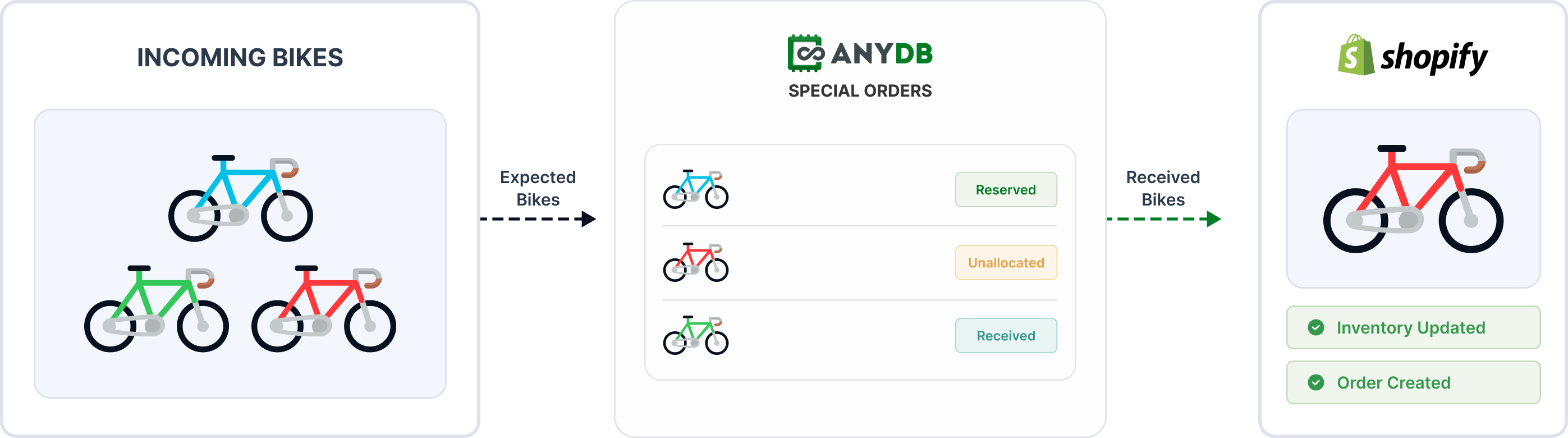
When a bike is out of stock or arriving soon, staff can connect the customer request to incoming inventory instead of treating the product as regular available stock.
This gives the team a clear view of which bikes are promised, which remain unallocated, and which are ready to be sold.
The team can use allocation lists or container lists before final vendor invoices arrive.
Staff can import or enter expected bikes into AnyDB and begin matching them to customers earlier in the process.
This supports the company’s sales process because customers may request bikes before final vendor documentation becomes available.
AnyDB connects incoming bikes to customer reservations.
Staff can search for existing Shopify customers or manually enter customer details when needed. Each reservation links a customer to a specific bike or SKU, making promised products easier to identify.
If a customer changes their mind, the bike can be unassigned and matched to another customer.
When bikes arrive, warehouse staff can mark received quantities in AnyDB.
The system can then update Shopify inventory so product availability reflects what has actually arrived.
For reserved bikes, the process can support Shopify order creation when the product is ready for the customer.
The company used purchase orders differently from a standard vendor purchasing process. Internally, they helped track bikes expected from factories and supported customer reservations.
The first proposed flow explored vendor PDFs, Excel imports, Shopify purchase orders, and inventory transfer objects.
After reviewing the process, the team chose a simpler first version: manage allocations inside AnyDB first, then add Shopify purchase order creation later if needed for accounting.
A clearer replacement path for Lightspeed special orders
Better visibility into incoming bikes and customer allocations before arrival
Reduced risk of selling bikes already promised to customers
More flexible handling of reallocations and shipment discrepancies
A stronger foundation for phased Shopify migration and future automation

The team sells high-performance bikes through a process that includes custom setup, incoming shipments, customer reservations, special orders, and allocation decisions.
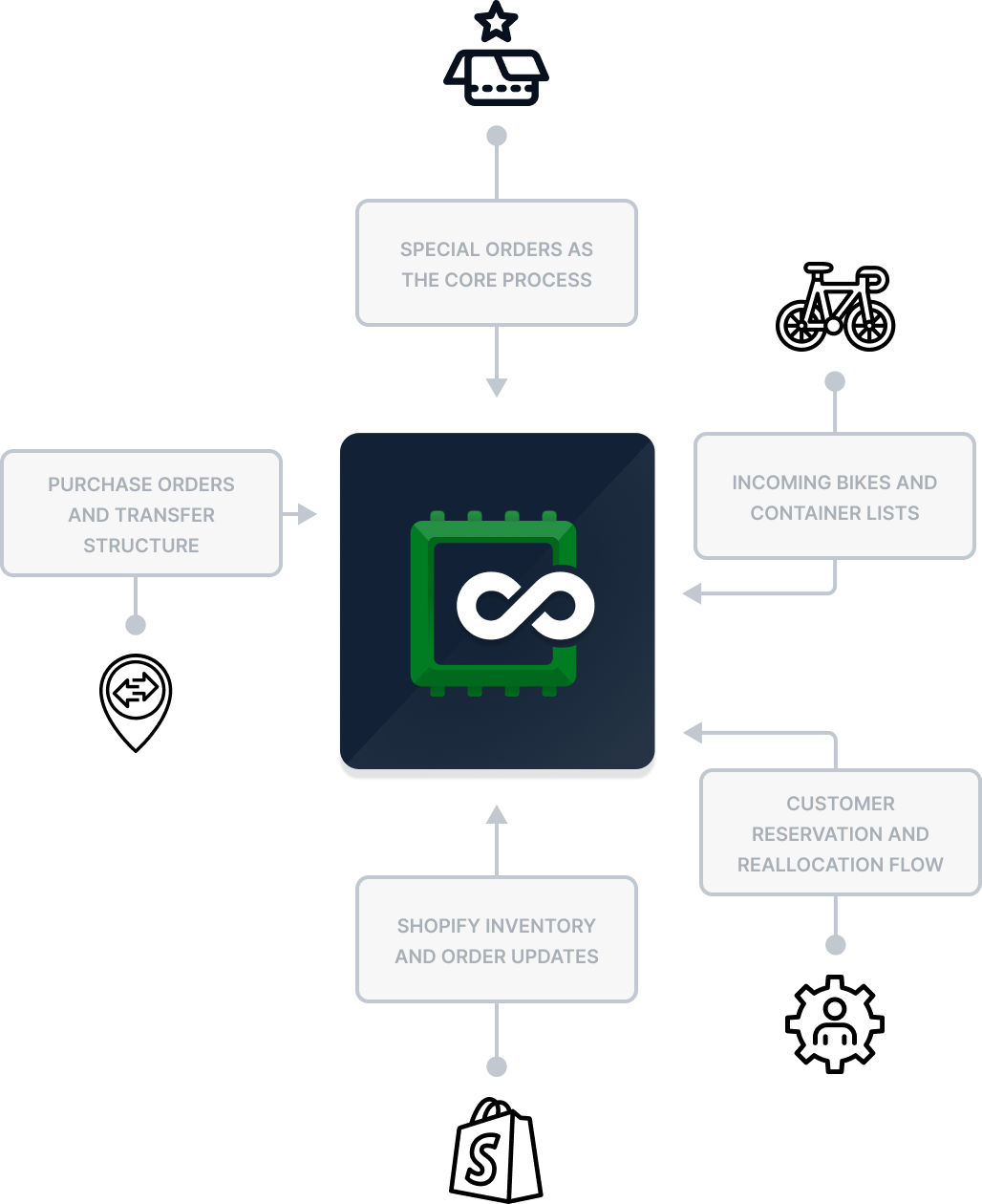
AnyDB fits this process because it can model how bikes move through the business: expected arrivals, reservation lists, customer assignments, received quantities, Shopify updates, and order creation.
The first version can stay simple. Staff can manage special orders in AnyDB, connect reservations to incoming bikes, update received quantities, and keep Shopify inventory aligned.
Later, the same structure can expand into Shopify purchase order creation, accounting support, deeper automation, customer notifications, and more advanced allocation logic.
This gives the company a practical operational layer for moving from Lightspeed to Shopify while preserving the special order process the team depends on.


