
Project Information and Ownership Drift
Keep project details, permits, responsibilities, deadlines, customer communication, and current status aligned.
AnyDB for Solar Installation Operations
Bring solar projects, installation partners, procurement, inventory, logistics, financial tracking, and customer updates together in one connected operational system.
Start with your installation workflow, then add connected systems as your project volume, partner network, and reporting requirements evolve.
Need help? We’ll help you set up your solar operations system at no cost.





Replace disconnected project information, manual partner and vendor follow-up, material gaps, scattered updates, and consolidated reporting work.
Keep project details, permits, responsibilities, deadlines, customer communication, and current status aligned.
Bring work orders, field reporting, assignments, delivery updates, documents, and handoffs into the project workflow.
Generate project-linked purchase orders and track vendor communication, approvals, costs, expected dates, and receipts.
Connect equipment requirements, stock availability, allocations, shortages, transfers, and deliveries to installation readiness.
Track purchasing, expenses, invoices, payments, and project financial progress alongside execution.
Start free, build the system yourself, or have our team build and manage it for you.
Start with the part of the installation process you need now, then expand the same connected structure over time.
Keep customer, site, technical, permit, document, status, and ownership details together.
2Coordinate partner work orders, schedules, documents, field progress, and reporting.
3Generate project-linked purchase orders and track suppliers, costs, approvals, and receiving.
4Connect material requirements, stock, deliveries, transfers, and installation readiness.
5Adapt workflows, customer updates, financial tracking, permissions, documents, and dashboards.
Keep every installation, partner assignment, purchase, material movement, delivery, cost, and update connected.
Manage customer, site, technical, permit, document, schedule, status, and ownership information.
Share controlled project views, assignments, files, schedules, forms, and live progress updates.
Generate purchase orders from installation needs and connect vendors, approvals, costs, and receipts.
Track required materials, availability, reservations, transfers, shipments, deliveries, and shortages.
Keep milestones, updates, project costs, expenses, invoices, payments, and reporting aligned.
Keep the customer, site assessment, technical information, permits, documents, deadlines, ownership, blockers, milestones, and installation progress connected from onboarding through completion.
Maintain contacts, property details, site assessments, system requirements, access notes, and communication history.
Connect designs, equipment specifications, permits, approvals, inspections, files, and compliance requirements.
Track the current stage, responsible team, deadlines, blockers, dependencies, appointments, and next actions.
Use work orders, shared views, portals, assignments, documents, schedules, and progress updates so internal teams and external partners work from the same information.
Define scope, location, dates, responsibilities, required materials, instructions, status, and completion criteria.
Give installation partners controlled access to assignments, documents, schedules, forms, and updates.
Capture progress, photos, issues, inspection results, completion evidence, and required follow-up in the project.
Turn equipment and material needs into connected purchase orders while tracking vendors, line items, costs, approvals, expected dates, receipts, and project impact.
Keep contacts, approved equipment, pricing, lead times, terms, documents, communication, and performance history.
Connect every supplier order, line item, quantity, cost, approval, expected date, and receipt to the installation.
Route approvals, evaluate conditions, assign follow-up, track exceptions, and compare purchasing against project costs.
Link required solar panels, equipment, components, stock availability, reservations, transfers, shipments, delivery dates, and logistics updates directly to project execution.
Connect each project to required equipment, quantities, specifications, available stock, shortages, and alternatives.
Track reservations, location-based inventory, transfers, adjustments, issues, and material consumption.
Coordinate shipment status, carriers, delivery locations, expected dates, receipts, exceptions, and partner handoffs.
Customize project stages, records, fields, partner workflows, customer communication, financial tracking, permissions, documents, dashboards, and automations as operations evolve.
Share accurate milestones, documents, appointments, decisions, and status without rebuilding reports across channels.
Connect estimates, purchasing, expenses, invoices, payments, project costs, and financial progress to execution.
Adapt terminology, stages, forms, permissions, notifications, dashboards, integrations, and additional operational systems.
The core records behind each installation keep customers, projects, partners, materials, vendors, documents, logistics, and financial activity connected.
Contacts, site, communication, appointments, requirements, milestones, files, and history.
Assessment, system design, equipment, permits, documents, ownership, schedule, and dependencies.
Stage, progress, blockers, deadlines, next actions, inspections, completion, and customer updates.
Partner, scope, assignment, schedule, required materials, files, field updates, and completion evidence.
Vendor, project, line items, costs, approval, expected dates, receipts, and exceptions.
Project, equipment, quantity, location, reservation, shortage, transfer, and consumption.
Carrier, project, materials, origin, destination, expected date, status, receipt, and issue.
Estimate, project cost, expense, invoice, payment, variance, and financial progress.
Turn AnyDB records into professional PDFs, DOCX files, and XLSX exports with fields, linked data, tables, terms, and other relevant information automatically included.
Pull customer, site, equipment, permit, partner, purchasing, logistics, and financial information into templates.
Create work orders, purchase orders, installation packs, status reports, inspection records, and handoff documents.
Provide current documents to internal teams, installation partners, vendors, logistics providers, and customers.
Keep every installation visible, prevent material gaps, reduce partner follow-up, control project costs, and provide customers with accurate updates.
See current status, ownership, blockers, deadlines, milestones, and next actions.
Connect required equipment, inventory availability, purchasing, shipments, and installation readiness.
Share assignments, documents, schedules, field forms, and progress updates through one workflow.
Track purchasing, expenses, invoices, payments, project costs, and financial progress alongside execution.
Share accurate project milestones, appointments, documents, and updates without rebuilding status reports.
Keep what works and move the installation steps that need more structure, visibility, or flexibility into AnyDB.
Turn spreadsheet-driven projects, material lists, schedules, and status trackers into connected records with relationships, permissions, automations, and history.
Replace a Business Spreadsheet →Run projects, procurement, inventory, partner work orders, logistics, and approvals without forcing every process into one rigid structure.
Explore the ERP Alternative →Keep the CRM focused on customers and sales while managing site assessments, permits, materials, partners, and field execution in AnyDB.
Explore Salesforce for Operations →Bring related project, purchasing, inventory, logistics, customer update, and financial workflows together without adding another standalone app for every need.
Connect Your Operations →Explore AnyDB for free, build your own solar operations system, or have our team build and manage it with you.
Explore connected solar installation operations.
Start FreeCustomize and run your own solar operations system.
View PlansHave your system built and managed for you.
Talk to Us
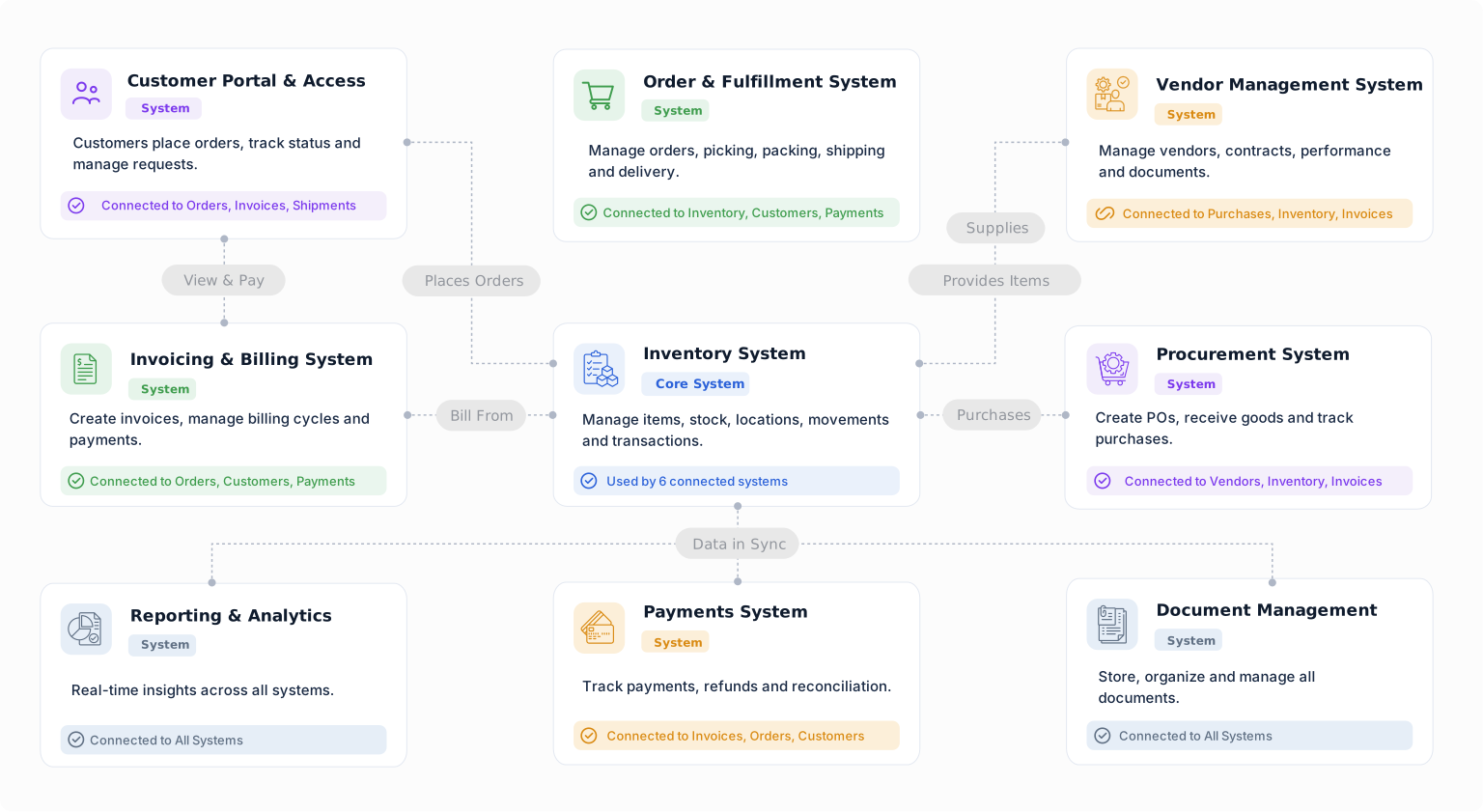
Start with your installation workflow today, then connect procurement, inventory, logistics, vendors, customer updates, and financial tracking as your needs grow.


