
Scattered Order Details
Keep customer requirements, items, quantities, documents, and updates together.
Bring sales orders, warehouse picking, shipping, and fulfillment together in one connected system.
Start with your order process, then customize records, handoffs, documents, permissions, notifications, and reporting around your operations.
Need help getting started? We can set up your order management system at no cost.





Replace scattered order details, unreliable status updates, slow handoffs, and disconnected shipment records with one shared process.
Keep customer requirements, items, quantities, documents, and updates together.
Give sales, warehouse, and logistics teams the same live information.
Track preparation, dispatch, delivery milestones, and proof in one place.
Make owners, next actions, deadlines, and blockers visible.
Keep products, specifications, quantities, inventory, and destinations connected.
Explore AnyDB for free, build your own order and fulfillment system, or have our team build and manage it with you.
Explore connected order and fulfillment operations and see how the structure fits.
Start Free PlanCustomize and run your own order management and fulfillment system.
View PlansHave your order and fulfillment system built and managed for you.
Schedule DemoStart with the included order structure or customize it around your products, inventory, warehouse process, shipping requirements, and customer experience.
Keep customers, items, requirements, pricing, documents, ownership, and status together.
2Link products, quantities, stock availability, allocations, locations, and specifications.
3Assign warehouse work and track picking, packing, blockers, and readiness.
4Connect carriers, destinations, milestones, documents, tracking, and proof.
5Adapt records, workflows, access, automations, documents, and reporting.
Run the complete order process through structured records with connected inventory, warehouse activity, shipments, documents, and history.
Keep customer requirements, items, pricing, status, owners, and documents together.
Connect availability, allocation, warehouse locations, and stock movement.
Track item-level picking, packing, exceptions, and readiness.
Keep carriers, destinations, milestones, documents, and proof connected.
Monitor status, ownership, blockers, deadlines, and next actions.
Capture the customer, order items, quantities, pricing, requirements, documents, owner, target dates, and current status without rebuilding context across separate tools.
Track the customer, requirements, pricing, terms, dates, owner, and current status.
Keep line items, specifications, files, notes, and customer documents attached.
Assign teams, surface blockers, and keep next actions and deadlines visible.
Link each order item to the correct product, specifications, quantity, warehouse location, stock position, allocation, and purchasing requirements.
Connect specifications, variants, files, pricing, and fulfillment requirements.
See availability, reserved quantities, locations, and item-level allocation.
Identify shortages and connect required purchasing or replenishment activity.
Turn order items into clear warehouse work. Assign owners, track preparation, record exceptions, and keep sales and logistics informed as the order moves forward.
Send work to the correct location, team, or owner with clear priorities.
Track item-level quantities, checks, preparation, and packing status.
Keep shortages, substitutions, damaged items, and shipment readiness visible.
Connect the carrier, origin, destination, tracking details, documents, milestones, delivery proof, and customer updates to the original sales order.
Track carriers, addresses, tracking numbers, dispatch dates, and status.
Keep shipment events, labels, manifests, notes, and delivery records connected.
Attach timestamps, signatures, photos, proof, and final customer updates.
Customize order records, statuses, item structures, warehouse steps, shipment workflows, permissions, notifications, document generation, and reporting.
Add new locations, fulfillment paths, approval steps, teams, or operational records as your process evolves.
Model the fields, classifications, relationships, and terminology your orders require.
Trigger assignments, reminders, approvals, escalations, and notifications.
Provide relevant permissions, dashboards, operational views, and history.
Each sales order becomes the central record connecting the customer, items, products, inventory, fulfillment activity, shipments, documents, and delivery events.
Customer details, requirements, line items, terms, and documents stay attached.
Sales, warehouse, and logistics teams work from the same updates.
Availability, allocation, picking, and packing remain visible throughout execution.
Carriers, destinations, milestones, documents, and proof remain connected.
Every status change, issue, handoff, and delivery event stays traceable.
Build the structure with connected records that reflect how orders move through your business.
Customer details, addresses, contacts, terms, and order history.
Status, owner, requirements, totals, documents, and fulfillment progress.
Products, quantities, pricing, allocation, and item-level status.
Specifications, inventory relationships, files, and fulfillment details.
Availability, warehouse location, allocation, and stock movement.
Carrier, destination, tracking, dispatch, and delivery status.
Milestones, timestamps, notes, documents, and delivery proof.
Create professional, ready-to-share PDFs, DOCX files, and spreadsheets with current fields, linked data, tables, terms, and shipment information automatically included.
Generate confirmations, summaries, invoices, and customer-ready records.
Create pick lists, packing lists, and item-level fulfillment documents.
Prepare delivery records, labels, manifests, and proof summaries.
Every team updates the same connected order structure, keeping ownership, progress, and next actions visible.
Capture the customer, requirements, items, quantities, pricing, and target dates.
Check product details, inventory, allocation, and any purchasing requirements.
Warehouse teams prepare linked order items and record fulfillment progress.
Connect carriers, destinations, documents, milestones, and delivery updates.
Preserve proof, timestamps, issues, final status, and the full order history.
Monitor status, ownership, blockers, deadlines, and next actions.
Keep items, quantities, specifications, and destinations consistent.
Give sales, warehouse, and logistics teams live shared updates.
Provide accurate order and shipment information without chasing updates.
Keep milestones, timestamps, documents, and proof attached.

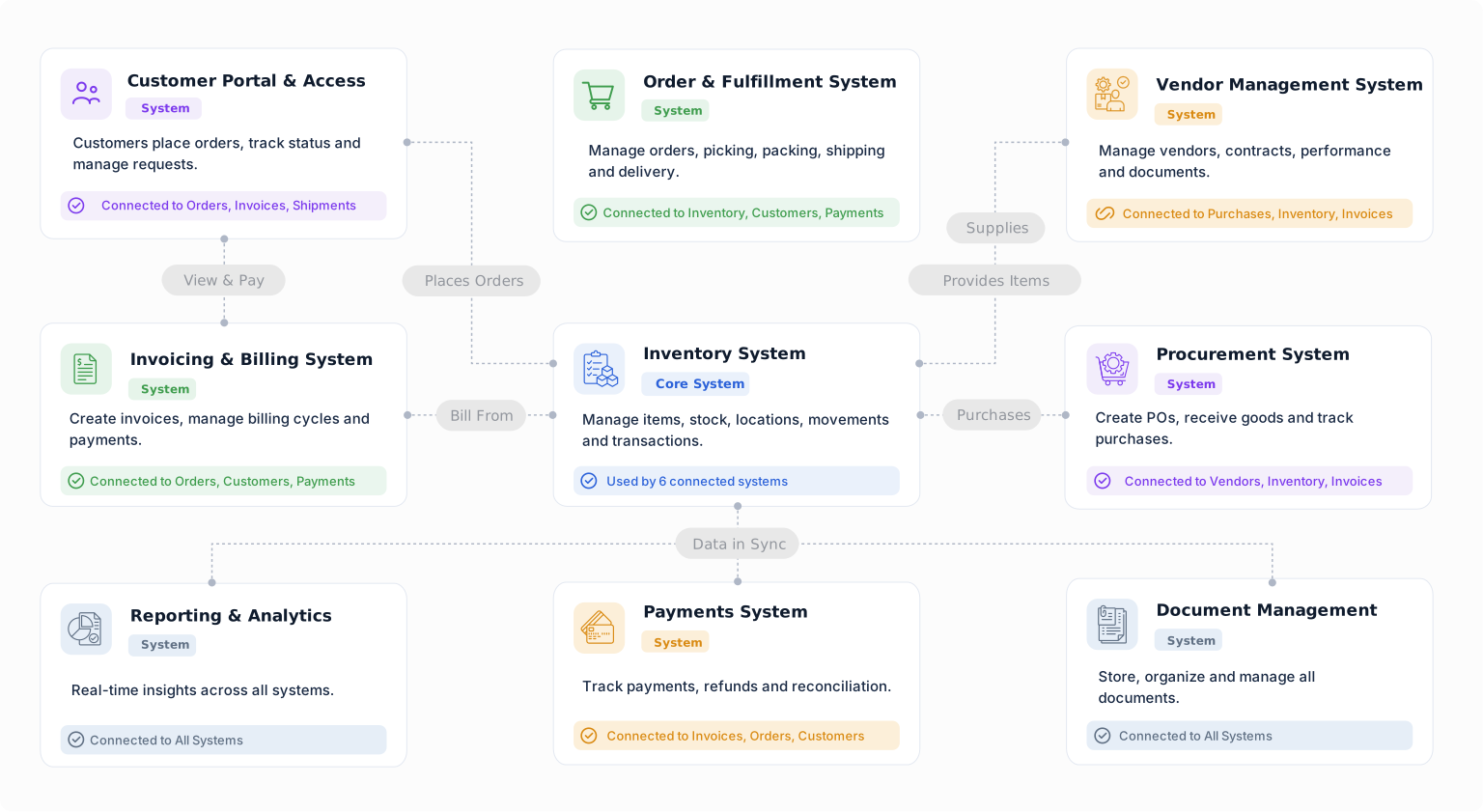
Build a starting point for order fulfillment with objects from the Business Object Library. Customize their fields, relationships, forms, views, and workflows around the way your team works.
Connect customer details with requests, orders, documents, and billing.
Keep accepted customer orders connected to fulfillment and billing.
Record each ordered item and quantity within a customer order.
Track an item at a location, warehouse, bin, or condition.
Record goods leaving inventory and connect them to the work or order they support.
Connect customer billing to the orders, projects, or services being delivered.
Start with your order process and expand as your operations grow.


