Managing Construction Inventory and Field Orders From One Connected System

Replacing manual logs, spreadsheets, and analog tracking with a connected system for warehouse stock, field requests, fulfillment, barcode scanning, pick lists, goods receipts, and project-linked transactions & workflows.
Construction inventory and field order system in AnyDB
  • Company

    Large specialty contractor

  • Team

    500–1,000 team members across 18 offices

  • Industry

    Construction and specialty contracting

  • Scale

    Multiple operating companies, warehouses, field teams, and construction services

Keywords: Construction inventory management, field orders, warehouse stock, barcode scanning, ERP integration, pick lists, goods receipts

Location: United States

With 18 offices, multiple operating companies, warehouses, and field teams, keeping construction materials organized required more than a basic inventory list.

The initial use case focused on more than 100 insulation materials, with plans to expand into other construction supplies. Materials moved across locations, while field requests needed to remain tied to specific projects.

The existing process relied heavily on manual and analog tracking. Field teams lacked a simple ordering process, while warehouse and procurement teams had limited visibility into stock, requests, and material movement.

Result: A connected construction inventory setup for warehouse stock, field requests, fulfillment, barcode scans, project-linked transactions, and future Spectrum-connected workflows.

Operational Objective

Create a practical way to manage construction materials, field requests, warehouse fulfillment, barcode scanning, and project-linked stock activity.

In practice, that meant:

  • Replace manual and spreadsheet-based tracking
  • Track materials across multiple warehouse locations
  • Support more than 100 insulation materials initially
  • Enable barcode scanning for item lookup and updates
  • Give field teams a simple way to request materials
  • Tie requests to specific projects or job IDs
  • Track requests through warehouse fulfillment
  • Support pick lists and goods receipts
  • Record materials received and issued
  • Track minimum stock levels and reorder quantities
  • Attach supporting files to transactions
  • Prepare for future Spectrum integration
  • Expand later into more materials, locations, and field workflows
Operational objective illustration
Manual inventory tracking illustration

What They Tried at First

Material operations relied on manual logs, spreadsheets, analog processes, and internal coordination rather than a connected inventory system.

This made it harder to manage stock across multiple locations while keeping material requests tied to projects. Field teams needed an easier ordering process, while warehouse staff needed better visibility into available stock and pending requests.

Barcode scanning was also a priority, giving staff a faster way to identify materials and complete stock updates from warehouses or job sites.

Spectrum remained important for project and business data, so the new inventory process needed to work alongside it and support future integration.

The first priority was solving stock tracking, field ordering, and warehouse fulfillment before adding more advanced workflows.

Where the Operation Broke Down

The existing setup provided limited visibility into materials across warehouses, field teams, projects, and related business processes.

What broke:

  • Material tracking relied on manual and analog processes
  • Stock was difficult to view across warehouse locations
  • Field teams lacked a simple way to request job materials
  • Warehouse fulfillment was difficult to track from request to completion
  • Barcode scanning was missing from the process
  • Receiving and issuing materials lacked a clear transaction history
  • Minimum stock and reorder levels were difficult to manage consistently
  • Material requests needed to remain tied to project IDs
  • The process needed to support future Spectrum integration
  • Field adoption depended on keeping workflows simple

Operational impact:

  • Limited visibility into available materials
  • More coordination around field ordering
  • Manual tracking throughout warehouse fulfillment
  • Greater risk of stock shortages
  • Less traceability of material movement
  • Inconsistent management of project-linked requests
  • More manual effort as the process expanded

The Operating Model Designed in AnyDB

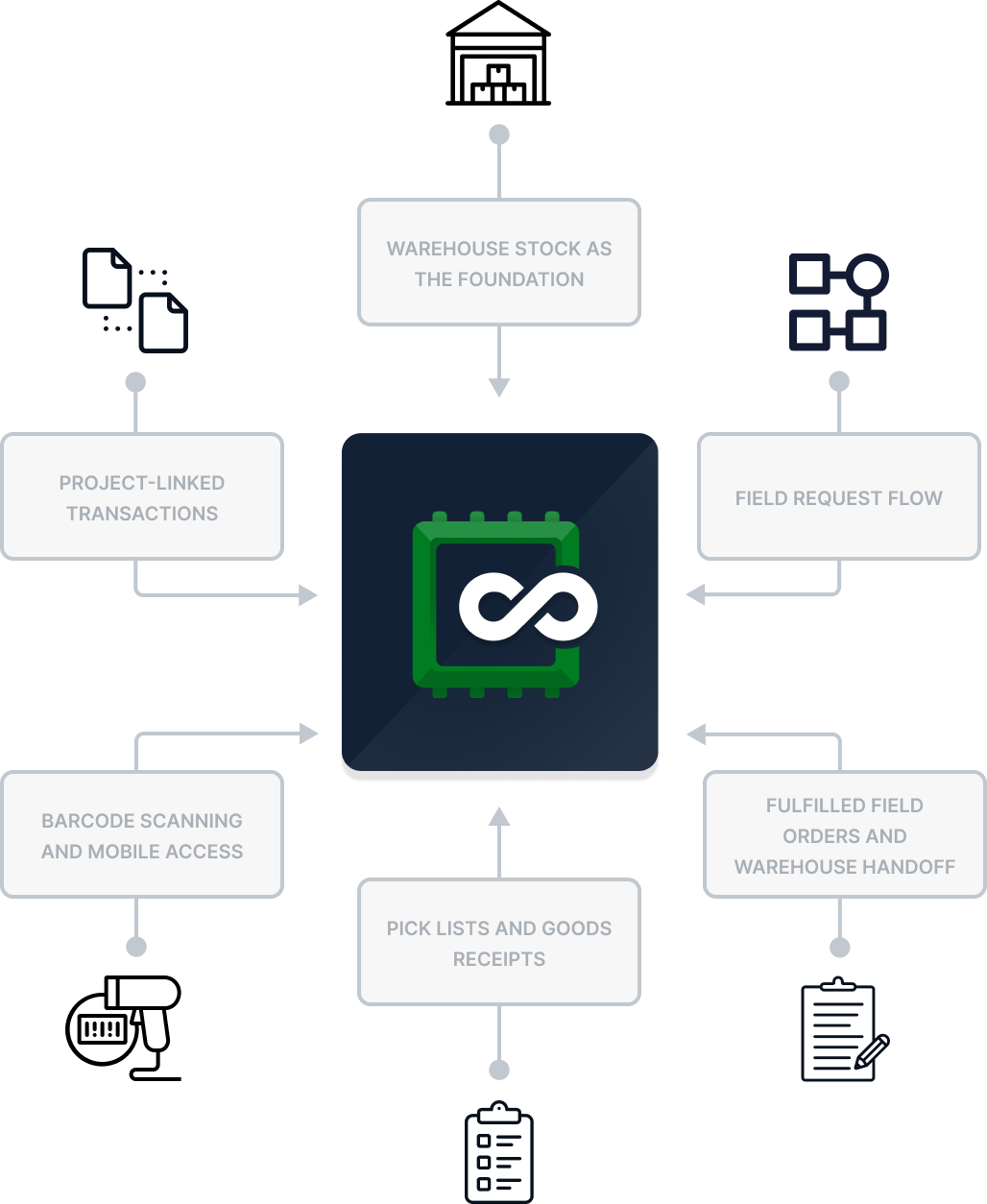
A construction inventory setup where materials, warehouse locations, field requests, fulfilled orders, barcode scans, pick lists, goods receipts, transactions, and project information stay connected.

Warehouse stock as the foundation

AnyDB organizes materials by warehouse location, quantity, minimum stock level, reorder quantity, and transaction history.

Each material record can include item details, current stock, reorder rules, files, and related transactions, giving warehouse and procurement teams a clearer view across locations.

Field request flow

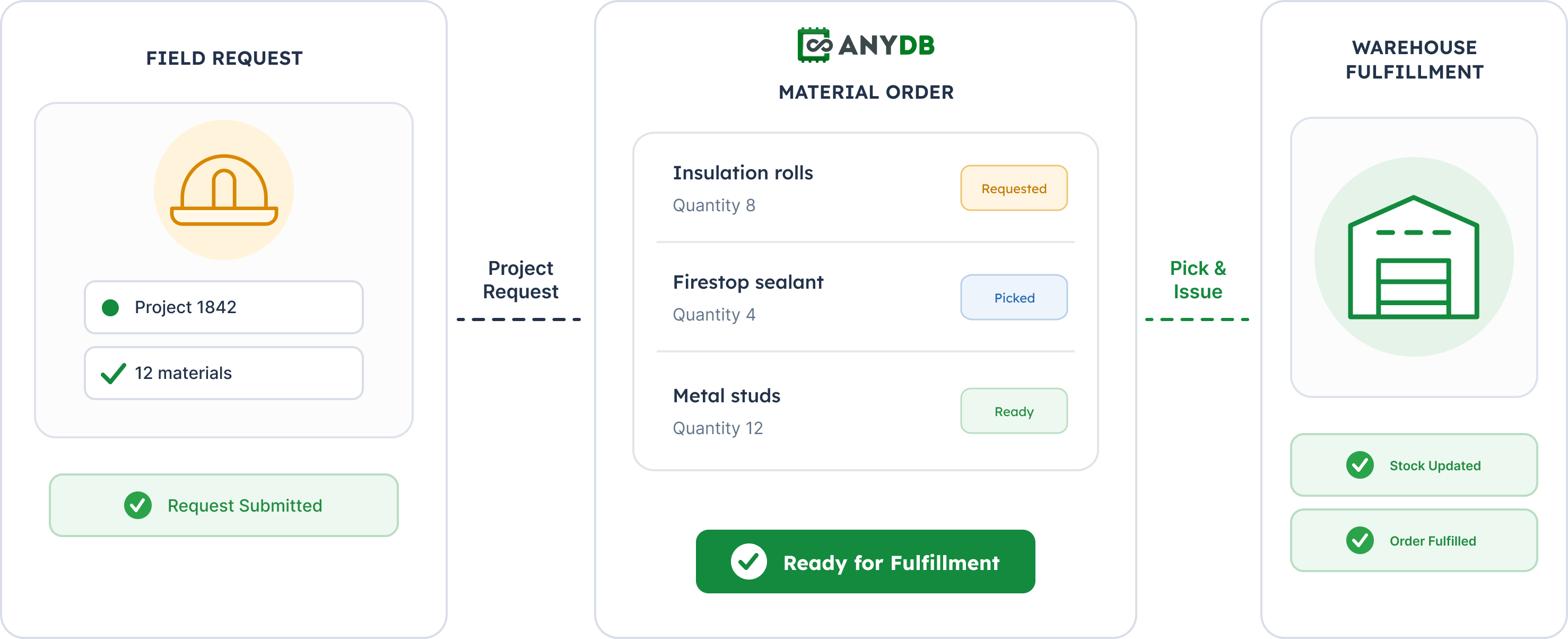
Foremen or authorized users can select materials, add quantities and job details, and submit requests tied to a project ID.

The first version can remain simple, with approval steps added later if needed.

Fulfilled field orders and warehouse handoff

Once a request is submitted, warehouse staff can prepare and track the order.

Teams can see what was requested, picked, fulfilled, or still pending, creating a clearer handoff between field and warehouse teams.

Pick lists and goods receipts

Pick lists help warehouse staff prepare outgoing materials.

Goods receipts record incoming quantities, update stock, and maintain a history of inventory increases. Together, they provide more structure around incoming and outgoing materials.

Barcode scanning and mobile access

Warehouse or field staff can scan a barcode to open the corresponding material record and complete stock updates.

The mobile app supports barcode scanning, stock adjustments, forms, and transaction updates from warehouses or job sites.

Project-linked transactions

Every material movement can be recorded as a transaction.

Transactions can capture the material, quantity, location, project ID, files, notes, and related field order, creating a clearer history of stock activity.

Connected construction inventory operating model

What Changed in Daily Work?

  • Warehouse teams manage stock from a structured system
  • Field teams submit project-linked material requests
  • Warehouse staff can track requests through fulfillment
  • Barcode scanning speeds up material lookup and updates
  • Receiving and issuing create a clearer transaction history
  • Pick lists support outgoing material preparation
  • Goods receipts update incoming stock
  • Minimum stock levels support replenishment planning
  • Material records can include files and job details
  • Mobile access supports warehouse and field activity

Operational Outcomes

Clearer visibility into materials across warehouse locations

Reduced dependence on manual tracking throughout fulfillment

Faster material lookup and updates through barcode scanning

Better connection between field requests, transactions, and project IDs

A scalable foundation for more materials, locations, and Spectrum-connected workflows

Result: Construction inventory can move into a connected process where warehouse stock, field requests, fulfillment, barcode scans, project IDs, and future Spectrum-connected workflows stay aligned.

Scalable operations illustration

Why This Works and Scales

For a contractor operating across multiple warehouses, offices, field teams, and job sites, inventory is closely tied to how work gets executed.

A material request may need to reference a project, trigger warehouse preparation, create an inventory transaction, support reorder planning, and eventually exchange information with Spectrum.

AnyDB can reflect that process by keeping materials, warehouses, requests, pick lists, goods receipts, transactions, files, and project IDs within the same operational system.

The first version can focus on central-office inventory and core warehouse workflows. From there, the same structure can expand into field ordering, approvals, barcode workflows, additional locations, and Spectrum integration.

This allows the company to start with a practical inventory setup and expand it as operational requirements grow.

Manage Construction Inventory and Field Orders From One Connected System.

Build an operational system around the way your warehouse and field teams work.