
Large Inventory Is Hard to Control
Track large SKU volumes, variants, stock levels, and multiple locations without relying on scattered spreadsheets.
AnyDB for Shopify Operations
Manage inventory, purchasing, special orders, vendors, fulfillment, warehouse activity, and internal workflows from one connected operational system behind your Shopify storefront.
Shopify handles the storefront. AnyDB runs the operations behind it with configurable two-way connections for products, variants, customers, orders, inventory, and locations.
Need help getting started? We can set up your Shopify-connected operational system at no cost.
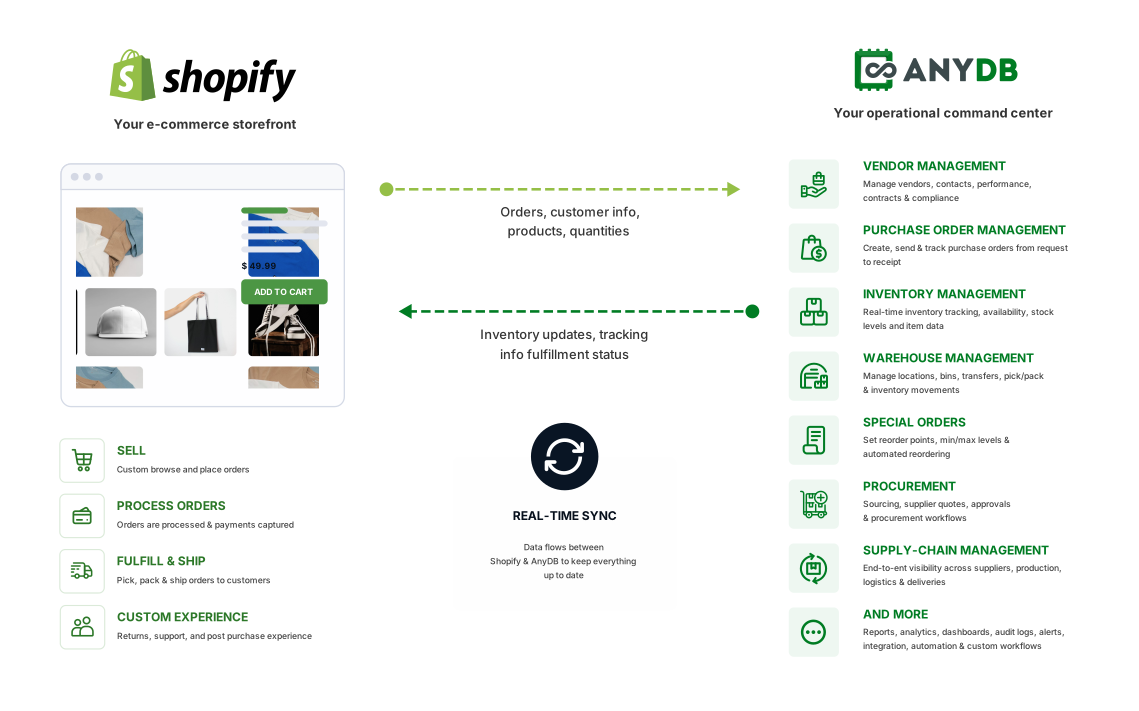
Shopify handles storefront activity well. Once operations include large inventory, multiple locations, vendor coordination, out-of-stock fulfillment, approvals, and internal steps, teams need a connected system behind it.
Track large SKU volumes, variants, stock levels, and multiple locations without relying on scattered spreadsheets.
Connect out-of-stock customer demand directly to vendor purchasing, receiving, and customer updates.
Keep suppliers, approvals, purchase orders, lead times, and receiving activity connected to demand.
Use configurable data mapping and workflows instead of forcing every operational process into fixed sync logic.
Track approvals, assignments, warehouse work, exceptions, notifications, and fulfillment status around each order.
Inventory, orders, and customers live inside Shopify while vendor coordination, approvals, special orders, and internal tracking often happen elsewhere. This split creates gaps, especially with large catalogs, multiple locations, or out-of-stock items that still need fulfillment.
Manual exports and rigid tools can delay updates, create inconsistencies, and limit how the real workflow is structured.
Customers browse, order, and pay in Shopify. AnyDB manages the inventory, purchasing, vendors, fulfillment, approvals, warehouse activity, and internal workflows behind those orders.
Choose the Shopify and AnyDB fields involved and whether each task moves data into AnyDB, back to Shopify, or both ways.
Start tasks when needed or use webhook-driven updates when changes happen in either connected system.
Review progress, detailed logs, historical runs, errors, and resync activity for operational visibility.
Start with the area you need now, then connect additional records and workflows as your operation evolves.
Manage large catalogs, stock levels, locations, transfers, and adjustments.
2Connect demand, suppliers, purchase orders, approvals, and receiving.
3Turn out-of-stock demand into traceable vendor purchasing and follow-up.
4Coordinate order steps, picking, packing, shipping, and internal status.
5Build workflows, approvals, views, portals, and automations around your operation.
Bring the operational work behind orders into one configurable environment without changing the Shopify storefront.
Map Shopify and AnyDB fields, choose the direction, and run updates manually or automatically.
Manage stock levels, transfers, adjustments, counts, and reorder information across locations.
Connect out-of-stock customer demand to vendor purchasing, receiving, and fulfillment.
Manage suppliers, purchase orders, approvals, expected dates, receipts, and costs.
Track internal order steps, owners, picking, packing, shipping, exceptions, and status.
Connect Shopify products, variants, inventory, and locations with stock control, adjustments, transfers, availability, reorder information, and internal reporting.
Maintain Shopify identifiers, SKUs, descriptions, options, pricing context, and operational fields.
Track available, committed, incoming, transferred, adjusted, and reorder quantities across locations.
Create low-stock views, alerts, counts, adjustment history, dashboards, and custom forecasting logic.
Manage vendors, approved products, pricing, lead times, purchase orders, approvals, receiving, and inventory updates in the same operational structure.
Keep contacts, approved products, pricing, lead times, terms, files, performance, and communication context.
Connect suppliers, line items, quantities, costs, approvals, expected dates, receipts, and related demand.
Record partial or complete receipts, exceptions, location placement, and stock updates without re-entry.
Connect special-order line items to vendor purchasing, approvals, expected dates, receiving, fulfillment, and customer notification.
Keep the customer, Shopify order, line item, requested quantity, location, and promised timing together.
Create linked purchase requirements, select a supplier, track cost, expected date, approval, and receipt.
Trigger assignments, reminders, status updates, exception handling, and ready-for-pickup or shipment notifications.
Manage order review, allocations, picking, packing, shipping, location work, exceptions, ownership, deadlines, and internal status around the order.
Keep customer, products, variants, quantities, locations, fulfillment needs, files, and internal notes connected.
Coordinate allocations, pick lists, packing, transfers, handoffs, shipment details, and exception resolution.
Use rules to assign work, evaluate conditions, request approvals, alert teams, and update status automatically.
Customize records, fields, relationships, formulas, views, portals, permissions, dashboards, automations, and integrations without changing the Shopify storefront.
Model special orders, purchasing, inventory, warehouse work, approvals, returns, service, or other processes.
Give store, warehouse, purchasing, vendors, management, and partners the information appropriate to their roles.
Add reminders, approvals, documents, webhooks, APIs, dashboards, mobile work, and new systems over time.
Shopify data can become the foundation for broader operational systems without disrupting the storefront setup.
Keep storefront data connected to the operational records that teams use after the sale.
Customer, status, location, totals, fulfillment, assignments, approvals, notes, and history.
Product, variant, quantity, availability, allocation, special-order need, and fulfillment status.
Shopify identifier, variants, SKU, description, supplier, operational fields, files, and relationships.
Contact details, Shopify history, related orders, special orders, service, and internal context.
Product, variant, location, available quantity, incoming stock, transfers, adjustments, and reorder data.
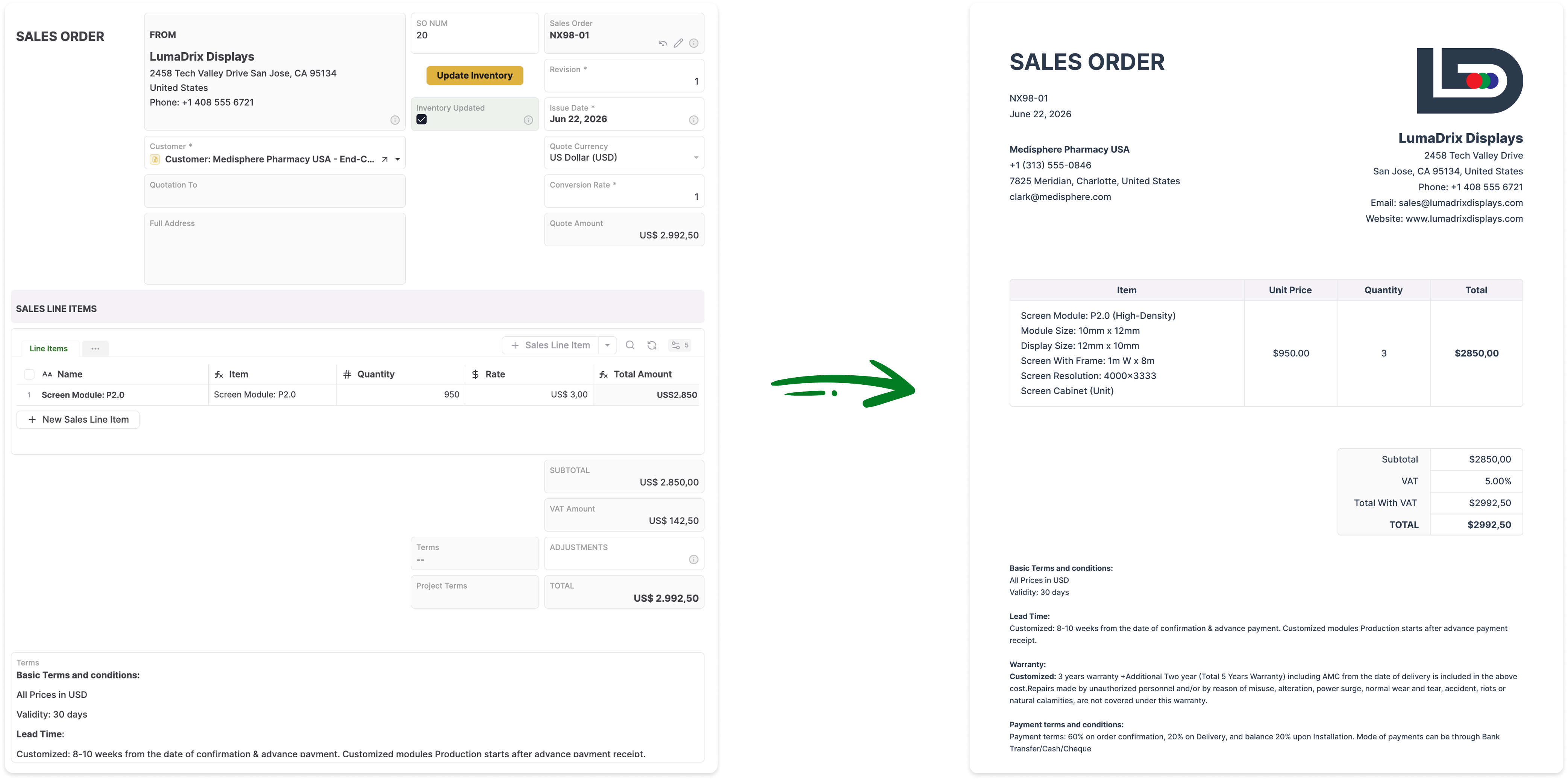
Turn AnyDB records into professional PDFs, DOCX files, and XLSX exports with fields, linked data, tables, terms, and other relevant information included automatically.
Shopify continues to manage the storefront while AnyDB manages the operational work behind each standard or special order.
Keep Shopify and the operational work behind it aligned while reducing manual coordination, exports, and disconnected tools.
Keep products, variants, locations, inventory levels, transfers, and adjustments visible.
Connect out-of-stock items to purchasing, receiving, fulfillment, and customer follow-up.
Create and manage supplier purchasing around actual order and inventory requirements.
Use configurable two-way data movement, automatic updates, logs, and manual controls.
Track owners, approvals, warehouse steps, exceptions, fulfillment status, and notifications.
Install the app, review the configuration guide, and see how a multi-location retailer connected daily operations.

Connect your Shopify store with an AnyDB workspace and begin configuring your operational data.
Download It Now
Review setup, configurable data movement, task direction, logs, webhooks, and app installation.
Read It
See how a multi-location retailer connected forecasting, purchasing, transfers, expiry tracking, and reporting.
Check It OutExplore AnyDB for free, build your Shopify-connected system, or have our team build and manage it with you.
Explore Shopify-connected operations.
Start FreeCustomize and run your own operational system.
View PlansHave your system built and managed for you.
Talk to Us
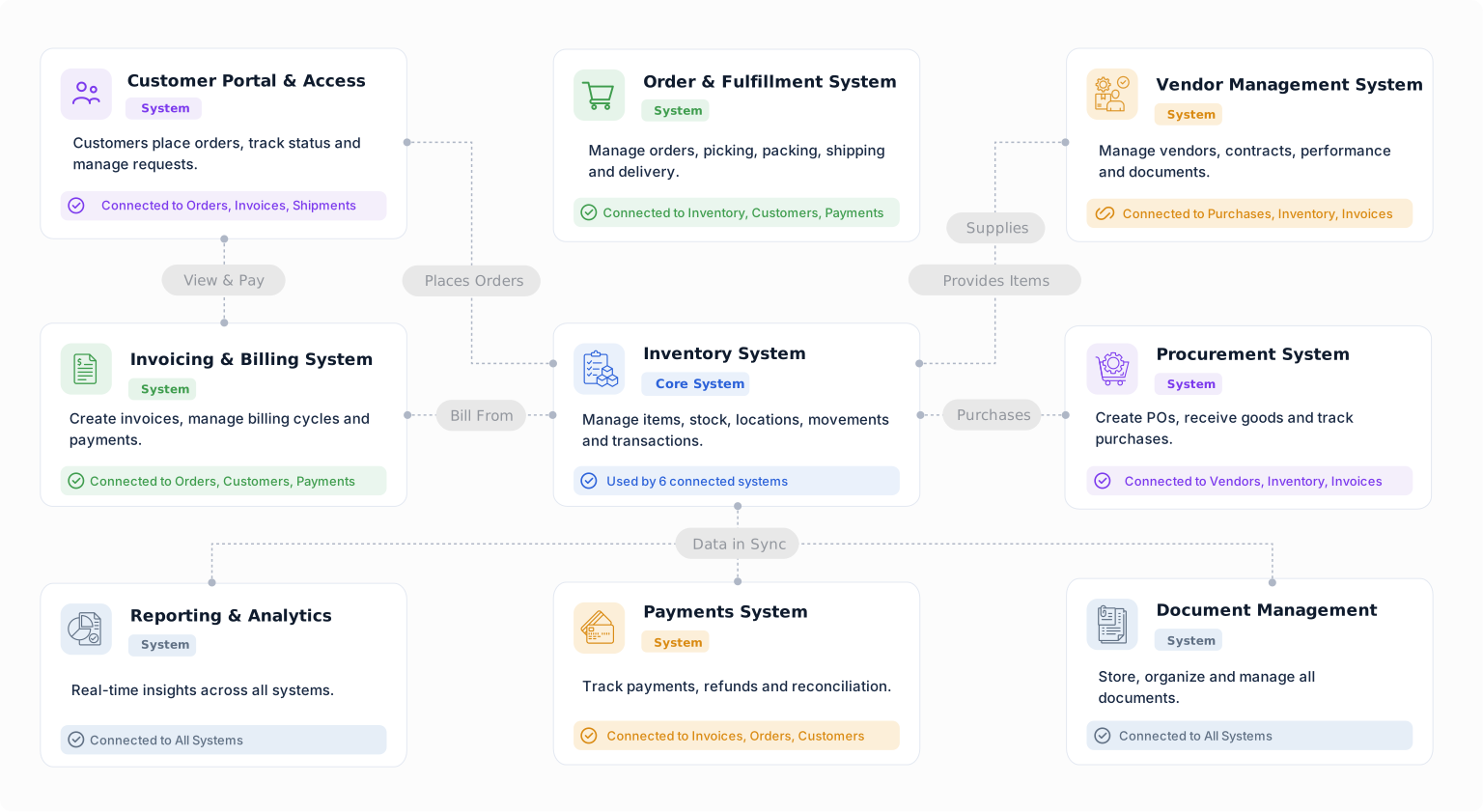
Build an operational system that fits how your team actually works and manage what happens after the sale.


