
Candidate Records Are Scattered
Keep resumes, skills, availability, experience, and notes in one candidate record.
Manage candidates, job openings, applications, interviews, offers, employee records, onboarding, documents, and HR workflows in one system.
Need help getting started? We can help you build an HR and recruitment system around your process.





Replace candidate spreadsheets, email attachments, shared folders, and disconnected HR tools with structured recruitment records.
Keep resumes, skills, availability, experience, and notes in one candidate record.
Track credential and document expiration dates before they affect a hire.
Filter candidates by skills, experience, qualifications, availability, and work authorization.
See which candidates are applied, screening, interviewing, offered, or hired.
Begin onboarding directly from an accepted offer.
Start free, build the system yourself, or have our team build and manage it for you.
Connect candidate intake, work history, hiring requirements, onboarding, and employee records while keeping sensitive information controlled.
Manage skills, availability, resumes, documents, applications, and work history.
2Manage departments, hiring managers, role requirements, compensation, and open positions.
3Shortlist candidates and track applications, interviews, evaluations, offers, and hires.
4Connect accepted offers with onboarding tasks, documents, approvals, and start dates.
5Change fields, views, forms, permissions, reports, workflows, and automations.
Keep candidate, hiring, employee, document, and HR work in the same recruitment system.
Keep skills, availability, resumes, documents, applications, and work history in structured records.
Track document type, verification, issue date, expiration date, and renewal requirements.
Connect candidates with roles, departments, hiring managers, interviews, offers, and hiring stages.
Share selected candidate information without exposing the full recruitment workspace.
Start onboarding from an accepted offer and track documents, tasks, approvals, and start dates.
1. Candidates, Documents, and Work History
Store contact details, location, skills, preferred roles, availability, work authorization, resumes, credentials, applications, references, and recruiter notes.
2. Teams and Job Openings
Store departments, hiring managers, role requirements, employment types, compensation ranges, locations, target dates, and required documents.
3. Matching and Hirings
Identify suitable candidates and keep applications, interviews, evaluations, offers, and hiring details connected.
Filter by skills, experience, qualifications, work authorization, location, and availability.
Connect each candidate to the relevant role, department, and hiring workflow.
Record review dates, candidate materials, evaluations, and hiring manager feedback.
Track instructions, feedback, offers, rejections, withdrawals, and next steps.
Record compensation, employment type, start date, recruiter, and offer status.
4. Employee Onboarding
Use accepted offer details to create employee records, assign onboarding tasks, collect documents, and track readiness for the start date.
5. Customizable HR and Recruitment
Add roles, departments, locations, skills, employment types, review cycles, onboarding stages, and HR policies.
Use customizable objects from the AnyDB Business Object Library as building blocks.
Move from application to ongoing employment without entering the same information across separate tools.
Candidate profile and documents are submitted and reviewed.
Previous roles, education, skills, and qualifications are connected.
Job Opening requirements are defined and suitable candidates shortlisted.
Interviews, evaluations, offers, and start dates are recorded.
Onboarding tasks, documents, approvals, and employee progress are tracked.
Give hiring managers access to selected information while keeping recruiter notes, other candidates, and private HR records controlled.
Share approved details, resumes, employment history, qualifications, and availability.
Create filtered views for candidates selected for a job opening or hiring team.
Choose which candidate documents and files are included with each submission.
Collect structured feedback from hiring team contacts and interviewers.
Share candidates, job openings, interview feedback, and approved documents through a focused portal.
Use workflow rules to notify recruiters, candidates, managers, HR, and people operations when action is required.
Notify a recruiter when a candidate submits an application.
Flag candidates who have not provided required documents or files.
Send reminders before credentials, work permits, training, or required documents expire.
Notify recruiters about interviews, start dates, and offers awaiting confirmation.
Alert the responsible person when onboarding tasks approach or pass their due dates.
Use reports and dashboards to review candidate availability, job openings, hiring pipelines, document status, onboarding, and workforce activity.
Review by skills, experience, location, availability, work authorization, and qualifications.
See job openings by department, location, role, target date, and hiring stage.
Track applied, screening, interviewing, offered, hired, and closed candidates.
Identify credentials, work permits, training, and required documents requiring renewal.
Review headcount, new hires, onboarding progress, turnover, and open positions.
Create consistent documents using candidate, role, offer, employee, and onboarding information stored in AnyDB.
Generate standardized summaries of skills, experience, qualifications, and availability.
Package approved candidate details, employment history, and qualifications.
Include the candidate, role, department, compensation, employment terms, and start date.
Use employee details, assigned tasks, policies, start dates, and approval status.
Generate Word or Excel files, export PDFs, and send them by automated email.
Show each team the records relevant to its responsibilities.
Manage assigned candidates, job openings, applications, hires, and follow-ups.
Review employee records, policies, credentials, onboarding, and compliance requirements.
Manage teams, job openings, candidate reviews, interview feedback, and offers.
Manage onboarding, employee changes, requests, documents, and offboarding.
Monitor headcount, job openings, hiring progress, recruiter workload, and workforce trends.
Connect a compatible AI assistant through AnyDB MCP and work with permitted recruitment records and files using natural-language instructions.
Review resumes, employment history, qualifications, and availability.
Identify relevant experience, qualifications, and missing information for review.
Find missing, unverified, expiring, and expired candidate documents.
Create or update records while following permissions defined in AnyDB.
Create views and operational summaries from authorized recruitment data.
Human recruiters remain responsible for candidate evaluation, hiring recommendations, and hire decisions.
Replace separate spreadsheets, inboxes, folders, and disconnected HR tools with connected recruitment records.



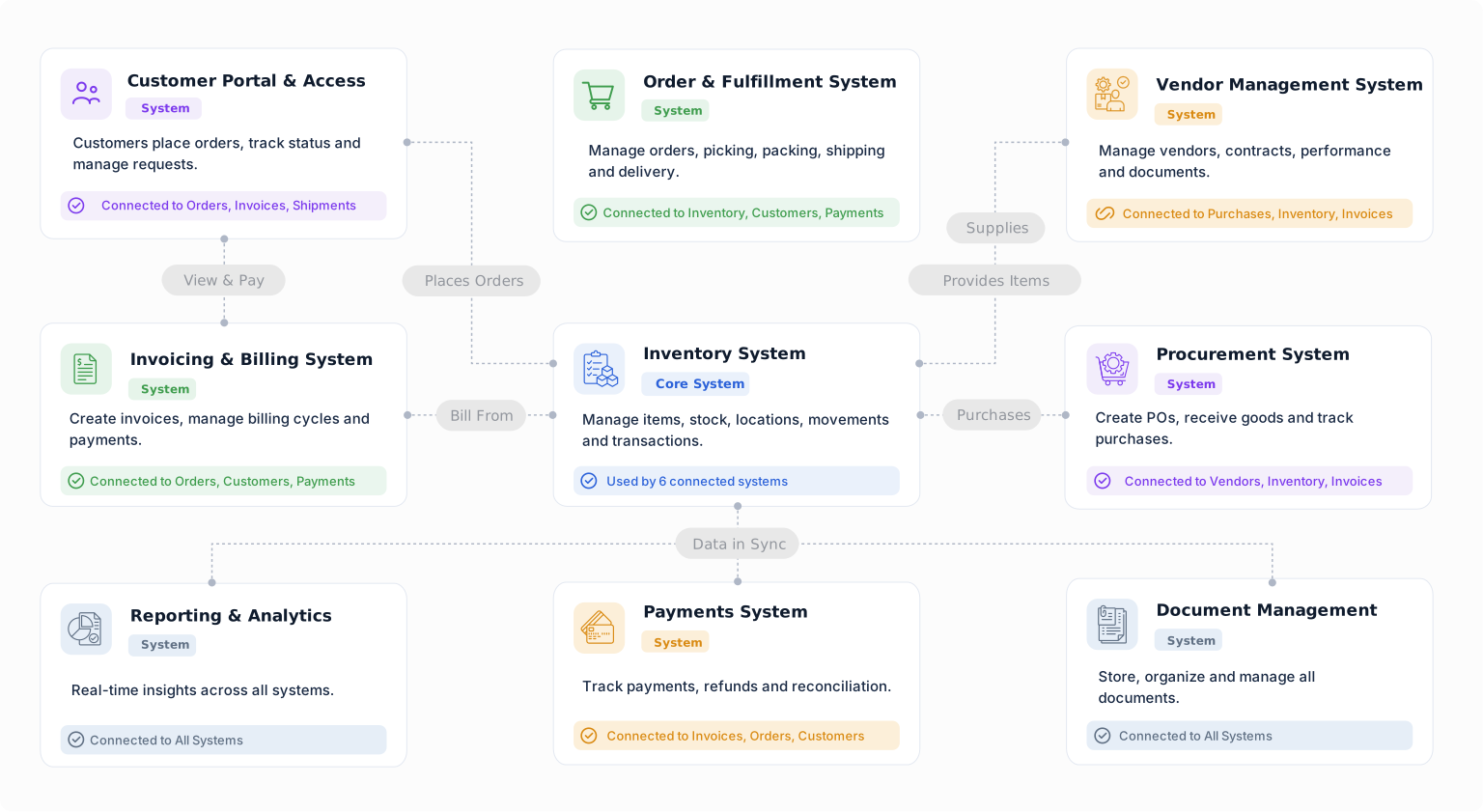
Build a starting point for HR and recruitment with objects from the Business Object Library. Customize their fields, relationships, forms, views, and workflows around the way your team works.
Use contact records as a starting point for candidate information and communication.
Connect employees to their responsibilities, tasks, and operational records.
Organize meetings, visits, and appointments with the people involved.
Manage business files with their own metadata, ownership, and lifecycle.
Coordinate interview follow-ups, onboarding activities, and employee requests.
Keep calls, emails, and other interactions linked to the people and records involved.
Manage candidates, job openings, interviews, offers, employees, onboarding, documents, and HR workflows in a system shaped around your recruitment process.


