
Multiple Files Hold Different Answers
Bring operational data into one system so teams stop comparing copies and rebuilding the latest version manually.
Replace Business Spreadsheets With AnyDB
Turn customer lists, order trackers, project sheets, inventory files, and approval logs into connected systems your team can use every day.
Import your existing data, organize it into structured records, connect related work, and adapt the system around how your company operates.
Need help moving your data? We can help review your spreadsheets, design the structure, import the records, and configure the first working system.





Recurring operational work needs clear ownership, connected information, controlled access, and reliable follow-up.
Bring operational data into one system so teams stop comparing copies and rebuilding the latest version manually.
Connect customers, orders, projects, inventory, vendors, invoices, tasks, and documents.
Assign responsibility, track status, set follow-up dates, and notify people when action is required.
Control access by team, role, record, field, assignment, or external audience.
Use saved views, reports, totals, and charts based on structured operational records.
Start free, build the system yourself, or have our team turn your spreadsheets into a working operational system.
Keep familiar table-style data entry while adding relationships, workflows, permissions, files, views, and reporting.
Bring data from Excel, CSV, or Google Sheets and use current columns as a starting point.
2Turn rows into structured records for customers, orders, projects, items, vendors, and requests.
3Link records so every order, project, item, invoice, task, and file keeps its context.
4Create forms, assignments, statuses, approvals, notifications, permissions, and portals.
5Give each team focused views and reusable reports without creating more spreadsheets.
Build around your current processes and adapt the system as operations change.
Turn rows from existing files and connected sheets into structured records.
Create and connect the customers, projects, orders, items, vendors, invoices, and requests you need.
Collect consistent information, assign responsibility, route approvals, and create follow-up.
Control access by role, group, record, field, assignment, or external audience.
Create summaries, charts, and formatted documents from live operational data.
Bring existing spreadsheet data into AnyDB and turn current columns into a clearer operational structure.
Check duplicate rows, inconsistent names, merged cells, hidden calculations, and columns holding several values.
Separate customers, orders, products, payments, tasks, locations, and other real parts of the process.
Map owners, dates, statuses, amounts, categories, and references, then validate one process before expanding.
Give each operational item fields, relationships, files, comments, ownership, and history.
Keep customer details in Customer records, item details in Inventory Items, and transactions with their order or movement.
Link orders to customers, line items, shipments, invoices, and payments without copying the same details across tabs.
Use text, numbers, currency, dates, selections, users, references, formulas, files, reports, charts, and buttons.
Replace spreadsheet handoffs with records that preserve ownership, status, files, decisions, and related information.
Assign requests, orders, tasks, approvals, and issues to the responsible person or team with stages that match your process.
Keep comments, files, dates, decisions, and updates together so the next team receives the complete story.
Start with customizable Project, Purchase Order, Inventory Item, Work Request, and Invoice objects, then adapt them to your operations.
Use forms, assignments, approvals, notifications, permissions, shared views, and portals around the records.
Collect internal requests, customer details, vendor updates, documents, files, and related information in a consistent format.
Route approvals, alert owners, create follow-up records, and generate quotes, invoices, reports, labels, or certificates.
Control access by workspace, database, group, role, record, field, assignment, guest, or external audience.
Create familiar tables, focused layouts, calendars, saved views, dynamic views, reports, and charts without maintaining separate copies.
Choose the layout that fits bulk editing, browsing, scheduling, prioritization, and daily coordination.
Show records based on status, ownership, team, customer, vendor, partner, or the signed-in user.
Group and summarize records, add detail rows, create charts, save definitions, and export CSV or XLSX.
Replace one operational process at a time and expand when the new structure is working well.
Select a file the team uses regularly, shares across departments, or checks repeatedly for follow-up.
Identify the rows, columns, formulas, tabs, files, decisions, owners, and reports people rely on.
Separate clear business objects and define how customers, orders, items, projects, and transactions connect.
Check field types and relationships, then add views, assignments, statuses, permissions, and dates.
Introduce forms, notifications, approvals, documents, integrations, and additional processes.
Use forms to create consistent records from teams, customers, vendors, partners, contractors, or public users.
Collect purchase requests, work requests, project updates, issues, approvals, and inventory movements.
Capture onboarding details, orders, service requests, documents, feedback, and external updates.
Use fields defined by the record type to reduce free-form entries and inconsistent columns.
Include one or multiple attachments and related information in the same submission.
Store submissions in a chosen folder or attach them to a customer, project, order, or vendor.
Give each person access to the records and fields required for their role.
Control which workspaces and databases each user or group can access.
Share specific records with the people who need them while keeping unrelated records private.
Hide or lock costs, margins, salaries, internal notes, decisions, or financial information.
Invite customers, vendors, partners, contractors, or reviewers to selected records, forms, files, and views.
Define who can view, create, update, delete, share, or manage information.
Use workflows around record creation, status changes, dates, assignments, approvals, and exceptions.
Assign a request, order, task, or issue to the right person or team.
Send requests to reviewers based on amount, department, category, location, or another condition.
Notify owners before a task, renewal, payment, delivery, or review reaches its deadline.
Flag overdue work, missing documents, low stock, rejected requests, or failed checks.
Create downstream records and generate quotes, invoices, reports, labels, or certificates from live data.
Structure AnyDB around the operational processes your company currently manages in separate files.
Connect customers, opportunities, quotes, orders, fulfillment, invoices, and account activity.
Manage items, locations, movements, suppliers, purchase orders, receipts, and reorder needs.
Connect projects, tasks, teams, resources, schedules, files, costs, and customer updates.
Route requests through review steps with clear ownership, decisions, files, and history.
Track equipment, locations, inspections, maintenance plans, work orders, parts, and service history.
Build systems for other spreadsheet-based processes and customize the records, workflows, views, and permissions around your operations.
Use AnyBot or connect a compatible AI assistant through AnyDB MCP to work with permitted records and files.
Create or adjust fields, relationships, views, and structures using natural-language instructions.
Ask for overdue records, open orders, low stock, pending approvals, or missing information.
Review customer, project, vendor, order, or operational history across connected records.
Organize information and prepare reusable reports from permitted operational data.
Let agents organize information and act within permissions while people retain judgment and accountability.
Move from separate files to one working source of truth.
Start free, build your own system, or have our team help replace the first spreadsheet-based process.
Import data and begin structuring one operational process.
Start Free PlanCustomize and run connected operational systems in AnyDB.
View PlansHave your spreadsheet data and process converted into a working system.
Talk to Us

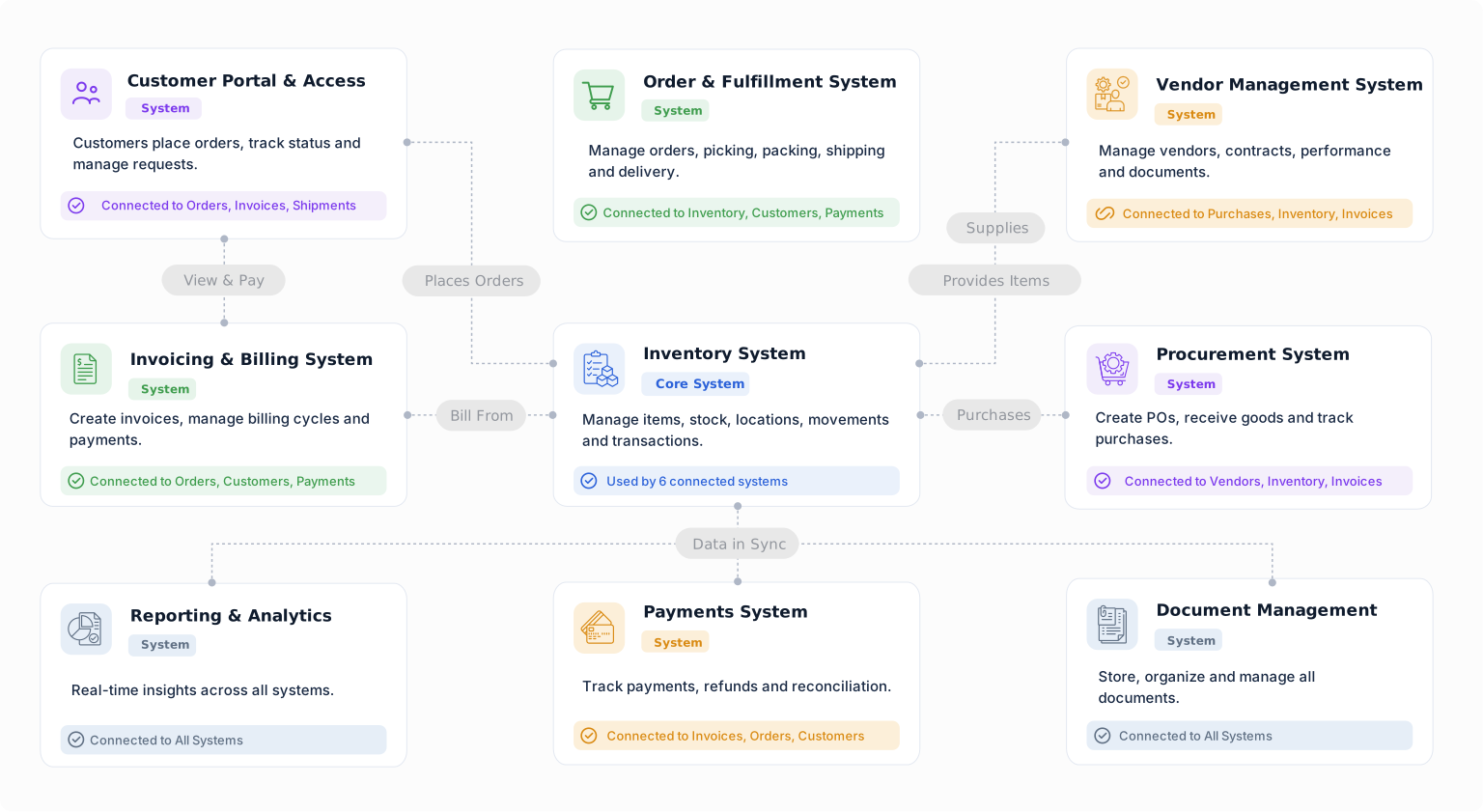
Connect data, ownership, workflows, files, permissions, and reporting in a system that can evolve with your operations.


