
Published on August 24, 2026


Enterprise app development decisions are often framed around the wrong choice: build or buy.
The failure point is usually the operating model underneath the application. A company can:
- Buy a powerful enterprise system and still end up with disconnected workflows;
- Build custom software and still create a system that is expensive to maintain;
- Add more tools and still leave teams working around the process instead of inside it.
Enterprise app development in 2026 is a question of fit between software structure and business structure. The application has to support data volume, permissions, integrations, governance, reporting, mobile access, and process change without turning every new requirement into another workaround.
For heavy-ops companies, the strongest systems are built around how work actually flows: customers, assets, orders, vendors, approvals, files, field activity, and the records that connect them.
What Is Enterprise App Development?
Enterprise app development is the process of designing, building, deploying, and maintaining large-scale software for complex organizational workflows, high data volumes, integrations, and strict security requirements.
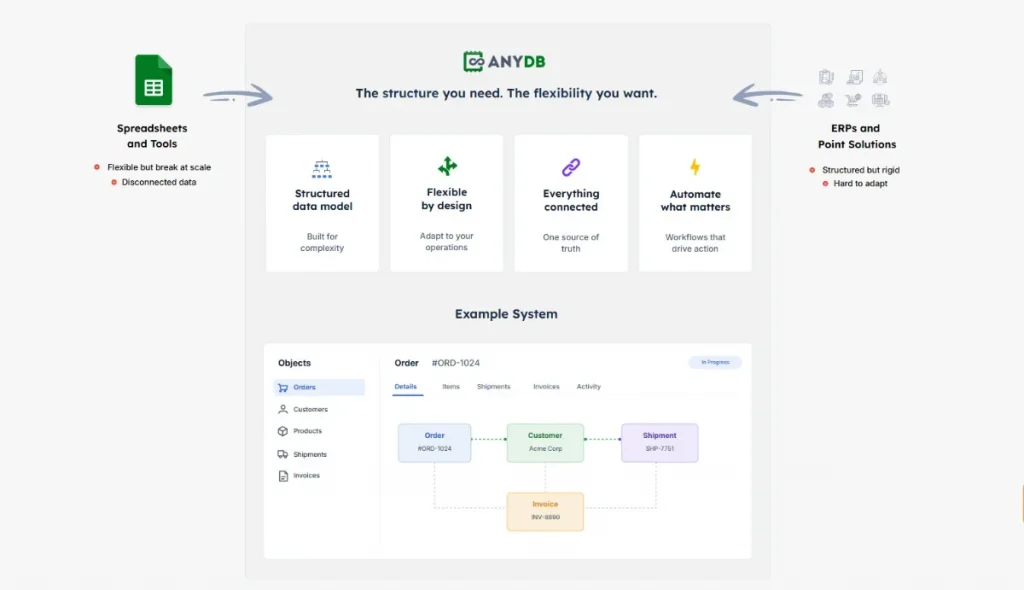
An enterprise app usually supports work across multiple departments, not one isolated task. It may connect finance, operations, sales, HR, supply chain, field teams, compliance, inventory, assets, vendors, and customer data in the same operating environment.
That is what separates enterprise software development from simple business applications.
A basic app can help a small team complete a defined workflow. An enterprise application needs to support scale, reliability, permissions, governance, integrations, reporting, and long-term maintainability.
The architecture matters because enterprise systems often become part of the company’s operating backbone. They define:
- How data moves;
- Who can access it;
- Which workflows are automated;
- How exceptions are handled; and
- How leaders see performance across the business.
In an enterprise cloud environment, the same principles apply: the software still has to match the structure of the business, protect sensitive data, and adapt as operations change.
Common Types Of Enterprise Applications
Enterprise application examples usually fall into a few familiar categories, each built around a major business function.
- ERP: Enterprise Resource Planning systems manage core operational and financial processes, including procurement, manufacturing, inventory, finance, and resource planning. They give leadership a structured view of how the business uses money, materials, people, and capacity;
- CRM: Customer Relationship Management systems organize customer data, communication history, sales activity, pipeline movement, and account ownership. They help commercial teams manage relationships and revenue processes with more consistency;
- SCM: Supply Chain Management systems support logistics, vendor coordination, inventory movement, purchasing, fulfillment, and demand planning. They help companies control how goods, materials, and information move across the supply chain;
- HRM: Human Resource Management systems centralize employee records, payroll, recruiting, benefits, performance, and workforce processes. They reduce manual work around people operations and compliance;
- Custom operational apps: These support workflows that do not fit cleanly inside ERP, CRM, SCM, or HRM systems. Examples include asset inspections, field operations, purchase approvals, work orders, quality checks, vendor documentation, and records-to-documents workflows.
Why Enterprise App Development Is So Difficult
The biggest enterprise app development failure is usually not poor coding. It is building software around a simplified version of the business.
On paper, the workflow looks clean:
- A request is created;
- A manager reviews it;
- Finance approves it;
- Operations fulfills it;
- Leadership sees the report.
Inside the real business, the same workflow has exceptions:
- A vendor certificate is missing;
- Inventory is only partially available;
- A field team uploads photos from the site;
- A customer has special contract terms;
- A finance approval depends on order value;
- A compliance team needs evidence attached;
- The ERP status does not match the spreadsheet.
Legacy systems are usually the first constraint. A company may have an ERP for finance, a CRM for sales, spreadsheets for operations, shared drives for documents, and custom databases built years ago by people who no longer own them.
Read Also: AnyDB as a Google Sheets Alternative
Scope is the second constraint. Teams discover edge cases only after the system starts taking shape. For example, a work order needs attachments, a purchase request needs approval rules, an asset needs inspection history.
Governance and compliance add another layer. Enterprise applications must control who can see, edit, approve, export, or audit data. Role-based access, privacy, audit trails, version history, and data control need to be designed from the start.
Then comes long-term maintenance. A system that cannot evolve becomes another legacy tool, because processes change, teams reorganize, regulations shift, and data models expand.
For heavy-ops companies, the issue is rarely the absence of apps, but fragmentation. Customers, orders, inventory, assets, vendors, approvals, and documents live across separate systems.
That is why platforms like AnyDB focus on modeling the business objects behind the work, then connecting records, files, workflows, permissions, and history in one operating structure.
Build Vs Buy Vs Custom Platform: How To Choose
Frame the decision around operational fit, time to value, cost, flexibility, governance, and maintenance.
| Option | Best For | Strengths | Risks |
| Buy off-the-shelf software | Standard processes that match existing software categories | Faster deployment, known features, vendor support | Rigid workflows, per-seat costs, limited customization, disconnected tools |
| Build custom software | Highly proprietary processes or unique product logic | Maximum control, tailored user experience, custom architecture | High cost, long timelines, developer dependency, ongoing maintenance |
| Use a custom platform | Complex operations that need flexibility without building from scratch | Faster setup, configurable workflows, connected records, permissions, portals, dashboards | Requires process design and internal alignment |
AnyDB fits the custom platform category because it gives teams a way to build around real workflows without starting every application from zero.
Instead of forcing operations into a rigid ERP module or funding a long custom development cycle, teams can model customers, orders, assets, vendors, approvals, files, portals, and field activity as connected business records.
The result is an operational system that can start with one workflow, expand across departments, and adapt as the business changes.
Book a free AnyDB demo and see how your team can build connected operational systems with records, workflows, portals, permissions, files, and real-time visibility.
What An Enterprise App Must Include
Modern enterprise app features are judged less by screen design and more by operational depth. A clean interface is useful, but the real test is whether the application can carry the business process with accuracy, control, and visibility.
An enterprise app should include:
- Scalability: Support more users, records, workflows, locations, and departments without slowing down or breaking the process;
- Integration: Connect with ERP, CRM, cloud tools, APIs, spreadsheets, databases, and reporting systems so data does not stay trapped in isolated tools;
- Security: Protect business data with role-based access, encryption, multi-factor authentication, permission control, and clear data ownership;
- Centralized management: Give leadership visibility across users, workflows, records, approvals, departments, and operational status;
- Automation: Reduce manual handoffs, reminders, approvals, status updates, and repetitive administrative work;
- Audit history: Preserve accountability across data changes, approvals, files, comments, decisions, and workflow activity;
- Mobile access: Support field teams, warehouse teams, inspectors, contractors, and site operations with mobile-ready records and forms;
- Reporting: Turn operational data into dashboards, exception views, performance metrics, and decision support.
AnyDB is especially relevant when these requirements need to work together. Teams can connect records, forms, portals, permissions, files, workflows, dashboards, and history in one operational structure instead of stitching together separate tools for each layer of the process.
How AnyDB Fits Enterprise App Development
For heavy-ops companies, the more important question is structural: can the system represent how the business actually works?
AnyDB is built for that problem.
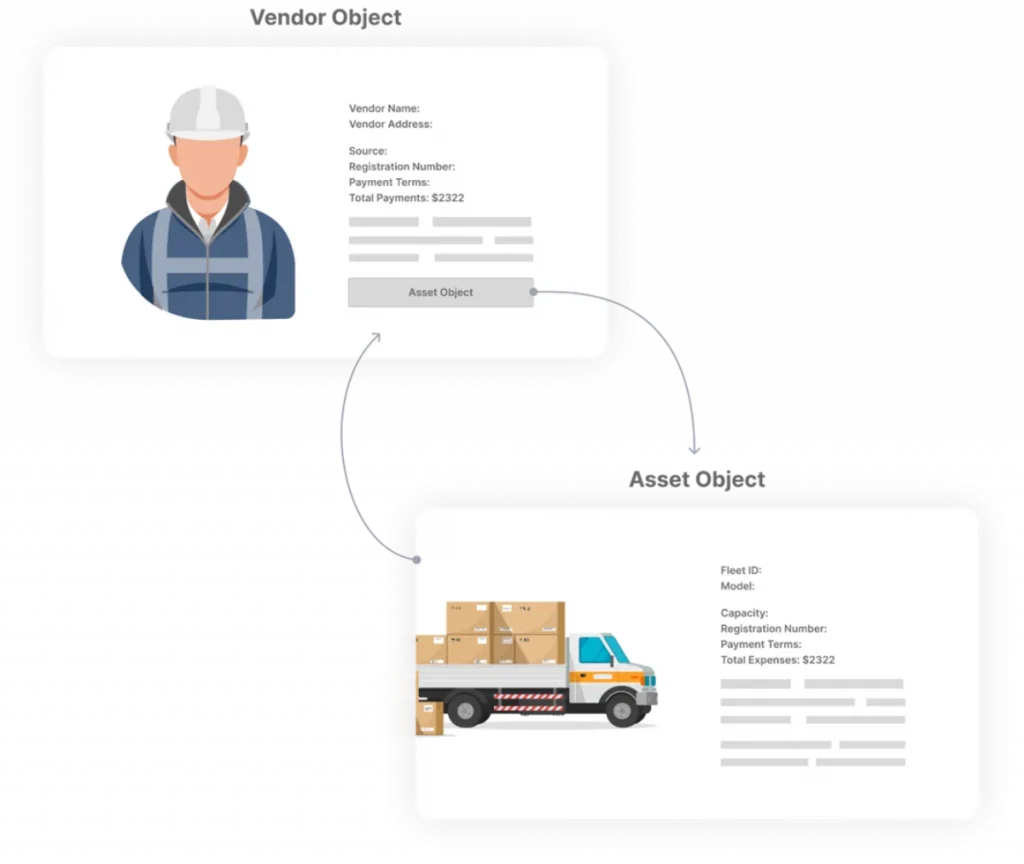
It is not a traditional ERP, a standalone CRM, or a generic app builder. It is an object-based business platform for companies that need to create operational systems around customers, orders, inventory, assets, vendors, approvals, files, field activity, and the workflows that connect them.
Build Around Business Objects
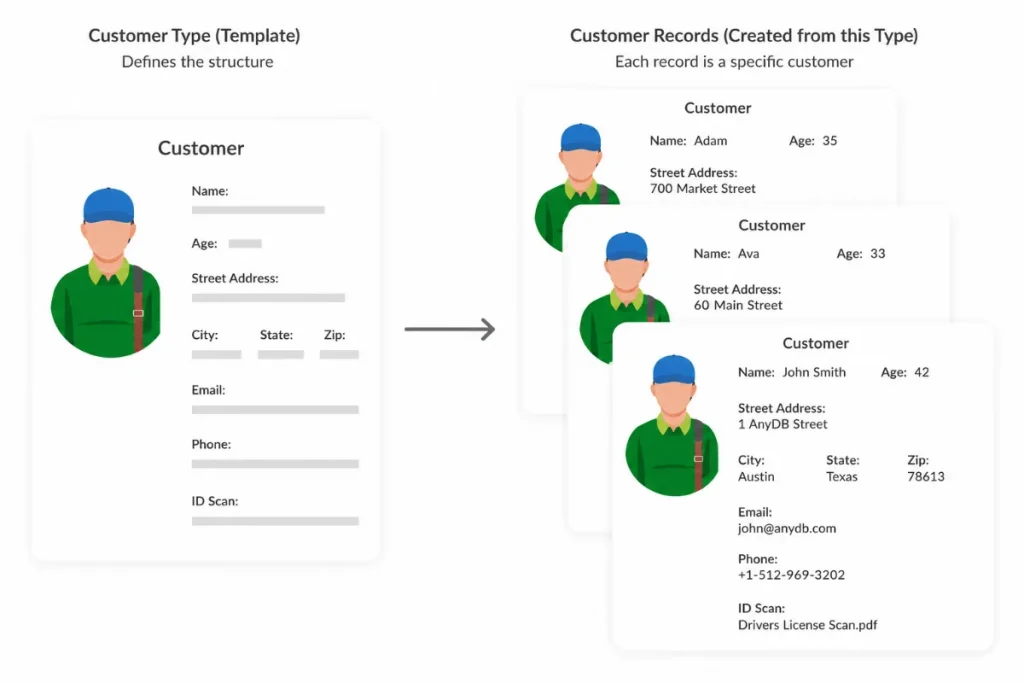
Most enterprise systems start with modules, tables, or predefined workflows. AnyDB starts with the operational record itself.
A sales order can contain line items, files, assignments, reminders, approvals, generated documents, comments, and activity history.
An asset can hold inspection records, maintenance work, photos, vendor documents, warranties, and field updates.
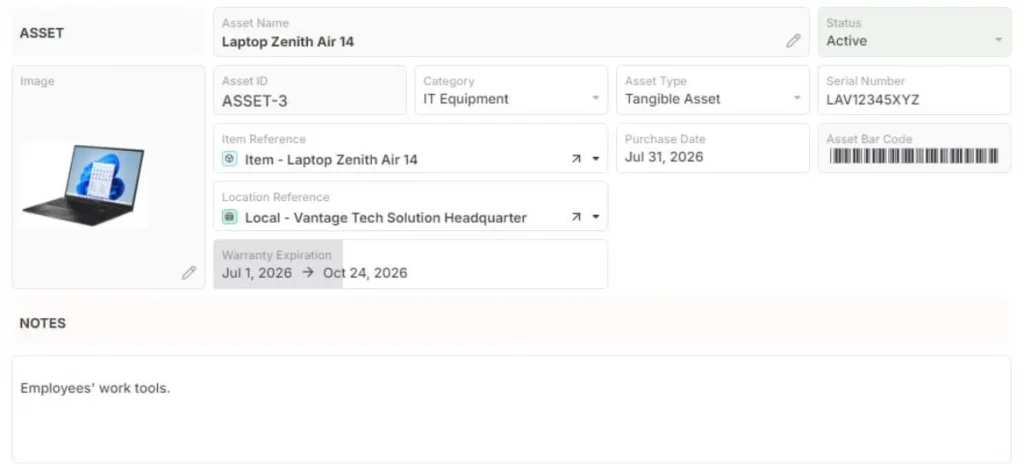
That structure matters because operations teams do not work from isolated data fields. They work from a complete business context.
Where AnyDB Fits
AnyDB is especially useful for workflows that depend on connected records, documents, approvals, field inputs, and operational visibility.
- Asset management and inventory: Track equipment, warehouse locations, stock movement, and inventory transactions without relying on disconnected spreadsheets;
- Order Management & Fulfillment: Connect requests, assets, technicians, parts, costs, approvals, and fulfillment status in one workflow;
- Projects and approvals: Manage initiatives, tasks, budgets, documents, owners, and decision history with clear accountability;
- SOPs and compliance audits: Run procedures, attach evidence, track exceptions, and preserve an audit-ready record of what happened;
- Vendor records and field operations: Centralize supplier information while allowing field teams to upload photos, scan QR codes, complete forms, or update records from mobile devices;
- Records-to-documents workflows: Generate Word, PDF, Excel, reports, invoices, delivery checklists, or compliance documents from live operational data.
Start With One Workflow And Expand
A common enterprise app development mistake is trying to design the entire operating system upfront. That creates long timelines, overbuilt requirements, and software that struggles to adapt once real users expose exceptions.
AnyDB lets teams start with one workflow, such as purchase approvals, asset inspections, inventory tracking, or vendor documentation, then expand into connected systems over time.
New records, child objects, files, workflows, portals, permissions, and dashboards can be added as the operation matures.
The biggest value is flexibility, but also continuity. Teams can keep building around the same operational structure instead of creating another isolated app every time a process changes.
For companies with complex operations, AnyDB gives enterprise app development a more practical foundation: connected business records, workflow depth, secure access, document generation, mobile usability, and real operational visibility.
Book a free AnyDB demo and setup call to see how your team can model orders, inventory, shipments, vendors, exceptions, approvals, and fulfillment workflows in one flexible operational system.
Frequently Asked Questions About Enterprise App Development
What Is Enterprise App Development?
Enterprise app development is the process of building large-scale software for complex workflows, high data volumes, integrations, security, and governance.
What Is An Enterprise App?
An enterprise app is software used by organizations to manage business processes across departments, users, data, workflows, and systems.
How Do You Build An Enterprise App?
Start by mapping workflows, users, data, integrations, security requirements, reporting needs, and long-term maintenance before choosing build, buy, or platform.
Should A Company Build Or Buy Enterprise Software?
Buy when the process is standard. Build when the process is highly proprietary. Use a custom platform when operations need flexibility without full custom development.

The End-to-End Operations System that Finally Fits Your Reality.
No more scattered spreadsheets or rigid, disconnected tools.
AnyDB is a modern, customizable platform for managing business records and operations across teams, clients, and partners.
Learn More


Phone: (512)-761-7979
© 2024 Humanly Inc. All rights reserved.
What is AnyDB?
AnyDB is a unified, customizable data store designed to streamline and empower your entire organization. Effortlessly store, organize, and share custom business data to drive both internal and external operations across teams. Think of it as spreadsheets on steroids.Perfect for Sales, Marketing, Operations, HR, and beyond. Discover AnyDB