Asset Management with AnyDB
Track the entire lifecycle of business assets from acquisition and assignment to maintenance, insurance, depreciation, and retirement. AnyDB gives teams one connected system for physical asset records, asset history, ownership, and financial accountability.
Keep asset identity, status, maintenance, ownership, and value connected in one system instead of scattered across spreadsheets, folders, and finance notes.
Full asset lifecycle visibility
Track assets from purchase to retirement with status history and assigned ownership.
Operational and financial context together
Keep depreciation, invoices, warranties, insurance, and asset status in the same operational record.
Useful for both lightweight and heavy assets
Manage laptops, phones, servers, vehicles, machinery, and other equipment in the same model.
Why unmanaged assets create hidden operational cost
When a company loses track of asset location, ownership, usage, or maintenance state, hidden costs accumulate quickly through wasted capital, unnecessary taxes or insurance, audit failures, and avoidable risk.
Business problem
Running a company without an asset management system is like trying to finish a large puzzle when many pieces are missing or unlabelled. Businesses need a reliable way to know what they own, where it is, who is using it, and whether it is healthy, depreciating, insured, or due for retirement.
Solution summary
- +Track hardware like laptops, smartphones, and servers with assignments and maintenance history.
- +Monitor heavy machinery or vehicles and identify items that are broken or out for repair.
- +Maintain a real-time ledger of asset values and depreciation for tax and internal reporting.
- +Centralize contact points for warranty claims and insurance renewals.
A simple asset model to start with
A strong asset management setup can start with only two record types: asset records for the current source of truth, and journal records for the event history around each asset.
Asset
Track identity, description, status, owner, assignment, location, vendor, purchase, insurance, and depreciation fields.
Asset Journal
Log events such as assignment, availability, maintenance, retirement, and disposal with attachments and notes.
How to set up the asset management workflow
Follow the setup sequence below to create the workspace, add assets, and record lifecycle events with the original walkthrough media intact.
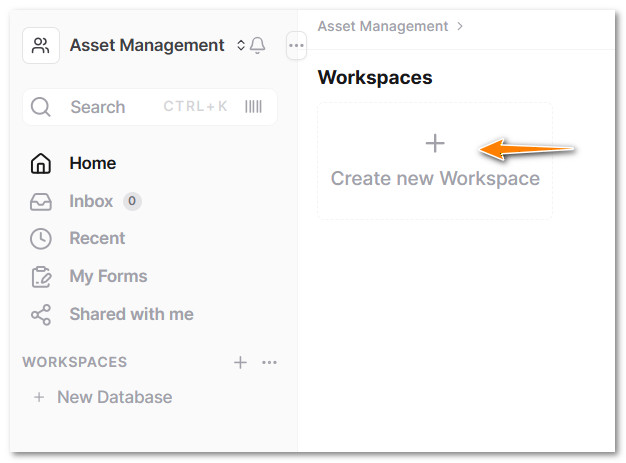
- Click on + Create new Workspace.
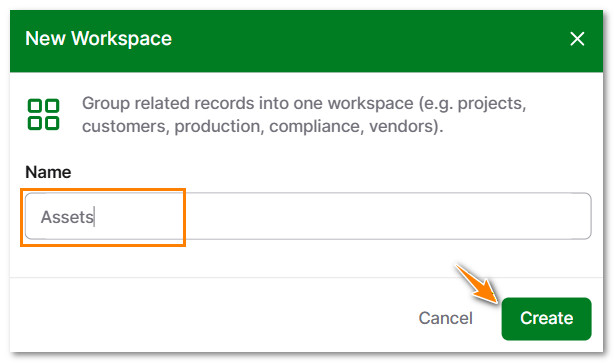
- Type a name for the New Workspace and click on Create.
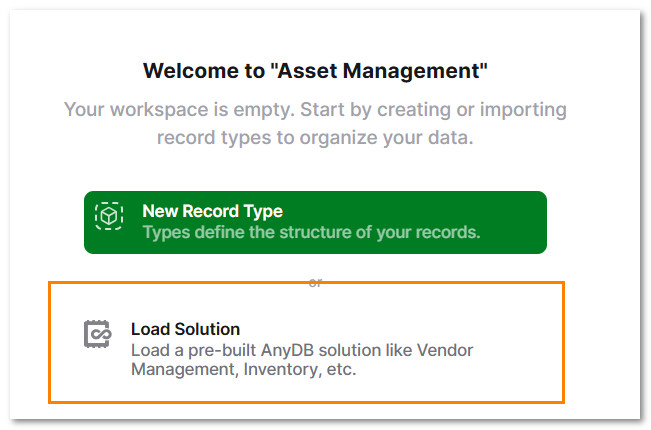
- Click on Load Solution.
- Select Asset Management and click on Load.
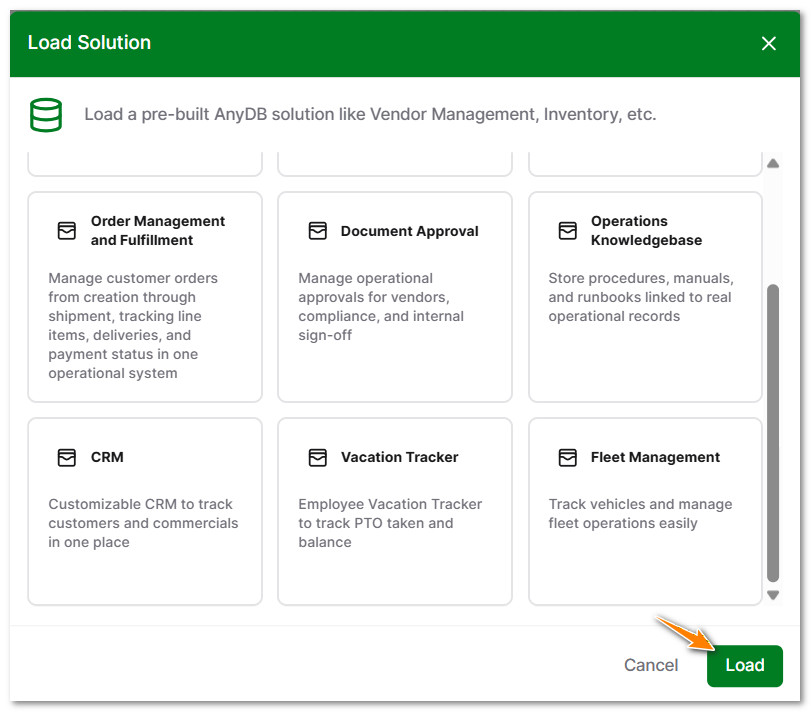
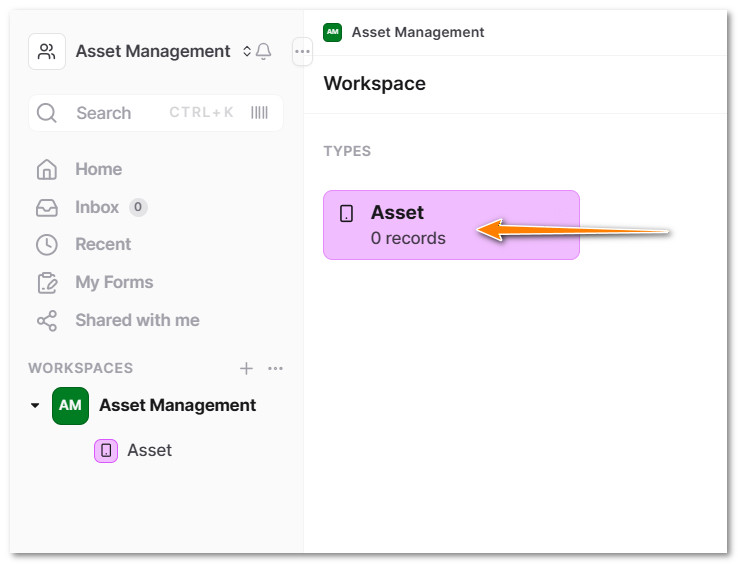
The database includes two record types: Asset and Asset Journal.
- In the Workspace, click on Asset.
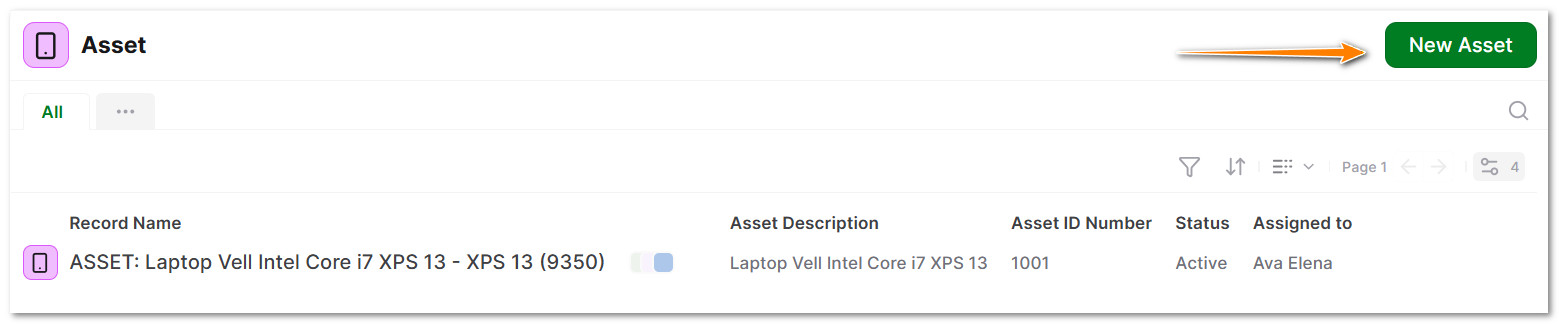
- Click on New Asset.
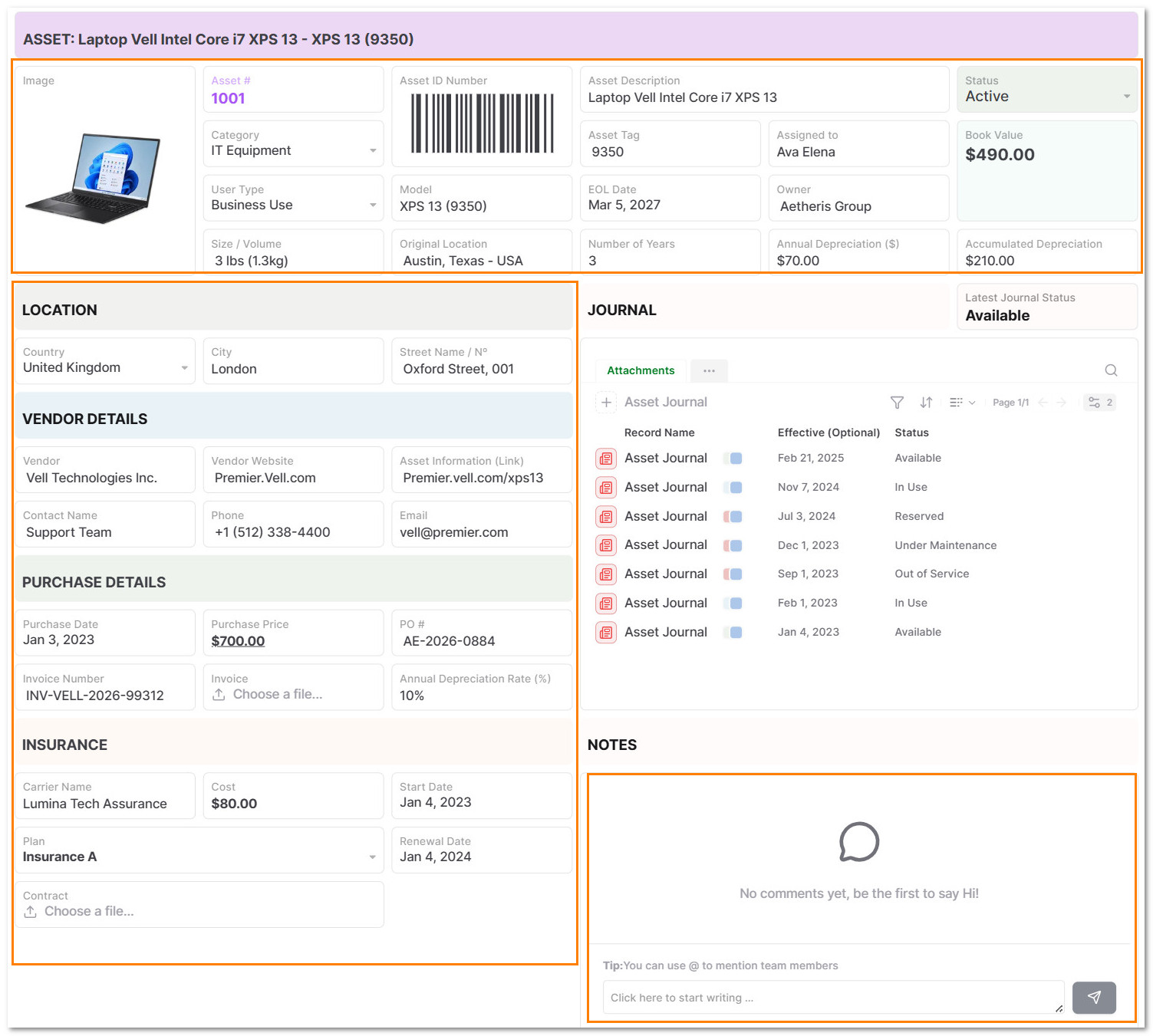
- Fill out the fields related to the Asset.
Key fields include:
- +Asset details: Image, ID Number, Code Bar, Description, Status, Book Value, Location, EOL Date, Owner, Assigned to, Model, Category, Volume/Size, and others.
- +Vendor details: Vendor Name, Website, Contact, Email.
- +Purchase details: Purchase Date, Price, PO, Invoice Number, Invoice File and Annual Depreciation Rate.
- +Insurance details: Carrier Name, Cost, Start Date, Renewal Date, Plan and Contract File.
- +Comments Section.
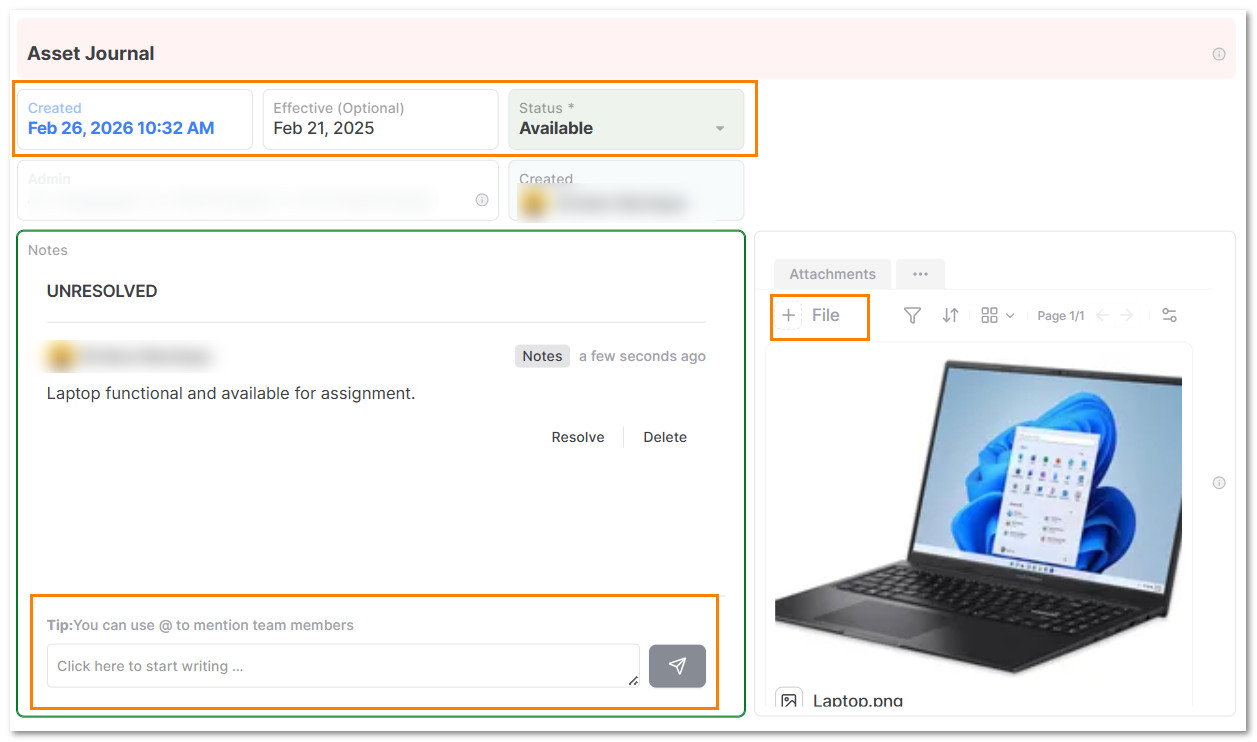
- In the Journal Section, click on + Asset Journal.
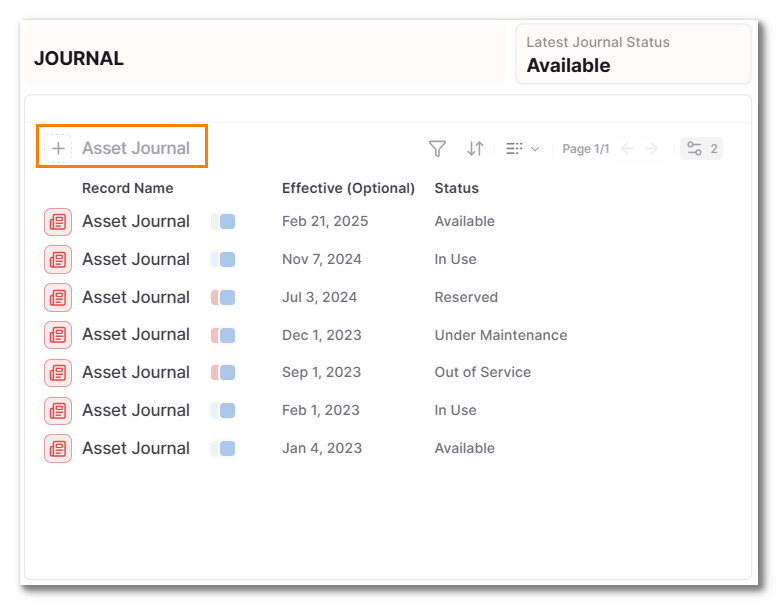
- Fill out the fields related to an event.
Fields include: Date, Status, File Attachment and Comments.
Status can be:
- +Available -> Ready to assign or operate.
- +In Use -> Actively assigned or operating.
- +Reserved -> Allocated but not yet active.
- +Under Maintenance -> Being serviced or repaired.
- +Out of Service -> Temporarily unusable.
- +Retired -> End of lifecycle, still recorded.
- +Disposed -> Sold, scrapped, or permanently removed.
Data model reference
| Field | Description |
|---|---|
| Asset | Tracks asset information and status |
| Asset Journal | Signal the event/status related to the asset |
Reporting and views
- +Asset Items by ID, owner, model, description, book value, location, cost, and more.
- +Securely share saved views with external users, internal team, and partners.
- +Example: a specific machine was shared with a vendor to guarantee design standards are being met.
Sharing and collaboration
- +Assign assets to individuals or teams.
- +Track progress collaboratively with comment threads.
- +Use status indicators.
- +Link updates to weekly reports or team check-ins.
- +Share views with leadership for transparency.
Tips and best practices
- +Set a follow-up date to avoid missing any steps.
- +Update asset journal regularly, not just at the end.
Pro Tip: Set up which fields the assigned person cannot edit in the asset record.
Who this solution is for
- +Leadership Teams for company-wide alignment on asset management.
- +People Managers for team-level accountability around assigned assets.
- +Individual Contributors to connect daily work tools to higher-level operational impact.
- +Chiefs of Staff / Ops to guarantee compliance, security, and cost visibility of assets.
Why use AnyDB for asset management
| Benefit | How AnyDB Supports It |
|---|---|
| Relational "Object" Structure | In AnyDB, an object is not just a record; it is a connected object. |
| Workflow Automation (No-Code) | You can automate actions without hiring a developer. |
| Transparent Progress | Live status, confidence levels, and update history. |
| Custom Views | Filters by team, time, or status. |
| Review-Ready | Use in weekly or quarterly review cycles. |
| Seamless Collaboration | Unlimited Guest Access for partners or external users. |
Related guides that strengthen this solution
These guides help extend asset workflows into tracking, sharing, and connected operational processes.
Search
Find assets by owner, location, status, value, or maintenance state quickly with saved views.
Sharing
Share asset records and filtered views with internal teams, vendors, or external partners securely.
Files
Attach invoices, contracts, warranty documents, and insurance files directly to asset records.
Permissions
Control which fields assigned users can edit and protect sensitive asset information.
Connecting Objects
Model how assets connect to owners, journals, vendors, and related business records.
Sheets
Give operations teams a spreadsheet-like view for fast browsing and updating of asset records.