Managing training inventory logistics
across multiple locations

How a training provider replaced Excel with a connected system for equipment, locations, receipts, transfers, kits, and field operations.
Free Demo/Setup
Book a call and let us set up AnyDB for you. Free of charge!
  • Company

    Risk management consulting and training provider

  • Team

    Approximately 10 people

  • Industry

    Training operations and field logistics

  • Scale

    350+ items across distributed locations

The company runs training programs across the United Kingdom and France, managing first aid kits, simulation gear, training materials, reusable assets, and consumables.

Equipment moves between a central hub, venue storage rooms, and mobile kits used during field sessions. Interns, freelancers, and on-site staff handle day-to-day logistics while operations are coordinated remotely.

The biggest challenge was ghost inventory. Items appeared available in Excel even when the actual stock position was different, and resolving discrepancies could require a full day of manual checking.

Result: A connected inventory and logistics system where receipts, transfers, kit preparation, item conditions, and location quantities are easier to track.

Operational Objective

Create a practical inventory system that keeps training logistics accurate across locations, staff changes, and recurring field operations.

In practice, that meant:

  • Track 350+ items and accurate quantities by location
  • Support French and English item names
  • Record complete and partial goods receipts
  • Manage transfers between source and destination locations
  • Generate pick lists for kits and venue deliveries
  • Send notifications when receipts or transfers are completed
  • Track kit components and selected asset conditions
  • Provide controlled views for interns, freelancers, and guests

What They Tried at First

The operation relied on Excel to track equipment, locations, quantities, movements, and field usage.

As training logistics expanded, more sheets were added for available stock, transfers, received goods, and kit preparation. Every update depended on someone entering the correct quantity in the correct place.

Excel remained familiar to the team, although it could not reliably show what was available at each location. Stock conflicts, missing items, and ghost inventory required manual checks before training sessions.

The company needed a simple system with stronger structure around receipts, transfers, location quantities, and controlled updates.

Where the Operation Broke Down

The existing setup could not keep inventory accurate as equipment moved between the hub, venues, storage rooms, and mobile kits.

What broke?

  • Stock quantities were maintained across spreadsheets
  • Transfers lacked clear source and destination tracking
  • Goods receipts depended on manual confirmation
  • Pick lists did not always create reliable movement records
  • Damaged, expired, or obsolete assets lacked separate visibility

Operational Impact

  • Manual checks were required to confirm available stock
  • Staff spent time resolving quantity discrepancies
  • Trainers risked receiving incomplete kits
  • Remote coordination depended on messages and manual updates
  • Rotating staff needed a safer way to complete stock tasks

The Operating Model After AnyDB

A custom logistics system where stock, locations, receipts, transfers, kit components, and item conditions follow clear workflows.

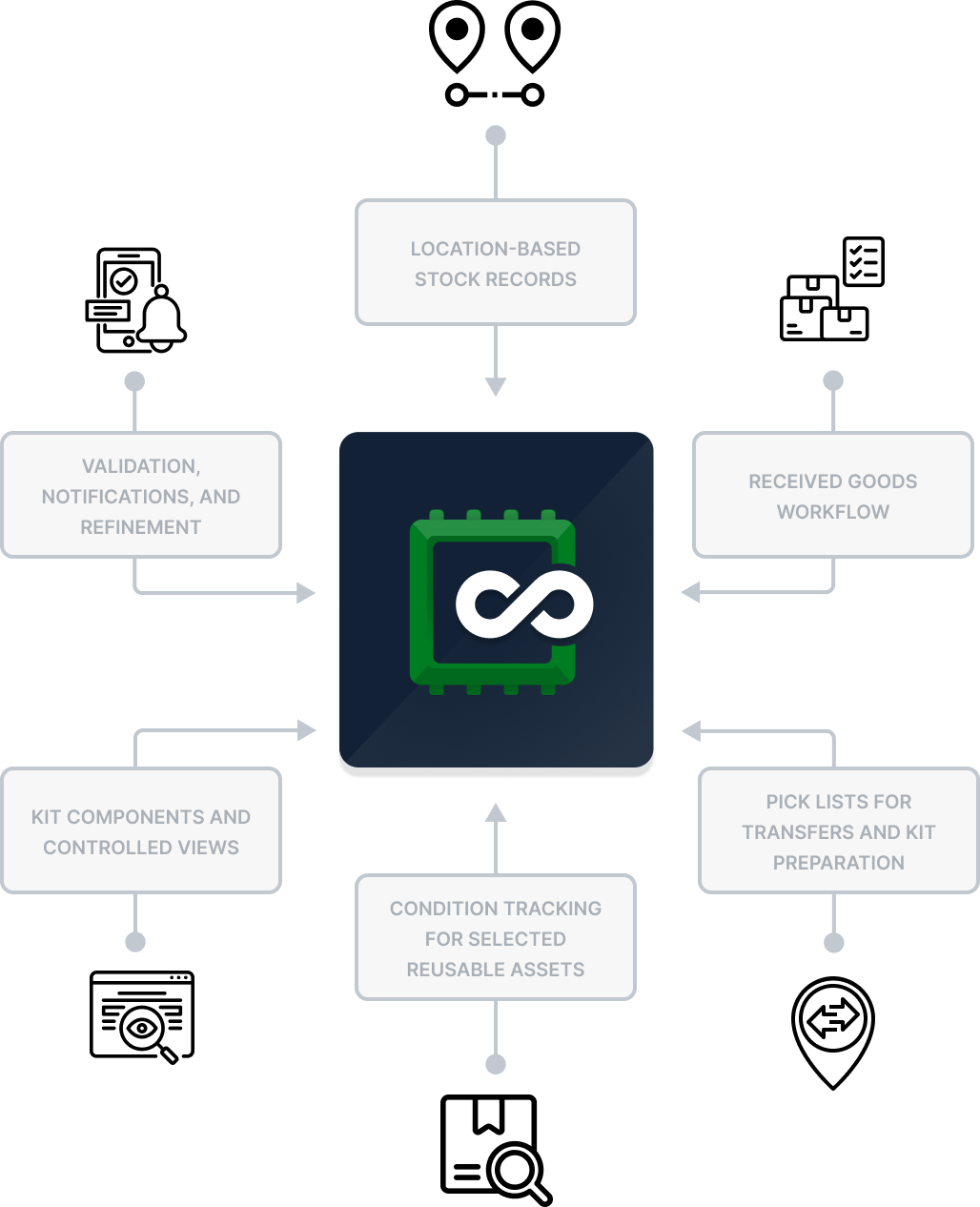
Location-based stock records

Each stock record connects an item to a specific location and quantity, giving the team a clear view across the central hub, venue storage rooms, and mobile setups.

Goods receipts update stock

Staff confirm complete or partial deliveries through a goods receipt workflow. Once posted, AnyDB updates the location quantity, creates a traceable record, and sends notifications.

Pick lists control movements

Each pick list includes the source, destination, item lines, quantities, and transfer status. Completing it deducts stock from the source and adds it to the destination.

Condition tracking where needed

Reusable assets can be separated by condition, including active, damaged, repairable, obsolete, expired, or waiting for pickup. Consumables remain simple to manage.

Guided access for every user

Kit components, validation rules, controlled views, and clear notifications help interns, freelancers, and occasional users complete tasks without accessing the full system.

What Changed in Daily Work?

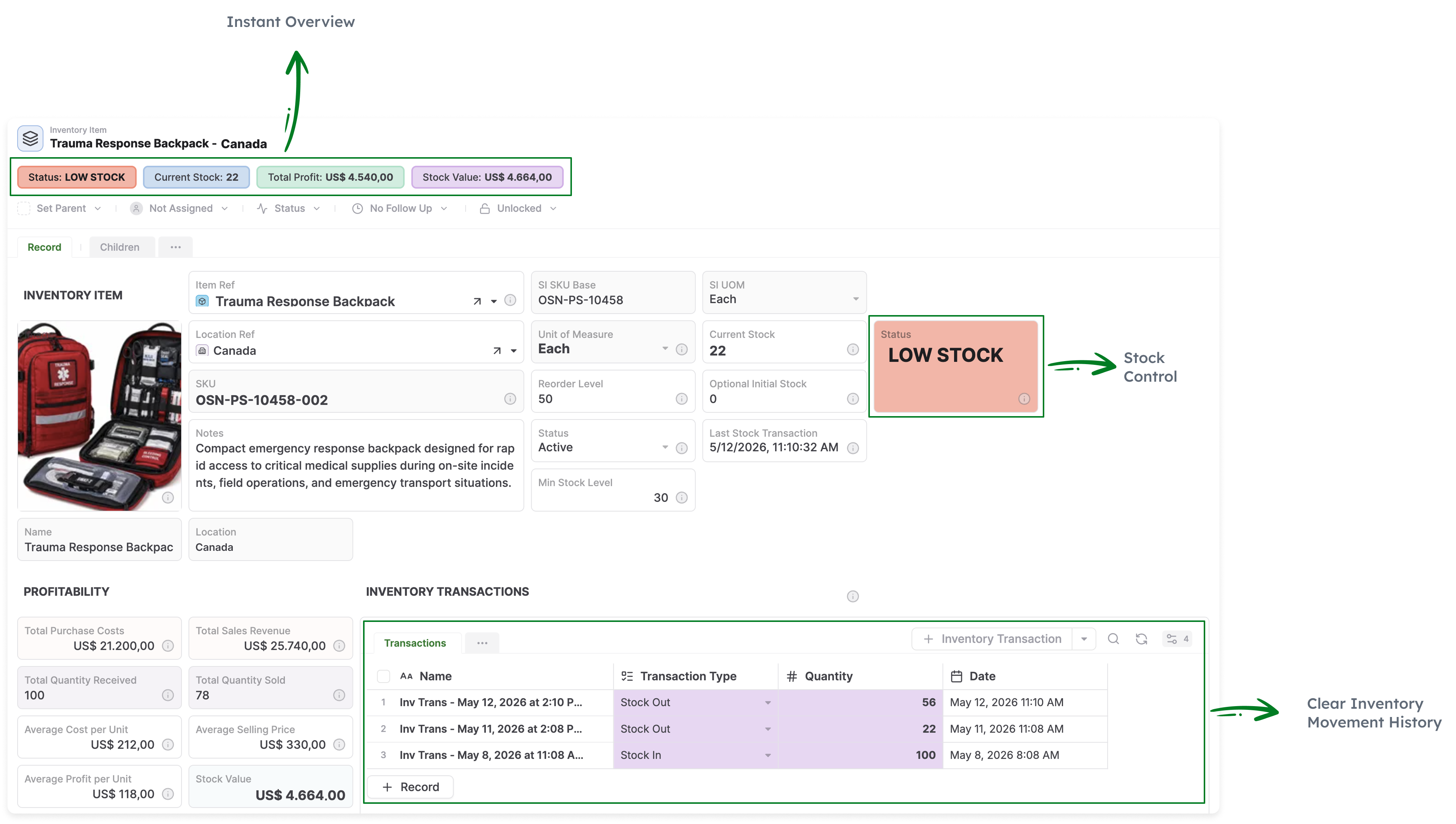
  • Staff see available equipment by location, quantity, and status
  • Goods receipts update stock through defined actions
  • Interns confirm received items through controlled views
  • Admins receive notifications when receipts or transfers are completed
  • Pick lists track movements between source and destination locations
  • Kit components appear inside the relevant inventory records
  • Condition statuses separate usable assets from unavailable stock
  • Validation rules reduce incorrect item and location selections

Operational Outcomes

Excel completely replaced with a custom operational system

Clearer stock visibility across hubs, venues, storage rooms, and mobile kits

Fewer ghost inventory issues and stock conflicts before training sessions

Faster confirmation of received goods through guided actions

More reliable transfer tracking through clear source and destination records

Result: Training logistics run through a structured system where receipts, transfers, location quantities, kit components, and condition statuses stay aligned.

Why This Works and Scales

The system follows how training equipment moves through the operation, keeping daily tasks simple while maintaining stronger controls in the background.

  • Consumables stay simple while selected assets include condition tracking
  • Guided actions and validation rules reduce incorrect updates
  • Controlled views support interns, freelancers, guests, and occasional users
  • New locations, categories, kits, and users can use the same structure
  • Returns, repairs, guest views, and document generation can be added later

Run Training Logistics
From One Connected System

Manage inventory, kit preparation, receipts, transfers, and field logistics with AnyDB. Need help? We’ll help you set up your system at no cost.