
01
Details get scattered
Guest counts, timing, venue instructions and customer requests live in separate messages and files.
Keep customers, event details, menus, pricing, preparation, delivery, tasks, documents and payments together in one flexible system built for catering operations.
An order changes hands across sales, kitchen, delivery and finance. When each team works from a different spreadsheet, inbox or message thread, small changes become expensive mistakes.
Guest counts, timing, venue instructions and customer requests live in separate messages and files.
Dietary needs, quantities and service additions change after the quote without reaching everyone.
Teams lack one live view of what is confirmed, in preparation, ready or out for delivery.
Deposits, balances and due dates are tracked separately from the order they belong to.
Move every event through a clear operating process while keeping the full history attached to the customer and order.
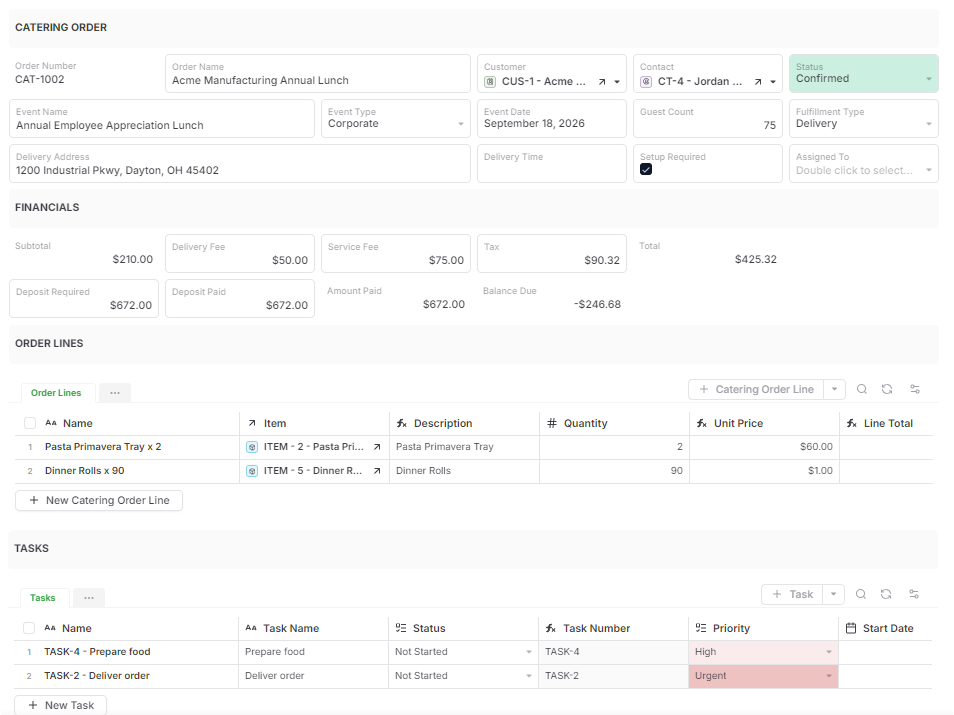
Each event becomes one operational record. Open it and see the customer, contact, schedule, guest count, fulfillment details, menu, prices, work, documents and payments without reconstructing the story.
The connected model also gives you customer history, repeat-order visibility and reliable reporting across every event.
The same order data can power focused views for sales, production, delivery and management.
See new requests, outstanding quotes, follow-ups, confirmed guest counts and customer communication.
Work from confirmed quantities, menu choices, dietary categories, deadlines and assigned prep tasks.
See delivery windows, venue contacts, setup instructions, assigned work and order completion status.
Review payment history, amount paid, balance due and customer documents from the order.
Track order volume, revenue, upcoming workload, fulfillment status and overdue actions.
Answer questions with the latest event information, previous orders, files, notes and payment activity.
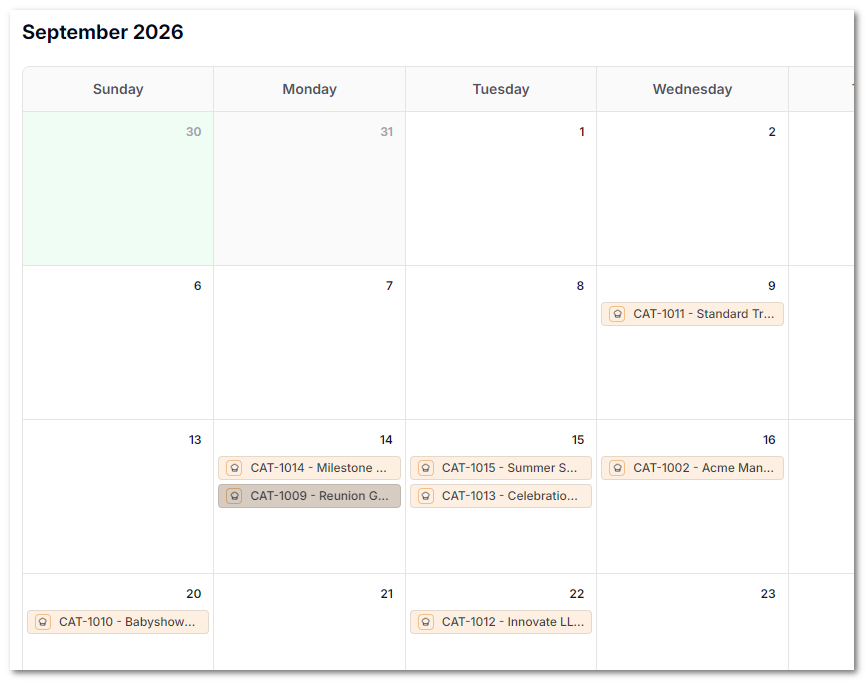
Start with the essentials and expand the system as your catering operation grows.
Capture inquiries through forms and connect each request to the right customer and contact.
Add food, beverages, rentals and services as reusable items with quantities, prices and dietary categories.
Calculate line amounts, subtotal, fees, taxes, total, amount paid and remaining balance.
Assign preparation, packing, delivery, setup and follow-up work directly inside the order.
Move orders from Draft and Quoted through Confirmed, Preparation, Delivery and Completion.
Record every payment and generate customer-ready quotes or invoices from live order information.
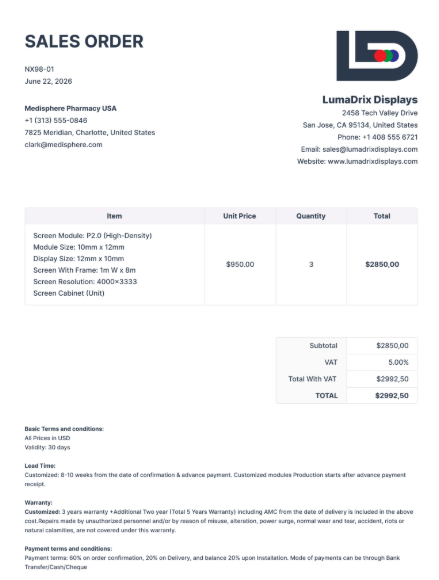
Generate a formal quote or invoice directly from the catering order. Customer information, event details, menu lines, pricing and terms are pulled into the document, reducing re-entry and version confusion.
Use the included catering workflow as-is, or change fields, views, forms, document templates, statuses and automations to match how your team operates.
Add more of your business when you need it. Connect ingredient inventory, purchasing, equipment rentals, staff scheduling, vendor management or customer portals without replacing the order system you already built.
Launch with the connected records and views needed to manage a real catering workflow. Add your menu, customers and first order, then customize the solution when you are ready.
Start with a complete order-management workflow today. Keep every customer, menu, task, document and payment connected from inquiry through completion.


