
Published on October 15, 2025


Client portal software is the modern handshake between businesses and their clients. Instead of endless back-and-forth or waiting in support queues, customers step into a secure, self-service hub where they can:
- access files,
- track progress,
- submit requests,
- approve documents,
- view dashboards,
- and get answers on their terms.
And here’s the kicker: 88% of customers today expect this kind of portal to be available for them, ready on-demand. If your business isn’t offering it, you’re already behind in some ways.
The benefits go beyond convenience. Client portal software reduces support costs, giving your team the freedom to focus on higher-value work. It also shines a light on client activity: customers check their own data, and companies gain valuable insights into behavior and needs.
In this article, we’ll explore how client portal software is reshaping business-to-client interactions and why adopting it can give your organization an edge.
Benefits of Client Portal Software
Client portal software is the digital space where trust and collaboration finally meet. Here’s why it matters:
1. Reduced Support Costs and Greater Agent Efficiency
A well-designed portal resolves common questions before they ever hit your inbox. Fewer tickets, less copy-paste work, and more time for your team to focus on complex problems. Agents shift from being human FAQs to actual problem solvers.
2. Enhanced Client Satisfaction and Trust
Clients love autonomy. When they can access information instantly, frustration drops and satisfaction rises. No endless waits. No “Did you get my email?” chases. Just answers when they need them.
3. Better Visibility and Analytics
When all interactions live in one place, you finally see the patterns: recurring issues, usage trends, and even content gaps. That visibility is the fuel for smarter decisions and continuous improvement.
4. Improved Transparency and Collaboration
Real-time access to project status, invoices, or deliverables clears up the “where do we stand?” confusion. Clients and teams share the same view, which means fewer misunderstandings and smoother collaboration.
5. Security and Regulatory Confidence
Unlike email or shared drives, portals provide encrypted access and permission controls. Compliance boxes get ticked, data stays safe, and risks are reduced.
6. Scalability for Teams and Workflows
Growing business? No problem. Client portals expand with you. Add users, roles, or new integrations without creating chaos for your support system. The portal adapts as your needs evolve.
The result is happier clients and more efficient teams.
What To Look for in Client Portal Software
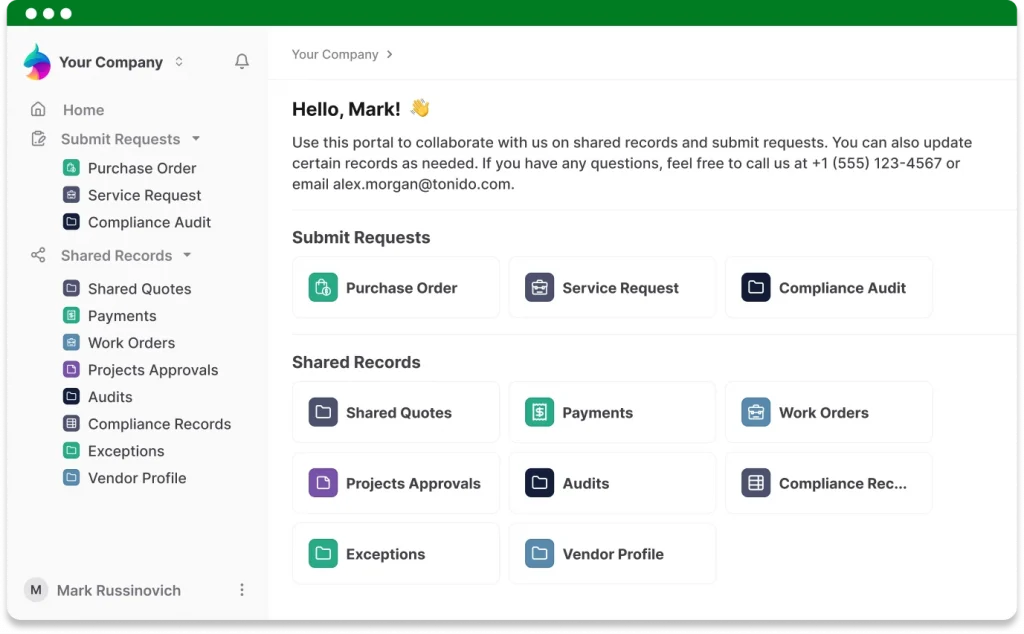
A portal is only as useful as the data behind it, so start by checking where that data lives. The best portals connect straight to the records your team works in every day, and the checklist below helps you spot them.
| Must-Have Feature | What To Check Before You Buy |
|---|---|
| Live data connection | Do client submissions land in the records your team already uses, or in a separate portal table that needs syncing? |
| Granular permissions | Can you control access by role, so each client or vendor sees only their own information? |
| Forms and submissions | Can clients send requests and files through forms that attach to the right record automatically? |
| Two-way editing | Can clients update the records you allow them to edit, with changes reflected in your internal system? |
| Branding | Can you add your logo, portal text, and URL so the portal feels like your business? |
| Guest pricing | Does the price change as you invite more clients, vendors, and partners? |
| Audit history | Can you see who changed what, and when? |
Run every vendor through the list, then add one more test. Ask to watch a client submit a form, and ask where that submission appears on the team’s side. The answer shows whether the portal and the system behind it are really one thing.
How AnyDB Helps Build Smarter Client Portals
AnyDB builds portals into the platform itself, so your team and your clients work from the same live records.
One Connected System With Live Data
A client fills in a form or uploads a contract, and it attaches to the right record your team already uses internally. There are no duplicate portal tables and no sync jobs to babysit. Everyone works from one source of truth, and a change made in one place updates everywhere in real time.
Granular Permissions Without Developer Overhead
AnyDB gives you fine-grained, role-based permissions, so you are never stuck choosing between view-only and full access. A supplier sees their purchase orders. A client sees their invoices. An auditor reviews compliance files without a peek at HR data. Paid plans include an audit history that tracks every change, and Enterprise adds Microsoft and Okta SSO for teams with stricter requirements.
An All-in-One Portal System
Why juggle Softr or Stacker for portals, Google Drive for files, SurveyMonkey for input, and endless email threads for updates? AnyDB brings it all together. Clients and partners log in, and everything they need is waiting in one secure, branded space, with public and private forms, files stored inside records, and every submission tracked.
Predictable and Fair Pricing at Scale
The cost of inviting external users tends to grow with your client list. Airtable bills editors by the seat and sells portals as a paid add-on priced by guest, Softr counts client users against plan limits, and Stacker has capped external users on its entry tiers. AnyDB gives you unlimited guest accounts for free, so you can invite dozens or hundreds of external users without watching costs balloon.
Branding and Customization That Go Further
Your portal adapts to your workflow, your tone, and your visual identity, so clients experience your brand from the first login. Build forms and dashboards that mirror your own processes, and have portals ready in minutes with no IT team required.
Here’s how branding works across plans:
- Free Plan: Portals carry the default AnyDB branding, which is enough for testing and early projects.
- Business Plan: Add your own branding and a custom portal domain, such as portal.yourdomain.com.
- Enterprise Plan: White-label options for organizations that need them.
Fewer Breakpoints, More Reliability
A patchwork of front-end interfaces, back-end databases, and third-party automation tools can work, but it is fragile. Automations break, data drifts out of sync, and someone has to fix it. Running portals inside one connected system removes most of those moving parts. Workflow automation handles routing and approvals on the same platform, and when you do need other tools, AnyDB connects through APIs, webhooks, Zapier, and Make.
Two-Way Editing on Structured Records
Submissions become structured records, complete with attachments, comments, and grouped views. Clients and teams see the same organized data, and clients can edit the records they are allowed to, with changes flowing straight into your internal database. Projects keep moving without extra admin work.
AI Teammates That Work Across Company Boundaries
AnyDB now lets you create AI Teammates with a defined role, clear instructions, and access to only the business context they need. A Teammate can review a delayed order, prepare a follow-up using the connected supplier and inventory records, and wait for a person to approve it before anything is sent.
Through the open A2A protocol, you can also make a Teammate available to customers, partners, and vendors, and to their own AI agents. On Business and Enterprise plans, Teammates can reach external tools such as Gmail, HubSpot, Jira, and Stripe through MCP, while following the same instructions, permissions, and approval boundaries. Every action remains visible in the activity history.
Learn more in the AnyDB portal guide.
| Why Use AnyDB Portals? | |
| Make it your own ✅ | Customize your portal with your logo, messaging, and URL to reflect your brand. |
| Increase credibility and build trust ✅ | Give external users a professional and consistent experience. |
| Collaborate beyond your team ✅ | Securely share data with clients, vendors, and partners with unlimited free guest accounts. |
| One connected system ✅ | Internal teams and external collaborators work from the same source of truth. |
| No more duplication ✅ | Stop syncing between apps, exporting files, or managing multiple tools. Everything updates in real time. |
| Real-time data sharing ✅ | Changes made in one place update everywhere, keeping everyone aligned. |
| Streamlined operations ✅ | Manage requests, records, and workflows in a single system for seamless collaboration. |
Elevate Client Experience With Client Portals
Client portal software gives clients answers when they want them and gives your team back the hours it once spent on status updates. Fewer repetitive tickets leave more time for the work that moves the business forward.
If your business is scaling, your client relationships should scale right alongside it, without adding cost, complexity, or risk to match.
Pro tip: stop juggling disconnected tools and build one connected system.
Schedule a call and the AnyDB team will help you build your own client portal on live data, with workflows and security already in place. If you would rather start on your own, a free AnyDB workspace is ready whenever you are.
Frequently Asked Questions About Client Portal Software
Five questions come up again and again when teams start comparing portals, and each gets a short answer below.
What is client portal software used for?
Client portal software gives clients a secure, self-service space to access files, submit requests, approve documents, track progress, and view dashboards. It reduces email back-and-forth and gives your team one place to see every client interaction.
Is a client portal the same as a customer portal?
The two terms describe the same idea. Professional services firms tend to say client portal, while product and operations teams often say customer portal. Portals for vendors, contractors, and partners work the same way, so the features to look for stay the same whichever term your team prefers.
How much does client portal software cost?
Pricing varies by tool, and the biggest variable is often how guest users are charged. Some platforms bill for each external user, so costs rise as your client list grows. AnyDB includes unlimited free guest accounts and offers a free plan, so you can build and test a portal before you pay anything.
Is client portal software secure?
A well-built portal is safer than email attachments and shared drives. Look for role-based permissions, controlled access, and an audit history. In AnyDB, external users see only the information assigned to them, and paid plans record every change.
Can AI work with a client portal?
AI can handle the preparation work around client requests while people keep control. In AnyDB, AI Teammates have defined roles, limited access, and human approval steps for sensitive actions. Teammates can also be made available to customers and partners through the A2A protocol.

The End-to-End Operations System that Finally Fits Your Reality.
No more scattered spreadsheets or rigid, disconnected tools.
AnyDB is a modern, customizable platform for managing business records and operations across teams, clients, and partners.
Learn More


Phone: (512)-761-7979
© 2024 Humanly Inc. All rights reserved.
What is AnyDB?
AnyDB is a unified, customizable data store designed to streamline and empower your entire organization. Effortlessly store, organize, and share custom business data to drive both internal and external operations across teams. Think of it as spreadsheets on steroids.Perfect for Sales, Marketing, Operations, HR, and beyond. Discover AnyDB