
Published on March 27, 2025


Airtable is a capable platform for teams that need to structure data, create workflows, and give users a flexible way to work with information. The question for businesses evaluating Airtable alternatives is whether that model matches the way their operation actually works.
The reasons for considering a switch vary.
Some teams are looking for lower costs, self-hosting, stronger database capabilities, or a different approach to project and document management.
Others are managing orders, inventory, assets, vendors, production, or field operations and need deeper connections between the records that drive those processes.
The 2026 acquisition announcement from Bending Spoons adds another reason to review the market. The transaction has been announced but has not yet closed, so there is no need to assume what it will mean for Airtable users.
This guide compares the leading Airtable alternatives by use case, helping you identify the platform that fits your data, workflows, users, and operational requirements.
Current community discussions reinforce this use-case approach. Users asking about Airtable alternatives mention pricing, production use, databases, automation, permissions, and the need for more structured operational systems rather than simply wanting another Airtable clone.
Why Are Businesses Looking for Airtable Alternatives?
Airtable can remain a strong choice for teams that need flexible databases and customizable workflows. However, as those workflows become more critical to the business, the platform may no longer match what the operation requires.
Common reasons teams start evaluating alternatives include:
- Cost: As more employees need edit access, Airtable’s per-user pricing can become harder to justify, particularly for larger teams.
- Complexity: Bases can accumulate linked records, interfaces, automations, and workarounds that make the system increasingly difficult to maintain.
- Operational requirements: Teams may need a system built around recurring processes such as orders, inventory, production, service delivery, or asset management rather than primarily organizing information.
- Permissions: More departments, roles, and external collaborators can create requirements for finer-grained access and visibility controls.
- Platform limits: Record limits, automation capacity, API constraints, sync requirements, or other technical considerations can affect production workflows.
- Infrastructure control: Some organizations prefer self-hosted or open-source solutions to control where their data and systems run.
- Growth: A tool introduced for one department or a lightweight workflow may eventually become part of a much broader business operation.
The right alternative therefore depends less on finding an identical tool and more on identifying what Airtable is no longer doing well enough for your specific operation.
Read Also: Airtable Cost Breakdown 2026: Is It Still Worth What You’re Paying?
What Does the Bending Spoons Acquisition Mean for Airtable Users?
On August 4, 2026, Bending Spoons announced an agreement to acquire Airtable in an all-cash transaction valuing the company at $1.285 billion in enterprise value.
For current Airtable users, the acquisition does not mean that a migration is necessary. There has been no announced change to Airtable’s pricing, plans, or product availability as a result of the deal.
Airtable’s current documentation continues to list its existing plans and features.
Still, a change in ownership can be a useful moment to reassess how dependent your business is on a particular platform. If Airtable is central to critical workflows, compare its current capabilities, costs, infrastructure model, and long-term fit with the alternatives available today.
For more details on the announcement, see this recent coverage from Reuters.
What Should You Look for in an Airtable Alternative?
The right Airtable alternative should be evaluated against the operation it needs to support, not simply how closely its interface resembles Airtable.
- Data model: Can it represent the relationships between the records your business depends on?
- Workflow depth: Can it handle approvals, assignments, dependencies, and recurring processes?
- Permissions: Can access be controlled by role, department, or other operational requirements?
- External collaboration: Can customers, vendors, and partners access the records relevant to them?
- Automation: Can repetitive updates, notifications, assignments, and handoffs be automated?
- Scalability: Can the platform support increasing records, users, workflows, and departments?
- Deployment: Does your organization require a cloud platform, or is self-hosting important?
- Integration: Can it connect with the ERP, CRM, databases, APIs, and other systems already in use?
- Cost model: How does the total cost change as more people participate in the operation?
For a company running complex processes, these questions can reveal significant differences between platforms that appear similar on the surface.
The key question is therefore not “Which tool looks most like Airtable?” but “Which platform matches the way our business actually operates?”
The Best Airtable Alternatives
There is no single “best” Airtable alternative because the platforms below solve different problems. A team leaving Airtable for self-hosting should evaluate a different category from one that needs project management, documentation, or a system for running operational workflows.
| Alternative | Best For | Main Strength | Main Trade-Off |
| AnyDB | Heavy operational workflows | Connected business objects, records, files, portals, and workflows | Uses an object-based model rather than Airtable-style linked tables |
| Baserow | Open-source and self-hosted teams | Open-source database and app builder with cloud and self-hosted deployment | Teams still need to design the data model and applications around their processes |
| NocoDB | Teams working with SQL databases | Spreadsheet-style interface over new or existing databases | External database and self-hosted setups may require more technical ownership |
| SmartSuite | Structured work management | Connected workflows, records, automations, permissions, and project management | Core Team, Professional, and Enterprise plans use per-user pricing |
| Notion | Documentation with lighter structured workflows | Combines documents, databases, forms, dashboards, and collaboration | Document-first model may be less natural for deeply structured operational systems |
| Coda / Superhuman Docs | Documents combined with structured data | Flexible docs with tables, formulas, buttons, automations, and integrations | Uses a document-centered model rather than a conventional database workspace |
| Smartsheet | Project and portfolio management | Spreadsheet-style project management with Gantt, dashboards, reports, forms, and enterprise controls | Strongest orientation is toward projects, programs, and work management |
AnyDB
AnyDB is the most distinct option in this list. It organizes operations around complete business objects such as orders, inventory, assets, customers, vendors, and projects.
Records can contain child records, files, assignments, approvals, history, portals, and generated documents.
AnyDB also supports managed cloud, private cloud, and self-hosted deployment.
Baserow
Baserow is a strong fit for teams that want an Airtable-like experience with open-source software and infrastructure control.
Its official platform supports database and application building, workflow automation, cloud deployment, and self-hosting through options including Docker, AWS, and Helm.
NocoDB
NocoDB provides a spreadsheet-style interface for databases and can connect to existing PostgreSQL, MySQL, SQL Server, and, through newer enterprise functionality, Oracle databases.
It also offers cloud and self-hosted deployment, making it particularly relevant when the database itself is an important part of the architecture.
SmartSuite
SmartSuite combines records, automations, permissions, project management, and operational workflows.
Its current Team plan starts at $15 per seat/month billed annually, while Professional is $32 per seat/month annually; Enterprise pricing is custom.
Notion
Notion remains strongest where documents and structured information need to live together.
Current plans include databases with properties and dependencies, forms, charts, dashboards, integrations, and collaboration features.
Coda / Superhuman Docs
Coda, now being presented as Superhuman Docs, blends documents, tables, applications, formulas, automations, and integrations.
Its Maker billing model charges for Doc Makers while editors and viewers are free, which can be attractive for organizations with many collaborators.
Smartsheet
Smartsheet is built around projects, programs, and work management. It supports Gantt, table, board, calendar and timeline views, dashboards, reports, forms, workload management, and enterprise portfolio capabilities. Its Pro plan currently starts at $9 per member/month when billed annually.
The useful comparison is therefore operating model first, feature list second: database ownership, documentation, project execution, collaboration, or connected business operations each point toward a different Airtable alternative.
Airtable Alternatives by Use Case
The best Airtable alternative also depends on the type of work the platform needs to support. Some teams want more control over infrastructure, while others need stronger documentation or a system that can carry operational processes across departments.
Best for Heavy Operational Workflows
AnyDB is particularly relevant when the business is managing connected operational processes across orders, inventory, assets, vendors, customers, projects, production, field work, approval workflows, documents, and dependencies.
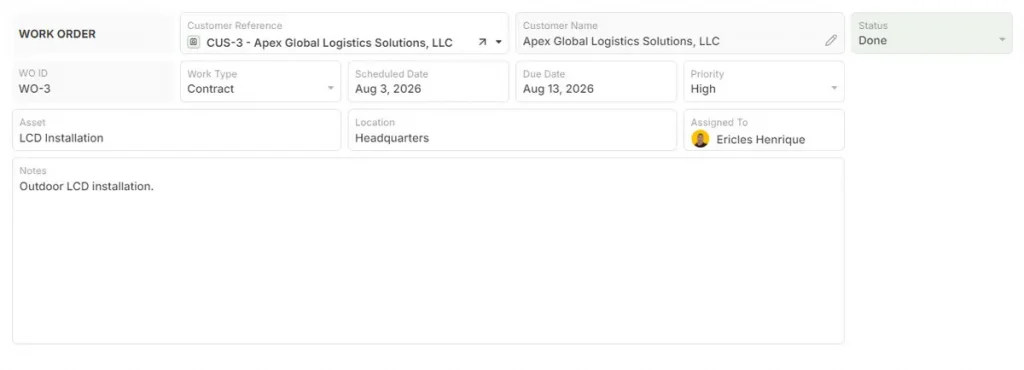
In these environments, the challenge is usually keeping the relationships between those records intact as work moves across teams.
A production order, for example, may depend on customer information, materials, purchasing tasks, machine work, inspections, documents, approvals, and delivery status.
AnyDB structures that work around connected business records, with relationships, child records, files, permissions, forms, assignments, and workflows attached to the underlying operation.
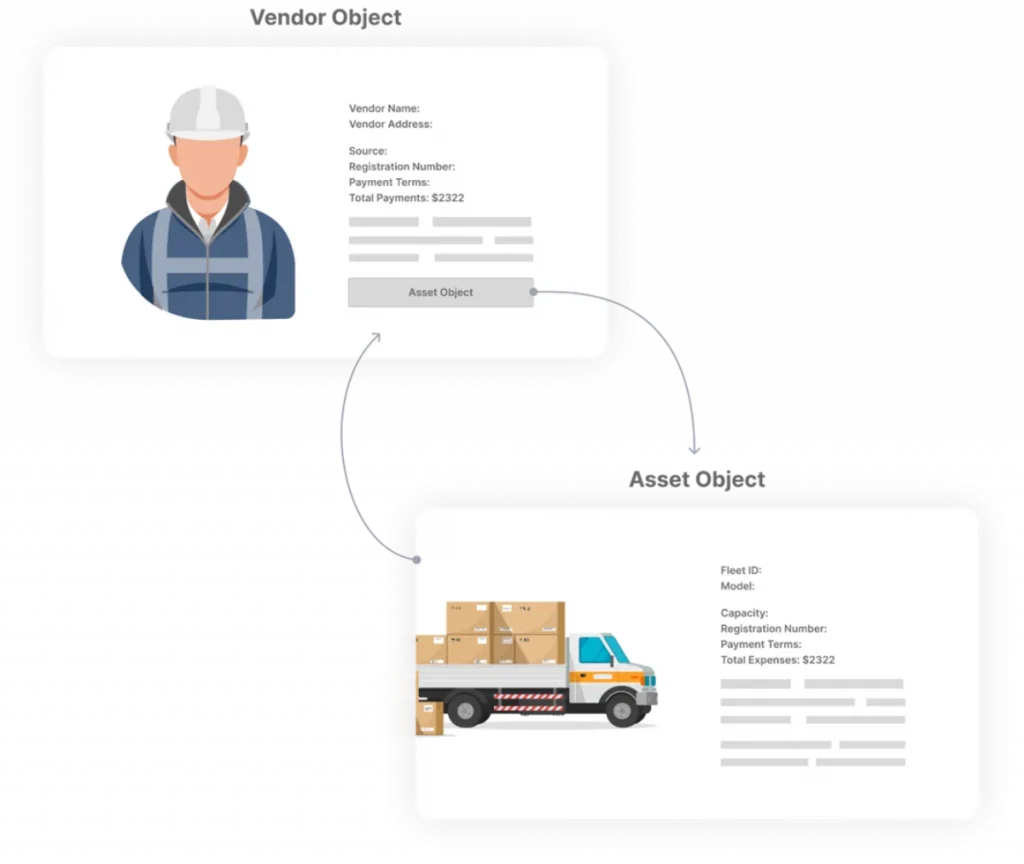
That makes it a stronger fit for companies that need an operational system built around how work actually moves through the business, rather than another lightweight database for organizing isolated tables.
Want to see how connected records, workflows, files, and operational data work together in AnyDB? Explore the AnyDB Guided Tour and see how the platform can structure your business operations.
Best for Open-Source and Self-Hosted Data
Baserow and NocoDB are strong options for teams that want greater control over where their data runs.
Baserow is closer to the familiar Airtable experience, with a spreadsheet-style interface, relational databases, application building, and self-hosting options. NocoDB is particularly relevant when a company already works with SQL databases and wants a more accessible interface on top of that infrastructure.
The distinction matters because self-hosting changes the responsibility model. The company gains more control over deployment and data infrastructure, but may also need greater technical ownership for hosting, maintenance, security, and upgrades.
Best for Documents and Knowledge
Notion and Coda make sense when operational data needs to live alongside substantial documentation.
Notion combines databases with pages, wikis, forms, and collaborative documentation, making it useful for teams whose workflows depend heavily on SOPs, project notes, internal knowledge, and lightweight structured data.
Coda takes a similar document-centered approach but adds tables, formulas, buttons, automations, and integrations inside interactive documents. It can work well when teams want to build processes around a shared document rather than around a traditional database interface.
AnyDB vs. Airtable: Which Fits Your Operation?
Airtable is built around linked tables and configurable views. AnyDB takes a different approach by structuring work around connected operational records that represent the actual objects and processes a business manages.
Connected Operational Records
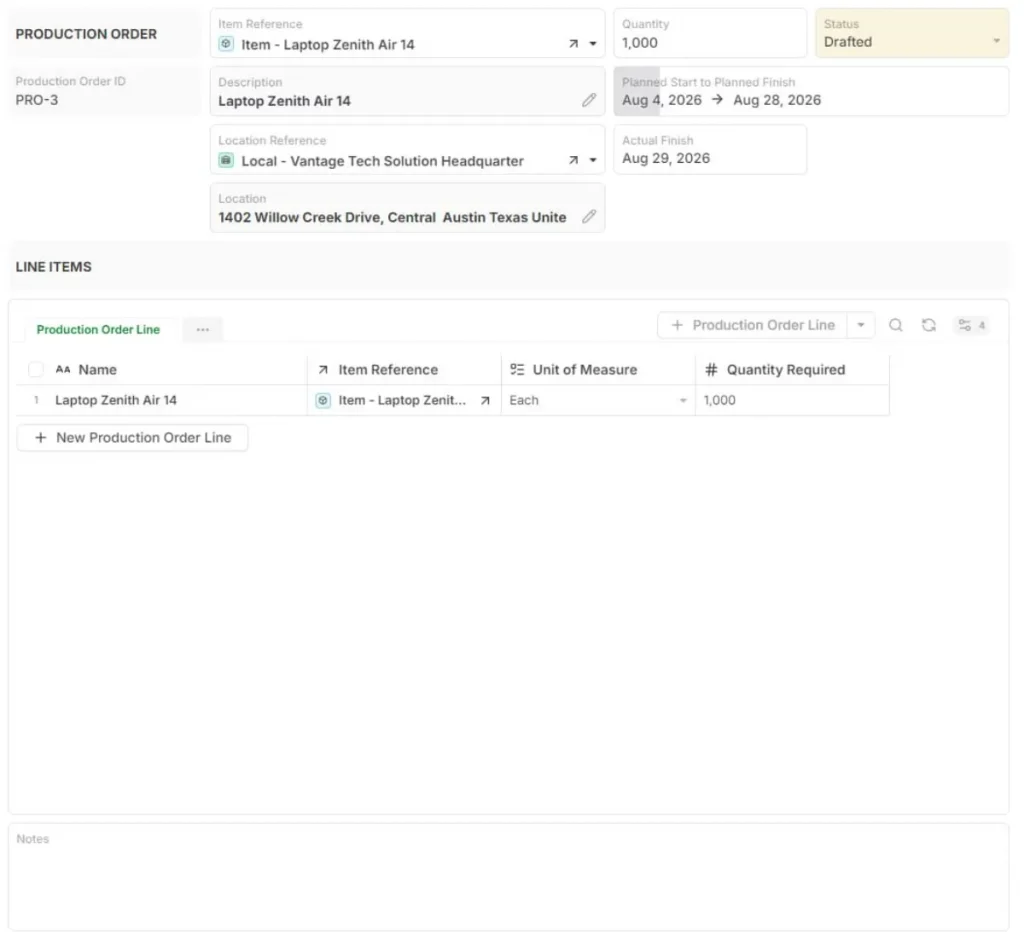
In AnyDB, customers, orders, inventory, assets, vendors, projects, documents, and other business objects can stay connected instead of being managed as separate sets of information.
For example, a manufacturing company may need an order connected to its customer, production project, materials, purchasing tasks, machine work, inspection records, and delivery documentation. Those relationships remain part of the operational record itself.
Hierarchical Workflows
Some processes have a natural parent-child structure. A project may contain work orders, inspections, tasks, files, or related sub-records.
AnyDB supports these nested relationships, which can make complex processes easier to represent when a flat table structure starts requiring additional workarounds.
Operational Processes
Forms, assignments, approvals, workflows, files, and dashboards can be built around the same underlying records.
That allows teams to capture information, route work, review changes, and track execution without separating the process from the business data it depends on.
Cross-Team Visibility
Operations, purchasing, production, service, finance, or management may all need access to the same records, but not necessarily the same interface or level of detail.
AnyDB can provide different views and permissions while keeping departments connected to the same operational data.
Flexible System Design
AnyDB is designed for teams that need to model their own processes around business objects and relationships. This can be especially relevant when the operation does not fit neatly into a predefined CRM, project management, inventory, or ERP module.
The choice between Airtable and AnyDB therefore comes down to the system you are trying to build.
Airtable can work well for flexible databases and team workflows. AnyDB is better aligned with businesses that need connected records, nested operational structure, and workflows spanning multiple parts of the operation.
If your operation depends on connected orders, inventory, vendors, assets, projects, approvals, and documents, the best way to evaluate AnyDB is to see how those relationships can be modeled around your actual workflows.
Schedule a demo to walk through your processes with the AnyDB team and see what that system could look like for your business.
Frequently Asked Questions About Airtable Alternatives
What Is the Best Alternative to Airtable?
The best Airtable alternative depends on what the platform needs to support. Compare options based on the data model, workflow requirements, number of users, integrations, permissions, deployment needs, and collaboration model.
Is There Anything Better Than Airtable?
Yes, depending on the use case. Airtable remains a capable option for flexible databases and team workflows, but another platform may fit better if the priority is self-hosting, deeper operational processes, document management, project execution, or infrastructure control.
What Is the Best Airtable Alternative for Businesses?
Businesses should choose based on the processes the system will carry. AnyDB is particularly relevant when multiple departments work around connected orders, inventory, assets, vendors, projects, documents, approvals, and other operational records.
Is AnyDB an Alternative to Airtable?
Yes. AnyDB can replace Airtable in some business workflows, but it uses a different operating model. It is designed around connected business records, hierarchical relationships, forms, workflows, assignments, permissions, files, and dashboards. That makes it especially relevant for companies using Airtable to support complex operational processes across departments.
What Are the Main Downsides of Airtable?
The limitations that matter depend on how Airtable is being used. Businesses may evaluate alternatives because of per-user costs, increasingly complicated bases, permission requirements, record or automation limits, integration needs, or workflows that require deeper operational structure.
What Happened to Airtable After the Bending Spoons Acquisition Announcement?
On August 4, 2026, Bending Spoons announced a definitive agreement to acquire Airtable for $1.285 billion in enterprise value. The transaction is still subject to closing conditions and regulatory approvals, so it should not yet be described as a completed acquisition.

The End-to-End Operations System that Finally Fits Your Reality.
No more scattered spreadsheets or rigid, disconnected tools.
AnyDB is a modern, customizable platform for managing business records and operations across teams, clients, and partners.
Learn More


Phone: (512)-761-7979
© 2024 Humanly Inc. All rights reserved.
What is AnyDB?
AnyDB is a unified, customizable data store designed to streamline and empower your entire organization. Effortlessly store, organize, and share custom business data to drive both internal and external operations across teams. Think of it as spreadsheets on steroids.Perfect for Sales, Marketing, Operations, HR, and beyond. Discover AnyDB