
Published on June 11, 2026


An operations management system is supposed to create operational clarity. Yet in many companies, operations become harder to understand as more tools are added.
Inventory lives in spreadsheets. Orders sit inside another platform. Field updates happen through chat. Approvals depend on email threads. Teams spend hours reconciling information just to answer simple operational questions:
What shipped? What is delayed? What still needs approval?
This is why operations management is less about task tracking and more about workflow coordination across inventory, logistics, vendors, field teams, approvals, assets, and execution data.
The challenge becomes even bigger as operations scale. More workflows create more dependencies, and disconnected systems reduce visibility across the business.
A modern operations management system centralizes operational workflows into one connected environment, allowing teams to structure processes, track execution, and scale operations without creating fragmentation.
What is an Operations Management System?
An operations management system is a centralized operational platform that connects workflows, records, approvals, resources, and execution data inside one operational environment.
Its purpose is to track tasks, but also to coordinate how the business actually runs across teams, processes, and operational dependencies.
But the real value only comes from operational consistency.
When workflows are standardized and operational records stay connected, teams spend less time reconciling information between systems and more time executing operations efficiently.
Managers gain operational visibility without depending on manual updates, while teams can coordinate everything from the same environment.
On the other hand, without it, businesses often scale fragmentation faster than they scale execution.
Project Management System vs. Operations Management System
A project management platform may track assignments and deadlines. An operations management system manages operational workflows that involve inventory, vendors, logistics, field teams, assets, approvals, shipments, work orders, reporting, and process coordination between departments.
This distinction matters because many companies mistake project management or ticketing tools for operational systems.
Read also: Project Tracking Made Easy: Your Step-by-Step Guide to Automation
For example, a delayed shipment should not remain isolated inside a logistics tool. It should immediately affect operational visibility across inventory allocation, customer orders, field scheduling, invoicing, and operational reporting.
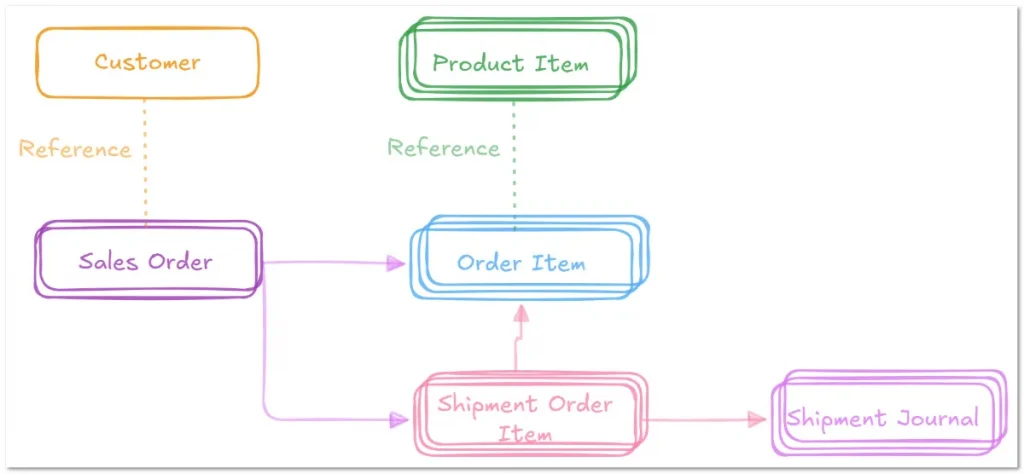
That level of coordination requires connected operational records, not disconnected task lists.
This is why operations management systems are often described as a “single source of truth.”
Instead of scattering operational data across spreadsheets, emails, SaaS apps, and manual approvals, teams work from one centralized operational structure where workflows stay connected in real time.
Operations Management Systems Core Features
Most operations management systems support functions such as:
- Workflow automation;
- Operational tracking;
- Resource and asset management;
- Process standardization;
- Real-time operational visibility;
- Cross-team coordination;
- Approval workflows;
- Reporting and execution monitoring.
Operations Management System vs ERP: What Changes?
An ERP and an operations management system often solve related problems, but they approach operations very differently.
Traditional ERPs were designed to standardize large business processes across finance, procurement, inventory, manufacturing, and compliance. They are highly structured systems built around predefined operational models.
That structure works well for some enterprises. It becomes harder for operational teams that need flexibility.
Many SMBs struggle because their workflows change constantly. A field operations company may adjust approval flows every month. A manufacturer may need custom inventory relationships. A logistics team may need operational tracking that does not fit rigid ERP tables.
This is where modern operations management systems differ.
Instead of forcing operations into fixed structures, they allow teams to build adaptable workflows around how the business actually operates.
Why Operational Teams Move Away From Rigid ERP Structures
Traditional ERPs are often:
- Expensive to implement;
- Slow to customize;
- Dependent on consultants or IT teams;
- Difficult to adapt when workflows change.
As a result, many operational teams end up rebuilding parts of their workflows outside the ERP itself using spreadsheets, emails, approvals, and disconnected operational tools.
The ERP becomes the “official system,” while operations happen elsewhere.
How Modern Operations Management Systems Differ
A modern operations management system focuses on operational flexibility and workflow coordination.
Teams can structure workflows, approvals, operational records, assets, inventory, vendors, work orders, and logistics processes without depending on large implementation projects.
This creates advantages such as:
- Faster workflow implementation;
- Lightweight operational coordination;
- Workflow customization;
- Adaptable operational structures;
- Real-time operational visibility;
- Easier operational scaling.
Platforms like AnyDB take this approach even further by combining customizable operational workflows with spreadsheet-like usability, allowing teams to structure operations without rigid ERP complexity.
How To Choose The Right Operations Management System
Choosing an operations management system is less about comparing feature lists and more about understanding how your operations actually function day to day.
Two companies may both manage inventory, approvals, field teams, and shipments, yet require completely different operational structures.
The right platform depends heavily on the following criteria:
- Workflow complexity;
- Operational dependencies; and
- How information moves between teams.
This is why businesses should evaluate operational software based on factors such as:
- Workflow flexibility;
- Operational visibility;
- Scalability;
- Connected operational records;
- Reporting capabilities;
- Permissions and approvals;
- Ease of adoption;
- Operational customization.
Many tools perform well for simple task tracking. Problems usually appear once operations become interconnected.
A platform may support tickets and assignments but struggle when workflows involve inventory allocation, multi-step approvals, asset relationships, shipment dependencies, vendor coordination, or operational reporting between departments.
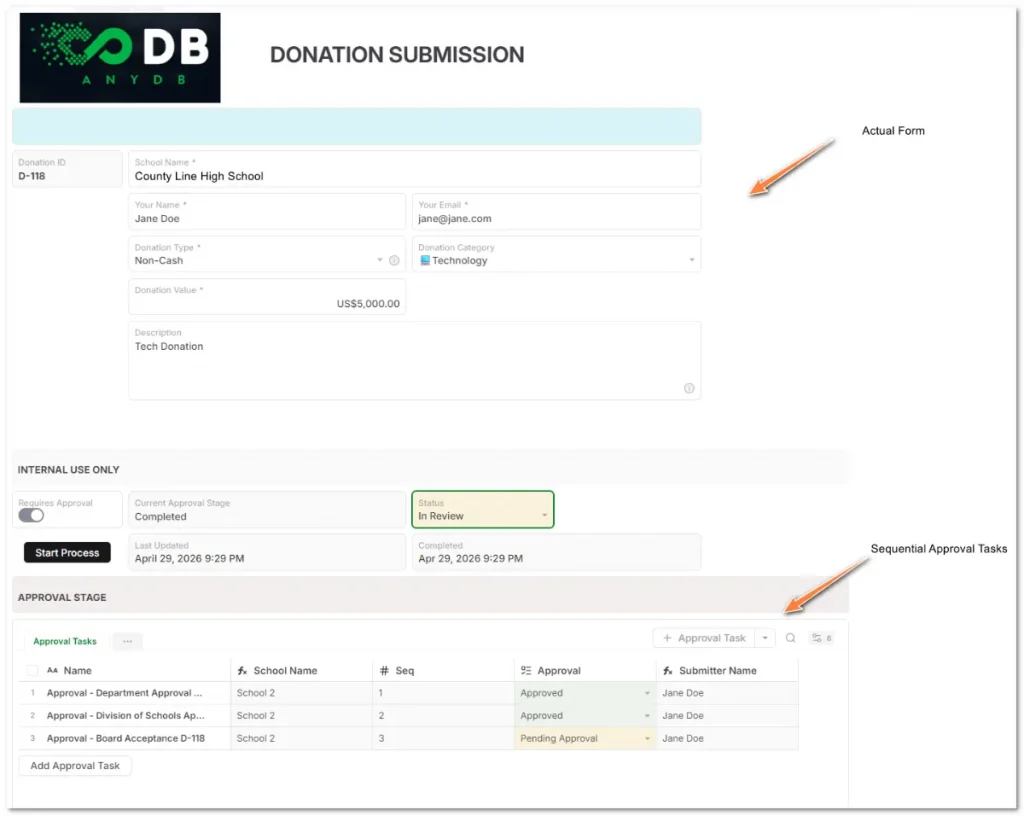
Operational complexity changes everything.
Map Your Workflows Before Evaluating Software
One of the biggest mistakes businesses make is evaluating operations software before mapping how work actually moves across the company.
Before requesting demos, document things such as:
- How approvals happen;
- Which teams depend on shared operational data;
- Where bottlenecks appear;
- Which records need operational relationships;
- Which workflows change frequently;
- Which processes still depend on spreadsheets or manual follow-ups.
This immediately exposes whether a platform supports operational coordination or only task management.
Inside-track evaluation tips most buyers overlook
Most software demos are optimized to show ideal workflows, not operational edge cases.
Ask vendors to demonstrate scenarios such as:
- Split shipments across warehouses;
- Multi-step approval changes;
- Asset maintenance linked to work orders;
- Operational updates across multiple teams;
- Workflow changes without developer support.
Also look beyond vendor websites.
Niche forums, Reddit discussions, implementation reviews, and operational communities often reveal how platforms behave after six months of real operational use, especially regarding customization limits, scalability, reporting flexibility, and workflow adaptability.
This is usually where the real operational differences appear.
Structuring Scalable Operations With Connected Workflows
Operational scalability does not come from adding more software. It comes from creating operational consistency across the business.
Instead of isolated tools handling separate operational tasks, businesses can structure workflows where records, approvals, inventory movements, assets, and operational updates stay connected in real time.
This creates centralized visibility across operations while reducing operational friction between departments.
That scalability depends on a few operational foundations:
- Standardized workflows;
- Connected operational records;
- Centralized operational visibility;
- Process consistency;
- Operational adaptability.
Platforms like AnyDB allow businesses to structure custom operational systems without the rigidity typically associated with traditional ERP implementations.
Teams can build operational workflows around how the business actually operates using connected records, customizable templates, spreadsheet-like usability, and operational structures that support inventory, logistics, vendors, assets, field operations, approvals, and execution tracking from one environment.
As operations become more interconnected, the ability to coordinate workflows across the business becomes a competitive operational advantage.
If your operations still depend on fragmented tools and manual coordination, exploring connected operational workflows is often the first step toward building a more scalable operational structure.
Book a free demo to see how AnyDB helps manufacturing teams coordinate production, inventory, maintenance, quality, and operational workflows in one connected system.
Frequently Asked Questions About Manufacturing Operations Management
Here are the answers:
What does an operations management system do?
An operations management system centralizes operational workflows, records, approvals, and execution processes inside one connected environment. Businesses use it to coordinate operations across inventory, logistics, field teams, vendors, assets, work orders, reporting, and operational tracking while improving visibility and reducing fragmented workflows.
What is the difference between an OMS and ERP?
An ERP typically focuses on standardized enterprise processes such as finance, procurement, accounting, and manufacturing using rigid operational structures. An operations management system focuses more on workflow coordination, operational flexibility, connected records, and adaptable operational processes.
Can small businesses use an operations management system?
Yes. Small and mid-sized businesses often benefit significantly from operations management systems because operational fragmentation usually appears early during growth. A centralized operational platform helps teams coordinate inventory, approvals, vendors, logistics, field operations, and reporting before workflows become difficult to scale.
Which workflows should an operations management system support?
An operations management system should support workflows such as inventory management, sales orders, shipment tracking, vendor coordination, work orders, field service operations, approvals, asset tracking, maintenance records, reporting, and operational execution tracking across departments.
How does an operations management system improve operational visibility?
An operations management system improves operational visibility by centralizing workflows and connecting operational records in real time. Teams can track operational updates, approvals, inventory changes, shipments, field execution, and process status without relying on spreadsheets, disconnected tools, or manual follow-ups.
What industries use operations management systems?
Operations management systems are used across industries such as manufacturing, logistics, field services, construction, healthcare, energy, retail, maintenance operations, custom production, distribution, and service businesses that manage operational workflows across multiple teams and processes.

The End-to-End Operations System that Finally Fits Your Reality.
No more scattered spreadsheets or rigid, disconnected tools.
AnyDB is a modern, customizable platform for managing business records and operations across teams, clients, and partners.
Learn More


Phone: (512)-761-7979
© 2024 Humanly Inc. All rights reserved.
What is AnyDB?
AnyDB is a unified, customizable data store designed to streamline and empower your entire organization. Effortlessly store, organize, and share custom business data to drive both internal and external operations across teams. Think of it as spreadsheets on steroids.Perfect for Sales, Marketing, Operations, HR, and beyond. Discover AnyDB