
Published on July 28, 2026


Service business management software should connect the full operating flow behind every job, because service work rarely moves in a straight line.
A customer request may start through email, WhatsApp, SMS, a website form, or a phone call.
From there, the team needs to prepare a quote, schedule the visit, assign the right technician, confirm parts or equipment, share job details, collect field updates, capture photos or signatures, issue the invoice, process payment, and plan any follow-up work.
For a small team, this can be managed for a while with calendars, spreadsheets, shared folders, and manual invoices.
The problem appears as the business adds more jobs, more technicians, more service locations, and higher customer expectations.
That is why service business management software should be evaluated by how well it connects customers, jobs, schedules, work orders, quotes, invoices, payments, documents, parts, assets, and follow-ups.
What Is Service Business Management Software?
Service business management software is a system that helps service companies manage daily operations across customers, job scheduling, dispatch, work orders, technician updates, quotes, invoices, payments, and reporting.
The important point is that service work is not only scheduling.
A job usually starts with a customer request, then moves through quoting, availability checks, technician assignment, parts or equipment planning, field execution, documentation, multi-step approvals, billing, and follow-up.
If each step sits in a different tool, the team may complete the job but still lose context along the way.
Most service business software supports:
- Job scheduling to organize appointments, routes, and service windows;
- Dispatch to assign the right technician to the right job;
- Customer management to store client history, notes, and contact details;
- Work orders to define the job scope, instructions, parts, and completion details;
- Quotes and estimates to prepare pricing before work begins;
- Invoicing and payments to bill customers and collect payments;
- Mobile field updates so technicians can update job status from the field;
- Time tracking to monitor labor, productivity, and job cost;
- Reporting to review performance, workload, revenue, and delays;
- Customer communication to keep clients informed before, during, and after service.
Service business management software is only useful if customer, job, field, billing, and follow-up data stay connected while the work is happening.
That is what separates a true service operations software from a set of disconnected scheduling, CRM, invoicing, and work order tools.
Key Features Of Service Business Management Software
The strongest service business management software is not the one with the longest feature list. It is the one that keeps the service record intact as work moves from the first customer request to scheduling, field execution, billing, and follow-up.
Scheduling And Dispatch
Scheduling and dispatch tools help teams assign jobs to field workers based on availability, location, skills, priority, and service windows. Most platforms include drag-and-drop calendars, route planning, technician assignment, job status updates, and schedule adjustments.
The operational challenge is that scheduling can fail even when the calendar looks organized. If the dispatcher cannot see customer history, job context, parts availability, travel time, asset details, or technician workload, the assignment may look correct in the schedule but create problems in the field.
AnyDB can connect schedules to customer records, job details, technician records, assets, parts, files, and follow-up workflows. That gives dispatchers a more complete view before assigning work.
Read Also: Cloud Based Field Service Management Software for Growing Teams
Customer Management
Customer management stores client details, contact information, service history, notes, preferences, assets, documents, and communication records. For service businesses, this context matters because every new job is connected to what happened before.
The customer experience becomes inconsistent when service history is split across invoices, emails, text messages, technician notes, and shared folders. A technician may arrive without knowing the customer’s previous issue, while the office team may not see what was discussed on-site.
AnyDB can make each customer a connected object with linked jobs, documents, assets, approvals, invoices, support notes, and service history. Instead of treating customer management as a static CRM record, the customer becomes the center of the service operation.
Work Orders And Job Tracking
Work order software defines what needs to be done, where it should happen, who is responsible, which instructions apply, what materials or equipment are required, and what completion should look like.
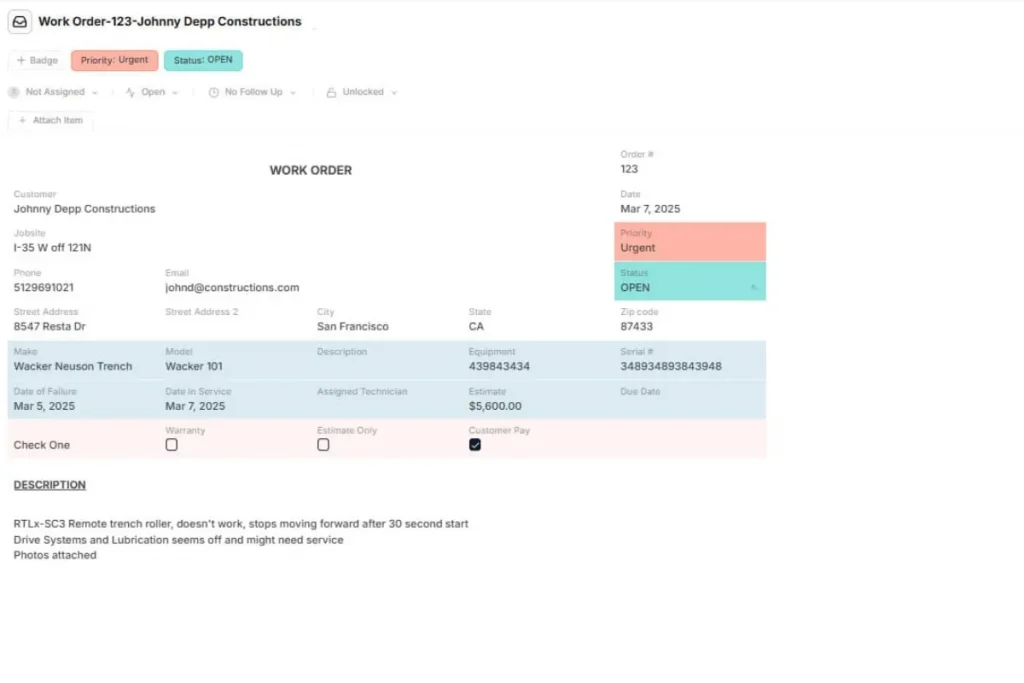
A strong job tracking process should support checklists, photos, signatures, status updates, technician notes, forms, and completion records. Otherwise, a job may be marked complete while leadership still lacks proof of what happened on-site.
AnyDB can connect work orders to customers, assets, technicians, parts, photos, forms, approvals, invoices, and audit history. This helps turn field service jobs into complete service records instead of isolated task updates.
Invoicing And Payments
Service business management software often supports quotes, estimates, invoices, payment links, card payments, deposits, recurring billing, and payment tracking. These features are useful, but only when billing reflects the actual work completed.
Billing errors happen when invoices are disconnected from approved quotes, completed work, parts used, technician time, or customer agreements. The team may need to review emails, notes, or job photos just to confirm what should be charged.
AnyDB can connect quotes, approvals, job records, parts usage, invoices, and customer documents, helping billing workflows stay tied to the real service record.
Mobile Apps For Field Teams
A mobile field service app lets technicians view job details, update statuses, upload photos, capture signatures, log time, record parts used, scan barcodes, and submit forms from the field.
This is where many tools either support adoption or create extra work. If field workers cannot update records easily, office teams end up relying on calls, texts, and end-of-day cleanup.
That delays billing, weakens reporting, and increases the chance of missing details.
AnyDB supports mobile-friendly workflows, forms, attached files, role-based access, and task-specific records for field execution. Technicians can work with the information they actually need, while managers keep the broader operational context connected.
Reporting And Operational Visibility
Reporting should show more than revenue or completed jobs. Service leaders need to understand job cycle time, technician workload, scheduling gaps, repeat visits, unpaid invoices, customer issues, parts usage, and service profitability.
The problem is that service business reporting becomes unreliable when customer records, schedules, work orders, field updates, and billing data live in separate tools. Reports may show activity, but not the full reason behind delays, rework, or margin loss.
AnyDB dashboards can connect customer, job, technician, asset, invoice, vendor, and follow-up data. That makes reporting more useful because leaders can trace performance back to the records and workflows behind it.
Best Service Business Management Software Options
The best service business management software depends on how the company actually runs service work: service type, team size, budget, number of field workers, dispatch needs, billing complexity, and how much operational flexibility the team needs.
| Software | Best Fit |
| AnyDB | Service companies that need connected operational records, custom workflows, customer portals, forms, documents, asset records, vendor coordination, and role-based access without being locked into a traditional service software structure. |
| Jobber | Small and mid-sized service businesses that need simple scheduling, customer management, quoting, invoicing, and payments. |
| Housecall Pro | Home service professionals that need booking, dispatch, customer communication, invoicing, and payment tools. |
| ServiceTitan | Larger residential and commercial contractors with more complex dispatch, reporting, operational, and customer management needs. |
| Clockify | Teams that mainly need time tracking and basic scheduling support, especially when budget is a primary concern. |
| Orderry | Repair, maintenance, trades, and mobile service teams that want service workflow management in one place. |
| FieldPulse | Service businesses that need scheduling, CRM, estimates, invoicing, payment tracking, and team management. |
| Simpro | Trade and field service companies that need stronger job management, asset maintenance, quoting, and project workflows. |
There is no universal best service business management software.
For growing businesses, the key question is whether standard field service software can model the way work actually happens. When the process includes custom workflows, connected records, documents, vendors, assets, approvals, and role-based access, a flexible platform like AnyDB may be a stronger fit.
How To Choose The Right Service Business Management Software
Choosing service business management software should start with how work actually moves through the company, not with a generic feature comparison.
- Map Your Service Workflow
Document how a customer request becomes a quote, scheduled job, work order, field update, invoice, payment, and follow-up. This shows which steps need to stay connected and where manual work creates delays.
- Identify Your Service Type
HVAC, plumbing, electrical, cleaning, equipment repair, installation, maintenance, construction service, and mobile repair businesses do not run the same way. Each service type has different requirements for scheduling, assets, parts, documentation, and customer communication.
- Review Scheduling And Dispatch Complexity
Evaluate technician count, routes, emergency calls, recurring jobs, service windows, skills, and availability. A simple calendar may work for a small team, but field service operations become harder to manage when dispatchers need real-time context before assigning work.
- Evaluate Customer And Asset Records
Service companies often need more than basic contact details. Review whether the system can track customer history, site details, installed equipment, warranties, photos, contracts, and recurring maintenance.
- Check Field Team Usability
Field workers need simple mobile access, clear job details, status updates, forms, photos, signatures, and parts logging. If the tool slows technicians down, the office team will still depend on calls, texts, and manual updates.
- Compare Billing, Payments, And Reporting
Quotes, invoices, payments, unpaid balances, job profitability, technician productivity, and service performance should be easy to connect and review. Billing should reflect the actual service record, not a separate manual process.
- Decide Whether You Need A Service Tool Or A Flexible Operations Platform
Standard service business tools work well for predictable scheduling and invoicing. Businesses with custom workflows, complex assets, vendor management, documentation needs, approvals, or non-standard service operations may need a flexible operations platform.
Using AnyDB For Service Business Operations
AnyDB is a flexible service operations software for companies whose workflows go beyond standard scheduling and invoicing. It helps teams connect the records behind service delivery, instead of managing jobs through separate calendars, spreadsheets, invoices, folders, and field updates.
With AnyDB, service businesses can structure and connect:
- Customers and service requests;
- Quotes, estimates, work orders, and jobs;
- Technicians, schedules, and field service workflows;
- Assets, equipment, parts, and inventory;
- Inspection forms, photos, files, and customer approvals;
- Vendor records, contracts, invoices, and payments;
- Recurring maintenance, follow-up tasks, and performance dashboards.
This matters because service work depends on context. A work order is more useful when it links to the customer record, asset history, parts used, technician notes, photos, invoice, and follow-up task.
AnyDB supports that model through object-based records, connected relationships, templates, forms, secure portals, role-based access control, field-level permissions, files, comments, activity history, version history, audit logs, and workflow automation.
Teams can also deploy on Cloud, GovCloud, or On-Prem, then start free and scale as needed.
AnyDB gives service businesses the structure of an operations system with the flexibility to model how service work actually happens.
Book a free demo call with AnyDB and see how your team can manage service operations with connected records, flexible workflows, and real operational visibility.
FAQs About Service Business Management Software
Before choosing service business management software, it helps to clarify how these systems support scheduling, customers, field teams, billing, and daily operations.
What Features Should Service Business Management Software Have?
Service business management software should include scheduling, dispatch, customer management, work orders, invoicing, payments, mobile apps, reporting, automation, and document storage. These features help teams connect service requests, field execution, billing, and follow-up work.
What Is The Difference Between Service Business Management Software And Field Service Management Software?
Field service management software focuses mainly on dispatch, technician scheduling, mobile field work, and job status updates. Service business management software is broader and can also include customer records, billing, documents, reporting, internal workflows, approvals, and service operations.
Can Small Businesses Use Service Business Management Software?
Yes. Small businesses can use service business management software to reduce manual scheduling, centralize customer records, send invoices faster, track jobs, and improve visibility. It helps teams move away from disconnected spreadsheets, calendars, emails, and manual follow-ups.

The End-to-End Operations System that Finally Fits Your Reality.
No more scattered spreadsheets or rigid, disconnected tools.
AnyDB is a modern, customizable platform for managing business records and operations across teams, clients, and partners.
Learn More


Phone: (512)-761-7979
© 2024 Humanly Inc. All rights reserved.
What is AnyDB?
AnyDB is a unified, customizable data store designed to streamline and empower your entire organization. Effortlessly store, organize, and share custom business data to drive both internal and external operations across teams. Think of it as spreadsheets on steroids.Perfect for Sales, Marketing, Operations, HR, and beyond. Discover AnyDB