Multi-Step Approval Workflows with AnyDB
Manage complex approval processes as structured operational systems where routing, decisions, ownership, and history stay connected. Replace brittle form workflows and email chains with a model that handles conditional logic, sequential approvals, and exceptions reliably.
Move from hidden approval logic to an explicit workflow model where requests, tasks, routing, decisions, and exceptions are visible.
Stateful approval processes
Each request and approval step is a real record with ownership, status, dates, comments, and files.
Conditional routing that stays readable
Approval paths can depend on type, department, category, value, or exception rules.
Auditability by design
Every decision remains attached to the request, so reporting and review reflect actual workflow activity.
Where multi-step approval workflows apply
Multi-step approval workflows show up across many operations. The same model works anywhere decisions need routing, ownership, sequencing, and a reliable audit trail.
Procurement and purchase approvals
Route purchase requests by amount, category, and department so small purchases can move quickly while high-value spend receives finance or executive approval.
Vendor onboarding and compliance
Review vendor details, compliance documents, payment terms, and final activation through a structured, audit-ready sequence.
Contract and legal approvals
Move contracts through business review, legal terms, finance impact, and executive sign-off while keeping comments and versions attached.
Financial approvals and budget sign-offs
Apply threshold-based routing for expenses, department approvals, finance review, and executive sign-off for strategic spend.
Project and change request approvals
Submit scope and impact, route to project or operations leads, and escalate to leadership before approved changes move into execution.
Donation and grant approvals
Route donations by type, value, and category, including auto-approval for low-risk cases and multi-level review for high-value requests.
HR and policy approvals
Manage policy drafts, employee-related changes, HR review, legal approval, and leadership sign-off with clear approval history.
What these use cases have in common
They involve multiple stakeholders, conditional routing, sequential approvals, and a strong need for traceability.
- +Decisions depend on real request data such as type, amount, category, or department.
- +Approvals must happen in the right order with clear ownership at each step.
- +Forms, spreadsheets, and email chains become fragile as exceptions grow.
Approvals often start simple, then become hard to operate
As approval logic grows, workflows move across forms, inboxes, spreadsheets, and internal coordination. The system may collect requests, but it cannot operate approvals reliably at scale.
Common failure points
- +Routing depends on several variables such as type, value, and category.
- +Approval paths become hard to maintain when exceptions appear.
- +Teams lose visibility into the current approval stage.
- +Decisions and timestamps are not consistently tracked.
How AnyDB changes the model
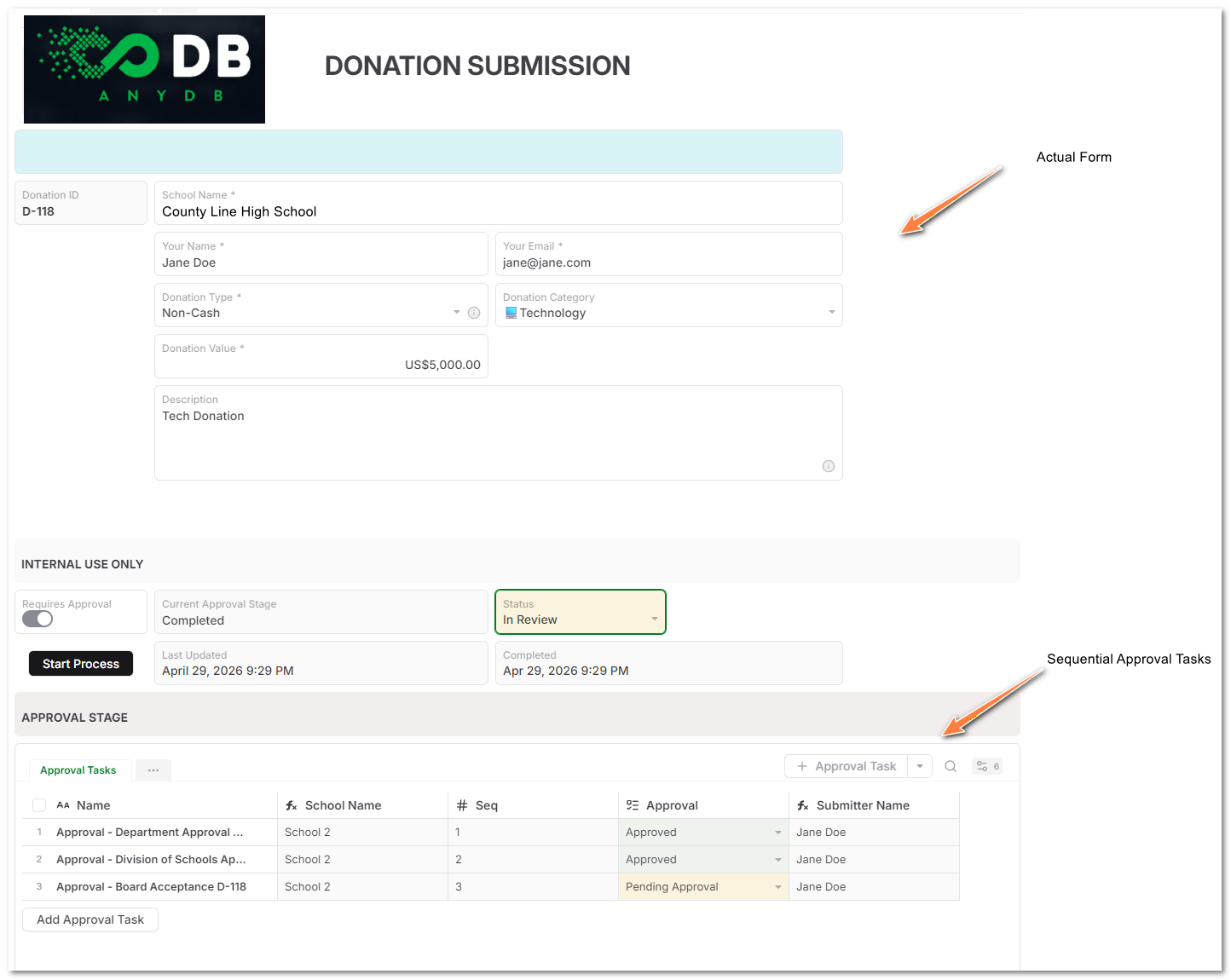
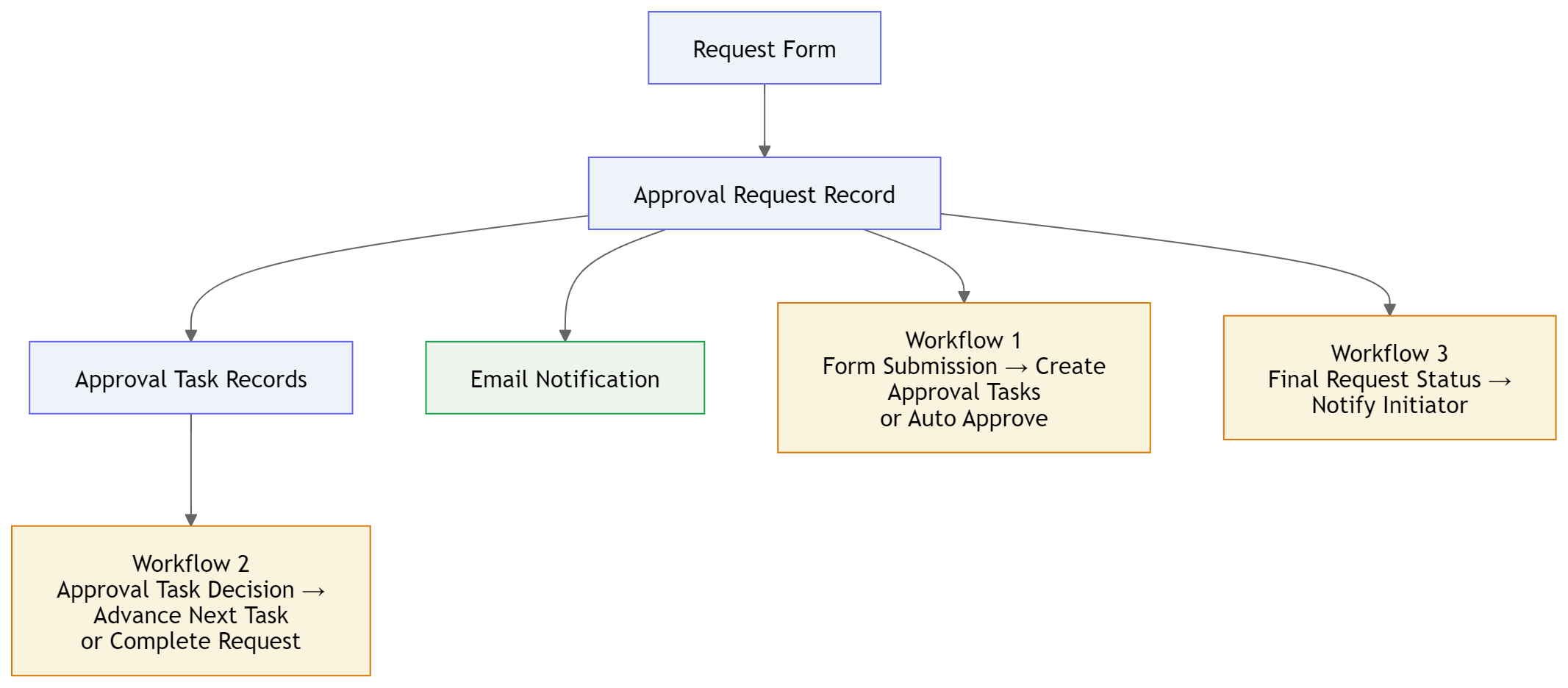
AnyDB lets you model approvals as structured operational processes, not just form submissions. The request becomes the parent record, and each approval step becomes a controlled child task with its own state.
A clean approval model to start with
Approval Request
Parent record for request type, category, value, requester, current stage, overall status, and completion timestamps.
Approval Task
Child record for each approval step, including sequence, approver, decision, stage, comments, and timestamp.
Routing Rule
Reusable rule that decides when approvals are required, skipped, auto-approved, or sent to specific roles.
What the request contains
- +Request type, category, value, and business context.
- +Current approval stage and overall request status.
- +Linked approval tasks and decision history.
- +Submitted, approved, rejected, and completed timestamps.
How routing works
- +Request type, such as cash, non-cash, contract, expense, or policy.
- +Value thresholds, such as skipping approvals below a small amount.
- +Category, department, role, location, vendor, or project.
- +Special conditions such as auto-approve, skip step, or escalate.
Workflow reference
These fields keep approval status visible at both the request and task level.
| Record | Recommended fields |
|---|---|
| Approval Request | Request Type, Category, Value, Requester, Current Approval Stage, Overall Status, Submitted Date, Completed Date |
| Approval Task | Sequence, Approval Stage, Approver, Approval Status, Decision Date, Decision Notes |
| Routing Rule | Rule Name, Request Type, Category, Threshold, Role, Step Order, Skip Condition |
| Notification Event | Recipient, Trigger, Message, Sent Date, Delivery Status |
Run approvals as sequenced child tasks
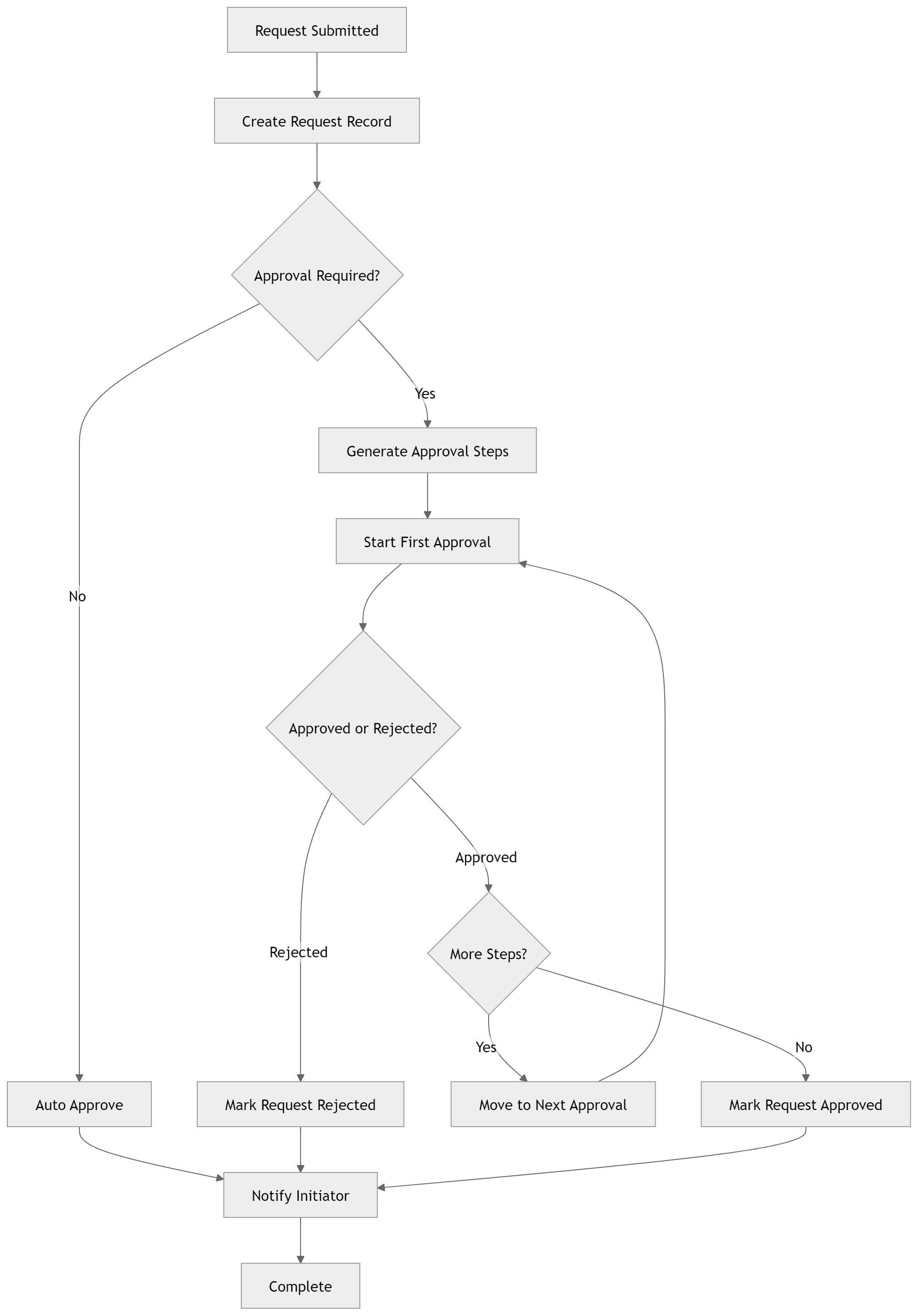
Approval tasks are generated dynamically from rules. Each task represents one step in the process. Only one task is active at a time.
Create tasks from rules
When a request is submitted, routing rules create the required approval task records.
Activate the first task
The first approval step becomes pending while later steps remain waiting.
Advance after approval
Approving the active task activates the next waiting task in sequence.
Stop on rejection
If any task is rejected, the parent request is marked rejected and the workflow stops.
Complete the request
When all tasks are approved, the parent request is marked approved or completed.
Report on history
Use task records and timestamps for audit trails, cycle time, blockers, and workload reporting.
Operational benefits
- +Requests route automatically without manual forwarding.
- +Approvers only see tasks relevant to them.
- +Approval state is visible at the parent request level.
- +Exceptions are handled consistently through rules.
- +Reporting reflects real workflow activity.
Where this applies
- +Procurement and purchase approvals.
- +Vendor onboarding and compliance approvals.
- +Financial approvals and budget sign-offs.
- +Contract, legal, project, HR, policy, donation, and grant approvals.
Why use AnyDB for approval workflows
| Benefit | How AnyDB Supports It |
|---|---|
| Structured approvals | Approval steps are explicit child records |
| Conditional routing | Paths are driven by real data, not static flows |
| Sequential control | One active approval step at a time |
| Auditability | Full history of decisions, comments, and timestamps |
| Visibility | Current stage is visible on the parent request |
| Flexibility | Handles complex conditions without breaking the model |
| Scalability | Works from simple approvals to complex operations |
Related guides that strengthen this solution
Use these guides to extend approval workflows across sharing, automation, files, reporting, and operational review.
Create Approval Tasks
Create sequenced approval task child records from routing rules when a request is submitted.
Advance Approval Task
Move approval workflows to the next step or complete them after a decision.
Automation Workflows
Trigger scripts and workflow steps as approval records change status.
Sharing and Permissions
Control which teams, groups, and external users can view or act on approval records.
Files
Attach supporting documents, contracts, evidence, and approval packets to the request.
Search and Views
Find pending, rejected, overdue, or completed approvals quickly.
Portals
Let external stakeholders submit or review approval requests with controlled visibility.
Document Generation
Generate approval packets, summaries, or formatted decision reports from records.