
Published on July 27, 2026


Order fulfillment software has one job that sounds simple until volume, channels, inventory movement, and customer expectations start colliding: keep every order connected to the work required to deliver it.
A single online order can trigger several operational steps.
At low volume, teams can manage them manually with spreadsheets, Shopify exports, carrier portals, warehouse notes, and customer service follow-ups. The risk grows when those steps stop matching in real time.
That is why order fulfillment software should be evaluated as an operational system, not just a shipping tool. It needs to connect order management, inventory management, shipping, warehouse work, and fulfillment operations while orders are still moving.
What Is Order Fulfillment Software?
Order fulfillment software is a system that helps businesses manage the process from order placement to delivery. It connects order capture, inventory allocation, warehouse picking, packing, shipping, tracking, and fulfillment updates in one operational flow.
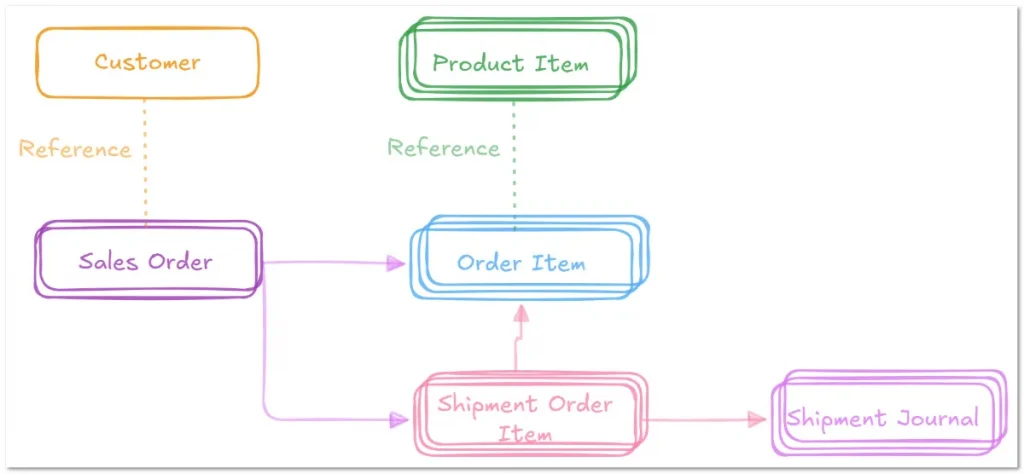
Fulfillment is not a single task. It is a chain of records and decisions that starts when an order enters the system and continues until the customer receives the right product, in the right quantity, through the right delivery method.
Most order fulfillment software supports:
- Order capture;
- Inventory synchronization;
- Warehouse picking;
- Packing workflows;
- Shipping labels;
- Carrier selection;
- Shipment tracking;
- Returns;
- Customer notifications;
- Reporting.
The value of the software depends on how well those steps stay connected while work is happening. If order data lives in one tool, inventory is updated somewhere else, shipping labels are created in a separate platform, and returns are tracked manually, the fulfillment process still relies on operational guesswork.
Order fulfillment software is only useful when order, inventory, warehouse, and shipment data move together in real time. That connection is what helps teams prevent overselling, reduce picking errors, answer customer questions faster, and manage fulfillment without rebuilding the truth from disconnected systems.
Key Features Of Order Fulfillment Software
The best order fulfillment software should move orders faster, but also reduce the number of places where fulfillment decisions can break. When evaluating tools, look at how well each feature connects orders, inventory, warehouse work, shipping, exceptions, and reporting.
Inventory Synchronization
Inventory synchronization tracks stock levels across sales channels, warehouses, and fulfillment locations. This is what helps prevent overselling, especially when the same SKU is sold through Shopify, Amazon, marketplaces, wholesale channels, and direct sales.
The risk is not only showing the wrong quantity. The larger problem is timing. If inventory updates after the order is already accepted, the team may sell stock that was already committed somewhere else.
A strong system should show:
- Available stock;
- Reserved stock;
- Stock by warehouse or location;
- Inventory committed to open orders;
- Reorder points;
- Recent stock movements.
AnyDB’s connected inventory records and stock transactions help teams track what moved, where it moved, and which order or workflow triggered the movement.
Pick, Pack, And Ship Workflows
Pick, pack, and ship workflows help warehouse teams move from order selection to shipping label generation. This is where order fulfillment software has to support real warehouse execution.
The system should help teams generate picking lists, confirm item selection, scan barcodes, follow packing instructions, print packing slips, create shipping labels, and update fulfillment status.
This matters because many fulfillment errors happen during handoff. For example:
- The order is correct in the system, but the picker grabs the wrong variant;
- The item is picked correctly, but packed with the wrong documentation;
- The package is ready, but the shipping label is created in another system and tracking is updated late.
AnyDB can create focused workflows for warehouse teams with mobile-friendly records, forms, barcode and QR Code-supported processes, and status tracking. Workers can update only the fields and tasks relevant to the fulfillment step, while managers keep visibility into the full order workflow.
Warehouse And Location Management
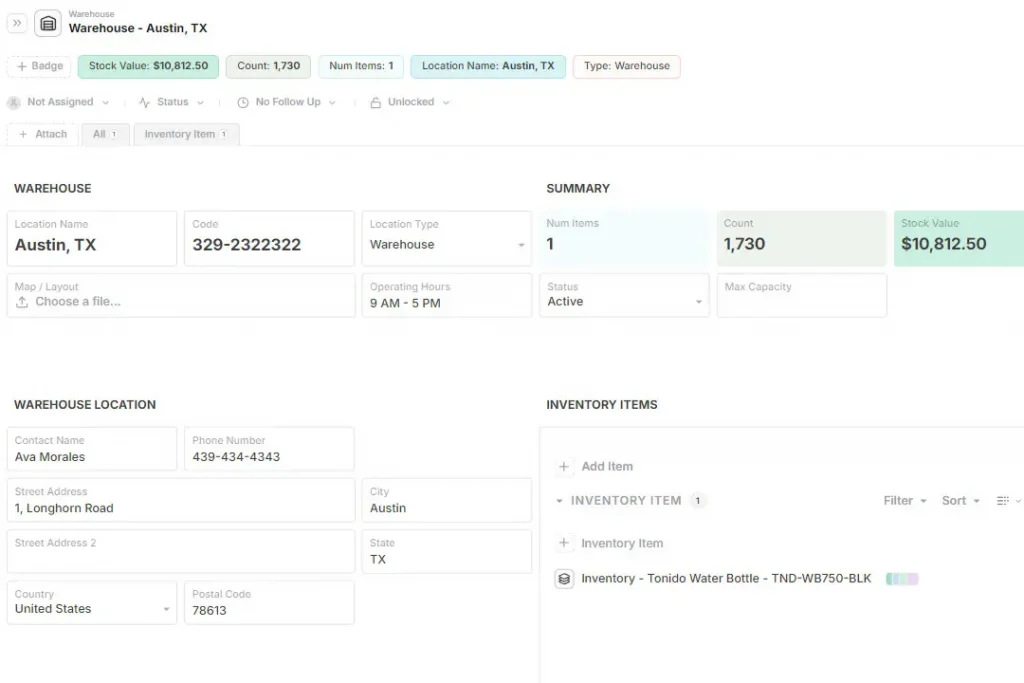
Businesses with multiple warehouses, bins, shelves, fulfillment centers, or third-party logistics partners need location-level visibility. Stock quantity alone is not enough if the team does not know where inventory sits.
A SKU may be available in total, but unavailable for a specific order because it is in the wrong warehouse, reserved for another customer, damaged, awaiting quality review, or still in receiving.
Order fulfillment software should help teams manage:
- Warehouses;
- Bin or shelf locations;
- Receiving areas;
- Pick zones;
- Reserved inventory;
- Damaged or quarantined stock;
- Fulfillment partner inventory.
Automation And Workflow Rules
Automation helps assign tasks, update order status, send alerts, generate reminders, and move orders through fulfillment stages. The best automation reflects real operational rules, not generic triggers that create blind spots.
For example, an order may need to pause if inventory is short, a shipment may need review if the delivery address is incomplete, or a return may need quality inspection before the item goes back into stock.
Useful workflow automation can support:
- Task assignment;
- Order status updates;
- Exception alerts;
- Approval routing;
- Return follow-ups;
- Shipping reminders;
- Customer update triggers.
AnyDB workflows can help route fulfillment tasks, approvals, exception reviews, and follow-ups. This is especially useful when fulfillment is not a straight line, such as custom orders, regulated products, B2B approvals, vendor coordination, or multi-step shipment documentation.
Reporting And Visibility
Fulfillment reporting should help teams understand where fulfillment is slowing down, where inventory accuracy is weak, and which workflows create the most exceptions.
Useful reports may include:
- Order cycle time;
- Pick and pack accuracy;
- Inventory accuracy;
- Warehouse workload;
- Delayed orders;
- Open exceptions;
- Return reasons;
- Delivery performance;
- Orders by channel or warehouse.
The most valuable reports are connected to action. If a dashboard shows delayed orders, the team should be able to see which warehouse, SKU, carrier, vendor, or internal task is causing the delay.
How To Choose The Right Order Fulfillment Software
Choosing order fulfillment software should start with how orders actually move through the business, from sales channel to inventory allocation, warehouse execution, delivery, returns, and reporting.
- Map Your Fulfillment Model
Start by defining whether you self-fulfill, use a 3PL, dropship, fulfill wholesale orders, ship from retail locations, or operate a hybrid model. Each model creates different requirements for inventory visibility, warehouse tasks, carrier coordination, and customer updates.
- Identify Your Sales Channels
List every channel where orders enter the business, including Shopify, Amazon, marketplaces, B2B orders, manual orders, and wholesale portals. Each channel may require different integrations, order rules, fulfillment timelines, and status updates.
- Review Inventory Complexity
Evaluate stock locations, SKUs, variants, bundles, lots, batches, reorder points, and stock movement rules. A simple shipping tool may not be enough if fulfillment depends on location-level inventory, batch traceability, or complex product combinations.
- Evaluate Warehouse Execution
Review how warehouse teams pick, pack, scan, label, and ship orders. The right system should support picking lists, packing slips, barcode scanning, bin locations, mobile workflows, and clear fulfillment status updates.
- Check Exception And Returns Handling
Look at how the system manages wrong shipments, damaged items, replacement orders, failed deliveries, returns, and customer updates. Fulfillment software should help teams resolve exceptions without losing the connection to the original order.
- Compare Automation And Reporting
Automation should reduce manual work through task assignments, alerts, reminders, and status updates. Reporting should help teams identify delays, stock issues, fulfillment bottlenecks, and operational cost.
- Decide Whether You Need A Fulfillment Tool Or A Flexible Operations Platform
Standard order fulfillment tools work well for predictable ecommerce shipping. Businesses with more specific workflows may need a flexible operations platform that connects fulfillment to inventory, vendors, approvals, documentation, compliance, customers, and internal tasks.
Using AnyDB For Order Fulfillment Operations
Standard order fulfillment software works well when the process is predictable: receive an order, allocate stock, pick, pack, ship, and update tracking. But many businesses need more than basic ecommerce fulfillment software.
Custom logistics, vendor coordination, internal approvals, shipment documents, inventory exceptions, returns, and customer-specific workflows often do not fit neatly into rigid fulfillment modules.
AnyDB works as a lightweight ERP alternative for teams that need order fulfillment operations to match how work actually moves.
Structure Your Real Operational Workflow
Instead of managing fulfillment through isolated spreadsheets, flat tables, emails, and disconnected shipping tools, AnyDB uses connected records to keep operational data tied together.
Teams can connect:
- Customer orders;
- Inventory items;
- Stock transactions;
- Warehouses and locations;
- Goods received;
- Picking tasks;
- Packing records;
- Shipment tracking journals;
- Purchase orders;
- Vendor records;
- Returns;
- Exceptions;
- Customer approvals;
- Delivery documents;
- Internal notes;
- Performance dashboards.
This creates a single source of truth for fulfillment operations.
Lightweight Flexibility With Operational Control
AnyDB is built on an object-based record model, which means teams can structure fulfillment around real business objects instead of forcing every workflow into predefined software fields.
With AnyDB, fulfillment teams can use:
- Templates to standardize order, shipment, return, and warehouse records;
- Forms to capture structured data from warehouse teams, customers, vendors, or partners;
- Secure portals to share records with external users without per-seat guest fees;
- Role-based access control to manage who can view, edit, or approve fulfillment data;
- Field-level permissions to hide sensitive information from external users;
- Version history and audit logs to keep fulfillment records traceable;
- Workflow automation to route tasks, approvals, reminders, and exception reviews;
- Cloud, GovCloud, or On-Prem deployment to meet security and operational requirements;
- Free starting access to build focused workflows before scaling.
AnyDB gives fulfillment teams the structure of an operations system with the flexibility to model the way orders actually move.
For businesses that need connected order fulfillment software across inventory, vendors, shipments, returns, documents, and internal workflows, it offers a practical path between spreadsheets and rigid enterprise systems.
Order Fulfillment Software As A Connected Operations Decision
Order fulfillment software should not be evaluated only by how well it prints shipping labels or connects to ecommerce channels.
The stronger question is whether the system can keep orders, inventory, warehouse tasks, shipments, returns, exceptions, and customer updates connected while fulfillment is moving.
Standard tools work well for many ecommerce teams, especially when the workflow is predictable and shipping is the main bottleneck. But businesses with custom workflows, multiple locations, vendor coordination, documentation needs, or exception-heavy fulfillment often need a more flexible operating model.
AnyDB helps teams build connected fulfillment operations without forcing every workflow into rigid software modules. Orders, inventory records, shipments, returns, files, approvals, vendors, and internal tasks can stay linked in one flexible operational system.
Book a free demo call with AnyDB and see how your team can manage fulfillment with connected records, flexible workflows, and real operational visibility.
Frequently Asked Questions About Order Fulfillment Software
Before choosing order fulfillment software, it helps to clarify how these systems manage orders, inventory, warehouse work, shipping, and delivery.
What Is Order Fulfillment Software?
Order fulfillment software helps businesses manage the process from order placement to delivery. It supports inventory allocation, picking, packing, shipping, tracking, returns, and customer updates.
What Is The Best Order Fulfillment Software?
The best order fulfillment software depends on order volume, sales channels, fulfillment model, warehouse complexity, budget, and integration needs. A small ecommerce brand, a wholesale distributor, and a multi-location operation may need different systems.
What Are The Main Features Of Order Fulfillment Software?
The main features include inventory synchronization, multichannel integration, pick-pack-ship workflows, shipping label creation, warehouse management, tracking, automation, returns, and reporting. These features help teams keep fulfillment work connected from order capture to delivery.
What Is The Difference Between Order Management And Order Fulfillment?
Order management tracks the broader order lifecycle, from order capture and status updates to customer and payment information. Order fulfillment focuses on the operational steps required to allocate inventory, pick, pack, ship, deliver, and update the customer.
Is Order Fulfillment Software The Same As Inventory Management Software?
No. Inventory management software tracks stock availability, locations, and movement over time. Order fulfillment software uses that inventory data to complete customer orders, coordinate warehouse work, manage shipping, and support delivery.

The End-to-End Operations System that Finally Fits Your Reality.
No more scattered spreadsheets or rigid, disconnected tools.
AnyDB is a modern, customizable platform for managing business records and operations across teams, clients, and partners.
Learn More


Phone: (512)-761-7979
© 2024 Humanly Inc. All rights reserved.
What is AnyDB?
AnyDB is a unified, customizable data store designed to streamline and empower your entire organization. Effortlessly store, organize, and share custom business data to drive both internal and external operations across teams. Think of it as spreadsheets on steroids.Perfect for Sales, Marketing, Operations, HR, and beyond. Discover AnyDB