
Published on June 3, 2026


Field service management often becomes a serious operational issue only after the business starts growing beyond a small, tightly coordinated team.
At first, spreadsheets, calls, WhatsApp messages, and manual scheduling may seem manageable. But once more technicians, service requests, locations, assets, and approvals enter the operation, coordination itself starts becoming difficult to control.
That is where field service management becomes operationally critical.
Field service management is the discipline responsible for coordinating mobile workforces, service jobs, assets, inventory, customer communication, and operational workflows between field and office teams in real time.
What Is Field Service Management?
Field service management (FSM) is the operational coordination of work performed outside the office by technicians, service crews, inspectors, installers, or maintenance teams.
In practice, it involves:
- Scheduling field work;
- Dispatching technicians;
- Managing service requests;
- Coordinating assets and parts;
- Tracking job status;
- Handling customer communication; and
- Keeping field execution connected to office operations.
A typical field operation depends on many moving pieces at the same time.
A technician may need the correct work order, asset history, replacement parts, customer instructions, inspection forms, and approval status before arriving onsite.
Meanwhile, dispatchers, finance teams, operations managers, and customer support teams also need visibility into what is happening in the field as work progresses.
That is why FSM is not only about scheduling technicians. It is about maintaining operational coordination while jobs, people, assets, and information constantly move across the business.
Why Field Service Operations Become Difficult to Manage
Field operations become difficult to manage because the work is constantly moving while the operation depends on coordination between many different people, assets, and decisions at the same time.
Schedules change throughout the day.
Emergency requests interrupt planned work.
Technicians need different skills, tools, parts, or approvals depending on the job.
Some service calls depend on inventory availability, while others cannot move forward until inspections or customer approvals are completed.
At the same time, office teams still need accurate visibility into what is happening in the field.
That is where operational gaps usually start appearing:
- A technician arrives onsite without the latest work instructions;
- An urgent service call gets assigned twice;
- A maintenance job is delayed because the required part is unavailable;
- SLA deadlines are missed because status updates were incomplete;
- Invoicing stalls because field notes or signatures were never submitted.
As operations grow, the challenge becomes maintaining consistent operational visibility while work, people, assets, and priorities continuously shift throughout the day.
Industries That Depend on Field Service Management
Field service management is essential in operations where work happens outside a centralized office and depends on coordinating technicians, assets, service history, inventory, and customer communication in real time. Here are some examples:
- HVAC and Mechanical Services: Managing installations, emergency repairs, inspections, recurring maintenance, and equipment servicing across multiple customer locations.
- Telecommunications and IT: Coordinating technicians responsible for network infrastructure, cable installation, equipment maintenance, and onsite technical support.
- Industrial Maintenance: Supporting asset-heavy operations that require inspections, preventive maintenance, compliance tracking, and detailed service records for machines and equipment.
- Healthcare and Medical Equipment: Handling home visits, medical device servicing, equipment calibration, and compliance-driven operational workflows.
- Facility and Property Operations: Coordinating recurring maintenance, inspections, cleaning schedules, repairs, and contractor workflows across buildings or sites.
Read also: HVAC Management Software: How to Digitize Work Orders, Assets, and Maintenance Logs
Core Components of Field Service Management
Field service management depends on keeping operational information connected while work moves between field teams, dispatchers, customers, assets, and back-office processes throughout the day.
Scheduling and Dispatching
Coordinate technician assignments, balance workloads, prioritize urgent work, and optimize routes across multiple service locations.
Work Order Management
Track service requests from intake through completion, including approvals, status changes, notes, and operational handoffs.
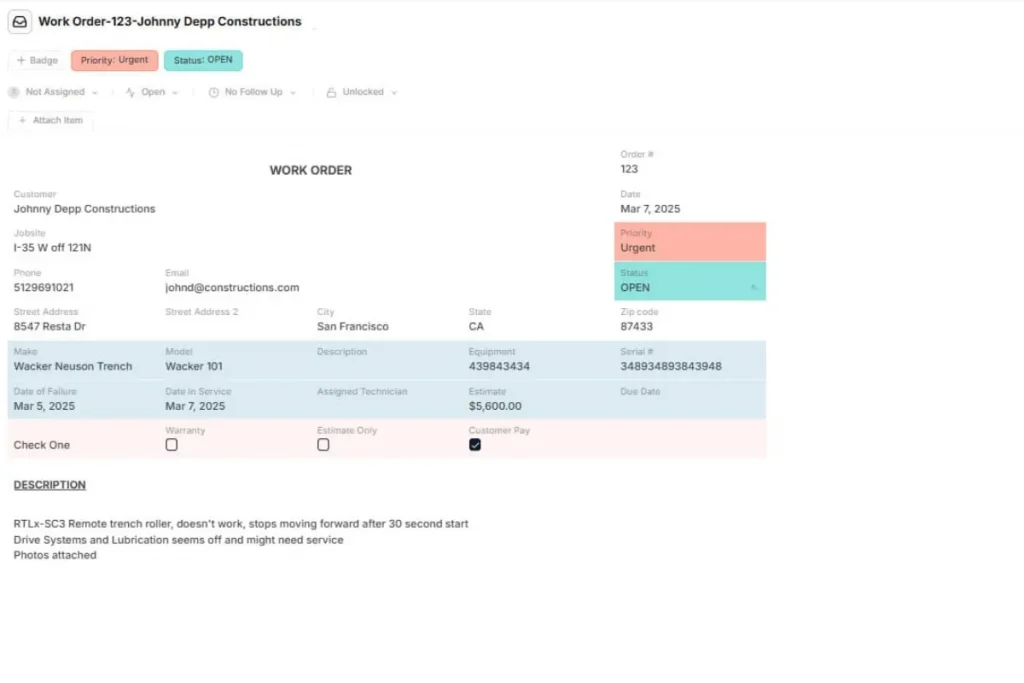
Mobile Field Execution
Allow technicians to access work orders, upload photos, complete checklists, collect signatures, and submit updates directly from the field.
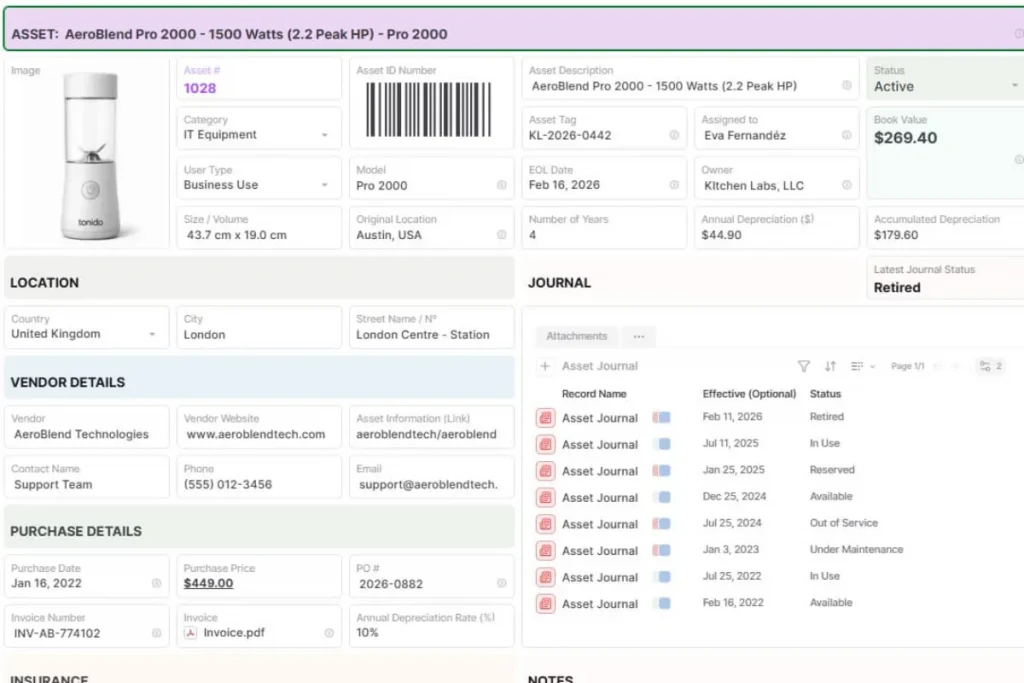
Asset and Service History
Maintain visibility into equipment records, maintenance history, inspections, previous visits, and recurring operational issues.
Inventory and Parts Coordination
Ensure technicians arrive onsite with the correct tools, replacement parts, or materials required to complete the work.
Customer Communication
Manage appointment coordination, service updates, approvals, delays, and operational communication throughout the service process.
Operational Reporting
Track completion rates, technician activity, SLA performance, recurring failures, unresolved work orders, and operational bottlenecks over time.
The Real Operational Challenge Behind FSM
Scheduling is only one layer of field service management.
The real operational challenge is keeping everything connected while work is constantly moving between the field and the office.
A single service job often depends on many operational pieces at the same time: technicians, assets, replacement parts, inspections, approvals, customer updates, invoices, and SLA commitments.
When those elements live in separate systems, or worse, in spreadsheets, chats, and emails, coordination starts breaking down quickly:
- A technician may complete the work, but invoicing gets delayed because the inspection form is missing;
- Customer support may promise an update without seeing the latest field activity;
- Inventory may be reserved for the wrong service call;
- Operations managers may struggle to understand which jobs are actually blocked and which are simply waiting for approval.
That is why field service operations become difficult to scale.
The challenge is maintaining operational continuity between all the records, teams, approvals, and workflow steps connected to the work being performed.
Best Practices for Structuring Field Service Operations
Well-structured field operations usually depend less on individual coordination effort and more on operational consistency across jobs, teams, and workflows.
It relies on:
- Standardize work order structure: Define consistent fields for job type, priority, customer information, asset details, required parts, approvals, technician notes, and completion requirements.
- Centralize operational records: Keep jobs, inspections, invoices, assets, photos, customer communication, and technician updates connected inside the same operational system.
- Reduce fragmented communication: Avoid managing operational updates across WhatsApp groups, calls, emails, and spreadsheets simultaneously. Critical job information should stay attached to the work order itself.
- Connect field execution to invoicing: Structure workflows so completed jobs, signatures, parts usage, and technician notes automatically support invoicing and financial processing.
- Maintain structured asset history: Keep inspections, maintenance records, recurring issues, warranty information, and previous visits linked directly to the correct asset.
- Automate recurring operational steps: Automate maintenance reminders, follow-ups, SLA alerts, approvals, recurring inspections, and status transitions whenever possible.
How AnyDB Supports Field Service Management Workflows
Many field service teams operate across disconnected tools: spreadsheets for scheduling, messaging apps for coordination, separate systems for invoicing, inspections, or asset tracking.
Over time, that fragmentation creates operational blind spots and constant reconciliation work between field and office teams.
AnyDB structures those workflows around connected operational records instead of isolated tools or spreadsheet-based processes.
Jobs as Live Operational Records
In AnyDB, service jobs are treated as live operational records rather than static spreadsheet rows.
Each job can contain operational fields, site photos, file attachments, technician updates, notes, signatures, timestamps, and workflow status inside the same record.
This keeps operational context connected to the work itself instead of spreading updates across emails, chats, or disconnected systems.
Connected Operational Relationships
Field operations depend heavily on relationships between operational records.
A work order may need to stay connected to the assigned technician, customer profile, physical asset, inspection records, replacement parts, invoices, or SLA requirements at the same time.
AnyDB uses an object-based structure where those relationships stay connected naturally across the workflow instead of requiring manual cross-checking between multiple systems.
Flexible Workflow Structure
Field workflows are rarely identical across teams or industries.
Some operations require inspections before work starts. Others depend on approvals, recurring maintenance cycles, compliance checklists, or multi-step operational handoffs between field and office teams.

AnyDB allows teams to structure workflows around how their operation already works, including custom templates, status-based workflows, follow-up scheduling, approvals, and operational checkpoints.
See templates built for real field operations!
Mobile Coordination in Real Time
Field teams can use the native Android and iOS apps to access work orders, scan QR codes, upload site photos, submit updates, and complete operational steps directly from the field.
As updates happen, office teams immediately see those changes reflected in live operational dashboards without waiting for manual synchronization or end-of-day reporting.
Operational Flexibility Without ERP Overhead
Traditional ERPs often introduce rigid structures and implementation overhead that do not fit many field service operations well.
At the same time, spreadsheets usually become unreliable once job volume and operational complexity increase.
AnyDB provides structured operational control without forcing teams into highly rigid workflows or long ERP implementation cycles. Teams can adapt records, workflows, approvals, and operational logic as the operation evolves.
Book a free demo to see how AnyDB helps field teams coordinate jobs, technicians, assets, inspections, and workflows in one connected operational system.
Frequently Asked Questions About Field Service Management
Here are the answers:
What is field service management?
Field service management is the coordination of technicians, service jobs, assets, customer communication, and operational workflows outside the office.
What does FSM software do?
FSM software helps teams schedule jobs, dispatch technicians, track field work, manage service records, and coordinate operations in real time.
What is the difference between FSM and CRM?
CRM focuses on sales and customer relationships. FSM focuses on field execution, work orders, technicians, assets, and service operations.
Which industries use field service management?
Industries like HVAC, telecommunications, industrial maintenance, healthcare, utilities, and facility management rely heavily on FSM workflows.
Why do field operations become difficult to scale?
As job volume grows, coordination becomes harder across technicians, schedules, assets, approvals, inventory, and customer communication.

The End-to-End Operations System that Finally Fits Your Reality.
No more scattered spreadsheets or rigid, disconnected tools.
AnyDB is a modern, customizable platform for managing business records and operations across teams, clients, and partners.
Learn More


Phone: (512)-761-7979
© 2024 Humanly Inc. All rights reserved.
What is AnyDB?
AnyDB is a unified, customizable data store designed to streamline and empower your entire organization. Effortlessly store, organize, and share custom business data to drive both internal and external operations across teams. Think of it as spreadsheets on steroids.Perfect for Sales, Marketing, Operations, HR, and beyond. Discover AnyDB