
Published on September 16, 2026


Claude MCP refers to using the Model Context Protocol to connect Claude with external tools, data sources, APIs, and business systems.
Instead of relying only on information typed or uploaded into a conversation, Claude can use approved MCP connections to retrieve current data, access relevant resources, or perform supported actions in connected services. What Claude can actually do depends on the MCP server, the permissions granted, and the Claude environment being used.
This guide explains how MCP works across Claude, Claude Code, and other Claude surfaces, including the difference between remote and local MCP servers, how connections are set up, and what they enable in real workflows.
It also covers practical business use cases, security considerations, and the main limitations to understand before giving Claude access to external systems.
What Is Claude MCP?
Claude MCP refers to Claude using the Model Context Protocol, an open standard originally created by Anthropic to connect AI applications with external tools, data sources, and systems. Anthropic later donated MCP to the Agentic AI Foundation under the Linux Foundation, while continuing to contribute to the standard.
The architecture is straightforward:
| Component | Role |
| Claude | Uses capabilities exposed through MCP |
| MCP client | Manages the connection from the AI application |
| MCP server | Exposes approved tools, data, or other capabilities |
| External system | The application, database, API, or service being accessed |
The official Model Context Protocol documentation describes MCP as a standardized way for AI applications to connect to external systems, including databases, files, tools, and workflows.
Users will typically encounter three core MCP concepts:
- MCP Tools: actions Claude can call, such as creating an issue, querying a database, or updating a record.
- Resources: context or data exposed by a server. In Claude Code, for example, resources can be referenced directly and fetched into the conversation.
- Prompts: reusable instructions exposed by an MCP server. Claude Code can dynamically discover these prompts and make them available as commands.
MCP does not automatically “turn Claude into an agent.” It gives Claude access to external capabilities. What Claude can actually retrieve, change, or execute depends on the MCP server, client environment, authentication, permissions, and tools exposed by the connected system.
Anthropic’s connector documentation makes the same distinction by treating MCP as the connection layer between Claude and external tools or data.
How Does MCP Work With Claude?
The connection typically works like this:
- An MCP server exposes specific tools, resources, or other capabilities.
- Claude connects to that server through a supported client or connector.
- Authentication determines which user, account, or system Claude is acting through.
- Claude discovers the available tools and data.
- When a request requires one of those capabilities, Claude can invoke it.
- The connected system returns the result, which Claude can then use in the conversation or workflow.
For example, if Claude is connected to a project management system, a user could ask which tasks are overdue. The MCP server can expose a task-search tool, Claude calls it, retrieves current records, and uses those results to answer.
Access still depends on the connected service. Anthropic’s connector documentation explains that Claude works within the permissions granted through the integration, so it does not automatically gain access to data the user cannot access in the source system.
Where Can You Use MCP With Claude?
MCP works across several Claude environments, but each surface supports a different type of connection.
Claude Web and Mobile
Claude web and mobile can use remote connectors to access cloud-based services and remotely hosted MCP servers. Anthropic says these connectors are available across Claude surfaces, including web and mobile.
Claude Desktop
Claude Desktop supports remote connectors and desktop extensions, which are better suited to local files, databases, desktop apps, and other resources on the user’s computer. Anthropic recommends remote connectors for cloud services and desktop extensions for local resources.
Claude Code
Claude Code has broader developer-focused MCP support, including remote HTTP and local stdio servers. Anthropic documents use cases involving databases, issue trackers, GitHub, monitoring, design tools, and automation.
Claude Code is therefore one MCP environment within the broader Claude ecosystem, not a synonym for Claude MCP.
What Can Claude Do With MCP?
Claude’s capabilities depend on what the connected MCP server exposes and what the user is authorized to access. In business and technical environments, that usually falls into four categories.
Access Current Business Data
Claude can retrieve information from connected databases, SaaS platforms, and internal systems. Depending on the integration, that can include:
- Customer or project records;
- Documents and files;
- Operational data;
- Current statuses;
- Summaries of live information.
This lets Claude answer questions using the current state of the connected system rather than relying only on information pasted into the conversation.
Take Actions in Connected Systems
If the MCP server exposes write tools and the user has permission to use them, Claude may also be able to:
- Create tasks;
- Update records;
- Send messages;
- Generate drafts;
- Trigger workflows;
- Create or modify issues.
The scope of those actions is defined by the server and the permissions behind the connection.
Support Development Workflows
Claude Code documents MCP use cases such as working from Jira issues, creating GitHub pull requests, querying PostgreSQL databases, checking monitoring systems, using design context, and creating Gmail drafts.
This makes MCP particularly useful when development work depends on context spread across multiple systems.
Work With Local Resources
With supported local MCP servers or desktop extensions, Claude can also work with resources stored on the user’s machine, such as local files, databases, and desktop applications, rather than only cloud-hosted services.
Claude MCP for Business Operations
For businesses, the practical value of Claude MCP appears when the assistant can work with the current operational context stored in company systems, rather than relying only on information copied into a prompt.
With the appropriate MCP connection and permissions, teams could ask questions such as:
- Which customer orders are still waiting for approval?
- Find the inspection documents associated with this asset.
- Which purchase tasks belong to this production project?
- Show the records that have missed their expected delivery date.
- Create a report for open service requests.
- Run the approved workflow for this record.
In these cases, Claude is working with live records, relationships, files, and workflow states exposed by the connected system.
This is the business side of the broader MCP tools ecosystem: giving an AI assistant controlled access to the information and actions that teams already use to run operations.
Connect Claude to AnyDB Through MCP
AnyDB MCP provides a concrete example. AnyDB operates a hosted remote MCP server at https://mcp.anydb.com, which Claude can add as a custom connector.
The current hosted connection uses OAuth, so users authenticate with AnyDB and approve access rather than placing an API key in Claude’s local configuration.
Once connected, Claude can work with the AnyDB information and capabilities available to that account, including records, object types, files, Views, reports, shares, and workflows.
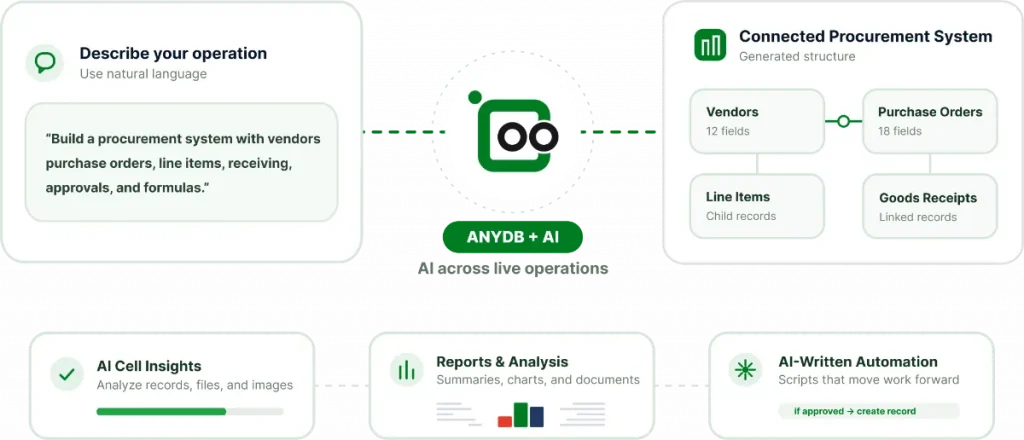
AI Built Into Your Operational System. Source: AnyDB
AnyDB’s MCP tools can search records by keyword or meaning, create or update information, generate reports and Views, work with attached files, and discover or execute workflows.
For example, a manufacturing manager could ask Claude to find a production order, review its related materials and purchasing tasks, locate inspection records, and summarize its delivery status using the connected AnyDB data.
That operational context is also part of AnyDB’s broader AI-native software approach, where AI can work across orders, projects, vendors, assets, inspections, approvals, and the relationships between them.
For companies evaluating Claude MCP for business use, this provides a concrete way to move beyond standalone conversations and connect Claude to the operational context where real work is managed.
Explore AnyDB MCP to see how compatible AI assistants can work with your business data and workflows.
Frequently Asked Questions About Claude MCP
What is MCP for Claude?
MCP is the protocol Claude can use to connect with external tools, applications, databases, and data sources through compatible MCP servers. It provides a standardized way for Claude to discover and use approved capabilities outside the model itself.
Is Claude MCP Free?
Anthropic currently makes custom remote MCP connectors available on Free, Pro, Max, Team, and Enterprise plans. Free users are limited to one custom connector. That does not mean every MCP connection is free. The connected service, API, server hosting, or third-party software may have its own costs.
Is Claude Based on MCP?
No. Claude is Anthropic’s AI model and product ecosystem. MCP is an interoperability protocol that Claude can use to connect to external systems, tools, and data sources.
What Is the Difference Between Claude Code and Claude MCP?
Claude Code is Anthropic’s coding environment. MCP is the protocol Claude Code can use to connect with external tools and systems. MCP also works beyond Claude Code, including through custom connectors in other Claude environments, so the terms are not interchangeable.
Can Claude Code Use MCP?
Yes. Claude Code supports MCP servers and provides commands for adding, managing, authenticating, and using them in development workflows. Anthropic documents support for both remote and local MCP connections.
How Do I Add MCP to Claude Code?
The basic process is to choose an MCP server and add it through Claude Code using the claude mcp add command with the appropriate server name, transport, and address or local command.
What Is the Claude MCP List Command?
claude mcp list displays the MCP servers configured in Claude Code and their current connection status. It is useful for checking whether a server has been added correctly before troubleshooting individual tools or authentication.
Can Claude MCP Connect to Business Databases?
Yes, provided an appropriate MCP server exposes the database or business system to Claude and the user has the necessary permissions. For example, a company could expose approved customer, project, inventory, or order data through an MCP server, allowing Claude to search or work with those records.
How Secure Is Claude MCP?
Claude MCP can be used securely, but the connection itself should not be treated as automatically trusted. Anthropic warns that custom connectors can connect Claude to services it has not verified. Once connected, Claude may be able to access or modify data according to the permissions granted to that service.

The End-to-End Operations System that Finally Fits Your Reality.
No more scattered spreadsheets or rigid, disconnected tools.
AnyDB is a modern, customizable platform for managing business records and operations across teams, clients, and partners.
Learn More


Phone: (512)-761-7979
© 2024 Humanly Inc. All rights reserved.
What is AnyDB?
AnyDB is a unified, customizable data store designed to streamline and empower your entire organization. Effortlessly store, organize, and share custom business data to drive both internal and external operations across teams. Think of it as spreadsheets on steroids.Perfect for Sales, Marketing, Operations, HR, and beyond. Discover AnyDB