
Published on September 1, 2026


Enterprise Excel-to-web portal conversion services can turn a complex workbook into a web-based system that multiple teams can access, update, and manage from one place.
The challenge sits inside the spreadsheet itself. A single file may contain formulas, VBA macros, validation rules, linked worksheets, approval logic, and years of operational knowledge that employees rely on every day.
A successful spreadsheet-to-web portal conversion therefore requires more than importing cells into a database. The underlying logic needs to be audited, the data structured, and the workflows translated into an interface that people can use reliably.
For operations teams, the result should provide controlled access, connected records, automation, and a reliable source of truth while preserving the business logic that made the original spreadsheet valuable.
That is the real purpose of Excel-to-web migration: turning a critical file into a system the business can operate from.
When Should You Turn an Excel Spreadsheet Into a Web Portal?
Excel can remain an excellent tool for analysis and individual work. The operational problem starts when one workbook becomes the interface for a process involving multiple people, records, and decisions.
Some signals are particularly revealing:
- Multiple employees need to edit the same workbook, creating conflicts over who changed what;
- Local copies circulate, making it difficult to identify the current version;
- Critical formulas or VBA macros are difficult to maintain, especially when only one person understands how they work;
- Managers need information while someone else is using the file, slowing access to operational data;
- Customers, vendors, or field teams need controlled access without exposing the entire workbook;
- Spreadsheet data must connect to other systems, creating manual imports, exports, or duplicate entries;
- Errors or outdated information affect decisions, turning a spreadsheet issue into an operational issue.
At that point, the relevant question is less “Can Excel do this?” and more “Is a file still the right interface for this operation?”
An Excel-to-web portal conversion can provide a shared environment while preserving the data and logic the business already relies on.
What Does Excel-to-Web Portal Conversion Actually Involve?
An Excel-to-web portal conversion is not simply putting an Excel file online. It means translating the data, logic, and rules inside the workbook into a system that people can use through a controlled web interface.
A serious migration typically follows seven steps:
- Audit the spreadsheet: Identify formulas, VBA macros, dependencies, data structures, and hidden business rules.
- Structure the data: Turn worksheets into defined records, fields, relationships, and calculations.
- Design the interface: Replace cell-based interaction with forms, views, dashboards, and workflows suited to each user.
- Preserve essential logic: Recreate or replace calculations and business rules that the operation depends on.
- Configure access: Define what employees, customers, vendors, and partners can view or edit.
- Connect systems: Integrate relevant ERPs, CRMs, databases, APIs, or other business tools.
- Test and validate: Compare the new system’s results with the original spreadsheet before deployment.
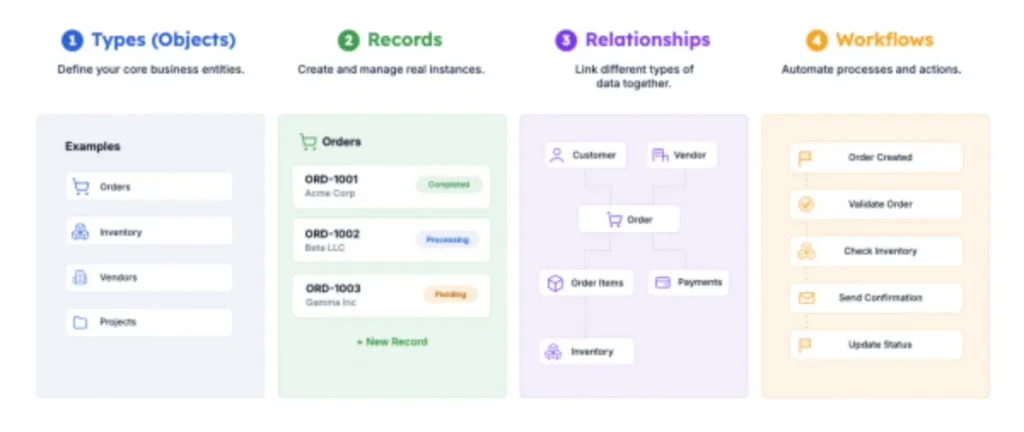
How a Business System Connects Data, Records, Relationships, and Workflows. Source: AnyDB
The important distinction is logic preservation. A successful spreadsheet-to-web migration carries the operational knowledge inside the workbook into a system that is easier to control, share, maintain, and evolve.
What Makes Enterprise Spreadsheet Migration Difficult?
Enterprise Excel-to-web migration services have to account for everything the spreadsheet does for the business, including logic, dependencies, access patterns, and operational decisions.
Hidden business logic
A workbook can contain rules that are never documented separately. Color coding, formulas, VBA macros, validation rules, and sequences of data entry may tell employees what requires attention, what can be approved, or what should happen next.
If those rules are missed during migration, the new system can reproduce the data while changing the way the operation works.
Interdependent spreadsheets
Enterprise spreadsheet environments rarely consist of one isolated file. A purchasing workbook may reference inventory data, while another file contains pricing, calculations, or historical records.
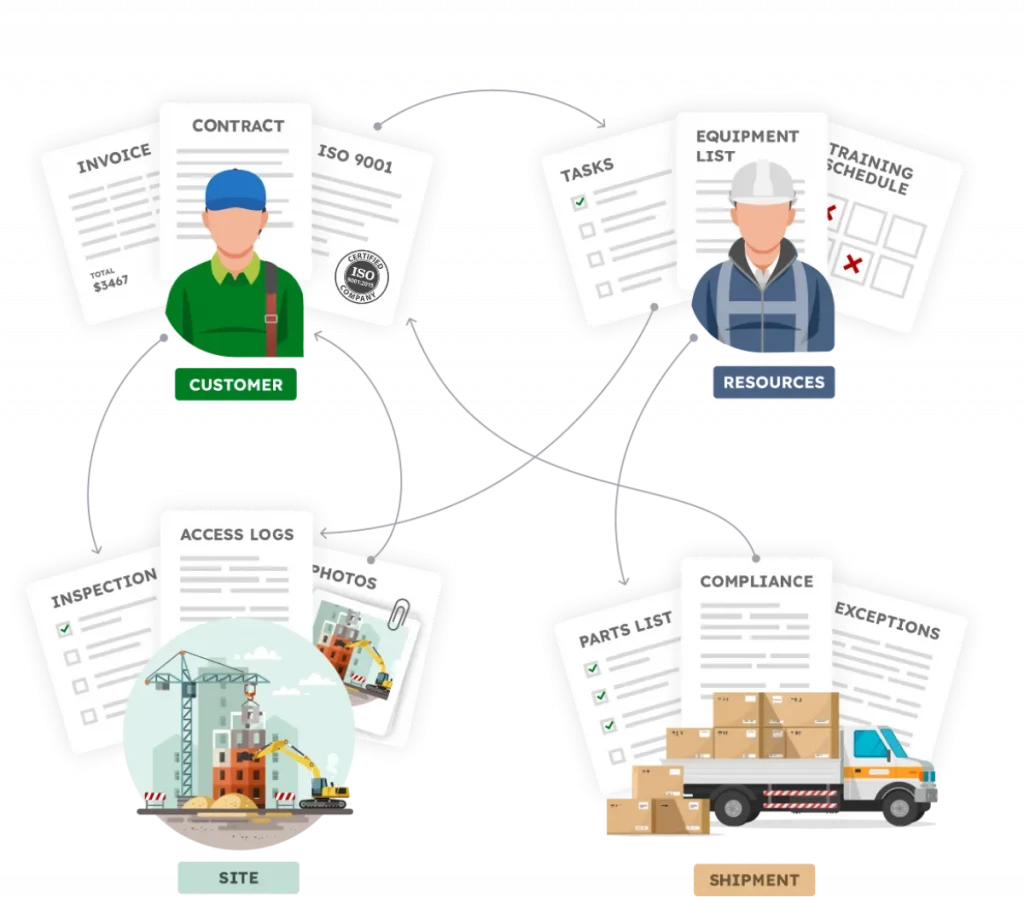
Businesses have connected data. Source: AnyDB
These dependencies need to be mapped before conversion so that relationships between datasets are preserved instead of replaced with manual processes.
Multiple users and permissions
Different employees may need access to different information. A salesperson may need customer records, while finance handles pricing and management reviews operational data.
A web-based system therefore needs defined permissions, particularly when customers, vendors, contractors, or field teams will also access the application.
Data integrity
Migration is an opportunity to identify duplicate records, inconsistent formats, missing values, historical data, and broken relationships before they become part of the new system.
The objective is to establish reliable records without discarding information the business still needs.
Operational continuity
The existing spreadsheet may be supporting orders, production, purchasing, field service, or financial decisions every day. The business cannot simply stop while the replacement is being built.
For that reason, migration should include controlled testing and, where appropriate, a period of parallel operation.
The most dangerous migration failure is transferring the visible data while losing the rules that made the spreadsheet useful.
What Should a Spreadsheet-to-Web Business System Include?
A successful spreadsheet-to-web business system should reproduce the operational depth of the original process while giving teams greater control over how information is created, connected, accessed, and acted on.
Structured records
Business information should exist as defined records, such as customers, orders, assets, inventory, projects, and vendors. Each record can hold the fields and information required for that type of work.
Connected data
Records should relate to one another directly. An order can connect to its customer, products, shipment, invoice, or inventory records, reducing duplicate information across separate files.
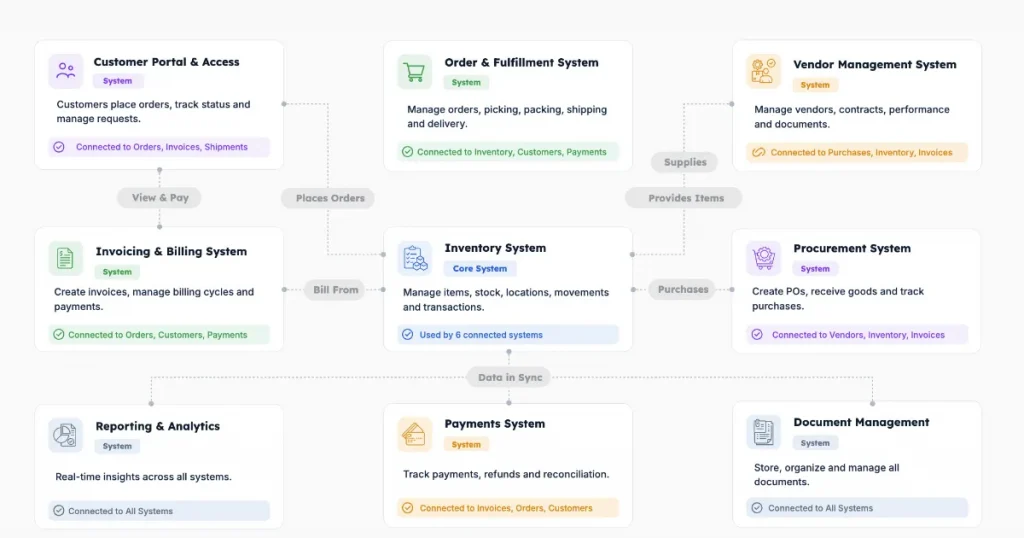
Structured and Connected Data System. Source: AnyDB
Forms
Forms provide controlled ways for employees, customers, vendors, and field teams to create or update records without working directly inside a complex data structure.
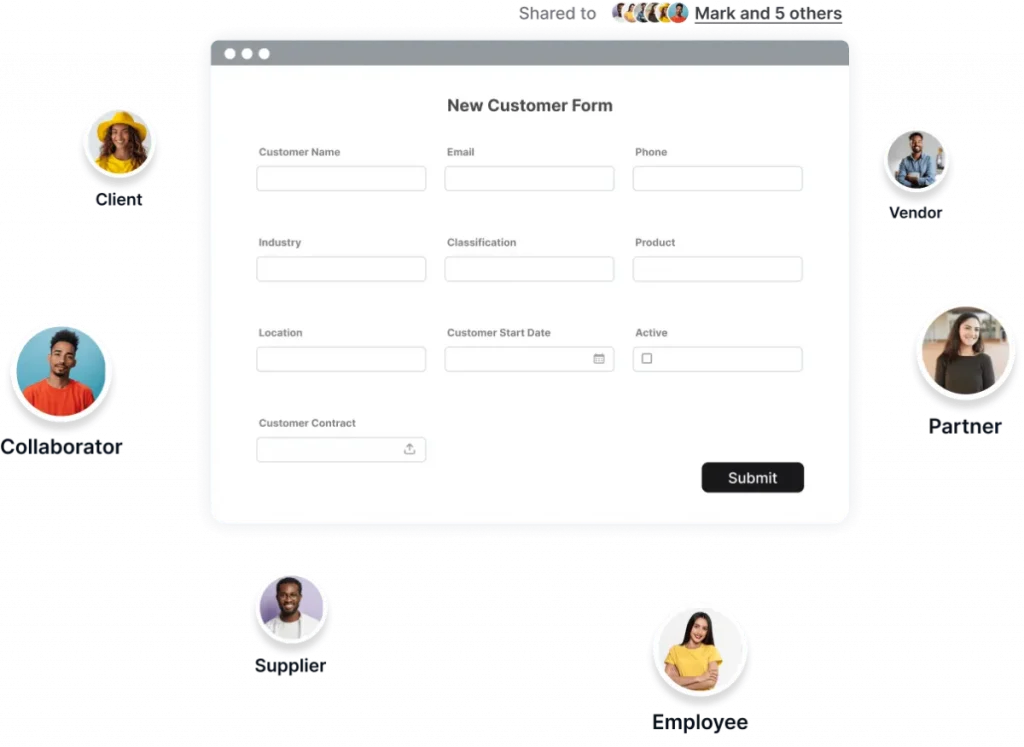
Integrated Forms. Source: AnyDB
Role-based permissions
Access should reflect responsibilities. Teams can receive different permissions based on their department, role, or the records they are responsible for.
Read Also: Master Role-Based Access Control: A Practical Guide for Businesses
Workflow automation
The system should support approvals, assignments, notifications, status changes, and repetitive updates, reducing manual handoffs between teams.
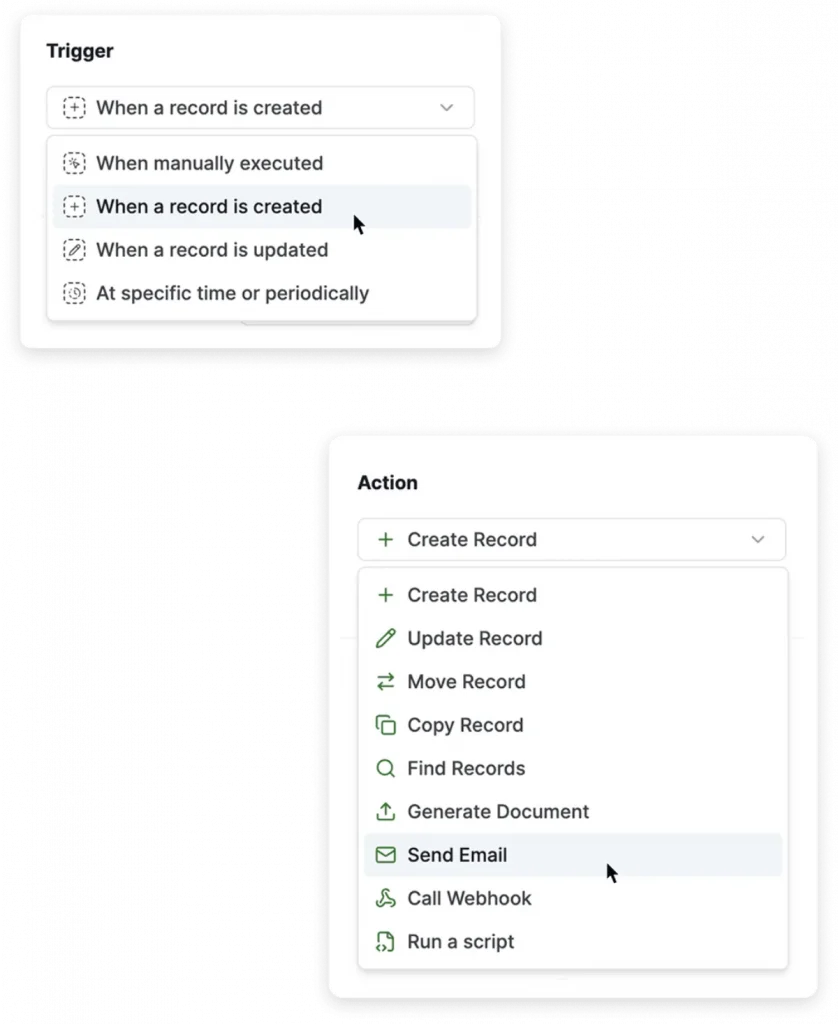
Workflow Automation. Source: AnyDB
Files and documentation
Drawings, contracts, images, reports, and other documents should remain attached to the records they support, keeping operational context together.
Audit history
Changes and operational activity should remain traceable, creating a history of updates, decisions, and actions.
Dashboards and views
Each team should see the information relevant to its responsibilities, while managers retain visibility across the operation.
Integrations
APIs and other integrations can connect the system with existing business applications, databases, and operational tools.
How to Convert an Excel Spreadsheet Into a Web-Based Business System
A spreadsheet migration works best when the existing data becomes the starting point for a structured operational system. The process can follow a controlled sequence:
- Audit the existing spreadsheet
Map formulas, dependencies, macros, data structures, and business rules.
- Identify records and relationships
Determine which information represents customers, orders, assets, vendors, projects, or other business records and how those records relate.
- Clean and structure the data
Remove duplicates, standardize fields, and prepare information for import.
- Document formulas, macros, and rules
Separate essential operational logic from calculations or spreadsheet features that can be replaced.
- Define users and permissions
Establish who can view, create, or edit each type of information.
- Rebuild essential workflows
Translate spreadsheet processes into structured fields, forms, templates, relationships, and workflows.
- Import representative data
Start with a controlled dataset rather than moving everything immediately.
- Validate results against Excel
Check calculations, records, relationships, and expected outcomes.
- Test with actual users
Confirm that employees can perform their daily tasks within the new system.
- Move the workflow into production
Once validated, establish the new system as the operational environment.
AnyDB supports this approach through templates, which provide reusable item structures for standardized records, and relationships that connect records in parent-child structures.
Teams can therefore use existing business data as the foundation and progressively build the records, relationships, forms, and workflows around it, instead of commissioning an entirely new application from zero.
Excel-to-Web Portal Conversion With AnyDB
For companies already running core processes through spreadsheets, the next step is often to give that information a structure the operation can rely on. AnyDB provides a bridge between spreadsheet familiarity and a connected operational system, allowing teams to work with familiar data while introducing stronger controls around it.
The same business information can be organized into:
- Spreadsheet-like editing: Teams can continue working with a familiar way of updating records.
- Structured fields and data types: Information gains defined fields instead of relying on unstructured cells.
- Linked records: Connect customers, orders, assets, inventory, vendors, projects, and other operational records.
- Custom templates: Standardize the structure of recurring business records and workflows.
- Forms and assigned work: Turn operational requests and activities into defined processes with clear ownership.
- Granular permissions: Control who can view or edit information across teams and workflows.
- Files and documentation: Keep contracts, drawings, images, reports, and other documents attached to their relevant records.
- Dashboards and reporting: Give managers visibility into operational activity and performance.
This model fits companies managing manufacturing, orders, shipping, asset tracking, vendor management, and other heavy operational workflows through scattered spreadsheets.
Instead of commissioning a traditional custom application from scratch, teams can start with the processes and data they already have, then build a connected system around them.
Ready to turn your spreadsheets into a connected operational system?
Book a free AnyDB demo call to discuss your existing workflow and explore how it can be structured in AnyDB.
Frequently Asked Questions About Excel-to-Web Portal Conversion
How Can I Convert an Excel Spreadsheet to a Website?
You can publish spreadsheet data online, but a business portal requires more. The data, logic, permissions, and workflows need to be structured for web-based use.
How Can I Convert My Excel Spreadsheet to a Web App?
Start by auditing the spreadsheet, structuring its data and relationships, then rebuilding essential formulas, rules, forms, and workflows in a web-based platform.
How Do I Convert an Excel File to a Webpage?
A simple webpage can display spreadsheet data, while a web application allows users to interact with it. The right approach depends on whether the file is informational or operational.
How Do I Convert an Excel File to a URL?
Uploading or publishing a file can create a shareable URL, but this does not turn Excel into a web application. A portal requires an interface and controlled access around the underlying data.
What Happens to Excel Formulas and Macros During Migration?
They should be audited first. Essential calculations and VBA logic may need to be recreated or replaced rather than directly converted.
How Long Does Excel-to-Web Migration Take?
The timeline depends on spreadsheet complexity, number of files, formulas, macros, integrations, users, and required workflows. Simple conversions can take weeks, while larger projects take longer.
How Much Does Spreadsheet-to-Web Conversion Cost?
There is no fixed cost. Complexity, user concurrency, macro requirements, integrations, and database needs all affect the project scope and price.

The End-to-End Operations System that Finally Fits Your Reality.
No more scattered spreadsheets or rigid, disconnected tools.
AnyDB is a modern, customizable platform for managing business records and operations across teams, clients, and partners.
Learn More


Phone: (512)-761-7979
© 2024 Humanly Inc. All rights reserved.
What is AnyDB?
AnyDB is a unified, customizable data store designed to streamline and empower your entire organization. Effortlessly store, organize, and share custom business data to drive both internal and external operations across teams. Think of it as spreadsheets on steroids.Perfect for Sales, Marketing, Operations, HR, and beyond. Discover AnyDB