
Published on September 15, 2026


MCP tools let AI applications reach beyond the model itself to retrieve data, call functions, update records, manage GitHub issues, or trigger workflows in connected systems.
The term is also used more broadly to describe the surrounding MCP ecosystem. That includes MCP servers, which expose tools and data; clients or hosts, which connect AI applications to those servers; and platforms or frameworks used to build, deploy, and manage MCP integrations.
That distinction matters because each layer solves a different problem. A business may need a server that exposes operational records, a client such as Claude or ChatGPT, or infrastructure for building its own AI-connected workflows.
In 2026, MCP has become more relevant as major AI applications and development environments add support for the protocol and its specification continues to evolve. This guide compares the main categories and the best MCP tools for different use cases.
What Are MCP Tools?
Technically, MCP tools are executable functions exposed by an MCP server that an AI application can discover and call. They are the part of the Model Context Protocol that lets a model take action outside the conversation itself.
Depending on the server, a tool might let an AI assistant query a database, retrieve a record, create an issue, update an application, execute a workflow, or call an external API. The official MCP documentation describes tools as one of the main ways AI applications connect to external systems and perform tasks.
| Term | Role | Example |
| MCP tool | A callable action | Search records, create issue |
| MCP server | Exposes tools and data to AI clients | AnyDB MCP, GitHub MCP Server |
| MCP client/host | Connects the AI application to MCP servers | Claude, ChatGPT, Cursor |
| MCP platform/framework | Helps developers build or manage MCP integrations | MCP SDK, Google ADK |
This distinction matters because “MCP tools” is often used loosely to describe the entire ecosystem.
The official TypeScript SDK separates servers, clients, tools, resources, and prompts into distinct parts of the architecture, while the C# SDK documentation explains tools specifically as capabilities that models can invoke.
One important technical update for 2026 is that MCP should no longer be described as inherently session-based.
The July 28, 2026 specification introduced a stateless protocol core, removing the required handshake and protocol-level session model. Servers can still maintain application state when needed, but that state is no longer built into the core transport.
How Do MCP Tools Work?
MCP tools follow a straightforward connection flow between an AI application and an external system:
- A company or service runs an MCP server.
- The server exposes approved capabilities, such as searching records or triggering a workflow.
- An MCP-compatible client connects to that server.
- The client discovers which tools and resources are available.
- The AI calls the relevant tool when a user request requires it.
- Authentication, permissions, and application-level controls determine what the AI can actually read, create, update, or execute.
For example, a user could ask an AI assistant to find an overdue customer order. The assistant connects to the business system through MCP, calls an authorized search tool, retrieves the relevant records, and presents the result.
If write access is supported and permitted, another tool could update the record or trigger a workflow.
MCP standardizes the connection, but security still depends on authentication, authorization, and the permissions defined by the connected system.
Best MCP Tools in 2026
The best MCP tools serve different roles across the ecosystem. Some act as clients that connect AI assistants to MCP servers, others expose tools and data, and some provide the infrastructure developers use to build or discover integrations.
| Tool / Platform | Category | Best For | What MCP Adds |
| Claude | MCP client | General AI and business workflows | Connects Claude to remote and local MCP services |
| ChatGPT | MCP client | AI workflows connected to company systems | Supports MCP-powered apps, connectors, and actions |
| Cursor | MCP client | AI-assisted software development | Gives coding agents access to external tools and context |
| VS Code / GitHub Copilot | MCP client | Development workflows | Connects agent workflows to MCP servers |
| GitHub MCP Server | MCP server | Software development | Repositories, issues, PRs, Actions, and security data |
| AnyDB MCP | MCP server | Business operations | Records, files, Views, reports, workflows, and shares |
| Google ADK | Framework | Building AI agents | Lets agents consume MCP tools and connect to MCP servers |
| Official MCP Registry | Discovery platform | Finding MCP servers | Central registry for publicly available MCP servers |
Claude
Claude supports custom connectors built on remote MCP servers, allowing users to connect the assistant to external tools and data sources.
Anthropic currently makes custom connectors available across Free, Pro, Max, Team, and Enterprise plans, although Free users are limited to one custom connector.
This makes Claude useful when an MCP server already exposes the business system, API, or developer environment the user needs to access. Local MCP connections are also supported through Claude Desktop in relevant configurations.
ChatGPT
ChatGPT can connect to MCP-powered apps and custom connectors, allowing compatible systems to expose tools that ChatGPT can use inside a conversation.
OpenAI currently describes full MCP support, including modify and write actions, as a beta capability for Business, Enterprise, and Edu workspaces. Availability and permissions can therefore depend on the user’s plan and workspace configuration.
For teams evaluating MCP tools for ChatGPT, the important question is what the connected server allows the model to read or change.
Cursor
Cursor uses MCP to connect its coding agent to external databases, APIs, documentation, and services such as GitHub, Linear, or Notion. Servers can be installed through Cursor’s interface or configured manually, and its current documentation supports local and HTTP-based MCP connections.
That makes Cursor particularly useful when developers want coding assistance grounded in systems outside the codebase itself.
VS Code / GitHub Copilot
VS Code supports MCP servers within its AI agent workflows. Developers can add servers that expose capabilities for file operations, databases, APIs, browser automation, and other external tools.
This allows GitHub Copilot and agent workflows in VS Code to work with external context without requiring each integration to be implemented directly inside the editor.
GitHub MCP Server
GitHub’s official MCP Server gives compatible AI clients direct access to GitHub workflows. Its tools cover repositories, code and commits, issues, pull requests, GitHub Actions, security findings, discussions, and team activity.
GitHub provides both remote and local deployment options. Teams can also restrict available toolsets or enable read-only mode, which removes tools capable of modifying repositories, issues, or pull requests.
This is a clear example of MCP moving beyond information retrieval into controlled operational actions.
AnyDB MCP
AnyDB MCP applies the same model to business operations. Its hosted MCP server connects compatible assistants such as Claude and ChatGPT to authorized AnyDB business data through OAuth.
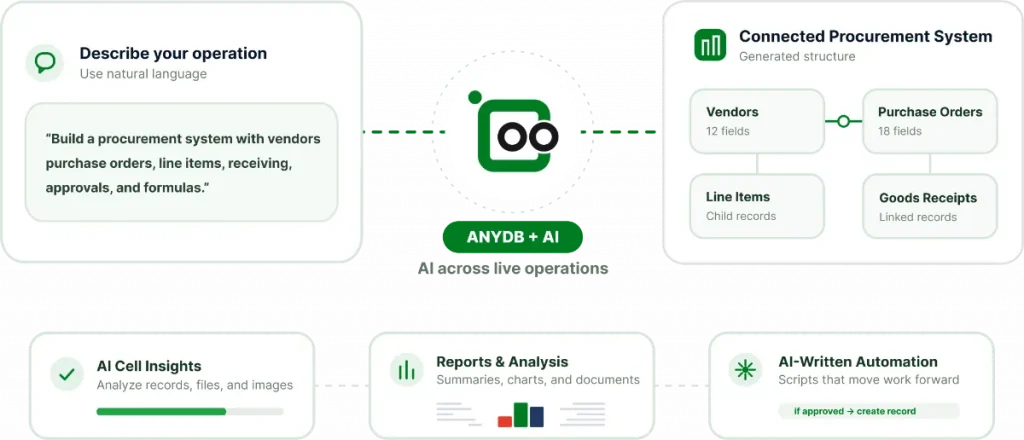
AI Built Into Your Operational System. Source: AnyDB
Users can work with records, files, object types, Views, reports, shares, and workflows.
Available capabilities include:
- Searching records by keyword or meaning,
- Creating and updating information,
- Building types and relationships,
- Generating reports,
- Creating customer shares,
- Executing workflows, and
- Managing files.
That makes AnyDB MCP particularly relevant when AI needs access to the operational context behind orders, assets, customers, projects, approvals, documents, and other connected business processes.
Book a demo and let us set up AnyDB for you!
MCP Tools for Business Operations: What Changes When AI Can Access Real Business Data?
There is a significant difference between asking an AI model a general question and giving it approved access to the records and workflows that reflect the current state of a business.
Without that connection, the model can only work with the information included in the prompt or available in its existing context. With MCP, an AI assistant can query authorized systems and act on live operational data.
That changes the type of questions users can ask:
- Which orders are waiting for inspection?
- Which purchase orders are associated with this production job?
- Find the documentation attached to this asset.
- Create a report for overdue work.
- Update an approved record.
- Execute an existing workflow.
The value comes from combining context with controlled action. The assistant is no longer reasoning only over generic information; it can work with the records, relationships, files, and process states that teams use to run the operation.
How AnyDB Combines MCP With AI-Native System Building
AnyDB connects two related AI capabilities: building the operational system and giving external AI assistants controlled access to it.
AnyBot can turn a written description into a working data structure inside AnyDB. Users can generate one object type or a connected system of types, create fields, statuses, formulas, and relationships, and build from existing XLSX, CSV, or Google Sheets data.
For example, a user could ask:
“Create a system for purchase orders linked to vendors, materials, approvals, and delivery status.”
AnyBot proposes the structure, while users can review field mappings and the generated setup before saving it.
AnyDB MCP adds the second layer. Since August 30, 2026, AnyDB has provided a hosted remote MCP endpoint at https://mcp.anydb.com, with OAuth support for Claude, ChatGPT, and other compatible MCP clients.
The workflow is straightforward: AnyBot helps build the system, AnyDB stores the connected operational context, and MCP lets compatible assistants work with that system under authorized access.
For companies exploring how this could work with their own data and workflows, schedule an AnyDB demo to see the model applied to a real operational process.
Frequently Asked Questions About MCP Tools
Which Tools Support MCP?
MCP support now spans several categories. Claude and ChatGPT can connect to MCP-powered services, while Cursor and VS Code/GitHub Copilot use MCP in development workflows. Because MCP support is evolving quickly, always check the product’s current documentation before choosing a client or server.
What Is an Example of an MCP Tool?
An MCP tool is a specific callable action, such as searching customer records, retrieving a file, creating a GitHub issue, updating an approved record, or executing a workflow. The tool is exposed by an MCP server and invoked by a compatible AI application.
What Are the Best MCP Tools?
The best option depends on the system you need to connect. GitHub MCP Server is well suited to software development workflows, while AnyDB MCP focuses on operational business data and workflows. Claude and ChatGPT act as clients that can connect to MCP services rather than serving the same role as those servers.
What Is the Difference Between an MCP Tool, Server, and Client?
MCP tools are actions the AI can call. The MCP server exposes those tools and related data. A client or host then connects the AI application to the server, making those capabilities available to the model.
How Do I Use MCP Tools?
The general process is to choose an MCP-compatible client, connect an appropriate MCP server, authenticate or configure access, review the capabilities it exposes, and then use those capabilities through the AI interface. The exact setup depends on the client and server.
Can ChatGPT Use MCP Tools?
Yes. ChatGPT can work with MCP-powered apps and custom connectors. OpenAI currently describes full MCP support, including write and modify actions, as a beta capability for ChatGPT Business, Enterprise, and Edu, while Pro users can connect MCP services with read/search permissions in developer mode.
Are MCP Tools Safe to Use?
They can be, but security depends on the server, authentication method, permissions, and implementation. MCP itself does not automatically make an integration safe.

The End-to-End Operations System that Finally Fits Your Reality.
No more scattered spreadsheets or rigid, disconnected tools.
AnyDB is a modern, customizable platform for managing business records and operations across teams, clients, and partners.
Learn More


Phone: (512)-761-7979
© 2024 Humanly Inc. All rights reserved.
What is AnyDB?
AnyDB is a unified, customizable data store designed to streamline and empower your entire organization. Effortlessly store, organize, and share custom business data to drive both internal and external operations across teams. Think of it as spreadsheets on steroids.Perfect for Sales, Marketing, Operations, HR, and beyond. Discover AnyDB