
Published on October 26, 2026


An Excel database usually starts as a stock sheet with three tabs, because Excel is familiar and already installed. Someone adds a VLOOKUP to pull vendor names, a colleague downloads a copy to edit on a Friday, and by Monday two files disagree about the same part number.
It is also flat, permissionless, and single-file.
The workbook is now the operation. Orders, stock counts, supplier terms, and delivery dates sit in a single file that anyone can rename, overwrite, or email. Data entry happens in whichever copy sits closest to the person typing.
This guide covers where Excel does the job well, where it breaks, how to tell you have crossed the line, and what to use instead. If the operation still fits in one clean sheet with one owner, you should keep Excel.
Can You Have a Database in Excel?
Yes. You can build a database in Excel, and many operations teams already run one.
Structure makes it a database, not the file format. A header row, consistent columns, one record per row, and filters or pivot tables on top are the whole recipe.
Take a vendor list with four columns: vendor name, contact, contract date, and status. Turn on filters to see active vendors, add a pivot table to count contracts by month, and the sheet behaves like a small database. Data validation on the status column keeps entries consistent.
Excel stores records but does not enforce relationships, permissions, or history.
It is a database by structure, not by governance.
What Is Microsoft Excel Database?
An Excel database is a worksheet organized as a table. Each row holds one record, each column holds one field, and named ranges or Excel tables let formulas and pivot tables treat the block as a unit.
The table is the container. Fields and data types decide what a column accepts: a date, a currency amount, a status from a drop-down list. The key column, in database terms the primary key, identifies a record so other sheets can point at it.
Lookup formulas simulate the link between two tables. A purchase order log stores the vendor ID, and VLOOKUP or XLOOKUP pulls the vendor name and payment terms from the vendor list. The relationship lives inside the formula, not in the structure.
Free Excel database templates for vendor lists, inventory logs, and project trackers are a legitimate starting point. They arrive with the table already designed.
Is Excel a SQL Database?
No. Excel is a spreadsheet application, and SQL is a query language for relational database management systems. Excel is not one of those systems.
The confusion comes from connectivity. Excel connects to external databases through Power Query and Open Database Connectivity (ODBC), and formulas plus pivot tables imitate queries well enough to feel like a database engine.
A finance team pulls a SQL table into Excel for monthly reporting. Excel is the reporting layer there, and the keys, constraints, and transactions stay in the source system.
Treating the workbook as the database drops constraints, transactions, and concurrent writes at once. The reporting stays; the guarantees leave.
Excel reads the database. It does not enforce it.
Which Is Better, Excel or SQL?
Neither is universally better. Excel wins on speed to a first answer and zero setup, while Structured Query Language (SQL) wins on concurrency, data integrity, and access control.
Five criteria decide it:
- How many people edit at once
- Whether relationships must be enforced
- How granular permissions go
- Whether an audit trail is required
- Who can maintain the system
A five-person team comparing monthly budget variance stays in Excel. The file is small, the owner is clear, and a database adds work without removing any.
A 60-person operation sharing inventory and vendor records needs the second option. Two buyers editing the same purchase order need row-level locking and a permission model, and a shared workbook has neither.
You might be thinking that SQL is for engineers, not for an operations team. That constraint is real, and it is why no-code platforms exist.
Pick the smallest tool that enforces the rules you actually need.
Where an Excel Database Breaks
The breakpoints arrive in a predictable order. Picture a 40-person field services company running work orders and parts in one shared workbook.
- Multiple editors. When two dispatchers save at once, Excel keeps the last write and discards the other. Work orders vanish without an error message.
- No permissions. Anyone who opens the file sees labor rates, margins, and vendor pricing. Excel protects a range with a password, not a person with a role.
- No enforced relationships. Deleting a vendor row orphans every work order that pointed at it. Nothing breaks until someone tries to invoice.
- No audit trail. Version control in Excel Online records that a cell changed, not who approved the change or why.
None of this is an Excel defect. The software was built for analysis, and it does not attempt to become a single source of truth for an operations team.
The file still opens. The record of truth does not.
What to Use Instead of an Excel Database
Four options sit on this spectrum, ordered by what they demand from you.
- Excel with stricter rules. The rules get stricter: data validation, locked cells, a named owner, a weekly archive. It fits while one team edits and no outside party needs access.
- A relational database with a developer. It fits when relationships and audit matter and someone can maintain schemas, backups, and access. No owner means no system.
- A no-code operational platform. It fits when more than one team edits, permissions and an audit trail are required, and a six-month implementation is not.
- An enterprise resource planning (ERP) suite. It fits when finance, procurement, production, and inventory share one process; it stops fitting when no internal team can administer the suite or absorb a long rollout.
AnyDB sits closer to the third slot. It is an object-based business database where records, relationships, files, workflows, and permissions share one data model, with customer, vendor, and partner portals layered on top and role-based access control underneath.
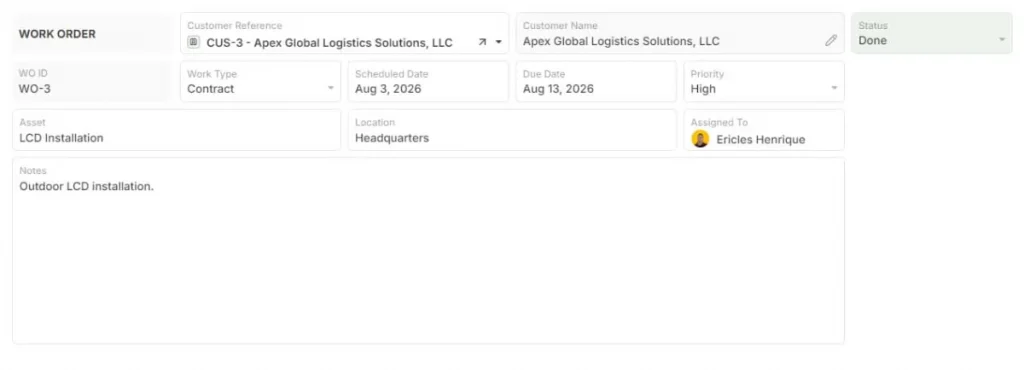
Work Order business object example. Source: AnyDB
Buy the layer that holds the rules, not the rows.
Why Replace Excel as a Database With AnyDB?
Excel works well for calculations and flexible analysis, but it becomes harder to manage when the same workbook is also carrying customers, orders, inventory, approvals, files, and handoffs between teams.
AnyDB lets you keep the spreadsheet-style flexibility while moving operational data into connected business objects with defined fields, owners, statuses, permissions, and relationships.
Instead of repeating customer or product information across tabs, you can connect orders to customers, line items, delivery records, invoices, suppliers, stock movements, and other related records.
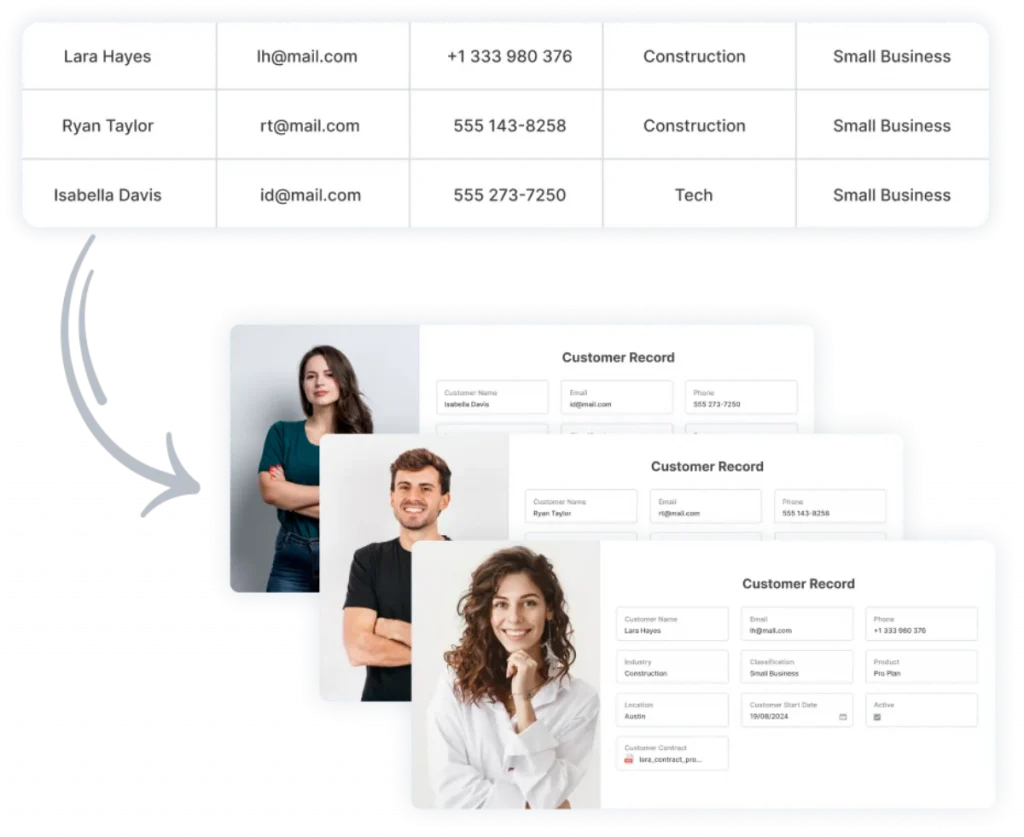
Turn Rows and Tabs Into Connected Business Objects. Source: AnyDB
Files and comments stay with the relevant record, while workflows can assign work, route approvals, and track what needs attention next.
You also do not need to migrate every spreadsheet at once. AnyDB supports Excel and CSV imports, including row-based imports that turn spreadsheet rows into structured records.
The recommended approach is to start with one process, validate the data and calculations, then expand into adjacent workflows.
If your spreadsheets are already acting like a database, schedule an AnyDB demo and bring one of your real workbooks. The AnyDB team can help map the process, identify the records and relationships behind it, and show how that workflow could run as a connected operational system.
Final Thoughts on Using an Excel Database
An Excel database holds while one person owns it. The breakpoints are concurrency, permissions, relationships, and audit. The replacement depends on scale and on who maintains the system, not on preference.
Structure without governance is still a spreadsheet.
AnyDB comes from the team behind FileCloud, and more than 3,000 organizations use the company’s products today. The pricing page compares what a structured operational database costs against the spreadsheet you maintain today.
See the plans on our pricing page.
Frequently Asked Questions About Excel Database
These answers cover the short form questions readers ask before choosing a template or sharing a workbook.
Where Can I Get an Excel Database Download or Template for Free?
Microsoft’s template gallery carries free Excel database templates for vendor lists, inventory, and project tracking. A new workbook in Excel Online offers the same layouts through its search box.
Is Microsoft Excel Free, and Can I Use Excel Online Without Installing It?
Excel for the web is free with a Microsoft account, and you can use it in a browser without installing the desktop application. The desktop application needs a Microsoft 365 subscription.
Can an Excel Database Handle Multiple Users at the Same Time?
Only partly: Excel Online supports co-authoring, but two people editing the same cell create conflicts, and the file has no permission model per record. The breakpoints section above covers what fails first.

The End-to-End Operations System that Finally Fits Your Reality.
No more scattered spreadsheets or rigid, disconnected tools.
AnyDB is a modern, customizable platform for managing business records and operations across teams, clients, and partners.
Learn More


Phone: (512)-761-7979
© 2024 Humanly Inc. All rights reserved.
What is AnyDB?
AnyDB is a unified, customizable data store designed to streamline and empower your entire organization. Effortlessly store, organize, and share custom business data to drive both internal and external operations across teams. Think of it as spreadsheets on steroids.Perfect for Sales, Marketing, Operations, HR, and beyond. Discover AnyDB