
Published on November 23, 2026


Production planning usually lives in a spreadsheet that three people edited by Thursday. The planner rebuilds the weekly plan while the shop floor runs an older copy. Orders ship late, machines sit idle, and freight gets expedited.
Production planning is the process of deciding what to make, how much, and when, and matching materials, labor, and capacity to that demand. It turns customer demand into commitments the plant can keep.
The sections below cover the layers of the plan and the metrics each layer owns. They also cover the five-step process and what changes when planning leaves a spreadsheet.
What Do You Mean by Production Planning?
Production planning aligns manufacturing resources, materials, and labor with customer demand across a defined horizon. It answers what to make, how much, and when, before a job reaches the shop floor.
Scope matters more than the label. A plan sets volumes and resource allocation across weeks or months. It does not assign jobs to machines. That decision belongs to scheduling, covered later.
The common mistake is treating a spreadsheet of open orders as a plan. Open orders record what customers asked for. A plan states production commitments and the resources they need.
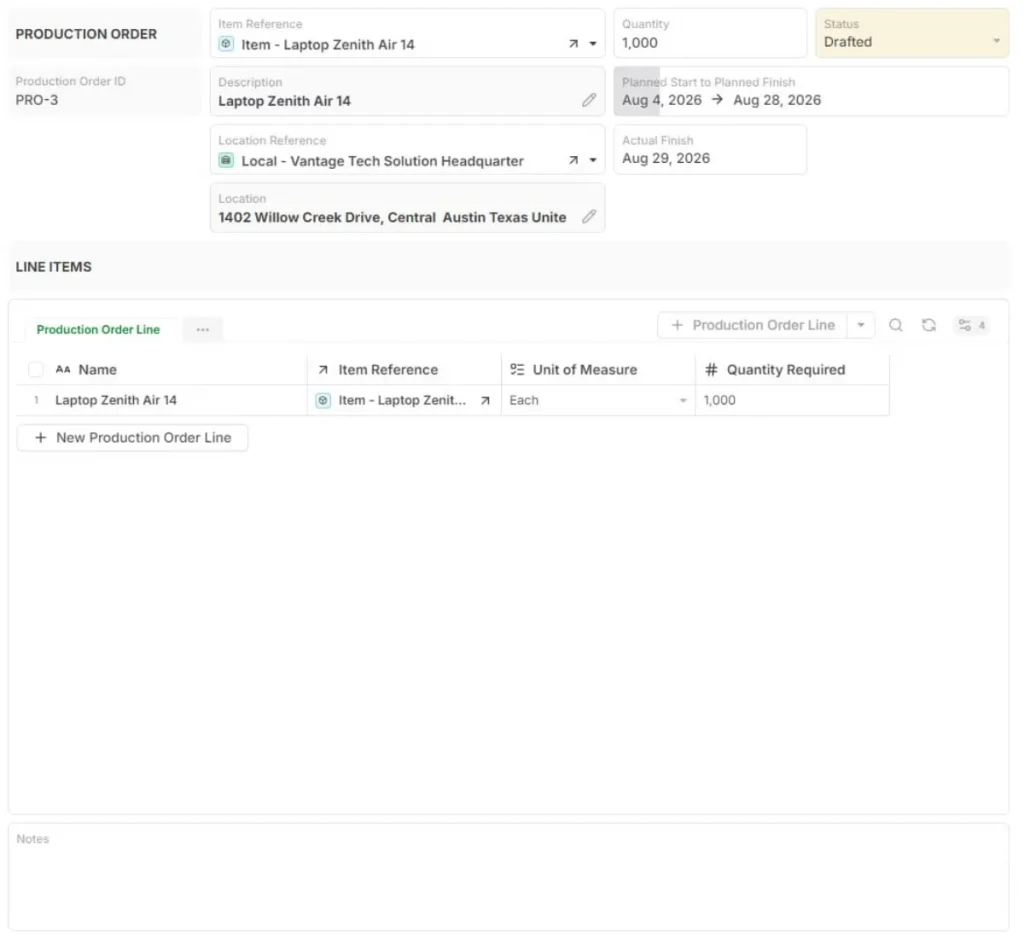
Production Order Records. Source: AnyDB
Production Planning vs. Production Scheduling
Production planning and production scheduling work at different levels. Planning defines what the plant needs to produce over the coming weeks or months, while scheduling decides exactly when and where that work will happen on the shop floor.
For example, suppose the monthly plan calls for 4,000 brackets to meet customer demand. That target belongs to the production plan. The schedule then turns it into specific execution details, such as Press 2 running Batch A on Tuesday’s first shift, followed by Batch B on another machine later in the week.
Keeping those layers separate matters because they answer different questions. The plan checks whether capacity, materials, and labor can support the required volume. The schedule adjusts daily execution around machine availability, shift changes, delays, and urgent orders.
When both are managed in the same spreadsheet, short-term changes can start overwriting long-term targets. The file gradually becomes a record of what already happened instead of a reliable view of what still needs to be produced.
Typically, the production planning team owns the plan, while the shop floor supervisor or scheduler owns day-to-day execution.
What Are the Three Main Types of Production Planning?
The three main types are batch production, job or project-based production, and flow or continuous production. Each type decides what the plan is built on: lots, single jobs, or a line rate.
- A batch run makes identical items in groups or lots. A chemical manufacturer running resin lots plans by lot size and changeover time, and the forecast sets how many lots the month holds.
- Job or project-based production builds one custom or unique item at a time. An engineering firm assembling a one-off skid plans backward from the delivery date, with labor and purchased parts tied to a job number.
- Flow or continuous production runs mass-produced goods on an assembly line. The plan protects the line rate, because stopping the line costs more than any single order.
Push and pull sit on top of the type. Push builds stock on forecasts, which is make-to-stock. Pull triggers output on actual orders, which is make-to-order.
The type decides whether forecast accuracy or order intake governs the plan.
See how a high-performance resin and polymer manufacturer replaced fragmented spreadsheets and disconnected tools with one connected system for hundreds of active orders, formulations, production, quality, and shipment coordination. Read the full AnyDB order management case study.
What Are the 5 Steps of Production Planning?
A production plan usually follows five steps: forecast demand, check capacity, calculate material requirements, build the master production schedule, and monitor actual output. Each step produces information the next one needs, so the sequence works best when the inputs stay current.
- Forecast Demand
Estimate what needs to be produced using historical sales, confirmed orders, seasonality, and other relevant demand signals. Output: demand forecast.
- Check Production Capacity
Compare the forecast with available machines, labor, space, and production time to see whether the plant can meet the target. Output: capacity load chart.
- Calculate Material Requirements
Use material requirements planning (MRP) to determine which raw materials are needed, in what quantities, and when they must arrive. This calculation depends on accurate inventory data. Output: purchase requisition list.
- Create the Master Production Schedule
Turn the demand and capacity plan into a master production schedule (MPS) with specific quantities and target production dates. Output: master schedule.
- Monitor Output and Adjust the Plan
Compare actual production with the schedule, identify bottlenecks or delays, and update the plan when conditions change. Output: variance report.
The Key Performance Indicators Each Production Planning Layer Owns
A key performance indicator (KPI) is only useful when it belongs to one layer of the plan. A plan without measurement is hard to defend.
Each layer carries its own metric, and each bad reading points somewhere specific.
- Demand forecasting: forecast accuracy and forecast bias.
- Capacity planning: utilization and capacity load.
- MRP: material availability and days of supply.
- MPS: schedule attainment and plan adherence.
- Monitoring and control: cycle time, scrap rate, and on-time completion.
Without layer-level metrics, every miss looks like a shop floor problem.
What Breaks When the Plan Lives in Spreadsheets
The plan breaks through version drift. A spreadsheet holds one file, and every planner, buyer, and supervisor keeps a copy. They diverge within a day.
When inventory items, purchase orders, and the master schedule sit in separate tabs, MRP runs on numbers that are already stale. Those figures produce wrong material requisitions. The errors then produce expedited freight and missed dates.
You might be thinking a full enterprise resource planning (ERP) suite is the only fix. The software addresses some operations, but customizing its rigid model costs more than the process it replaces.
A connected data model is the middle ground. Records, relationships, and permissions live in one place, so a requisition reads the same count the buyer sees.
If your production planning still depends on workarounds around a rigid ERP, AnyDB offers a different path: keep the systems that already handle finance or accounting, while moving operational workflows into a more flexible, connected layer.
See how AnyDB can replace or complement rigid ERP processes with configurable records, workflows, approvals, and cross-team visibility. Explore AnyDB as an ERP alternative.
Production Planning That Holds Up in Practice
A reliable production plan depends on more than a schedule. Demand, capacity, materials, BOMs, work orders, inventory, and shop-floor execution all need to stay connected so teams can see where the plan is holding and where it needs adjustment.
AnyDB gives manufacturers a flexible operational layer for that work. Inventory, BOMs, production orders, approvals, files, and related records can live on one connected data model, while teams keep the ERP or accounting systems that already handle finance and compliance.
AnyDB is built by the team behind FileCloud, a platform trusted by 3,000+ organizations worldwide.
If your production planning still depends on spreadsheets, disconnected tools, or ERP workarounds, start with one real workflow. Explore AnyDB pricing and create a free workspace to model the records, relationships, and approvals your production team already manages.
Frequently Asked Questions About Production Planning
These answers cover the questions that remain after the sections above.
Is Production Planning a Good Career?
Yes, for people who like analysis and can tolerate firefighting. The role mixes forecast modeling, capacity checks, and daily recovery work when the schedule slips. Progression usually runs from planner to planning manager to supply chain lead.
What Should a Production Planning Template Contain?
Five blocks: demand, capacity, material requirements, a dated master schedule, and a variance log. A template without a capacity block is an order list with dates.
What Does a Production Planning Department Actually Own?
It owns the volume decision: what the plant commits to make, when, and with which resources. It balances demand against capacity and hands a dated plan to the shop floor. Machine sequencing stays with the supervisor.
Where Can I Find a Production Planning Document or Chart to Use as a Starting Point?
Start with a live capacity load chart and a dated master schedule. A downloaded document goes stale within a week of printing.

The End-to-End Operations System that Finally Fits Your Reality.
No more scattered spreadsheets or rigid, disconnected tools.
AnyDB is a modern, customizable platform for managing business records and operations across teams, clients, and partners.
Learn More


Phone: (512)-761-7979
© 2024 Humanly Inc. All rights reserved.
What is AnyDB?
AnyDB is a unified, customizable data store designed to streamline and empower your entire organization. Effortlessly store, organize, and share custom business data to drive both internal and external operations across teams. Think of it as spreadsheets on steroids.Perfect for Sales, Marketing, Operations, HR, and beyond. Discover AnyDB