
Published on April 27, 2026


Field service management software for small business usually becomes relevant not because the business is trying to “modernize,” but because coordinating jobs manually is no longer working.
It often starts with small signs: a technician shows up late because the schedule changed and no one updated it properly, a customer asks for a status update and the team has to check WhatsApp to understand what happened, or an invoice stays pending days after the work was already completed.
In many small service businesses, jobs are still being coordinated through a mix of memory, spreadsheets, messages, and quick internal calls. That setup can work for a while, but once job volume grows, it creates too much room for missed appointments, unclear responsibilities, and operational bottlenecks.
A good system helps the team keep jobs, schedules, technicians, customers, and follow-ups organized in one operational flow, without adding unnecessary complexity.
What Is Field Service Management Software?
Field service management software is the system a service business uses to keep field operations organized once jobs, technicians, and customer requests become too difficult to coordinate manually.
At its core, it helps small businesses manage the operational side of service delivery: assigning field jobs, organizing technician schedules, dispatching visits, updating customers, generating invoices, and maintaining service records.
In other words, it keeps the work moving from appointment to completion without depending on memory, messages, or disconnected tools.
For small businesses, that matters more than it may seem. Most teams do not need “advanced field operations software.” They need something that helps them send the right technician to the right job, at the right time, with the right information.
In practice, that usually means:
- Sending technicians to service calls without confusion;
- Keeping job status updated throughout the day;
- Avoiding missed or forgotten visits;
- Capturing notes, photos, or service details in the field;
- Invoicing faster after the work is done.
That is the real job of FSM software: reducing the coordination work that usually sits between booking the job and getting paid for it.
Core Features to Look For in Field Service Management Software
The most useful features are usually the ones that reduce back-and-forth, keep the team aligned, and help jobs move without constant supervision.
Look for features such as:
- Scheduling and dispatching: A clear calendar view to assign jobs, move appointments, and coordinate technician availability without confusion.
- Mobile access for technicians: Field teams should be able to open job details, upload photos, collect signatures, add notes, and update status directly from their phones.
- Customer and job history: Access to previous visits, reported issues, service notes, and contact details helps technicians arrive with context instead of starting from zero.
- Invoicing and payment collection: The ability to generate invoices quickly after service and, ideally, collect payment without creating a separate manual process.
- Status tracking and team visibility: Everyone should be able to see what is scheduled, in progress, completed, or delayed without having to ask around.
- Basic workflow coordination: Even small teams benefit from simple internal structure, such as follow-ups, next steps, or alerts when a job needs attention.
These are the features that usually make the biggest difference in day-to-day field operations.
What Makes Small Business Field Operations Hard to Manage?
In small businesses, teams are usually lean but overloaded. The same people are handling scheduling, customer communication, and problem-solving in real time. Often, the owner is still in the middle of operations assigning jobs, answering messages, and resolving issues manually.
Work also tends to be spread across multiple channels: calls, WhatsApp, spreadsheets, and memory. There is no single place to see what is happening.
On top of that, jobs are rarely standard. There are exceptions, delays, reschedules, and custom steps that don’t fit a simple flow.
Individually, these are manageable. Together, they create constant friction, and that is what makes field operations hard to control as the business grows.
How to Choose Field Service Management Software for Small Business
Choosing the right FSM software is less about comparing features and more about understanding how your operation actually runs:
- Start with how jobs actually move
Before looking at tools, map your real workflow. How do jobs come in? Who assigns them? What happens in the field? How are they closed? If the system doesn’t reflect this flow, it won’t hold.
- Map the operational records you need
At a minimum, you’re managing jobs, customers, technicians, assets, invoices, photos, and signatures. The system should keep these connected, not scattered across tabs or tools.
- Look for mobile-first execution
If technicians can’t easily access, update, and complete jobs from their phones, the system will be bypassed. Field adoption is what makes or breaks the tool.
- Make sure the system fits growth
What works for 10 jobs a week often breaks at 50. Check if the software can handle more technicians, more jobs, and more complexity without adding friction.
- Avoid tools that only solve scheduling
Scheduling is important, but it’s just one part. The real value comes from managing the full job lifecycle, from assignment to completion and invoicing.
How AnyDB Supports Field Service Management Workflows
AnyDB approaches field service management differently. Instead of forcing your business into rigid FSM modules, it acts as a lightweight ERP alternative that structures operations around real-world objects.
Each service job becomes a live, customizable record built from a template.
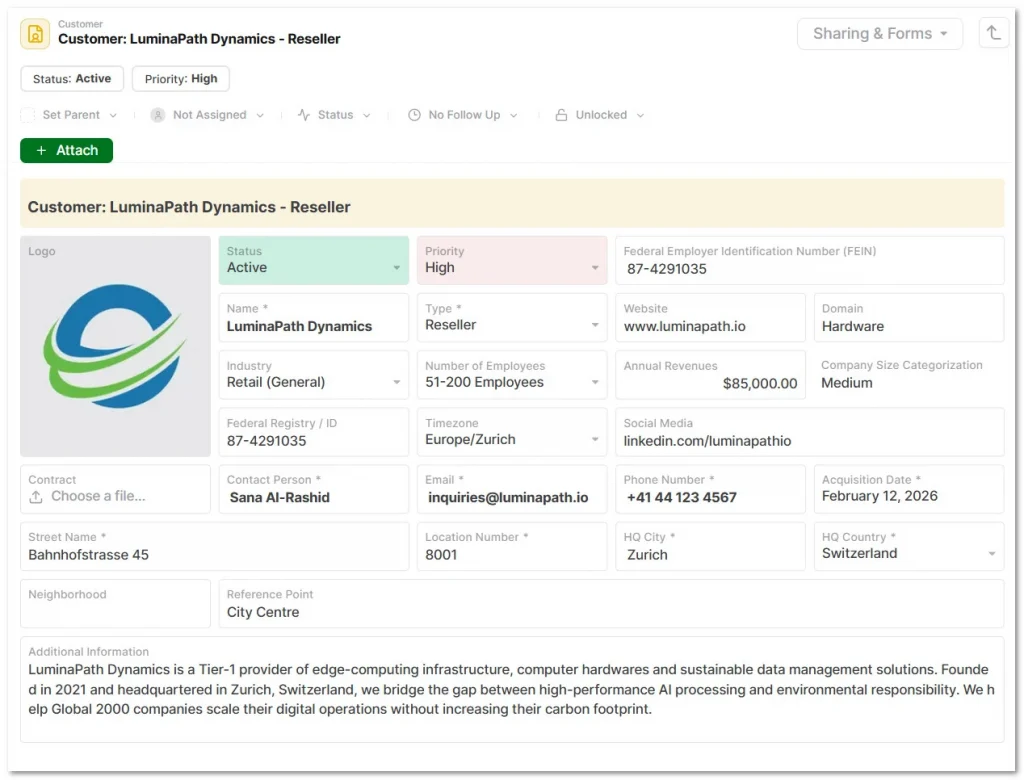
Because AnyDB includes native iOS and Android apps, field technicians can use their phones to upload site photos, update status badges, and log dates directly into the system in real time.
Jobs do not live in isolation. Because AnyDB is an object-based platform, you do not need complex SQL joins. A “Work Order” record can be directly attached to an “Asset” object, referenced to a “Customer Profile,” and linked to an “Invoice”.
Your team gets complete context without ever switching tools.
Field operations often include site inspections, internal handoffs, or client approvals. AnyDB supports this natively. You can set automated Follow-Up Dates for recurring maintenance, use Integrated Forms for field data collection, or share a Secure Portal so clients can view the status of an installation without logging into your internal database.
For growing service businesses, the challenge is usually a lack of structure, not effort. AnyDB replaces fragmented spreadsheets and disconnected tracking apps with a unified system. It gives your team the operational solidity and audit-ready traceability of an ERP, but remains as practical and easy to use as a spreadsheet.
Want to bring structure to your field operations without adding complexity? Book a free demo and see how your jobs, team, and workflows can run in one connected system.
Frequently Asked Questions About Field Service Management Software for Small Business
Here are the answers:
What is field service management software?
It is software that helps service businesses manage jobs, technicians, scheduling, customer updates, and field operations in one workflow.
What is the best field service management software for small business?
The best option is the one that fits how your jobs, team, and service workflow actually operate, not just the one with the most features.
Do small businesses need FSM software?
Yes. Once job volume grows, FSM software helps reduce missed visits, scheduling confusion, delayed invoicing, and manual coordination.
What features should I look for?
Look for scheduling, mobile access, job tracking, customer history, invoicing, team visibility, and a workflow that fits your operation.

The End-to-End Operations System that Finally Fits Your Reality.
No more scattered spreadsheets or rigid, disconnected tools.
AnyDB is a modern, customizable platform for managing business records and operations across teams, clients, and partners.
Learn More


Phone: (512)-761-7979
© 2024 Humanly Inc. All rights reserved.
What is AnyDB?
AnyDB is a unified, customizable data store designed to streamline and empower your entire organization. Effortlessly store, organize, and share custom business data to drive both internal and external operations across teams. Think of it as spreadsheets on steroids.Perfect for Sales, Marketing, Operations, HR, and beyond. Discover AnyDB