
Published on June 30, 2026


ERP implementation is often labeled as an IT project, which is usually the first mistake. The technical setup matters, but it is rarely the hardest part. The harder work is deciding how the business will represent real operations inside an ERP system: how teams quote, buy, manufacture, receive goods, ship orders, approve work, track inventory, document compliance, and report financial results.
That is where many ERP implementation challenges begin. Processes that were manageable in spreadsheets, Google Drive, email, or shared folders suddenly need to become structured workflows.
Teams that understand their work in practice may struggle to translate exceptions, approvals, handoffs, and operational shortcuts into rigid enterprise resource planning modules.
A company can complete the technical ERP project and still fail operationally.
If the system does not match how people actually work, employees will create side spreadsheets, delay updates, avoid the tool, or rely on informal processes to keep operations moving. The ERP may be live, but the business remains fragmented.
What Is ERP Implementation?
ERP implementation is the process of planning, configuring, testing, migrating data, deploying, and optimizing an enterprise resource planning system.
In practical terms, it is the work of translating daily operations into system logic. The ERP system needs to understand how the business handles finance, procurement, inventory, manufacturing, human resources, supply chain, sales operations, compliance, and reporting.
That translation is where the project becomes difficult. An ERP system cannot fix processes the organization does not understand well enough to model.
If approval rules are informal, inventory records are inconsistent, or departments define the same customer, vendor, or product differently, the software will expose those gaps quickly.
Successful ERP deployment depends on:
- Clear requirements;
- Process mapping;
- Data quality;
- Change management;
- Testing, training, and post-launch support.
Why ERP Implementation Is So Difficult
ERP implementation challenges rarely come from software alone. They usually appear because the project exposes operational gaps the company has worked around for years.
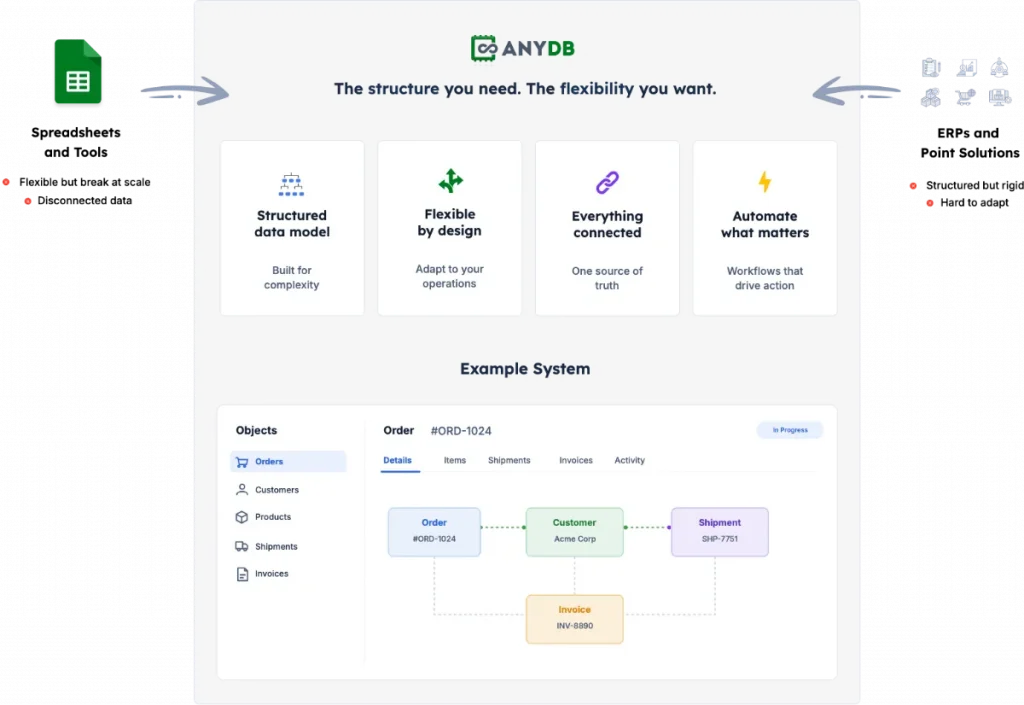
Many growing businesses start with spreadsheets, shared drives, and disconnected tools because they are flexible. Teams can adapt quickly, create their own tracking systems, and keep work moving without waiting for IT.
As the company scales, that flexibility turns into inconsistency.
Then leadership chooses an ERP for structure. The problem is that the business may not be ready for the level of standardization the ERP requires.
The most common sources of ERP failure include:
- Undefined workflows;
- Inconsistent data;
- Departments using different processes for the same task;
- Local workarounds that never became official procedures;
- Poor documentation;
- Limited internal ownership;
- Employee resistance;
- Over-customization;
- Underestimated training needs.
ERP project management is also misunderstood. Implementation is not an IT function alone. It is a people and operations project that requires leaders, finance, operations, department owners, and end users to define how work should actually run.
AnyDB approaches this from a more intuitive starting point. Its object-based model lets teams represent real business items and relationships, such as projects, vendors, assets, orders, inspections, and inventory movement, without forcing operators to think in complex relational tables or rigid ERP modules.
The 6 Key ERP Implementation Stages
ERP implementation follows a structured lifecycle, but each stage creates risk when teams treat it as a checklist instead of a decision about how operations will work inside the system.
Discovery & Planning
Define the project team, goals, budget, timeline, business requirements, and success criteria. Weak ERP requirements create expensive problems later, so operations, finance, IT, and end users should document what is critical, what is optional, which workflows exist today, and which processes need to change.
Design
Design maps business workflows to the system’s capabilities. This is where many ERP projects become painful because the company discovers that real processes do not fit standard ERP modules. Teams should evaluate workflow mapping, customization decisions, approval flows, reporting needs, field-level data, and operational exceptions.
Development & Configuration
Development and configuration define modules, workflows, permissions, fields, integrations, and business rules. Costs rise when every operational exception requires consultants, code, or complex IT support, and the system may still feel rigid.
Testing
Testing validates functionality, data integrity, security, permissions, integrations, and daily workflows. It must include end users testing real tasks, such as purchase orders, lot tracking, inventory movement, invoice approvals, shipment updates, compliance documentation, and reporting.
Deployment
Deployment is the go-live phase, either through a big bang or phased rollout. Teams should watch for operational disruption, migration errors, user confusion, downtime, and support overload.
Ongoing Support & Optimization
ERP implementation continues after launch because workflows change, reports need updates, and teams require ongoing training. Traditional ERPs often make changes slow or expensive.
ERP Implementation Hidden Costs
ERP hidden costs rarely appear in the first proposal. They show up later, when the business discovers how much work is required to make the system usable.
Common hidden costs include:
- Consultant dependency;
- Customization fees;
- Internal project time;
- Training hours;
- Lost productivity during go-live;
- Data cleanup and migration;
- Integration work;
- Reporting rebuilds;
- Change requests;
- Long-term ERP maintenance.
The most expensive ERP cost is often the work employees continue doing outside the system after implementation.
When teams create shadow spreadsheets, duplicate records, or side workflows because the ERP does not support daily operations, the company pays twice. It pays for the ERP system and again for the manual work required to keep operations moving.
Low adoption also weakens reporting. If users avoid the system, leadership loses trust in the data and returns to manual verification.
AnyDB reduces hidden operational cost by helping teams build systems that fit their workflows from the start. Teams can expand gradually, connect records across departments, and maintain ERP-level structure without relying on a heavy implementation model.
How To Avoid ERP Implementation Failure
ERP implementation best practices should start before software configuration. The goal is to reduce ERP failure by proving that the system can support real work, real users, and real operational complexity.
- Define The Operating Model Before The Software
Map how work actually happens before configuring any ERP system. Teams should document workflows, owners, approvals, exceptions, data fields, documents, and reporting needs so the ERP implementation plan is based on operations, not assumptions.
- Clean And Structure Business Data Early
Messy data should be addressed before migration. Define record types, naming rules, required fields, relationships, and ownership so the system does not inherit duplicate records, incomplete files, or inconsistent business definitions.
- Involve End Users Before Testing
Operators, finance users, warehouse staff, procurement teams, and managers should participate in requirements and design, not only final testing. ERP readiness improves when the people doing the work help define how the system should support it.
- Avoid Over-Customizing A Rigid System
Customization can make an ERP expensive and difficult to maintain. Teams should decide which workflows truly need customization, which can be simplified, and which may signal that the system is not the right operational fit.
- Choose A System That Matches Operational Complexity
Companies should evaluate whether they need a heavy ERP, a modular ERP, or a flexible operational platform. ERP project success depends on fit, especially when operations include exceptions, field activity, inventory movement, compliance records, vendor documents, or multi-step approvals.
- Start Smaller When Possible
Phased adoption reduces risk. Start with one high-value workflow, such as inventory, vendor management, order tracking, maintenance, compliance documentation, or site operations, then expand from there. AnyDB supports this approach because teams can start with one system, add more systems as operations grow, and keep everything connected.
ERP Vs. AnyDB: When A Traditional ERP May Be Too Rigid
Traditional ERPs can be valuable for companies with mature processes, large budgets, dedicated implementation teams, and strong change management capacity. When operations are already standardized, an ERP system can help centralize finance, procurement, inventory, and reporting at scale.
The mismatch appears when a growing business needs structure but is still operationally fluid. This is common when:
- The business has complex operations but limited implementation resources;
- Processes are evolving quickly;
- Teams need flexibility without losing structure;
- Data lives across spreadsheets, files, and tools;
- Employees need a system they can adopt quickly;
- Records need to connect operations, vendors, inventory, compliance, and approvals;
- Leadership wants enterprise-class control without enterprise-class pricing.
AnyDB is built for that gap. It combines the structure of an ERP with the flexibility of spreadsheets through object-based business records, easy-to-use layouts, attached files, comments, history, and connected relationships.
“We spent over two years searching for software that could handle our business complexity. Every solution required us to change how we worked.
With AnyDB we built a connected operational system reflecting how our business actually operates. Today over 40 connected business objects manage proposals, procurement, inventory, projects, commissioning and maintenance.
What used to be fragmented across spreadsheets, emails, and separate applications is now connected in one place. We have complete visibility into our operations, our team works more efficiently, and management can access critical information instantly.”
Ribu, Owner, Dgicon, Commercial LED Solutions
Teams can also use role-based access control, version history, audit logs, secure portals, forms, and Cloud, GovCloud, or On-Prem deployment. They can start free, scale as needed, and use setup calls to design the right data model and workflows.
ERP Implementation As An Operational Decision
ERP implementation is not only a software decision. It is a decision about how the business will structure work, data, approvals, ownership, and reporting.
When ERP projects fail, they often reveal the same issue: the company needed connected operational data, but the chosen system was too rigid, too expensive, too difficult to adopt, or too disconnected from daily execution.
AnyDB gives growing teams a way to build and run connected business operations without starting with a heavy ERP implementation. Teams can model real business objects, connect records, automate workflows, control permissions, and expand one system at a time.
The goal is not to replace every ERP use case. It is to avoid forcing growing teams into an enterprise system before their operations are ready for one.
Book a free demo call with AnyDB and see how your team can build connected operations with ERP-level structure and spreadsheet-level flexibility.
Frequently Asked Questions About ERP Implementation
Before starting an ERP implementation, it helps to clarify a few concepts that influence cost, adoption, and long-term system fit.
Why Do ERP Implementations Fail?
ERP implementations fail because of weak requirements, poor data quality, lack of user adoption, underestimated change management, cost overruns, and systems that do not fit real operations. Many failures happen when companies treat ERP as software setup instead of operational redesign.
How Long Does ERP Implementation Take?
ERP implementation timelines vary by company size, project scope, data complexity, integrations, and change management needs. Many ERP projects take several months, while larger or more complex implementations can take more than a year.
What Is The Best Alternative To ERP For Growing Teams?
The best alternative to ERP for growing teams may be a flexible operational platform. AnyDB helps teams manage connected records, workflows, permissions, forms, portals, and reporting without the cost and rigidity of a traditional ERP.

The End-to-End Operations System that Finally Fits Your Reality.
No more scattered spreadsheets or rigid, disconnected tools.
AnyDB is a modern, customizable platform for managing business records and operations across teams, clients, and partners.
Learn More


Phone: (512)-761-7979
© 2024 Humanly Inc. All rights reserved.
What is AnyDB?
AnyDB is a unified, customizable data store designed to streamline and empower your entire organization. Effortlessly store, organize, and share custom business data to drive both internal and external operations across teams. Think of it as spreadsheets on steroids.Perfect for Sales, Marketing, Operations, HR, and beyond. Discover AnyDB