
Published on June 30, 2026


Manufacturing ERP looks valuable on paper because it promises to connect production management, inventory management, supply chain, finance, and quality in one system.
The real test starts on the shop floor.
Manufacturing operations are full of exceptions that do not always fit cleanly into standard modules: material shortages, engineering revisions, job changes, equipment dependencies, quality events, rework, late supplier deliveries, and production decisions made while work is already moving.
That is why the problem is not choosing the ERP with the largest feature list. It is choosing a system workers can use without slowing production down.
A manufacturing ERP can fail when operators face screens with too many irrelevant fields, when barcode scanning or mobile updates are difficult, or when leadership reports depend on incomplete shop floor data.
For growing manufacturers, the goal is structure without losing operational fit.
What Is Manufacturing ERP?
Manufacturing ERP is an enterprise resource planning system built to manage production planning, material requirements, inventory, purchasing, shop floor activity, quality, financials, and reporting.
Its role is to connect business planning with physical execution. A manufacturing ERP should help teams understand:
- What needs to be produced;
- Which materials are available;
- Which orders are delayed;
- Which machines or labor resources are needed;
- What quality checks apply; and
- How production affects cost and delivery.
Manufacturing ERP systems typically support production planning, material requirements planning, work orders, bills of materials, inventory tracking, procurement, quality management, compliance records, financial management, and reporting.
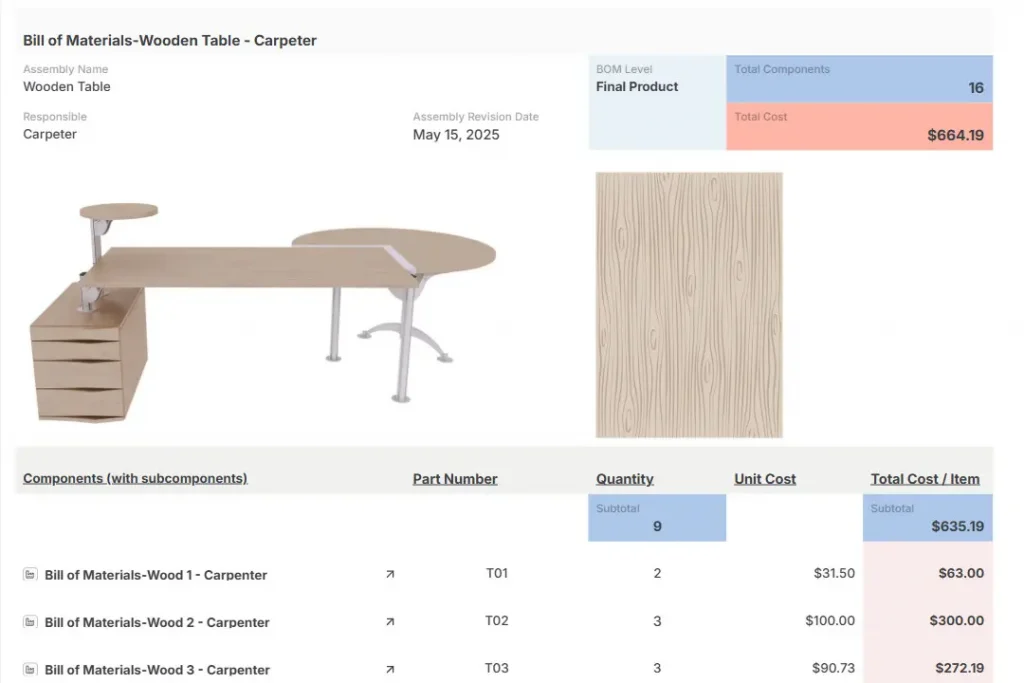
The system only works when production data is accurate, maintained, and connected to the work happening on the floor.
If BOMs are outdated, inventory updates are delayed, or quality checks happen outside the system, leadership may see reports that look organized but do not reflect operational reality.
That is why ERP for manufacturing should be evaluated as manufacturing operations software, not just enterprise resource planning software.
Why Manufacturing ERP Is So Hard To Get Right
Manufacturing ERP challenges start with the nature of manufacturing itself. Production is difficult to standardize because it combines planning, physical movement, labor, materials, machines, quality, documentation, and exceptions in the same operating environment.
Many ERP systems can work well when the company has clean data, disciplined processes, strong training, and a thoughtful ERP implementation. Without those foundations, even a powerful system can become unreliable.
A manufacturing ERP can fail when:
- Processes are poorly documented;
- Data is inaccurate or outdated;
- BOMs are incomplete;
- Units of measure are inconsistent;
- Operators are not trained;
- Work orders do not reflect real shop floor conditions;
- Quality checks happen outside the system;
- Inventory records are updated late;
- Maintenance records are disconnected from equipment;
- Customizations are added without a clear architecture.
In that scenario, the ERP does not create the problem, but it amplifies it. Poor manufacturing data becomes poor reporting, weak process discipline becomes low shop floor adoption, and bad training turns daily work into workarounds.
Core Manufacturing ERP Modules
Manufacturing ERP modules should be evaluated by how well they support real production work, not by how many features appear on a sales page. Each module needs to manage the operational relationship between plans, materials, labor, machines, inventory, quality, and cost.
Production Planning & Scheduling
Production planning and scheduling help teams decide what should be produced, when it should happen, who should do the work, and which materials, machines, and capacity are required.
This module matters because production plans rarely stay static. Materials arrive late, machines go down, labor capacity changes, customer due dates shift, and urgent jobs enter the queue.
If the schedule is disconnected from inventory, equipment, work orders, or shipments, planners make decisions with partial information.
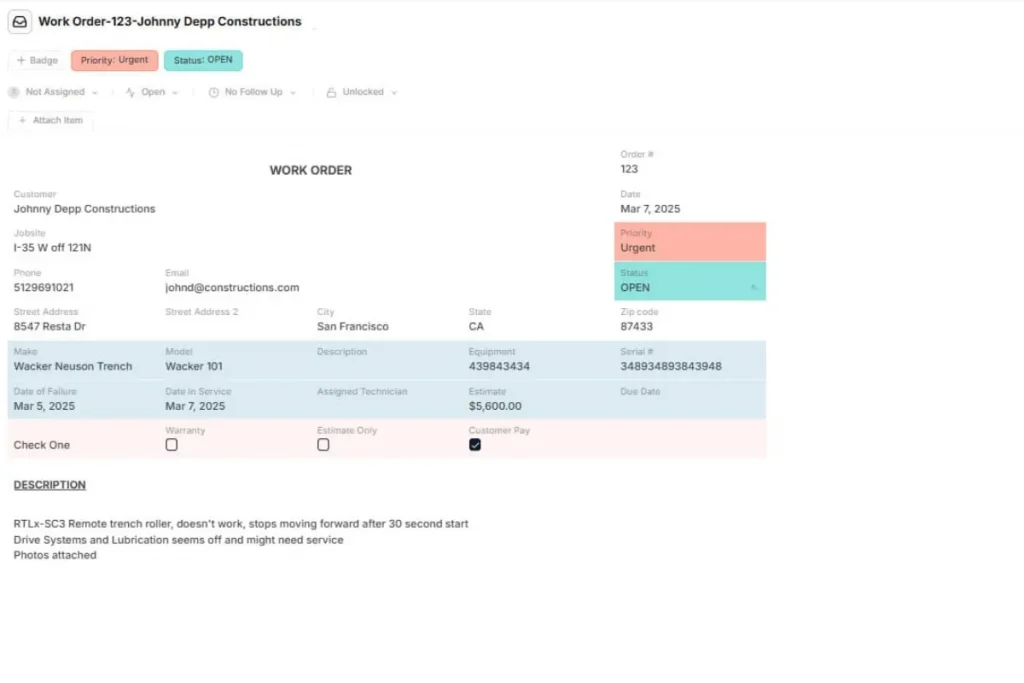
AnyDB can connect production schedules to work orders, inventory availability, equipment records, customer orders, shipments, and operational notes. Instead of managing production as a static calendar, teams can manage it as a connected workflow.
Material Requirements Planning
Material requirements planning, or MRP, helps manufacturers calculate which raw materials, components, or parts are needed to complete production.
MRP becomes unreliable when BOMs are inaccurate, procurement is delayed, inventory records are outdated, or the system shows stock that is not actually available.
That creates two opposite risks: overstocking materials that tie up cash or running into stockouts that delay production.
AnyDB supports transaction-based inventory tracking, supplier records, purchase activity, and inventory movement. This helps teams connect material planning to actual stock events, instead of relying only on static quantity fields.
Shop Floor Control
Shop floor control helps teams track production execution, labor reporting, machine monitoring, work order progress, and real-time performance.
The common failure point is usability. Operators often do not need full ERP complexity.
They need to scan a barcode, update a status, record a defect, log completed work, or confirm a machine-related issue quickly.
Walkthrough Order Management & Fulfillment in AnyDB
If the interface adds too many irrelevant fields, shop floor adoption drops and production data becomes incomplete.
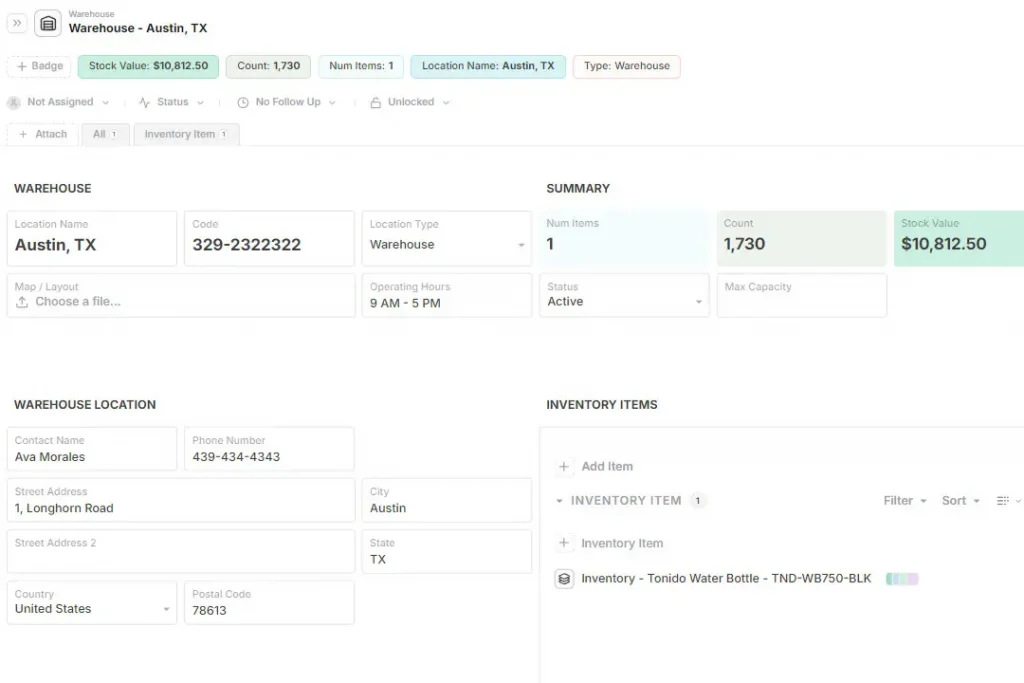
AnyDB can give shop floor users focused records, forms, portals, and mobile-friendly workflows. Workers see the fields and actions relevant to their role, while managers still get connected production execution data.
Inventory Management
Inventory management tracks raw materials, work in progress, finished goods, consumables, parts, and warehouse movement.
Manufacturing inventory requires more than quantity on hand. Teams often need lot numbers, batch history, bin or warehouse location, movement records, reorder points, supplier data, usage history, and links to production or shipment activity.
If inventory is updated late, purchasing, scheduling, and financial reporting all become less reliable.
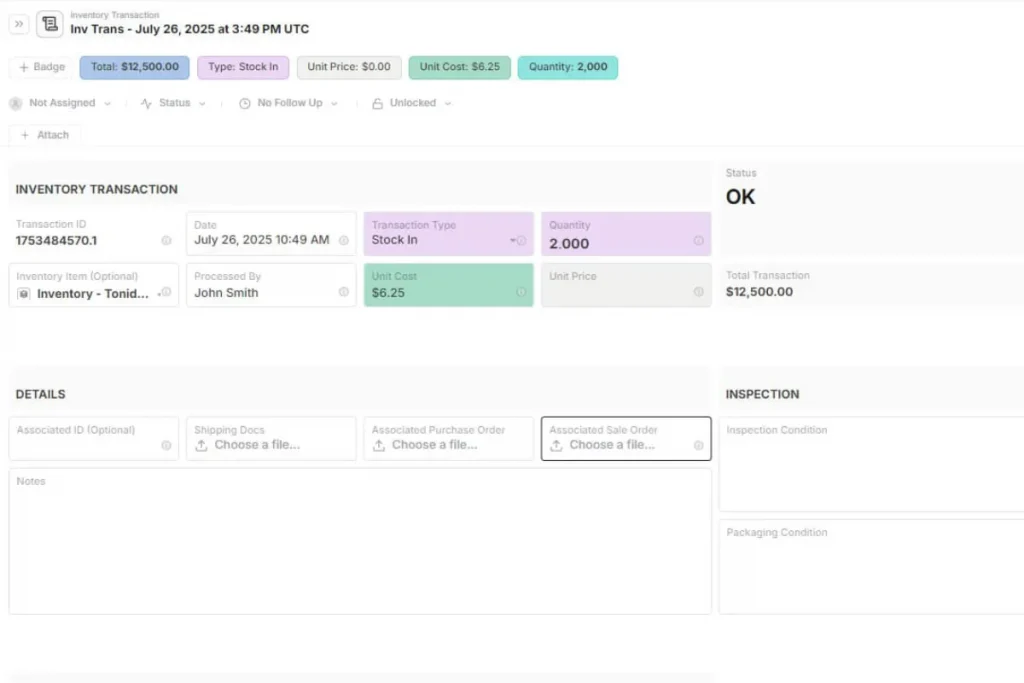
AnyDB’s inventory systems can track every stock transaction and connect inventory movement to orders, shipments, vendors, parts, and compliance records. That gives teams a clearer view of what moved, why it moved, and which operation it supports.
Quality & Compliance
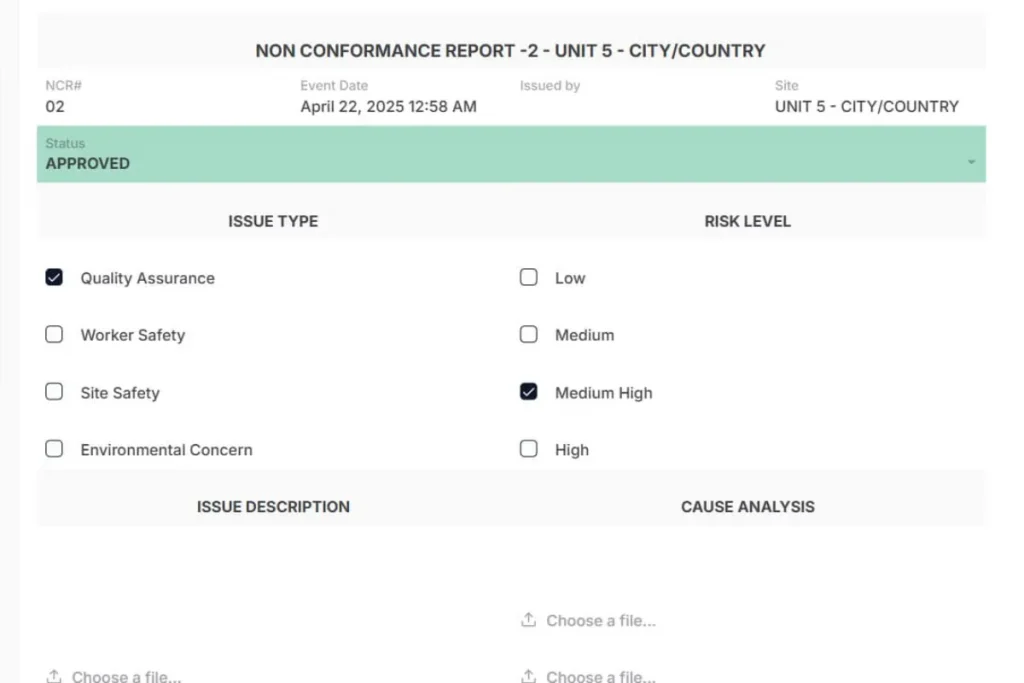
Quality and compliance modules manage inspections, audits, nonconformance reports, corrective actions, traceability, documents, and regulatory evidence.
This matters because manufacturing quality is tied to proof. Teams need to show:
- What was inspected;
- Which standard applied;
- What failed;
- Who reviewed it;
- What corrective action followed; and
- Whether the issue was closed.
For pharma, medical devices, food products, industrial equipment, and regulated supply chains, disconnected quality records create operational and compliance risk.
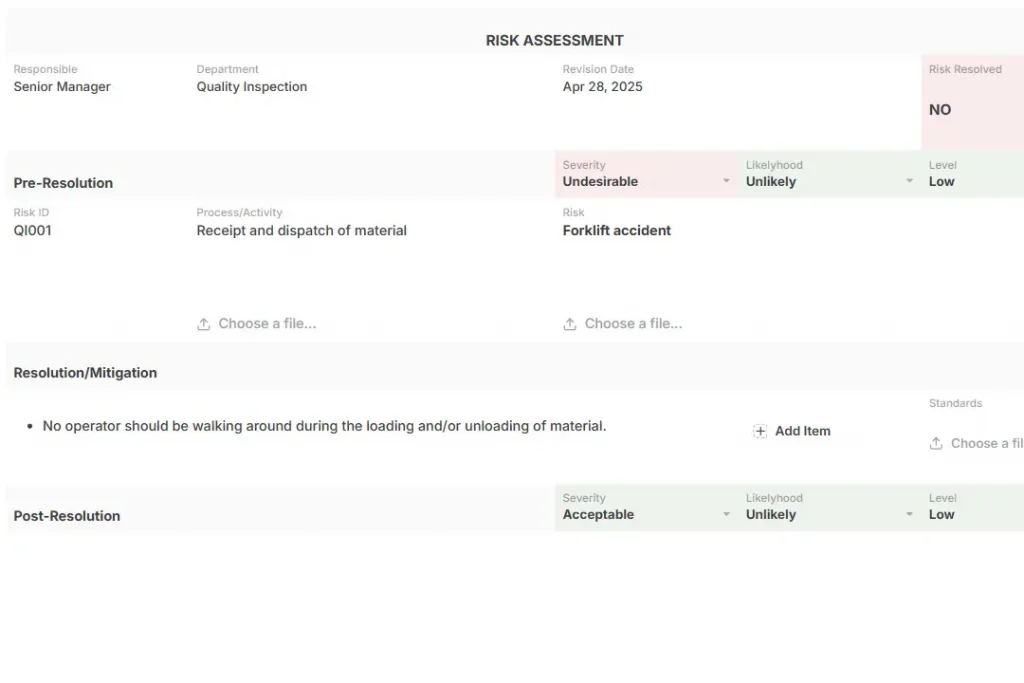
AnyDB can connect inspections, nonconformance reports, corrective actions, evidence files, approvals, and audit logs in one operational record structure. Quality data stays attached to the production, supplier, asset, or compliance record it belongs to.
Financial Management
Financial management connects production activity to job costing, purchasing, payroll, accounting, inventory valuation, and profitability.
Finance needs reliable production and inventory data to understand costs accurately. If labor, materials, scrap, rework, purchasing, and inventory movement are not captured consistently, job costing becomes an estimate instead of an operational truth.
AnyDB can support operational cost visibility by connecting purchasing, inventory, vendor activity, production records, and approvals.
For manufacturers that are not ready for a full ERP finance implementation, this creates a practical path to cleaner operational data before heavier financial system integration.
Most Used Manufacturing ERP Software Options
The best manufacturing ERP depends on company size, manufacturing method, budget, process maturity, and implementation capacity. A system that works for a high-volume, multi-site manufacturer may be too heavy for a smaller shop still standardizing production data.
Common manufacturing ERP platforms include:
- Oracle NetSuite: Often used by manufacturers that want cloud-based ERP software to connect operational and financial data;
- Acumatica Cloud ERP: A scalable cloud ERP platform often considered by growing manufacturers that need flexibility across users and workflows;
- Microsoft Dynamics 365 Business Central: A common option for small and mid-sized companies already working inside the Microsoft ecosystem;
- Odoo ERP: A modular ERP platform that can work well when implementation is disciplined and customization is controlled;
- SAP Business One: A smaller-business ERP option from SAP, often evaluated by manufacturers that need stronger inventory and business management structure;
- Epicor Kinetic: A manufacturing-focused ERP platform often used by discrete, make-to-order, and complex production environments;
- Infor SyteLine: An ERP platform built for manufacturers with deeper industry-specific production, supply chain, and planning needs.
No platform is universally the best manufacturing ERP. Small manufacturers may prefer modular systems, regulated manufacturers may need traceability and documentation, and high-volume shop floors need fast interfaces and disciplined data capture.
AnyDB should be considered when manufacturers need connected operational systems, custom workflows, inventory movement, compliance records, portals, forms, and role-based access without a traditional ERP implementation burden.
How To Choose The Right Manufacturing ERP Or Alternative
Choosing manufacturing ERP should start with how production actually works, not with the largest feature list. The right system must fit the company’s workflows, data discipline, shop floor reality, and implementation capacity.
- Identify Your Manufacturing Method
Make-to-order, engineer-to-order, process manufacturing, batch manufacturing, discrete manufacturing, and mixed-mode manufacturing all require different ERP requirements. A system should match the way products are planned, built, revised, tracked, and delivered.
- Map Production And Inventory Workflows
Before choosing software, document work orders, material movement, BOMs, revisions, quality checks, approvals, and warehouse activity. This shows which processes need structure and which exceptions the system must support.
- Evaluate Shop Floor Usability
Operators need fast, focused tools. If the system is too complex, users will return to paper, spreadsheets, or informal updates, which weakens production data.
- Review Data Governance Requirements
Manufacturers need clean part numbers, BOMs, supplier records, inventory rules, quality records, and document control. Without that foundation, ERP readiness is low.
- Compare Implementation Capacity
A powerful ERP may fail without internal ownership, training time, budget, or a strong implementation partner.
- Decide Whether You Need ERP Or A Flexible Operations Platform
Some manufacturers need a full ERP. Others need a connected operational system for production, inventory, quality, vendors, assets, and compliance first. AnyDB fits companies that need to build around real manufacturing objects and expand gradually while keeping records connected.
Using AnyDB For Manufacturing Operations
Instead of forcing production into predefined software silos, AnyDB structures manufacturing operations through connected records.
Teams can model the way the business actually runs, from supply chain activity and production lines to inspections, inventory movement, and equipment history.
AnyDB supports manufacturing use cases such as:
- Inventory systems with transaction history: Track every stock-in and stock-out event instead of relying on static quantity fields;
- Goods received and shipment tracking: Connect sales orders, shipment journals, freight details, transport modes, and delivery events;
- Parts records and compliance documents: Link raw materials, components, safety sheets, certifications, and compliance PDFs in one record structure;
- Material traceability: Support regulated workflows that require visibility into controlled substances, consumables, and material usage;
- Lot, batch, and chain-of-custody history: Track which batches of materials were used in specific production runs;
- Vendor certifications, contracts, and invoices: Centralize supplier profiles with RFPs, compliance credentials, contracts, and payment records;
- Supply logistics connected to inventory movement: Use live stock and usage data to support purchasing and logistics decisions;
- Site inspections with photos and access logs: Let field and floor teams capture inspection photos, statuses, and access activity from mobile devices;
- Maintenance tasks and equipment records: Track physical assets, maintenance history, manuals, and related work;
- Quality exceptions and nonconformance reports: Log defects, document root causes, and connect issues to vendors, production runs, or corrective actions;
- Employee tasks, training, and equipment records: Track certifications, safety gear, license expirations, and follow-up tasks.
The Platform Capabilities Powering Your Floor
AnyDB provides the operational infrastructure manufacturers need to manage connected work at scale. Teams can use:
- Object-based records: Model real business items, such as finished products, components, machines, vendors, inspections, and shipments;
- Fields, files, comments, and history on each object: Keep QA photos, internal notes, documents, and activity records attached to the item they belong to;
- Connected relationships between records: Link a vendor to a purchase order, an inventory item, a production run, and a final shipment;
- Templates: Standardize data capture for BOMs, work orders, inspections, assets, and employee profiles;
- Forms: Collect structured data directly from the shop floor;
- Secure portals for vendors, customers, and partners: Give external users controlled access to submit invoices, acknowledge purchase orders, or share documents without exposing internal data;
- Role-based access control: Control what floor workers, managers, vendors, customers, and auditors can see or update;
- Field-level control: Hide sensitive fields, such as costs or internal notes, from external forms and portals;
- Version history and audit logs: Maintain traceability over changes, approvals, and record activity;
- Cloud, GovCloud, or On-Prem deployment: Choose the hosting environment that fits IT, security, or regulatory requirements;
- 90-day disaster recovery: Protect mission-critical production data with backup coverage;
- Start free and scale as needed: Build focused workflows first, then expand as the operation grows.
AnyDB gives manufacturers ERP-level operational structure without forcing every workflow into a traditional ERP implementation. Teams get connected data, audit trails, permissions, and workflow control while keeping the flexibility needed to keep production moving.
Book a free demo call with AnyDB and see how your team can manage manufacturing operations with ERP-level structure and spreadsheet-level flexibility.
Frequently Asked Questions About Manufacturing ERP
Before choosing manufacturing ERP software, it helps to clarify how these systems support production, inventory, quality, and day-to-day operations.
What Are The Main Modules In Manufacturing ERP?
The main manufacturing ERP modules include production planning, MRP, shop floor control, inventory management, quality and compliance, financial management, procurement, and reporting. Together, they help connect production activity with materials, costs, documentation, and operational visibility.
Why Do Manufacturing ERP Implementations Fail?
Manufacturing ERP implementations often fail because of poor data quality, weak process discipline, low shop floor adoption, over-customization, poor training, and systems that do not fit real operations. The software may be powerful, but it will fail if teams cannot maintain accurate data and use it consistently.
Is There An Alternative To Manufacturing ERP?
Yes. Manufacturers may use a flexible operations platform when they need connected production, inventory, quality, vendor, and compliance records without the cost or rigidity of a traditional ERP. AnyDB supports this model by helping teams build around real manufacturing objects and expand gradually.

The End-to-End Operations System that Finally Fits Your Reality.
No more scattered spreadsheets or rigid, disconnected tools.
AnyDB is a modern, customizable platform for managing business records and operations across teams, clients, and partners.
Learn More


Phone: (512)-761-7979
© 2024 Humanly Inc. All rights reserved.
What is AnyDB?
AnyDB is a unified, customizable data store designed to streamline and empower your entire organization. Effortlessly store, organize, and share custom business data to drive both internal and external operations across teams. Think of it as spreadsheets on steroids.Perfect for Sales, Marketing, Operations, HR, and beyond. Discover AnyDB