
Published on September 21, 2026


A purchase request starts with one simple rule. Anything above $5,000 needs a manager’s approval. Then the rules multiply. Finance reviews larger amounts. Procurement joins for certain categories. Legal gets involved with specific vendors. Before long, the path a request takes depends on what it contains, not just who submitted it. That shift is what separates approval workflow software from a simple sign-off button.
The system needs to read the conditions inside each request, send it down the right path, and keep permissions, supporting information, decisions, and history intact along the way.
This comparison looks at eight platforms through that lens. We evaluate each one on routing flexibility, permissions and access control, forms and structured intake, automation, auditability, integrations, and how well it handles cross-team work and conditional exceptions.
Approval Workflow Software Rules Rarely Stay Simple
A basic approval flow is easy to picture. Someone submits a request, someone reviews it, and a decision comes back. Every request follows the same path because the rules never change.
Most operations do not stay this tidy for long.
The Path Changes With What Is Inside the Request
Consider a purchase process again. A request under $1,000 might only need a manager’s sign-off. Add a software subscription and procurement joins the review. A purchase from a specific vendor might trigger a compliance check, while a request from a high-risk department follows an entirely different route.
Value, category, department, vendor, and risk level can each redirect where a request goes next. A platform might advertise several approval stages, but the sharper question is how precisely those stages respond to what is actually inside the request.
Exceptions Are Part of the Rules, Not Outside Them
Exceptions love to show up right when a workflow looks finished. They are not rare edge cases to shrug off.
In most operations, they are baked into how the process runs. A low-value request might approve itself automatically. One category might skip a department entirely. Each exception adds another path, and each path has to stay understandable to whoever maintains it later. A sequence of steps quietly turns into a set of rules governing how requests move through the business.
There is one more layer worth naming: the information an approver needs to make the call, from supporting documents to prior decisions to vendor history. Some software just moves a request from one reviewer to the next. Far fewer platforms keep the request, its data, its permissions, and its audit trail connected the whole way through.
Read More: Approval Workflow: Automating Approvals Across Teams and Processes

8 Approval Workflow Software Platforms Compared
Approval workflow software means different things depending on the operation behind it. A finance team wants controlled invoice approvals. A creative team wants structured document review. An enterprise living inside Microsoft 365 wants approvals built into tools it already uses. The eight platforms below start from different places:
Microsoft Power Automate
Power Automate turns an approval into one step inside a larger Microsoft 365 automation, with Teams, SharePoint, and other services reacting to the outcome. It suits organizations already running operations through that ecosystem. Access control mostly follows the existing Microsoft 365 tenant, and as flows pick up more conditions, whoever maintains them needs real fluency in Power Automate itself.
Kissflow
Kissflow centers on forms and workflow design, approachable enough for business teams to build and adjust approval processes without writing code. Conditional routing, parallel branches, escalations, and audit trails cover real ground, and its cross-department orientation works well when procurement, finance, and HR share a process. Permissions run role-based rather than field-level, worth checking against how tightly sensitive data needs controlling.
ProcessMaker
ProcessMaker treats approvals as one piece of a formal business process, with a BPM engine built for process modeling, conditional paths, human tasks, and integrations. That suits organizations with established, multi-step procedures and several participants. The depth carries its own weight, though. Someone on the team needs to own the process administration as the workflows grow more sophisticated.
Pipefy
Pipefy puts the pipeline first. Requests arrive through a form, move through stages, hit an approval checkpoint, and continue into whatever comes next, which suits procurement or onboarding-style processes well. Cross-team handoffs that do not map to a single pipeline ask more of it, since the structure mostly assumes work flows in one direction.
Monday.com
Monday.com folds approvals into the boards teams already use to run projects. Approval stages and permissions sit alongside the rest of the work, so a manager sees status and context in one place. The underlying logic is lighter than tools built specifically for workflow, and highly conditional processes with several branching rules tend to outgrow what a board’s automation can express.
Jotform Workflows
Jotform starts from the form. Its workflow builder uses form responses to trigger conditions, branch requests down different paths, run parallel approvals, and connect decisions to follow up actions. The open question is what happens after submission. If the approval needs ongoing connections to other operational records, a form first model only tells part of the story.
ApprovalMax
ApprovalMax knows exactly what it is for. Its workflows tie directly into financial documents and accounting platforms such as Xero, QuickBooks Online, and NetSuite. Bills, purchase orders, expenses, and vendor records all move through sequential and parallel approvals built in. That specialization is also its ceiling. Outside a financial workflow on one of its supported accounting systems, it has little left to offer.
Filestage
Filestage is built for reviewing content, not requests. Marketing assets, documents, and creative files move through versions, comments, and sign-off stages where the file itself is what is being approved. That focus is a strength few generalist tools can match. If the decision depends on a customer, contract, or vendor record sitting elsewhere, Filestage will not be the one holding onto that context.
Zoho Creator
Zoho Creator comes at approvals from the record outward. Trigger conditions, multiple approval levels, and role-based or field-based approvers can fire actions automatically after a decision. Because everything lives on custom records, approvals can sit inside a broader application your team builds around them, and that flexibility always comes with configuration work attached.
| Platform | Strongest Fit | Where It Can Struggle |
|---|---|---|
| Microsoft Power Automate | Microsoft-centric organizations | Workflow maintenance as conditions multiply |
| Kissflow | Cross-department business process automation | Field-level permission granularity |
| ProcessMaker | Formal, multi-step business processes | Administrative overhead |
| Pipefy | Process-driven, single-direction operations | Cross-team handoffs outside the pipeline |
| monday.com | Teams already managing work in boards | Depth of conditional logic |
| Jotform Workflows | Form led request intake | Connecting approvals to ongoing records |
| ApprovalMax | Finance teams on Xero, QuickBooks, or NetSuite | Anything outside financial workflows |
| Filestage | Document and creative review | Approvals tied to operational records |
| Zoho Creator | Custom business applications | Ongoing configuration and maintenance |
Once the approval itself stops being the only thing under evaluation, the differences get easier to see. Every platform above can organize a decision. Far fewer can hold onto everything connected to it once that decision needs tracing back six months later.
AnyDB: When Approval Workflow Software Needs a Connected Operational System
At some point, an approval stops being a standalone request. It belongs to a purchase, a vendor, a project, a contract, a donation, or a compliance requirement, and the surrounding record matters as much as the decision itself.
A request-based model keeps things simple: collect the request, route it, record the decision, and notify the requester. A connected operational model goes further. It keeps the request as a structured record linked to its documents and related data. It evaluates conditions from real operational information and triggers whatever needs to happen next.
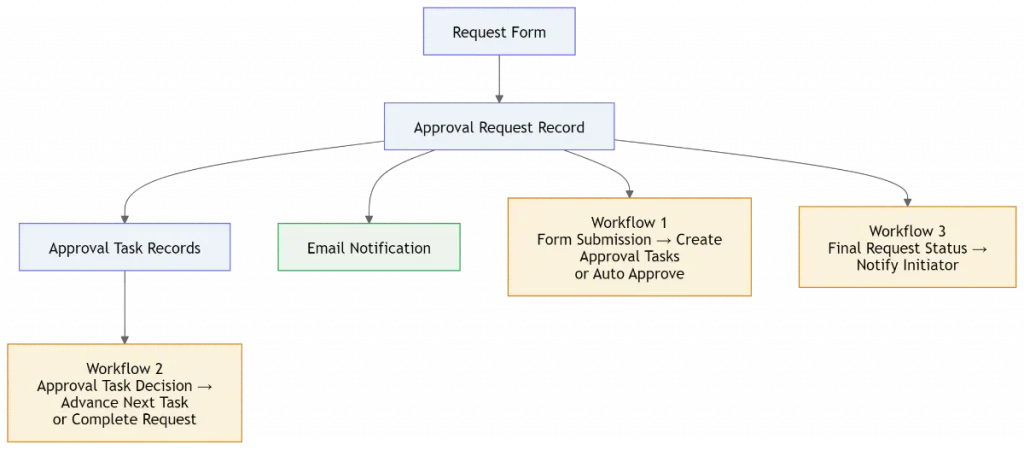
AnyDB approaches approval workflows as a custom operational system built on that second model. It combines structured records and forms with conditional routing, sequential stages, exception rules, permissions, notifications, and connections to the rest of an organization’s operational systems.
How Howard County Schools Rebuilt Its Donation Approvals
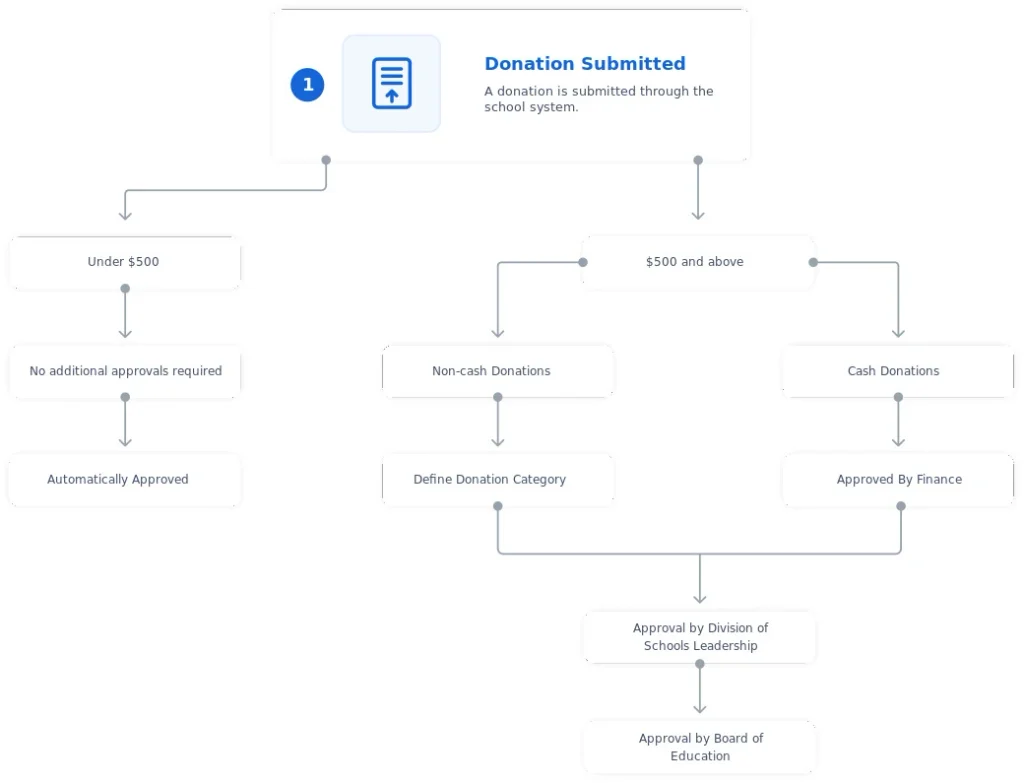
The Howard County Public School System offers a clean example. Across 78 schools, donation approvals covered cash and non-cash gifts, several categories, multiple departments, and exceptions for small value or pass-through donations.
The previous setup could collect submissions well enough. But the workflow grew harder to maintain as routing depended on type, value, category, and a growing list of exceptions, and consistent auditability was slipping.
AnyDB restructured the operation instead of adding another approval screen on top of the old one. Each donation became a record carrying its type, category, value, and status. Approval stages became explicit workflow steps, each with its own sequence and department owner. Routing responded to the donation’s actual data. Defined exceptions bypassed approval automatically, and the parent record kept showing the current stage, overall status, and completion timestamp.
The improvement did not come from a better interface. It came from modeling the approval operation itself, something that matters more with every department, request type, and exception an organization adds.
Read More: Managing Donation Approvals Across 78 Schools Without Workflow Breakdowns
Choose Approval Workflow Software That Can Keep Up With Your Rules
Approval workflow software should fit the rules that shape each decision, nothing more and nothing less. A straightforward process may need little beyond a request, an approver, and a clear outcome. As conditions, exceptions, ownership, and connected records enter the picture, the system needs to handle that complexity without losing clarity.
If your approval processes have reached that second stage, explore how AnyDB builds a custom operational system around approval workflows.
See whether it fits the way your operation actually runs.
Frequently Asked Questions About Approval Workflow Software
Approval workflow software questions tend to repeat across finance, procurement, HR, and IT teams evaluating a purchase. Here are direct answers to the ones that come up most often.
What is approval workflow software?
Approval workflow software organizes how requests move through review and decision stages instead of living in email threads, spreadsheets, or shared documents. It routes requests, assigns reviewers, records decisions, sends notifications, and keeps a history of what happened. The value grows once approvals involve multiple people, departments, or recurring processes that need consistent handling.
What features actually matter when evaluating it?
The right feature set depends on the process, but most approval workflow software needs to represent how decisions are genuinely made. Conditional routing sends different requests to the right reviewers. Forms capture what the approver needs to see. Permissions control who can access or change information, and automation handles notifications, assignments, and reminders.
For more involved processes, add multi-step approvals, exception handling, audit history, and integrations with the systems where the underlying data already lives. A polished approval button matters less than being able to explain exactly why a request took the path it did.
Can approval workflow software handle exceptions?
Most platforms can, though the depth varies quite a bit between them. Common examples include skipping a stage, routing through an alternate path, approving predefined cases automatically, adding an extra reviewer, or sending a rejected request back for changes.
What matters is whether exceptions are built into the workflow rules or handled manually every time one comes up. Frequent exceptions deserve to be explicit parts of the process, not workarounds someone remembers to apply.
When should approvals become part of a broader operational system?
When the approval is tightly connected to everything around it. A request that references a customer, vendor, contract, project, or compliance requirement needs that connection to survive the approval process, not just the decision itself.
At that point, a custom operational system such as AnyDB can model those relationships alongside approval stages, conditions, and history. The workflow can then adapt as the operation itself changes. For a single, self-contained approval with no downstream dependencies, a dedicated tool is often the simpler, faster choice.

The End-to-End Operations System that Finally Fits Your Reality.
No more scattered spreadsheets or rigid, disconnected tools.
AnyDB is a modern, customizable platform for managing business records and operations across teams, clients, and partners.
Learn More


Phone: (512)-761-7979
© 2024 Humanly Inc. All rights reserved.
What is AnyDB?
AnyDB is a unified, customizable data store designed to streamline and empower your entire organization. Effortlessly store, organize, and share custom business data to drive both internal and external operations across teams. Think of it as spreadsheets on steroids.Perfect for Sales, Marketing, Operations, HR, and beyond. Discover AnyDB