
Published on June 17, 2025


Google Sheets handles a short list and quick math well. Teams begin hunting for google sheets alternatives the moment records need to relate to each other, permissions need to be granular, and workflows need logic-based triggers.
The market now splits into four groups: traditional spreadsheets, spreadsheet-database hybrids, project management platforms, and business operations platforms.
This article evaluates each option by use case, not by feature count.
Read on for a decision framework and a comparison table that matches a tool to your workflow.
Why Teams Are Hunting for a Google Sheets Alternative
Sheets works fine for simple tasks and falls short on real operations. Six limits show up again and again:
- No relational structure. Linking a client to an invoice to a project takes fragile formulas or manual copy-paste.
- A 10 million cell ceiling per spreadsheet. Large tabs slow down and crash.
- Slow performance on cross-referencing and long formulas.
- No native logic-based automations, so approval workflows and alerts run outside the sheet.
- Fragmented processes across departments, each with its own file.
- Rigid views. Kanban, Gantt, and dashboards require plug-ins or a second tool.
Disconnected data produces error-prone workflows and slow decisions. Operations, finance, and admin teams absorb the cost because they run multi-step processes daily.
One team keeps inventory in one tab, invoices in another, and vendor list in a third. A single supplier price change forces manual edits in three places.
5 Google Sheets Alternatives Built for More Than Spreadsheets
Three types of tools cover the main jobs:
- Business operations platforms (AnyDB) fit teams running connected processes across departments.
- Spreadsheet-database hybrids (Airtable, Coda) suit teams that need multiple views over structured records.
- Project management platforms (Smartsheet) fit groups coordinating schedules, resources, and approvals.
- Data-connected spreadsheets (Rows) serve teams pulling live numbers from other systems.
The table below reflects information currently published by each company. Pricing and plan limits can change, so verify them before making a purchase decision:
| Tool | Best For | Core Strengths | Key Trade-Offs | Entry-Tier Price |
| AnyDB | Operations, finance, and administrative teams managing connected business processes | Connected records, dynamic references, rollups, cell-level permissions, workflows, and unlimited free guest users | Hosted AnyDB requires an internet connection; the Free plan limits object types, workflows, storage, and AI credits | Free: $0 for up to 5 team users. Business: $10/user/month billed annually, 5-user minimum. |
| Airtable | Teams building relational databases and configurable workflows | Multiple views, automations, interfaces, sync, APIs, and AI capabilities | Two-way sync is limited to Business and Enterprise Scale; Team and Business charge for Editor-level and higher collaborators, and record/API limits vary by plan | Free: $0. Team: $20/collaborator/month billed annually. Business: $45/collaborator/month billed annually. |
| Coda / Superhuman Docs | Product, operations, and knowledge teams combining documentation with structured data | Flexible docs, tables, formulas, Packs, automations, AI, and 100+ integrations/templates | Free and Pro plans have automation quotas; AI usage is credit-based; Pack sync tables also have plan-dependent row limits | Free: $0. Paid workspaces use Doc Maker pricing, while Editors and Viewers remain free. |
| Smartsheet | PMOs, project teams, and organizations managing portfolios and governed work | Gantt, dashboards, reports, forms, automations, workload tracking, plus advanced tools such as Control Center, WorkApps, Resource Management, and Bridge | Several advanced portfolio, resource, and workflow capabilities are premium features or require higher plans/add-ons | Pro: $9/member/month billed annually. Business: $19/member/month billed annually. |
| Rows | Teams analyzing connected data in a spreadsheet-style environment | Built-in integrations, AI analysis, Python, API access, automated Data Tables, and shareable interactive views | Free plan allows only 5 AI tasks/month, manual Data Table refreshes, 10 integration accounts, and 3 guests; faster automation requires paid plans | Free: $0. Plus: $6/user/month billed annually. |
1. AnyDB
AnyDB keeps the familiarity of spreadsheet-style data entry while organizing business information as connected records. A record can contain structured fields, files, comments, child records, references, formulas, and history, so teams can manage the operational context around an order, asset, customer, project, or work order in one system.
Best for operations, finance, and administrative teams that need structured records and workflows across multiple business processes.
AnyDB supports dynamic references between linked records. For example, DYNREF can retrieve a current value from another connected record, while rollup formulas can aggregate values from child records into a parent object.
That is useful for processes such as calculating bill of materials costs from component records.
Teams can also apply validation rules, assignments, workflows, and granular access controls. AnyDB supports cell-level visibility and locking as well as broader permissions across records, workspaces, users, and groups.
External clients, vendors, and contractors can access shared records and Views through guest portals, and guest users do not consume team licenses.
A work order, for example, can keep related parts, photos, child records, documents, and status information connected to the same operational context.
AnyDB also includes AI-native capabilities that go beyond spreadsheet replacement.
With AnyBot, users can describe the operational system they need and generate object types, fields, formulas, relationships, and connected structures from natural language.
AnyDB also supports MCP connections, allowing compatible AI assistants to work with authorized operational data, records, files, Views, reports, and workflows. Together, these features let teams use AI both to build the system itself and interact with the business context stored inside it. anydb.com
AnyDB currently offers a Free plan for up to five team users, with unlimited records and systems, 25 business object types, 3 workflows, 1 GB of storage, and unlimited guest users.
The Business plan starts at $10 per user per month when billed annually, with a five-user minimum.
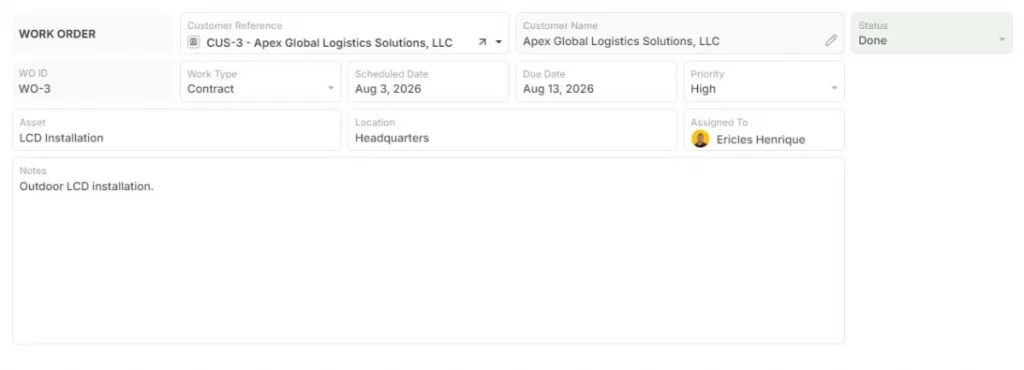
Trade-offs: The Free plan limits object types, workflows, storage, and AI usage. Teams that need private hosting, self-hosting, GovCloud, or more advanced deployment controls need the Enterprise plan.
2. Airtable
Airtable combines relational data with a familiar spreadsheet-style interface and configurable views, automations, interfaces, sync, and AI features.
Best for teams that want to build custom databases and workflows without starting from a traditional database interface.
Users can organize information through views such as grid, calendar, Kanban, timeline, and Gantt, while automations can respond to record changes and connect work across other applications.
Airtable also includes AI functionality across its plans, with usage governed by monthly AI credits.
Sync capabilities depend on the plan. In particular, two-way sync is currently limited to Business and Enterprise Scale plans, so teams relying heavily on synchronized bases should include plan requirements in their evaluation. Airtable Help Center
Trade-offs: Airtable’s pricing is tied to billable collaborators, and access to some advanced capabilities depends on higher plans. AI usage is credit-based, with additional credits available for purchase. Teams should also account for record, automation, API, and sync limits when comparing plans.
3. Coda
Coda combines documents, structured tables, formulas, automations, integrations, and AI in the same workspace.
Best for: product, operations, and knowledge teams that want documentation and structured data to live together.
A Coda doc can combine narrative content with interactive tables, buttons, formulas, and automations. Packs extend those documents with external integrations and synchronized data, while Coda AI can summarize, generate, or analyze information inside the workspace.
This model works particularly well for processes where documentation and data are closely connected, such as planning, product operations, meeting workflows, internal knowledge, or collaborative decision-making.
Trade-offs: Coda applies different limits by plan. On the Free plan, shared docs have object limits, automations are capped, and Pack sync tables are limited to 100 rows with manual refresh. Paid plans increase automation allowances, AI credits, history, and sync capacity. Coda AI also uses a credit-based model tied to Doc Makers.
Teams should therefore evaluate both the document model and the expected volume of automations, synced data, and AI usage before choosing a plan.
4. Smartsheet
Smartsheet is built around project, program, and portfolio management, using a spreadsheet-style interface alongside project planning and reporting tools.
Best for: PMOs, project teams, and organizations coordinating structured work across departments.
Core capabilities include Gantt views, dashboards, reports, forms, automation, workload tracking, and portfolio management.
Smartsheet also offers advanced products such as Control Center, Resource Management, WorkApps, and Bridge, which support standardized project deployment, resource planning, secure internal applications, and cross-system workflow automation.
Trade-offs: Not every advanced capability is included in entry-level plans. Products such as Control Center, Resource Management, WorkApps, and Bridge may require higher-tier plans or additional licensing, so buyers should verify which capabilities are included in their expected configuration.
5. Rows
Rows combines a spreadsheet interface with live integrations, automation, AI, and shareable data experiences.
Best for: teams that need to pull data from external systems, analyze it in a spreadsheet environment, and share the results through reports or interactive views.
Rows supports integrations with external applications and APIs, allowing teams to bring information from sources such as analytics, advertising, finance, and other SaaS tools into the spreadsheet. Built-in AI can assist with analysis and enrichment, while Data Tables and shareable views support recurring reporting workflows.
That makes Rows particularly useful when the spreadsheet acts as an analysis and reporting layer over data coming from other systems.
Trade-offs: The Free plan places limits on AI tasks, integration accounts, guest users, and Data Table refreshes. More frequent automation and higher usage require paid plans. Teams should also evaluate whether a spreadsheet-centered model is appropriate when the underlying process depends heavily on connected operational records rather than analysis and reporting alone.
Choosing the Right Google Sheets Alternative for Your Workflow
Two questions matter most. Does your data need to relate across records? Do external people need access without a per-seat cost?
- Related tables and connected records: an object-based operations platform.
- Permissions and external collaboration: secure guest portals.
- Automation and complex triggers: native logic-based automations.
- Views and dashboards: Kanban, Gantt, and real-time dashboards without plug-ins.
- Team size and budget: free tiers rarely cover growing guest access.
- Enterprise integrations: Salesforce, SAP, and legacy system connectors.
- Flat structure: a traditional spreadsheet.
- Generative AI: tools with built-in AI enrichment or AI Blocks.
- Strict corporate hierarchy: enterprise project management software.
- Free alternative: free spreadsheet or free plan options.
- Future growth: a platform that adds records, permissions, and workflows without migration.
Match the tool to that answer: spreadsheet, database, project tracker, or operations platform.
Ready to Go Beyond Spreadsheets?
Google Sheets remains excellent for quick collaboration and simple tasks, while modern workflows demand more. Audit your current limitations before testing google sheets alternatives.
List the three workflows that break most often in Sheets, then check whether each needs connected records, granular permissions, or external guest access. Those three requirements point to an object-based operations platform rather than another spreadsheet.
AnyDB provides enterprise resource planning (ERP)-grade custom operations without the cost, delay, or pain, with unlimited free guest accounts and cell-level privacy.
Frequently Asked Questions About Google Sheets Alternatives
Is Airtable really a full Google Sheets replacement?
No. Airtable covers relational records, multiple views, and automations, which places it high on most google sheets alternatives lists. It still trails Excel on formula depth and heavy numeric modeling.
How does AnyDB differ from a traditional spreadsheet?
AnyDB stores records as objects instead of flat rows. Each record holds fields, files, sub-objects, comments, and audit history. DYNREF cells pull live values from connected records, so a parent object updates when a child value changes.
What is the best free spreadsheet?
Google Sheets keeps a free tier tied to a Google account. LibreOffice Calc and Zoho Sheet are free options as well, and AnyDB’s Free Plan covers 5 users with unlimited records and unlimited free guest accounts.

The End-to-End Operations System that Finally Fits Your Reality.
No more scattered spreadsheets or rigid, disconnected tools.
AnyDB is a modern, customizable platform for managing business records and operations across teams, clients, and partners.
Learn More


Phone: (512)-761-7979
© 2024 Humanly Inc. All rights reserved.
What is AnyDB?
AnyDB is a unified, customizable data store designed to streamline and empower your entire organization. Effortlessly store, organize, and share custom business data to drive both internal and external operations across teams. Think of it as spreadsheets on steroids.Perfect for Sales, Marketing, Operations, HR, and beyond. Discover AnyDB