
Published on October 23, 2026


A reseller emails a deal registration request, and no partner management software exists yet. The answer is a shared spreadsheet link. Three weeks later, your team cannot say which partner owns the account, and two reps quote competing discounts to one customer.
Pipeline leaks quietly, and partners stop referring.
Partner management software, also called Partner Relationship Management (PRM) software, is a platform that runs the lifecycle of indirect partners, including resellers, distributors and referral partners: recruitment, onboarding, training, deal registration, incentives and reporting.
That definition covers the channel layer well. The harder question is where a dedicated PRM ends and where the rest of your operation has to live.
What Is Partner Relationship Management (PRM)?
Partner Relationship Management (PRM) is the set of processes, tools and systems a company uses to manage relationships with indirect partners across their lifecycle.
Three things share the name:
- As a discipline, PRM is the rulebook for recruitment, partner training and incentives.
- As a software category, PRM software automates those rules.
- The partner manager owns the relationship, and no tool changes that.
The partner lifecycle then runs in order for your team: recruit, onboard, train, enable and support co-selling, register deals, track incentives, report.
That order repeats for every channel partner you add.
What Does a Partner Manager Do?
A partner manager recruits, onboards and trains partners, then tracks their pipeline and resolves conflicts between them.
The work splits into four tasks, each with a visible artifact behind it:
- Recruiting and qualifying new partners against your written ideal partner profile, using an application form.
- Onboarding and training them on your product and pricing, tracked on a checklist and a training record.
- Supporting deal registration and co-selling through a registration form and an approval queue.
- Reviewing performance and incentives on a quarterly scorecard.
Read Also: Partners Portal: How to Build a Secure Collaboration Hub for Vendors and Resellers
What Partner Management Software Actually Automates
Software automates the channel layer stage by stage, and each stage removes a manual habit.
- Recruitment: an application form routes to review, replacing inbound email triage.
- Onboarding: checklists and document collection move into a shared record, so your team stops chasing a folder of attachments.
- Training: assignment and completion records update in one place, so you stop checking a spreadsheet tab.
- Deal registration: approval rules route each request, replacing a chain of messages.
- Incentives: rebate calculation runs from recorded deals, so a quarterly reconciliation no longer starts from scratch.
- Reporting: a partner-facing dashboard shows the current state, so your monthly status email becomes optional.
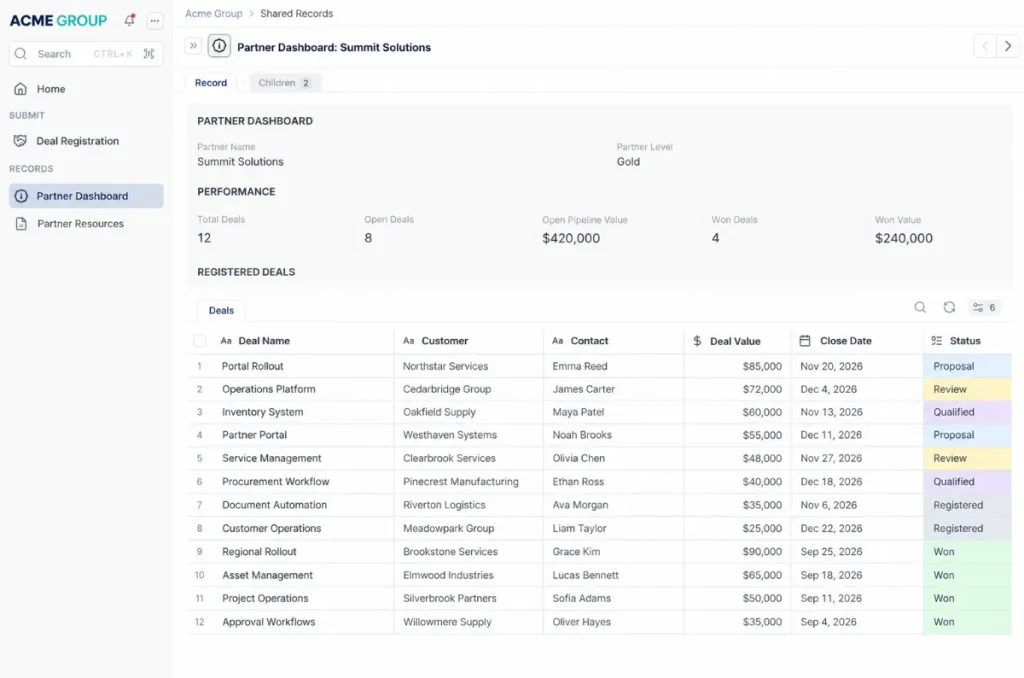
Partner Dashboard Example. Source: AnyDB
In most tools, a rule evaluates a record and moves it forward, so you see the state without asking.
Then the limit.
These tools automate the relationship, the deal and the incentive. They do not run your partner’s inventory, orders, production or service records.
A distributor can show a registered deal in the PRM and have no view of whether the stock to fulfill it exists. That gap sits outside the tool’s scope.
Where Partner Management Software Stops
You might be thinking a PRM plus a spreadsheet covers everything. It does not, because a standalone PRM holds the partner record, not the partner’s operational record.
Your stock, orders, shipments, assets and approvals stay in another system. Someone reconciles them by hand, usually after a partner asks why a shipment is late.
A portal that requires the partner to upload files makes it worse: the same data now lives in two places and drifts apart with every update.
The alternative model is a portal as a layer, described on AnyDB’s partners page. The partner sees and updates the same records the internal team works on, and permissions decide which fields and rows are visible. Nothing is copied into a separate destination.
Your partner program may still be three resellers and a shared inbox. A dedicated PRM is more tool than you need.
Best Partner Management Software: How to Evaluate the Options
The evaluation starts with your own lifecycle gaps, not a vendor feature matrix. Six criteria settle most of the decision:
- Lifecycle coverage
The tool’s automation compared with your manual work. A demo that shows every module is a warning sign.
- Operational connections
Whether partner data must touch inventory, orders or service records. A portal that only stores uploads fails the test.
- Partner access
Branding, guest users and permissions. Per-partner licenses that punish growth cost more than they show.
- Integration surface
The Application Programming Interface (API), Model Context Protocol (MCP) tools and the apps you already run. A spreadsheet export labeled an integration leaves you with manual work.
- Governance
Single sign-on, role-based access and audit logs. Shared admin rights are a governance gap.
- Total cost at your partner count
Next year’s program, not the demo count. Per-seat pricing modeled on the demo misses the total.
If you run below roughly twenty active partners and one deal motion, a shared inbox and a controlled spreadsheet can be enough. That number is your own rule, not a market benchmark.
If you’re comparing partner management software, the pricing model matters as much as the feature set.
Review AnyDB pricing to see what’s included from the free plan through Business and custom Enterprise options, and compare the cost against the number of users, guests, workflows, and operational processes you need to support.
Partner Relationship Management Examples
AnyDB’s published case studies show how partner relationships often sit inside broader operational processes. Suppliers, vendors, customers, and service partners become more useful when their records stay connected to the work, documents, and transactions they participate in.
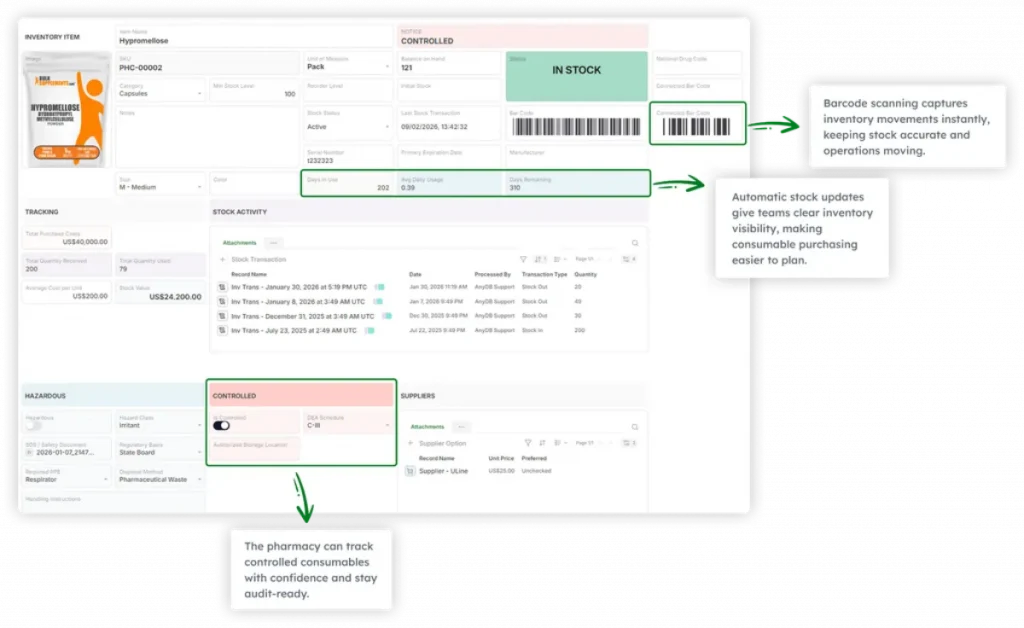
A compounding pharmacy replaced separate spreadsheets with a connected system for roughly 300 consumable inventory items, supplier information, purchasing, and staff compliance.
Inventory records now connect to suppliers and pricing history, while licenses and certifications stay attached to employee records.
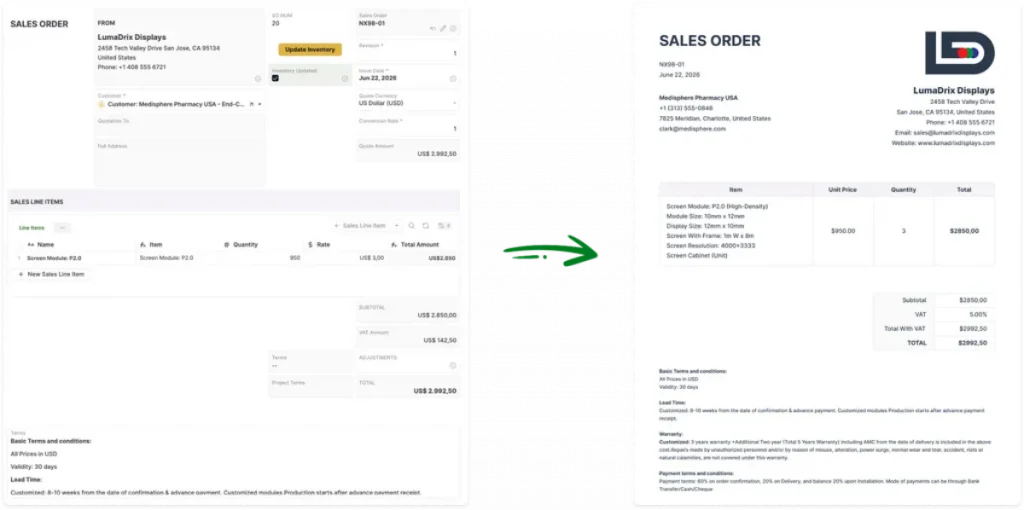
An LED solutions provider connected quotations, projects, procurement, and vendor information in AnyDB.
Once a quote is approved, project and purchasing activity can continue from the same underlying data, while materials and supplier orders remain tied to the project scope.
Partner Management Software: Choose the Layer, Not the Label
Partner management software runs recruitment, onboarding, deal registration and incentives well. It stops at the edge of the operational record, where stock, orders and approvals live.
The tool manages the relationship. The data has to live somewhere you can act on it. You can now tell whether you need a channel tool, an operational platform with a partner portal, or neither yet.
AnyDB is built by the team behind FileCloud, trusted by 3,000+ organizations worldwide, and treats portals as a layer over the same data model rather than a separate destination.
Frequently Asked Questions About Partner Management Software
These answers cover the terms you may check after the main comparison.
What Is a Client Relationship Management Tool?
A client relationship management (CRM) tool stores accounts, contacts and interactions for direct customers. A PRM does the same job for indirect partners.
What Is the Most Popular Supply Chain Management Software?
No single supply chain management software product is most popular across all segments. Leaders differ by revenue, deployment count and industry focus.
What Are the 7 C’s of CRM?
The seven C’s usually name customer, cost, convenience, communication, consistency, customization and creativity. Lists vary by source.
Does Partner Management Software Include Partner Management Software Training?
Usually yes. Most PRM products include a training module with assignment and completion records for channel partners. Training for your own staff is often a separate service.
Can AnyDB Be Used for Partner Management?
Yes. AnyDB can manage partners, vendors, contracts, files, approvals, orders, and related operational records in one connected system, with permissions controlling what each user or guest can access.
Can Partners Access AnyDB Without a Full User License?
Yes. AnyDB supports secure guest access, so clients, vendors, and contractors can work with the records and Views shared with them without consuming a standard team license.
Can Partner Management Software Connect to Inventory, Orders, and Workflows?
Yes, if the platform supports connected operational records. In AnyDB, partner records can stay linked to inventory, orders, documents, approvals, and workflows instead of living in a separate partner database.

The End-to-End Operations System that Finally Fits Your Reality.
No more scattered spreadsheets or rigid, disconnected tools.
AnyDB is a modern, customizable platform for managing business records and operations across teams, clients, and partners.
Learn More


Phone: (512)-761-7979
© 2024 Humanly Inc. All rights reserved.
What is AnyDB?
AnyDB is a unified, customizable data store designed to streamline and empower your entire organization. Effortlessly store, organize, and share custom business data to drive both internal and external operations across teams. Think of it as spreadsheets on steroids.Perfect for Sales, Marketing, Operations, HR, and beyond. Discover AnyDB