
Published on October 21, 2026


A custom CRM (Customer Relationship Management) system is software built or tailored to match your workflows, data model, and team roles instead of a fixed template.
Most teams searching for one are not choosing between custom and nothing. They are choosing between a system that fits and a system they keep working around.
Consider a 120-person field services company. Dispatch, invoicing, and asset history all sit inside a sales CRM. Pipeline stages hold service calls, invoices live in attachments, and the asset history sits in a spreadsheet the dispatcher updates by hand every Friday.
This guide gives you three tests: cost, path, fit.
What Is Custom CRM?
A custom CRM is software built or adapted to match a company’s workflows, data model, and team roles rather than forcing the business into a rigid template. The data model carries the weight here: which records exist, how they connect, and who can see each field.
Three build paths produce that result:
- A no-code template gives you objects, forms, and permissions you configure in a browser.
- A low-code builder adds scripting and integrations on top of the same visual model.
- A full custom build means your team owns the codebase, the hosting, and every upgrade.
A build like this changes the underlying data model. Adding fields and pipeline stages in Zoho CRM or HubSpot customizes a product; the schema underneath still assumes deals.
A company that needs vendor onboarding, contract approvals, and asset maintenance on one record cannot reach that by adding fields to a sales pipeline.
Custom CRM Software vs. Off-the-Shelf: What Actually Changes
An off-the-shelf CRM was designed to move a deal from lead to closed. Growing operations teams load it with invoicing, field work, inventory transactions, and approvals instead. The tool keeps running, but the record structure never catches up, and the gap shows up as hours of rekeying.
Four dimensions separate the two:
- Data model. You define records and relationships, including parent-child structures.
- Permissions. Role-based access and cell-level rules decide who sees which field.
- Reporting. Reports run on your objects rather than a fixed sales schema.
- Cost of change. You absorb each process change, not a vendor roadmap.
How Much Does a Custom CRM Cost?
A custom CRM can range from roughly $30,000 to well above $100,000, depending on integrations, permissions, migration, reporting, and workflow complexity.
Configuring an existing no-code or low-code platform can reduce the initial build cost, but there is no reliable industry benchmark that guarantees a low-five-figure implementation.
Scope drives the range, not the word custom. The total comes from seven parts:
- Discovery maps how work runs today.
- Data modeling defines objects and relationships.
- Build covers configuration or code.
- Integrations connect accounting, email, and warehouse tools.
- Migration moves existing records.
- Permissions and governance cover access rules and audit logs.
- Maintenance pays for whoever fixes the system after launch.
You might be thinking the quote you already received settles this. Quotes diverge because scope is defined differently and because maintenance ownership changes the number.
Some vendors price a product while others price a project. Scope and ownership explain the gap.
If you’re comparing the cost of building a custom CRM with configuring a platform that can grow with your operation, AnyDB gives you room to start small and scale as the system becomes more important to the business.
Explore AnyDB pricing to start for free or compare plans for larger teams, advanced workflows, and custom enterprise requirements.

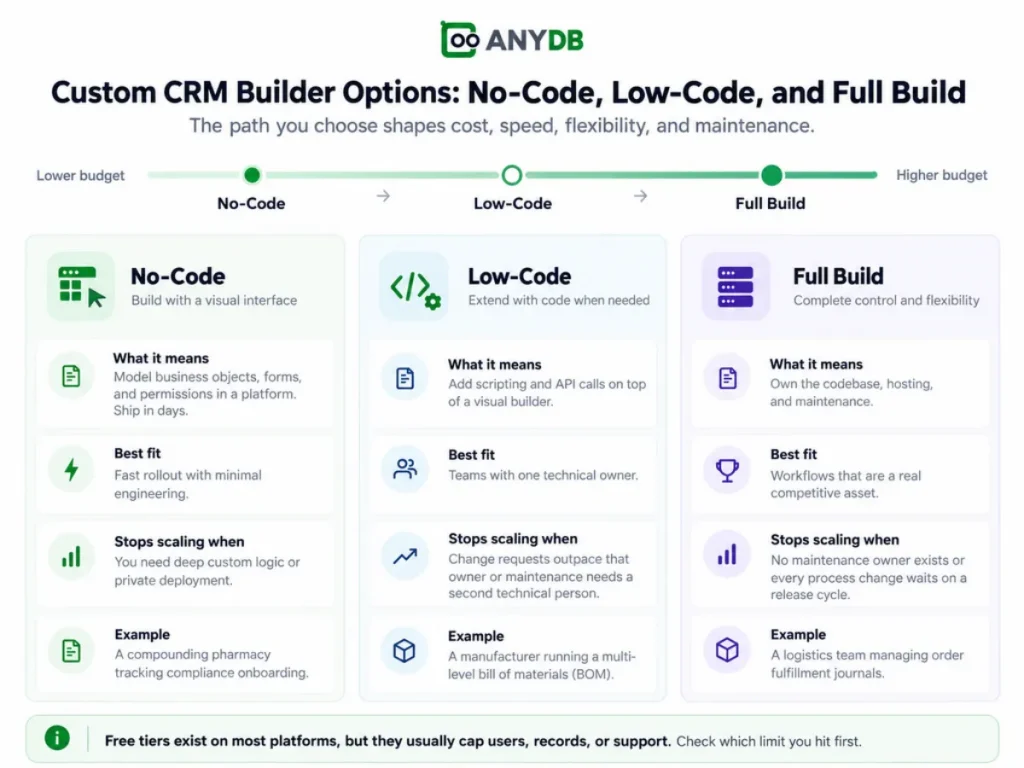
Custom CRM Builder Options: No-Code, Low-Code, and Full Build
The path you choose sets where your budget lands. No-code sits at the low end of that range, low-code sits in the middle, and full build reaches the upper end.
With no-code, you model business objects, forms, and permissions in a platform and ship in days. It stops scaling when you need deep custom logic or private deployment.
A compounding pharmacy tracking compliance onboarding can run on this path.
With low-code, you add scripting and application programming interface (API) calls on top of a visual builder. It fits teams with one technical owner. It stops scaling when change requests outpace that owner or maintenance needs a second technical person.
A manufacturer running a multi-level bill of materials (BOM) usually lands here.
With a full build, you own the codebase, the hosting, and the maintenance. It fits when the workflow is a genuine competitive asset, such as a logistics team managing order fulfillment journals.
It stops scaling when no maintenance owner exists or when each process change waits on a release cycle.
Free tiers exist on most platforms. They cap users, records, or support, so check which limit you hit first.
How to Build a CRM with AI
Artificial intelligence (AI) can draft schemas, forms, and automation logic, but it cannot host your data or enforce permissions on its own. It needs a system of record underneath.
The mechanism is straightforward. You describe the process in plain language. The AI proposes the business objects and relationships, drafts fields and validation rules, then acts on the platform through the Model Context Protocol (MCP).
Claude and ChatGPT connect this way, so the model performs the action and the record updates in the same step.
Read Also:
Claude MCP: How Model Context Protocol Works and What You Can Do With It
MCP Server for ChatGPT: How It Works, Use Cases, and Setup Options
AnyDB MCP: Connect AI Assistants to Your Business Data and Workflows
The AI can propose the CRM structure, but the platform still controls what users can access and change. Once the draft is created, the team reviews permissions, roles, and workflow rules before the system goes live.
For example, if a team asks the AI to create a vendor onboarding process, it can generate the records, fields, and relationships. A person then checks who should be able to view, edit, or approve each part of that process.
When a Custom CRM Beats Off-the-Shelf and When It Does Not
Scope and ownership decide this, and the process has to be worth owning. Start with the criteria in order, because the first one filters most requests.
A custom CRM beats off-the-shelf when:
- The process is a competitive asset rather than a commodity.
- The data model does not fit a sales pipeline.
- More than one team works from the same records.
- External partners need access to that data.
- The cost of the workaround exceeds the cost of the build.
Skip it when the operation still fits in a spreadsheet, when nobody owns maintenance, or when the need is standard deal management.
An off-the-shelf CRM is cheaper in all three cases.
You might be thinking a custom CRM is always more expensive. The threshold answers that: the cost of the workaround exceeds the cost of the build.
For instance, a chemical manufacturer that moved production and asset records into one model stopped paying for spreadsheet upkeep nobody could audit. Count those reconciled hours and the bracket shifts.
Build where the workaround costs more; buy elsewhere.
Custom CRM: The Decision Comes Down to Scope, Not Labels
Three things now sit on your side of the table. A custom CRM is defined by its data model, not by how many fields you configure. Cost follows scope and ownership, so the budget conversation starts with what you will maintain. The build path should match the team that owns it.
That leaves the original choice: a system that fits the operation, or an operation that keeps bending to the system.
AnyDB is built by the team behind FileCloud, trusted by 3,000+ organizations worldwide, and runs CRM, inventory, procurement, assets, and portals on one connected data model.
If you’re deciding whether to keep adapting your process to a generic CRM or build around the way your operation actually works, start with one real business object. Create a free AnyDB workspace and model the process you want the system to support.
Frequently Asked Questions About Custom CRM
The answers below resolve the remaining build questions.
Can I Create My Own CRM?
Yes, you can create your own CRM by modeling your records in an existing platform or by commissioning a build. List the records your operation tracks, then check whether objects, permissions, and workflows can cover them. If they can, you own configuration, not code.
Can ChatGPT Create a CRM for Me?
Partly, because ChatGPT can draft the schema, fields, and automation logic but cannot host records, enforce permissions, or produce an audit trail. The build still needs a system of record beneath it.
Build Your Own CRM Free: What Do Free Tiers Actually Include?
Free tiers usually include a user cap, a record cap, and community support. A free plan might be enough to model two or three business objects and test the data model; it is not enough to run a full operation with partner access.

The End-to-End Operations System that Finally Fits Your Reality.
No more scattered spreadsheets or rigid, disconnected tools.
AnyDB is a modern, customizable platform for managing business records and operations across teams, clients, and partners.
Learn More


Phone: (512)-761-7979
© 2024 Humanly Inc. All rights reserved.
What is AnyDB?
AnyDB is a unified, customizable data store designed to streamline and empower your entire organization. Effortlessly store, organize, and share custom business data to drive both internal and external operations across teams. Think of it as spreadsheets on steroids.Perfect for Sales, Marketing, Operations, HR, and beyond. Discover AnyDB