
Published on October 21, 2026


Customer relationship management (CRM) systems disagree, and the artificial intelligence (AI) assistant cannot confirm which customer record is correct. Every AI CRM project starts in that gap.
That problem shows up quickly in day-to-day work.
A sales operations lead may already pay for the CRM and add AI assistants, yet still see duplicate customer records, deals that remain open after closing, or a credit approval stall because the assistant cannot see the order connected to the opportunity.
That leads to a more practical decision: should the company adopt an AI CRM platform, or add AI on top of its existing CRM?
Data ownership decides the answer.
What an AI CRM Actually Is?
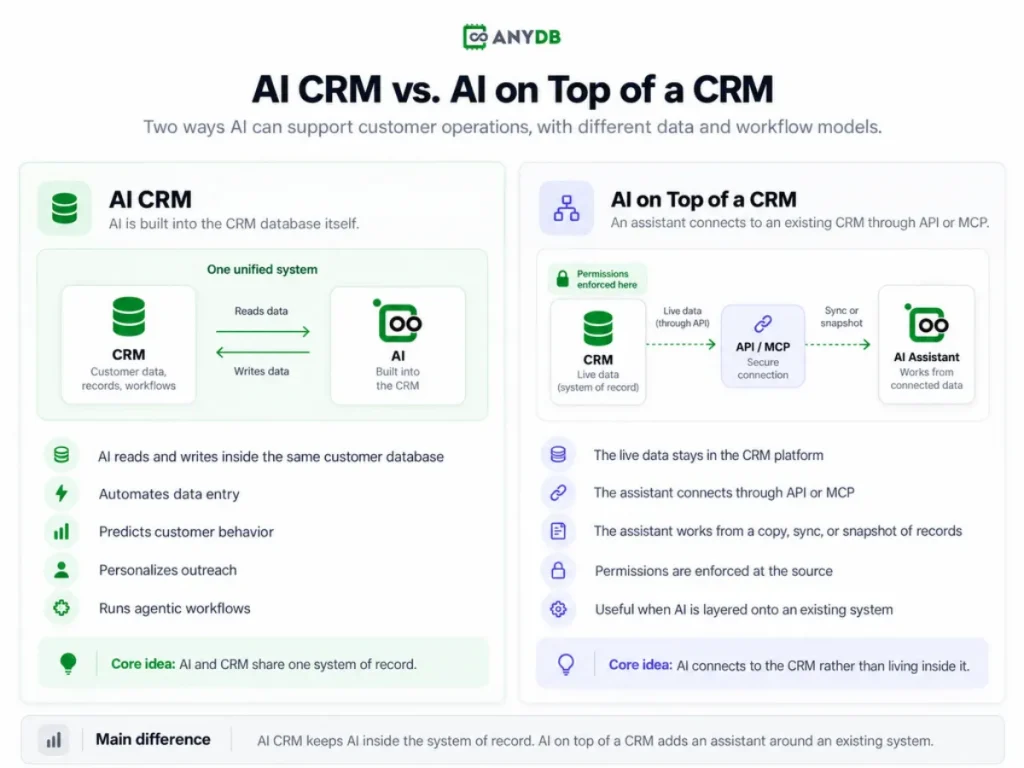
An AI CRM is a database platform with AI built in that automates data entry, predicts customer behavior, personalizes outreach and runs agentic workflows. The AI reads and writes inside the same database that holds the customer data.
AI on top of an existing CRM connects an assistant through an Application Programming Interface (API) or a Model Context Protocol (MCP) tool to a copy or a sync of the records. The live data stays in the CRM platform, the assistant holds a snapshot, and the platform enforces permissions at the source.
A field service management team keeps work orders in the CRM and asset history in a separate system. When the assistant drafts a follow-up, it sees only part of the picture. The work order is there, but the asset history is not, so the technician can be sent to the job without the full service record.
It changes how reliable the assistant can be. In one model, the assistant works from a single record under a single permissions layer. In the other, it depends on two systems, two records, and two permission structures that may not stay aligned.
How Is AI Used in CRM?
AI in CRM captures and cleans records, predicts pipeline and churn, personalizes outreach, and runs multi-step tasks through agents. Each function depends on the freshness of the record it reads:
- Data entry and deduplication. The AI parses an email or a call transcript and proposes a contact or a merge. On a synced copy, it proposes merges against records that changed yesterday.
- Forecasting and churn prediction rank open deals and flag accounts at risk. On a copy, the score reflects last night’s pipeline, not the deal that closed this morning.
- Next-best-action and conversation summaries across email and WhatsApp compress a thread into a task. The summary is only as complete as the copy the assistant can reach.
- Agentic execution drafts a renewal email, but the agent cannot check whether the contract approval is still pending. It sends the draft anyway.
Connect CRM with orders, projects, inventory, service, invoicing, and the work that follows a sale. Start with ready-to-use CRM objects.
Where AI on Top of Your CRM Breaks
You may think an assistant connected to your CRM is good enough. It usually is, until the assistant needs a record the sync does not carry:
- The copy problem. The assistant reads a stale sync and answers with confidence about a record that changed two hours ago. Nobody in the thread can tell.
- The permission problem. Role-based access control lives in the CRM, and a bolt-on assistant often authenticates as one service account. Cell-level restrictions do not travel with the data.
- The scope problem. The record the assistant needs may sit in inventory or contracts, outside the CRM. Data silos defeat the answer even when the model is right.
- The write-back problem. The action happens in the assistant and the record never updates. The team reconciles two sources by hand.
Consider a chemical manufacturer that handles quote approvals outside the CRM. The sales record may still show the deal as open even after the approval process has put it on hold. If the assistant only sees the CRM, it can keep drafting follow-ups for an opportunity that is no longer moving forward.
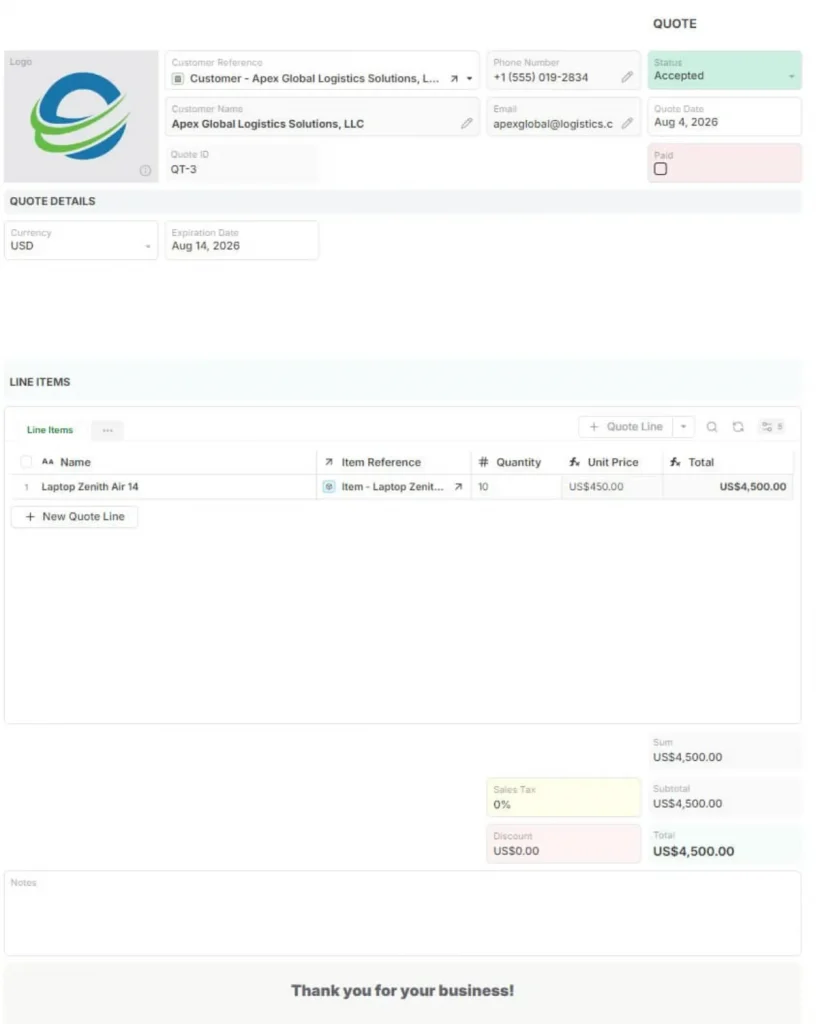
Quote Business Object. Source: AnyDB
That is the risk with bolt-on AI: it inherits whatever the connection fails to capture. If the sync does not include the approval state, the assistant is working from an incomplete version of the process.
AI CRM Software: How to Evaluate What You Are Actually Buying
Evaluate AI CRM software by testing where the AI reads and writes, not by the length of the feature page. Run five checks during a trial:
- Does the AI act on the live record or a copy?
Ask it to change a linked record and watch whether both sides update.
- Can permissions be enforced at the cell level?
Log in as a restricted user and confirm the assistant refuses what that user cannot see.
- Can you model your own business objects without a developer?
An AI CRM builder and an AI CRM open source option should both let you add an object and a relation in an afternoon.
- What does the free tier include?
For AI CRM free and AI CRM for small business plans, count user caps and AI credits before you import anything.
- What does exit look like?
AI CRM GitHub access and a documented API export separate a platform from vendor lock-in.
I recommend you to run this test in week one. Import 500 real records and update a linked object through the AI.
What Actually Changes When AI Sits on the System of Record
The same AI function behaves differently depending on where the data lives. When the system of record holds the records, the relationships, the files and the permissions, the assistant has nothing to reconcile.
First, the AI performs the action and then updates the record. There is no write-back step and no second copy to merge.
Second, customer, vendor, and partner portals expose that same data without uploading anything. The assistant and the partner read one version.
Third, governance decides what the AI can touch. Single sign-on (SSO) with Microsoft Entra ID and Okta, role-based access and cell-level permissions set the boundary, and audit logs record what changed.
Claude MCP and ChatGPT MCP are the concrete cases. The AI acts on the record through MCP, and permissions still decide who sees what.
The AI CRM Decision Comes Down to Where Your Data Lives
An AI CRM and AI on top of a CRM differ first in data ownership, and only then in features. That order decides what the assistant can see and change.
You now have a way to recognize the bolt-on failure modes and a five-criteria test for AI CRM software. You also have a clear picture of what changes when AI acts on the system of record.
AnyDB is built by the team behind FileCloud, a platform trusted by 3,000+ organizations worldwide. Start a free plan and model one real business object.
Frequently Asked Questions about AI CRM
What Are the Top 3 CRM Platforms?
Salesforce, HubSpot, and Microsoft Dynamics 365 are among the most established CRM platforms. For operational teams, the better choice depends on whether customer data also needs to connect with orders, assets, projects, or service workflows.
Can ChatGPT Make a CRM?
ChatGPT can help design fields, workflows, and CRM structures, but it is not a durable CRM database. Businesses still need persistent records, permissions, audit history, and workflow controls.
Is Salesforce the #1 AI CRM?
Salesforce is one of the largest CRM platforms and has extensive AI capabilities. Whether it is the best fit depends on whether the business needs a traditional sales CRM or a broader operational system.
Can AnyDB Be Used as an AI CRM?
Yes. AnyDB can manage customers, contacts, opportunities, orders, service records, documents, approvals, and related operational data as connected business objects.
When Is AnyDB a Better Fit Than a Traditional AI CRM?
AnyDB is a strong fit when customer data needs to stay connected to operational records such as quotes, production jobs, assets, inspections, service history, or delivery records.
Can AI Assistants Work Directly With CRM Data in AnyDB?
Yes. Through AnyDB MCP, compatible AI assistants can work with authorized records, files, Views, reports, object types, and workflows. AnyBot can also help build those CRM structures by generating fields, formulas, relationships, and connected object types from a written description.

The End-to-End Operations System that Finally Fits Your Reality.
No more scattered spreadsheets or rigid, disconnected tools.
AnyDB is a modern, customizable platform for managing business records and operations across teams, clients, and partners.
Learn More


Phone: (512)-761-7979
© 2024 Humanly Inc. All rights reserved.
What is AnyDB?
AnyDB is a unified, customizable data store designed to streamline and empower your entire organization. Effortlessly store, organize, and share custom business data to drive both internal and external operations across teams. Think of it as spreadsheets on steroids.Perfect for Sales, Marketing, Operations, HR, and beyond. Discover AnyDB