
Published on September 27, 2026


An insurance claim can start with a phone call and quickly turn into a surprisingly busy piece of work. Customer and policy information needs to stay together. Meanwhile, documents arrive, photos get reviewed, contractors get involved, and invoices move through approval. Insurers need updates, and payments have to be tracked. Several people may be working on the same claim at different stages, often without a full view of what the others are doing.
That kind of operation puts a CRM under pressure. A system built to manage customer relationships gradually becomes responsible for coordinating the work around those relationships. Files, emails, spreadsheets, and portals fill the gaps along the way.
Evaluating Salesforce alternatives from that angle changes the question. The right system should make the work easier to represent, connect, and change as the process evolves, rather than forcing teams to work around the software.
In this article, you’ll learn:
- Why insurance claims put CRM software under unusual pressure
- What to look for when evaluating Salesforce alternatives
- The main categories of Salesforce alternatives, including how AnyDB approaches claims as a connected operational record
Why Insurance Claims Put CRM Software to the Test
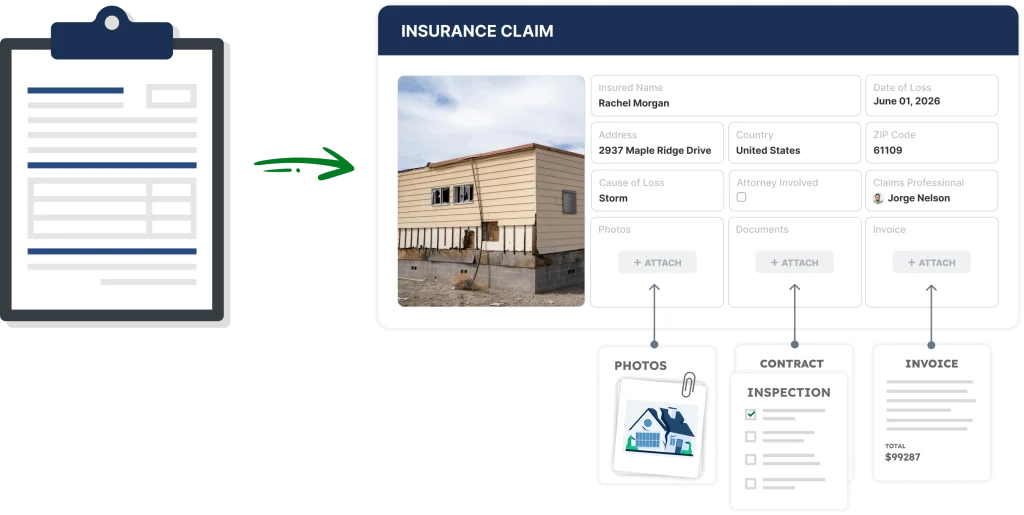
An insurance claim has a habit of growing. What starts with a policyholder and a loss can soon involve a property, a contractor, an adjuster, invoices, estimates, photos, reviews, approvals, insurer communication, collections, and payments. Different people often own different steps, and the claim keeps moving through all of them.
That changes the role of the software. A CRM gives customer information, communication, and relationship history a strong home. But insurance claims also require managing the operational details around each case. As those requirements pile up, companies often connect their CRM to document storage, spreadsheets, email, and workflow tools to keep the process moving. At that point, evaluating Salesforce alternatives becomes less about CRM functionality and more about one question. How well can the software represent the actual work?
Adding another tool can close one gap while opening another. A portal fixes document intake. A spreadsheet makes one review easier to track. The team ends up with a pile of perfectly reasonable tools that still needs someone to connect the dots. And claims have plenty of dots.
Evaluating Salesforce alternatives for insurance operations means looking at the software’s structure, not just its CRM features. CRM software remains useful. The challenge begins when the claim needs the system to understand the work as well as the customer.
What to Look for in Salesforce Alternatives
A good Salesforce alternative should give the operation room to breathe. That means looking past the feature count and paying attention to how the system handles the details that keep complex work moving. Cost and implementation time still belong in the evaluation. They just answer a different question than whether the software can represent the work itself.
For an insurance claims team, six areas deserve particular attention:
1. Records and workflows that adapt to the process
Claims rarely fit into a few standard records, and the steps around them change often enough that a rigid workflow becomes a liability. A useful system lets teams build relationships between claims, policyholders, properties, and contractors. New requirements shouldn’t turn into development projects.
2. Documents that belong to the record
A claim can generate a mountain of material, from photos and estimates to invoices and correspondence. File management works best when those documents stay connected to the record, instead of scattered across folders and inboxes.
3. External access without losing control
Contractors, policyholders, adjusters, and partners often need to submit information or check progress. Portals can bring those interactions into the workflow itself, with access limited to what each participant needs.
4. Visibility that doesn’t need a status meeting
Managers and teams should be able to see who owns a task, what’s waiting for approval, and what needs attention, without chasing updates across systems. That matters even more once several people are touching the same claim.
5. A history worth trusting
Claims can depend on decisions made weeks or months earlier, so a useful system preserves changes, approvals, and activity history. An audit trail isn’t there to make the software look serious. It gives people something more practical: context.
6. Integrations that connect the ecosystem
Replacing Salesforce doesn’t mean replacing everything around it. The alternative worth evaluating should still connect to accounting, communication, or payment systems through APIs and connectors.

Salesforce Alternatives for Insurance Claims
No single category of software is automatically the right Salesforce alternative for a claims operation. Different platforms solve different parts of the problem, and the best fit depends on how much of the claim process the system needs to own.
| Category | Examples | Best suited to |
| CRM platforms | HubSpot, Creatio | Customer-centered operations with configurable workflows |
| Insurance-specific software | Guidewire, Duck Creek | Standardized insurance processes and industry-specific requirements |
| ERP and broader business platforms | Microsoft Dynamics 365, Oracle NetSuite | Operations closely connected to finance and broader business processes |
| Low-code and custom application platforms | Mendix, OutSystems | Organizations building tailored applications within a development platform |
| Custom operational systems | AnyDB | Complex workflows that need the software structure to follow the operation |
CRM platforms
Tools such as HubSpot and Creatio still offer customer management, automation, and reporting. Both also let teams build custom objects on top of the core CRM. A team can create a claims object, add fields for policy numbers and settlement amounts, and set up automation rules to move a claim through stages. That approach makes sense when the relationship stays the center of the operation and the surrounding process stays fairly simple.
The friction shows up as the operation grows. Every new document type, approval step, or external stakeholder means another custom field or workflow rule. Each one gets layered onto a data model that was originally built for contacts and deals, not claims and payments. The evaluation needs to widen once documents, external partners, and financial steps pile up around it. At that point, the CRM ends up managing an operation it was never designed to represent.
Insurance-specific software
Platforms such as Guidewire and Duck Creek Technologies are built specifically for insurance. They cover policy administration, underwriting, billing, and claims within a single suite. The platform already models concepts such as coverage, claims examiners, and loss reserves. That gives teams a head start compared to configuring those concepts from scratch in a general-purpose system.
The tradeoff shows up in scale and rigidity. These platforms are built around the standard insurance lifecycle. That fits large carriers well, but it can feel heavy for a claims management or recovery operation with a narrower, more specific workflow. Organizations may need to bend their process to fit the platform’s model, especially when the workflow sits outside the standard lifecycle. A collections and recovery process layered on top of claims handling is one example.
ERP and broader business platforms
Microsoft Dynamics 365 and Oracle NetSuite bring financial data, reporting, and customer records into one environment. That’s a real advantage when claim settlements, recoveries, and payments need to reconcile against the general ledger. Finance teams already trust these platforms with the numbers, so keeping claims activity close to that data can simplify reporting.
The limitation is that claims work involves more than financial records. Document intake, portal access for contractors, and review workflows are not native strengths of an ERP. Building them usually means a separate module, a custom development project, or a connected CRM layered on top. For a claims operation, that can mean paying for and maintaining more platforms than the daily work actually needs.
Low-code and custom application platforms
Mendix and OutSystems help teams build tailored applications without writing everything from scratch. They use visual development tools that speed up the process compared to full custom code. For a claims operation with genuinely unique requirements, that flexibility can be appealing. The application can be shaped around the exact stages, fields, and approvals the team already uses.
The tradeoff arrives with maintenance. Someone still needs to design the data model, build the portal experience, and keep the logic consistent as requirements change. That usually means an in-house developer or a partner agency, not a business user. Low code helps teams build something custom. But someone still needs to keep those applications consistent as they multiply across the organization.
Custom operational systems
This category starts from the operation itself, not a predefined software category. It skips both the CRM’s contact model and the blank canvas of custom development. Instead, a custom operational system gets configured directly around the records, relationships, permissions, and workflows a business already uses. Most changes don’t need a developer at all.
AnyDB takes this approach for insurance claims. Rather than treating a claim as a support ticket or a CRM opportunity, the claim itself becomes the central record. Policyholder details, property information, documents, contractors, reviews, approvals, collections activity, and payments all connect around it. External users can submit documents through secure portals. Internal teams work from one connected view of the claim.
The workflow can change as the operation changes, instead of waiting on a development cycle. For claims operations with a real mix of documents, external collaboration, and financial tracking, this is the category built to represent that mix directly.
From CRM to Claims Operations: The AnyDB Approach
A useful way to understand AnyDB is to look at what happens when the claim itself becomes the center of the system.
That was the shift in a recent insurance claims operation. The company was already running Salesforce alongside Google Drive, email, and shared document workflows, using them to coordinate contractors, collect invoices, review claims, communicate with insurers, manage collections, and track payments. That workload had grown well beyond what a CRM was built to handle.
The first request to AnyDB was relatively focused: build client and contractor portals to make document submission easier. As the workflow got mapped out, the portal turned out to be one piece of a much larger process. AnyDB organized the operation around the insurance claim as the master record instead. That record holds the policyholder, property, insurer, service providers, documents, invoices, reviews, decisions, collections, and payments in one connected structure.
That changes how the team interacts with the information.
A contractor submits documents through a dedicated portal, and those files stay connected to the relevant claim and invoice. A review generates the next task, an approval triggers a submission, and a payment connects back to the settlement. Follow-ups get scheduled when activity runs overdue, and dashboards surface claim, review, and collection status in one place.
This also opens the door to automation and AI without making either one the headline. Uploaded documents can trigger information extraction. Workflow rules create review tasks, update statuses, and flag overdue activity. The technology supports the process instead of becoming another process for the team to manage.
When a Salesforce Alternative Needs to Fit the Workflow
The same situation shows up whenever a CRM gradually takes on project coordination, document reviews, approvals, or compliance work that has grown around customer records. This isn’t only an insurance problem. Adding another field or automation feels reasonable at first, then another workflow arrives, then another integration, until understanding the process means understanding the software configuration first.
Salesforce alternatives can take many forms, from another CRM to industry-specific software or a broader business platform. A custom operational system takes a different approach in that case too. It starts with the workflow, then models the records, relationships, permissions, and views needed to run it, rather than asking which platform has the longest feature list.
Choose the System Around the Claim, Not Just the Customer
A claim carries a lot of work inside it. Customer information is only the beginning. Documents, people, decisions, approvals, payments, and deadlines all become part of the same operation.
Choosing among Salesforce alternatives deserves an operational view for that reason. AnyDB helps companies build that kind of environment around the way their operations actually work. If your CRM has gradually become responsible for more of the process than it was built for, the AnyDB team can help.
Together you can explore what a system designed around the workflow could look like. Schedule a call with us.
Frequently Asked Questions About Salesforce Alternatives
The right Salesforce alternative depends on what the software needs to represent and how much of the operation it should connect. It also depends on where the current setup starts creating friction.
What are the main types of Salesforce alternatives?
Salesforce alternatives span several categories. These include other CRM platforms, insurance-specific software, ERP and broader business platforms, low-code application platforms, and custom operational systems. The useful comparison isn’t which has the most features, but which type of system fits the work your team needs to manage.
When does a custom operational system make sense?
A custom operational system becomes relevant when a company’s workflows don’t fit a standard software category. That often happens because a CRM has accumulated years of customizations or because the operation depends on a specific mix of records, approvals, and follow-ups. Designing the system around the workflow gives that kind of operation a more direct way to organize the work.
Is AnyDB a CRM replacement?
AnyDB takes a broader approach. Rather than starting from CRM functionality, it builds a custom operational system around the records, relationships, workflows, and permissions a specific business needs. It doesn’t require every other tool in the stack to be replaced. In an insurance claims environment, the claim itself becomes the central record. It connects policyholders, contractors, documents, reviews, invoices, payments, and follow-ups.

The End-to-End Operations System that Finally Fits Your Reality.
No more scattered spreadsheets or rigid, disconnected tools.
AnyDB is a modern, customizable platform for managing business records and operations across teams, clients, and partners.
Learn More


Phone: (512)-761-7979
© 2024 Humanly Inc. All rights reserved.
What is AnyDB?
AnyDB is a unified, customizable data store designed to streamline and empower your entire organization. Effortlessly store, organize, and share custom business data to drive both internal and external operations across teams. Think of it as spreadsheets on steroids.Perfect for Sales, Marketing, Operations, HR, and beyond. Discover AnyDB