
Published on August 25, 2026


A nurse needs an infusion pump for a patient. A technician is waiting to inspect another device. The pharmacy team is checking whether a critical supply is available. The hospital may already have everything it needs. The challenge is knowing where each asset is, whether it’s ready for use, and what needs to happen next.
That challenge grows as equipment moves between departments, maintenance teams, storage areas, and patient care. Estimates cited by Pole Star suggest nurses can spend between 20 minutes and one hour per shift searching for equipment. Across a healthcare organization, that time adds up fast.
Hospital asset tracking software exists to close exactly that gap. In healthcare, asset visibility earns its keep when it gives teams enough context to act, not just enough data to file.
In this article, you’ll learn:
- why manual and spreadsheet-based tracking becomes difficult in healthcare
- what to check in hospital asset tracking software
- when location tracking is enough and when a broader operational system makes sense
Why Hospital Asset Tracking Gets Complicated
A hospital asset rarely stays where it started. An infusion pump can move from storage to a department, then to a patient area, cleaning, maintenance, and back into storage before another department needs it.
At each stage, the asset picks up new context. Its location changes, someone becomes responsible for it, its condition may be updated, and an inspection event can create documents, tasks, or follow-up actions. By the time the pump returns to storage, its current location tells only part of the story.
A spreadsheet can certainly hold fields such as:
- Asset ID
- Location
- Department
- Maintenance date
- Purchase information
That structure works while the operation stays stable. As movement increases, though, teams tend to create extra sheets, send email updates, and run manual checks to fill the gaps. The asset stays the same. Its surrounding information starts living in several places at once.
Location Is Only the Beginning
Hospital teams need asset visibility that supports decisions about readiness. Depending on the equipment, that can mean knowing whether it is available and operational, when maintenance is due, who handles it, and what has happened throughout its lifecycle.
That distinction matters when evaluating hospital asset tracking software. A system can report an accurate location and still leave the team without the context needed to act on it.
The more decisions depend on an asset record, the less useful that record becomes sitting in isolation.
What to Look For in Hospital Asset Tracking Software
Evaluating hospital asset tracking software is less about collecting the longest feature list and more about understanding how each capability supports the work around an asset.
| Capability | Why it matters in healthcare |
| Location and availability | Helps teams identify where equipment is and whether it can be used. |
| Asset history | Provides visibility into transfers, usage, inspections, and previous events. |
| Maintenance workflows | Connects assets with preventive maintenance, repairs, and follow-ups. |
| Barcode, RFID, BLE or RTLS support | Enables tracking methods suited to different asset types and accuracy requirements. |
| Documents and records | Keeps certifications, manuals, photos, invoices, and other evidence connected. |
| Alerts and reminders | Helps prevent maintenance, certification, renewal, or replenishment dates from being missed. |
| Role-based access | Gives clinical, administrative, and external users the information appropriate to their role. |
| Reporting and dashboards | Gives managers visibility into availability, use, inventory, and operational exceptions. |
| Integrations | Allows asset information to connect with existing healthcare and operational systems. |
| Flexible workflows | Supports different processes for devices, supplies, and other asset types. |
The tracking technology itself deserves a closer look too.
RFID, BLE, and RTLS can provide automated location visibility, while barcode scanning makes it practical to record movements as part of everyday work. Each approach comes with its own infrastructure and accuracy tradeoffs, so the right choice depends on the asset, the environment, and the process being managed.
A useful system should also leave room for the unexpected. Healthcare operations seldom follow one universal script, and equipment, supplies, inspections, and maintenance can each call for different steps and participants.
When Asset Tracking Needs a More Flexible Operational System
Location tracking solves an important part of asset management. It helps a hospital find mobile equipment fast. But the picture gets much wider once that same asset needs to move through maintenance, approvals, documentation, and back into service.
Think of a medical device moving through a process like this: department, maintenance request, inspection, technician, document, approval, return to service. Location matters throughout that journey. So do the people involved, the actions completed, the evidence collected, and the next step.
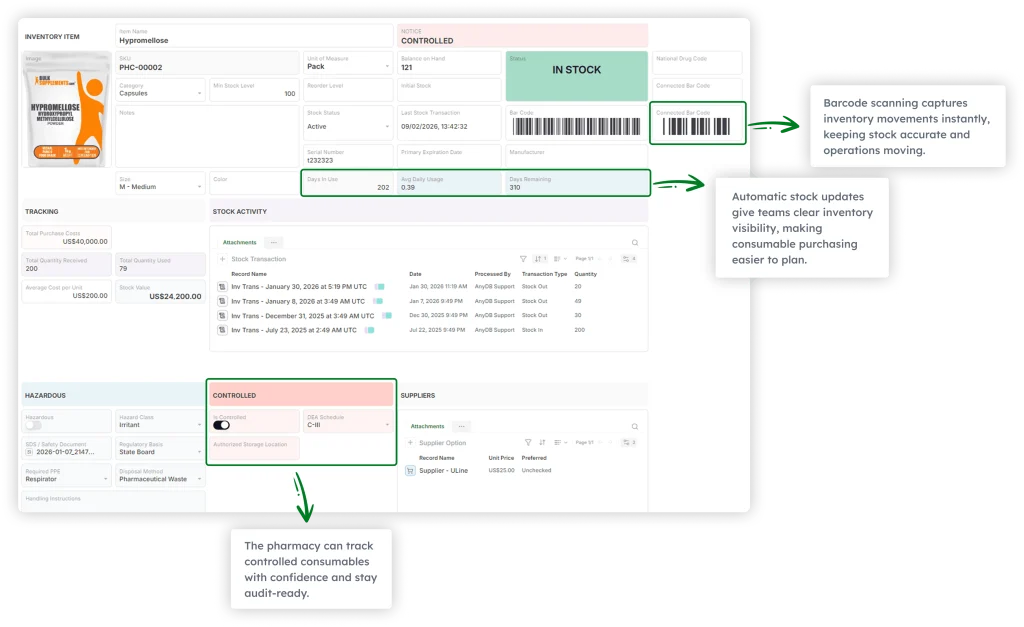
The same idea applies to supplies. A stock item may move from a storage location through barcode scanning and inventory movement to a supplier reorder. Compliance information gets attached along the way. Keeping those relationships together gives teams more useful operational context than an isolated asset record ever could.
AnyDB’s custom operational system approach was built for this kind of gap. AnyDB does not replace specialized RTLS infrastructure for indoor positioning. Instead, it provides a configurable operational layer for connecting assets with the processes built around them.
| AnyDB Capability | What It Enables |
| Connected asset records | Link equipment and supplies to departments, people, suppliers, and locations. |
| Operational workflows | Structure inspections, maintenance, transfers, approvals, and follow-ups. |
| Barcode and mobile workflows | Record movements as work happens. |
| Documents and files | Keep certifications, photos, invoices, and supporting records attached. |
| Alerts | Trigger reminders for maintenance, renewals, certifications, and inventory thresholds. |
| Forms and portals | Collect information from staff, suppliers, inspectors, or other collaborators. |
| Dashboards and views | Give managers real-time visibility into operational activity. |
The advantage is personalization.
Healthcare organizations can configure records, relationships, workflows, and interfaces around their own processes, instead of adapting every step to fit a fixed software structure.
What a Connected Healthcare Operation Looks Like in Practice
The connection between an asset and the rest of the operation becomes much easier to picture inside a real healthcare environment.
An independent compounding pharmacy with about 25 employees manages around 300 consumable inventory items across its daily operations. The team also needs to keep staff licenses, certifications, and issued safety equipment up to date.
Before AnyDB, this information lived across many spreadsheets, each maintained by a different person. Staff performed manual shelf checks, updated inventory at the end of the day, and relied on manual reminders for compliance. Supplier and pricing information sat scattered across records too, and barcode labels already existed but weren’t being used to record inventory movements.
Switching systems wasn’t really the point.
Recording activity as it happened was. Staff could scan consumables as they were used or restocked. That created a movement record right away, instead of waiting for an end-of-day update. Each item stayed connected to its location, supplier, stock level, and movement history. Employee records brought licenses, certifications, and issued equipment into the same operational picture.
Low stock thresholds and license expiration dates could then trigger alerts on their own.
| Operational change | Reported outcome |
| Inventory reconciliation | Reduced from approximately 3 hours per week to under 30 minutes. |
| Manual stock movement entry | Reduced by approximately 70%. |
| Stockouts | Reduced by approximately 30% to 50%. |
| License tracking | Moved from manual reminders to automated alerts. |
The underlying challenge in a pharmacy and in a hospital ward isn’t so different. A barcode, a location, or a status field is useful on its own. Its value grows once it connects to what’s actually happening around it.
The pharmacy came away with more than tidier inventory records: a system that updated itself as staff worked, giving the team a current view of what was available, where it sat, what needed attention, and what came next.
Read More: Real-Time, Scan-Based Pharmacy Operations
Build Asset Visibility Around the Way Healthcare Works
Hospital asset tracking gives healthcare teams a clearer view of equipment, supplies, availability, and movement. But visibility only goes so far on its own. Its real value shows up once it connects to the work those assets support.
Ready to see equipment, maintenance, and compliance living in one connected record instead of six spreadsheets?
Explore AnyDB for Hospital Asset Management and see how a flexible operational layer adapts as your processes do.
Frequently Asked Questions About Hospital Asset Tracking Software
Hospital asset tracking involves more than locating equipment. These are some of the practical questions healthcare teams should consider when evaluating tracking and asset management software.
What is hospital asset tracking?
Hospital asset tracking is the process of monitoring equipment, devices, and supplies as they move through a healthcare organization, covering their location, availability, and condition. It can use barcodes, RFID, BLE, or RTLS, alongside records that support maintenance and day-to-day operations.
What hospital assets can be tracked?
Hospitals commonly track infusion pumps, wheelchairs, beds, ventilators, diagnostic equipment, medical carts, laptops, tablets, and supplies. The most suitable tracking method depends on the asset itself and the workflow around it.
Is RTLS the same as hospital asset tracking software?
RTLS is a technology that provides real-time location information. Hospital asset tracking software is broader, covering the records, workflows, maintenance history, reporting, and operational processes that surround those assets.
Can hospitals manage asset tracking with spreadsheet?
Spreadsheets can work for smaller, more stable inventories. As assets move more often and more people update records, spreadsheets get harder to maintain because they don’t naturally provide history, permissions, alerts, workflows, or connected records.

The End-to-End Operations System that Finally Fits Your Reality.
No more scattered spreadsheets or rigid, disconnected tools.
AnyDB is a modern, customizable platform for managing business records and operations across teams, clients, and partners.
Learn More


Phone: (512)-761-7979
© 2024 Humanly Inc. All rights reserved.
What is AnyDB?
AnyDB is a unified, customizable data store designed to streamline and empower your entire organization. Effortlessly store, organize, and share custom business data to drive both internal and external operations across teams. Think of it as spreadsheets on steroids.Perfect for Sales, Marketing, Operations, HR, and beyond. Discover AnyDB