
Published on August 20, 2026


A company can own 500 laptops, 2,000 tools, or thousands of devices and still struggle to answer a basic question: what is happening to each asset right now? Location is only part of the picture. An asset may be assigned to an employee, sent for repair, linked to a customer, waiting for inspection, or carrying documents that matter to its next step.
That’s the challenge more businesses are running into, and it’s part of why the asset tracking market itself is growing so fast. Grand View Research puts it at $27.8 billion in 2026, headed toward $51.6 billion by 2030. Companies are outgrowing a location pin and looking for something that keeps up with everything else attached to an asset.
The right asset tracking software should preserve that context as it moves through the operation.
In this guide, you’ll see what to look for when evaluating asset tracking software, how popular platforms differ, and when a custom operational system makes sense for more connected asset operations.
Asset Tracking Gets Hard When the Asset Starts Moving
An asset record can begin with something simple like a serial number, a location, and the person responsible for it. As the asset moves through the operation, that record starts collecting context. Its condition changes, maintenance gets scheduled, documents are added, ownership may change, and new actions become necessary.
A useful system keeps these details connected instead of treating each update as a separate piece of information. A practical asset record may include:
- Location and assigned user
- Status and condition
- Purchase and vendor information
- Maintenance and inspection history
- Documents and photos
- Transfers and movements
- Related customers, contracts, or work orders
- Upcoming actions and renewals
Consider a device that arrives at a warehouse, gets assigned to an employee, returns for repair, and is later shipped to a customer. The device keeps the same identity throughout that journey, while almost everything around it changes. Its location changes, its condition is updated, and new shipping or customer information becomes relevant.
If those updates live across a spreadsheet and a maintenance system, someone eventually has to piece the story together. That might mean checking four systems to answer one question about a single device. The asset is right there. The information about it is playing hide and seek.
An Asset’s Lifecycle Involves More Than Its Location
Good asset tracking follows the asset through its lifecycle rather than treating each movement as an isolated update. Purchase, receipt, assignment, maintenance, transfer, return, inspection, and retirement can all become part of the same operational history.
Picture a forklift moving through a single year. A warehouse lead checks it out to a shift crew. A technician logs a hydraulic repair three months later. An auditor confirms its condition during the annual inspection. An operations manager schedules its retirement once repair costs pass what the forklift is worth. Each moment involves a different person, but they all belong to the same asset record. When that record stays connected, everyone involved sees the full picture instead of just their own piece of it.
This is why flexibility matters when evaluating asset tracking software. The system should accommodate the workflow the asset actually follows, including the relationships that make each stage meaningful.
Excel often makes a sensible starting point. Teams can create fields, add new columns, and adjust the structure as their needs change. The trouble arrives when the asset operation grows beyond what a shared table can comfortably coordinate.
Spreadsheets fall short somewhere else. They don’t offer connected records, permissions, history, workflows, or the operational visibility that complex asset operations need.
5 Asset Tracking Software Platforms to Consider in 2026
The right asset tracking software depends heavily on what the business needs to do with its assets. The five platforms below take distinct approaches.
Rather than ranking them, it’s more useful to look at where each one fits naturally.
| Platform | Strongest fit | Main focus |
| Asset Panda | Complex asset programs | Lifecycle management |
| Sortly | Simple tracking | Inventory and mobile tracking |
| Samsara | Field operations | Equipment and location |
| UpKeep | Maintenance teams | Asset and work orders |
| EZOfficeInventory | Shared equipment | Assignment and checkout |
Asset Panda
Asset Panda is built for organizations that need considerable control over how assets are tracked throughout their lifecycle. Teams can configure custom fields, workflows, inspections, maintenance activities, permissions, notifications, and reporting, while mobile capabilities support asset work outside the office.
Sortly
Sortly takes a simpler, more visual approach. Its platform supports barcode and QR scanning, mobile access, check in and check out, custom organization, photos, alerts, and reporting, making it particularly accessible for teams that want to get an asset tracking process running without a heavy implementation.
Samsara
Samsara is particularly suited to assets that spend their time moving around. Its equipment tracking capabilities combine location visibility, geofencing, utilization reporting, maintenance, and Bluetooth-based tracking for smaller or unpowered equipment. For organizations managing vehicles, heavy equipment, trailers, tools, and other field assets, location is a critical part of the operational picture.
UpKeep
UpKeep approaches asset tracking through the lens of maintenance. Asset records connect with work orders, preventive maintenance, inspections, parts, and technician activity, giving maintenance teams a shared operational record for keeping equipment running. Its mobile-first approach also supports technicians working directly in the field.
EZOfficeInventory
EZOfficeInventory focuses on organizations that need to manage shared equipment across people, locations, and projects. Its capabilities include asset lifecycle management, reservations, check in and check out, mobile tracking, and integrations with scanning hardware such as RFID readers.
All five can support asset tracking software use cases, while the operational problems they’re built to solve vary considerably. The right choice comes down to which problem your team actually has.
When Asset Tracking Needs to Become an Operational System
Dedicated asset tracking software works well when the asset is the main thing the business needs to manage. Once that asset becomes part of a larger operational process, the requirements start to change.
A device may be linked to a SIM, a customer, a shipment, an inspection, and a support request. Field equipment may move between technicians and jobs while accumulating inspection records, photos, maintenance activities, and customer information. At that point, keeping a list of assets is only one piece of the job.
AnyDB takes a different approach as a custom operational system, letting organizations model the relationships around an asset through connected records, configurable workflows, and controlled access.
| AnyDB Capability | What It Enables |
| Connected asset records | Link assets to people, customers, vendors, and locations. |
| Files and documents | Keep warranties, photos, certificates, and invoices connected. |
| Workflows and alerts | Trigger maintenance, inspections, transfers, and renewals. |
| Forms and portals | Let external users submit information securely. |
| Dashboards and views | Give managers real-time operational visibility. |
The result is a system that follows the operation around the asset instead of asking the operation to fit a predefined asset workflow.
A Real Example: Device and SIM Tracking
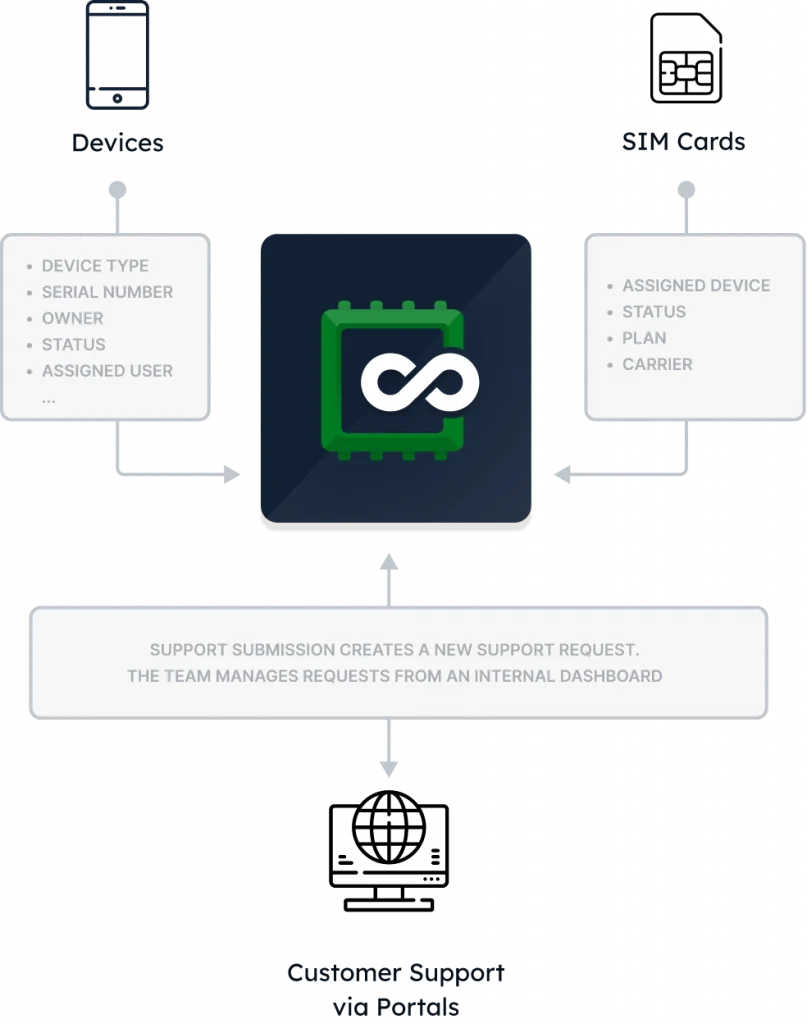
One AnyDB customer was managing approximately 11,000 to 12,000 devices, with information about devices, SIM cards, locations, ownership, inspections, and support spread across spreadsheets and other systems. Keeping those records aligned required ongoing reconciliation and manual effort.
AnyDB brought those relationships into a structured operational system, connecting the information needed to understand each device throughout its lifecycle. The improvement came from connecting the records around the assets, rather than simply replacing one asset list with another.
Read More: Case Study Asset Management System for Device and SIM Tracking
Choose Asset Tracking Software That Fits the Operation
The right asset tracking software should keep your asset’s history, condition, documents, relationships, and next steps connected as the operation moves forward.
For straightforward tracking needs, a dedicated platform may be exactly what the business needs. When assets are deeply connected to customers, vendors, field teams, maintenance, inspections, and other workflows, the system around the asset needs room to adapt.
AnyDB can fit here as a custom operational system that gives teams the flexibility to build asset management around the way their operation actually works.
Ready to see what connected asset management looks like? Explore AnyDB for Asset Management and see how it brings your asset records, workflows, and teams into one connected system.
Frequently Asked Questions About Asset Tracking Software
Choosing asset tracking software often comes down to understanding how much of the surrounding operation the system needs to support. These are some of the questions teams commonly consider when evaluating their options.
What does asset tracking software do?
Asset tracking software helps organizations record and track assets throughout their lifecycle, including their location, assigned user, status, condition, maintenance history, and other relevant information. More capable platforms can also connect assets to workflows, documents, people, and related operational records.
What should I look for in asset tracking software?
Look for capabilities that match the way your assets actually move through the business. Depending on the operation, this may include lifecycle management, mobile access, barcode or QR scanning, maintenance tracking, permissions, reporting, workflows, alerts, and integrations. The relationships between assets and the rest of the operation also deserve attention.
When is a spreadsheet no longer enough for asset tracking?
Spreadsheets can work well for smaller asset lists and straightforward processes. As assets move between people and locations, various teams update records, and information about maintenance, ownership, repairs, or customers needs to stay connected, a structured system can provide stronger control, history, and visibility.
Can asset tracking software manage maintenance and inspections?
Many asset tracking platforms include maintenance and inspection capabilities, while others connect asset records to dedicated maintenance workflows. The right approach depends on how central maintenance is to the operation and whether teams need to connect inspections, work orders, documents, and follow-up activities to each asset.

The End-to-End Operations System that Finally Fits Your Reality.
No more scattered spreadsheets or rigid, disconnected tools.
AnyDB is a modern, customizable platform for managing business records and operations across teams, clients, and partners.
Learn More


Phone: (512)-761-7979
© 2024 Humanly Inc. All rights reserved.
What is AnyDB?
AnyDB is a unified, customizable data store designed to streamline and empower your entire organization. Effortlessly store, organize, and share custom business data to drive both internal and external operations across teams. Think of it as spreadsheets on steroids.Perfect for Sales, Marketing, Operations, HR, and beyond. Discover AnyDB