
Published on November 23, 2026


The procurement process covers the full cycle from need identification to the review after payment. It is the end-to-end sequence of acquiring goods, services, or raw materials. A broken cycle shows up as late deliveries, duplicate payments, and audit findings.
Purchasing is only the transaction: the purchase order, delivery, and invoice. A manufacturer orders a machined part, receiving signs for the box, and accounts payable gets a bill with no linked order. You watch the line run short while payment waits.
This guide gives you seven steps, the handoff where each one breaks, and the control to place at that point.
What Is the Procurement Process?
The procurement process is the end-to-end business cycle of acquiring goods, services, or raw materials. It spans strategic sourcing, vendor selection, ordering, receipt, payment, and a performance review.
Purchasing covers the transaction. You raise a purchase order and release payment. The sourcing decision behind that order, the vendor shortlist, and the review after delivery sit outside purchasing.
That gap explains why you can close an order in an afternoon and still not know which supplier costs less across a year.
Read Also: What Is a Vendor List and How to Build an Effective One
You can split procurement into three types:
- Direct procurement covers raw materials and components that go into the product you sell.
- Indirect procurement covers what keeps the business running, such as software, office supplies, and utilities.
- Services procurement covers contracted work, including maintenance, logistics, and engineering support.
In mid-market companies, this work sits inside enterprise resource planning (ERP) operations, where vendor records, purchase orders, and invoices share one system. When they do not, a vendor management system becomes a folder of scanned files.
How to Complete the Procurement Process in 7 Steps
The procurement process moves from identifying a need to approving payment. Each step should have a clear owner, a defined record, and a controlled handoff to the next team.
- Create and Submit the Purchase Requisition
The requesting department documents what is needed, why it is needed, and the expected budget. The requester then submits a purchase requisition for approval. Before moving forward, confirm that the requisition has the required budget and approvals.
- Research Suppliers and Request Bids
The buyer identifies potential suppliers and sends the appropriate request, such as an RFI, RFQ, or RFP. Use the same evaluation criteria for every supplier response. A scoring framework makes it easier to compare vendors consistently instead of reviewing each proposal differently.
- Evaluate Offers by Total Cost
Compare supplier proposals using total cost of ownership (TCO), including freight, duties, maintenance, service, and other relevant costs.
- Negotiate and Approve the Contract
Procurement and legal agree on commercial terms, payment schedules, service levels, responsibilities, and other contractual conditions. Store the signed contract with the vendor record so the purchasing team can find the current terms without searching shared folders.
- Issue the Purchase Order
Once the requisition is approved, procurement creates the purchase order (PO). The PO formalizes the approved spend and gives receiving and accounts payable a record to reference later.
- Receive and Inspect the Goods
Warehouse or receiving staff confirm what arrived, inspect the shipment, count the units, and record shortages, damage, or other discrepancies.
- Match the PO, Receipt, and Invoice
Accounts payable performs a three-way match between the purchase order, goods receipt, and supplier invoice before payment is approved. This final control helps prevent duplicate payments and unsupported charges.
Where the Handoffs Break and What to Automate at Each Step
A requisition sits in an inbox, an approval lacks a budget line, and a receipt stays on paper. You can trace each gap to a record that never reached the next owner. The controls below sit at those handoffs:
- When requisitions live in email, you need a form that routes to budget approval and writes the record.
- When sourcing runs on memory, you can use a shared supplier list with past bids and scores.
- When proposals sit in a spreadsheet with no weights, you can apply a scorecard tied to TCO criteria.
- When contract terms sit apart from the vendor profile, link renewal dates to the vendor record so you catch expiries.
- When PO numbers get retyped, you should generate the number from the approved requisition.
- When receipts arrive on paper, use a mobile receiving form that updates the PO line as you count the pallet.
- When the three-way match is manual, you can match PO, receipt, and invoice in one record to close the duplicate payment window.
You might think this is a lot of structure for a 60-person company. It is three forms and one approval rule, about the size of the spreadsheet it replaces.
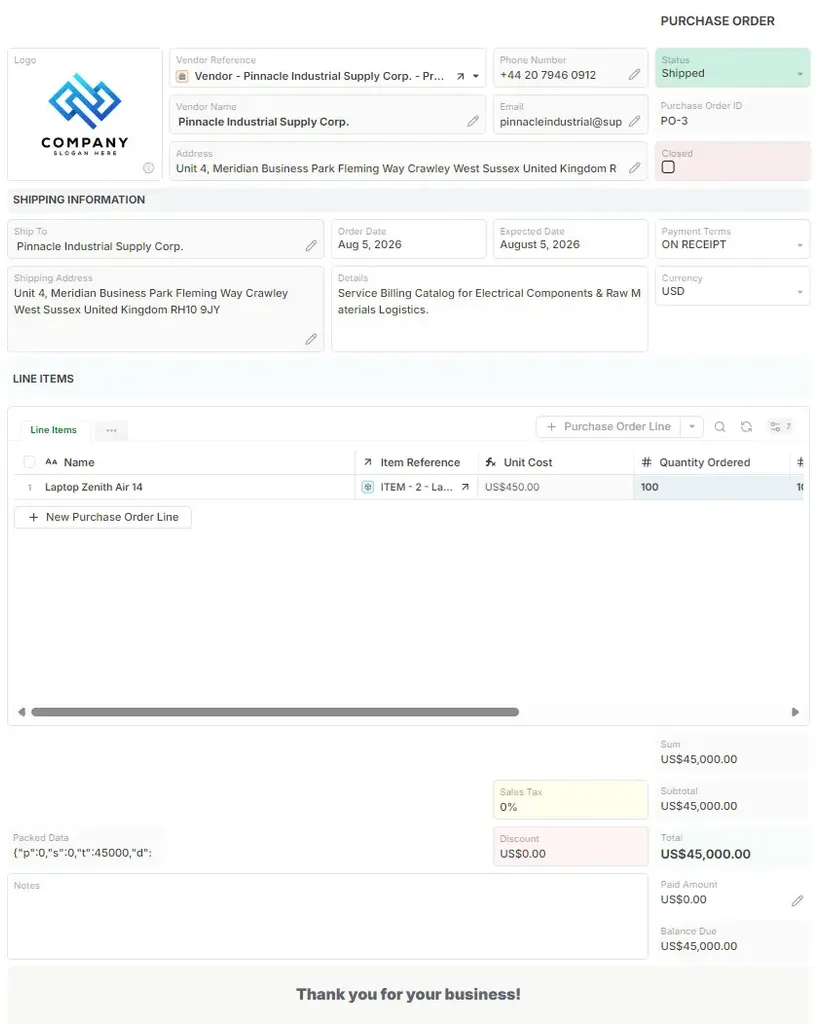
Purchase Order Records. Source: AnyDB
Procurement Process Flowchart
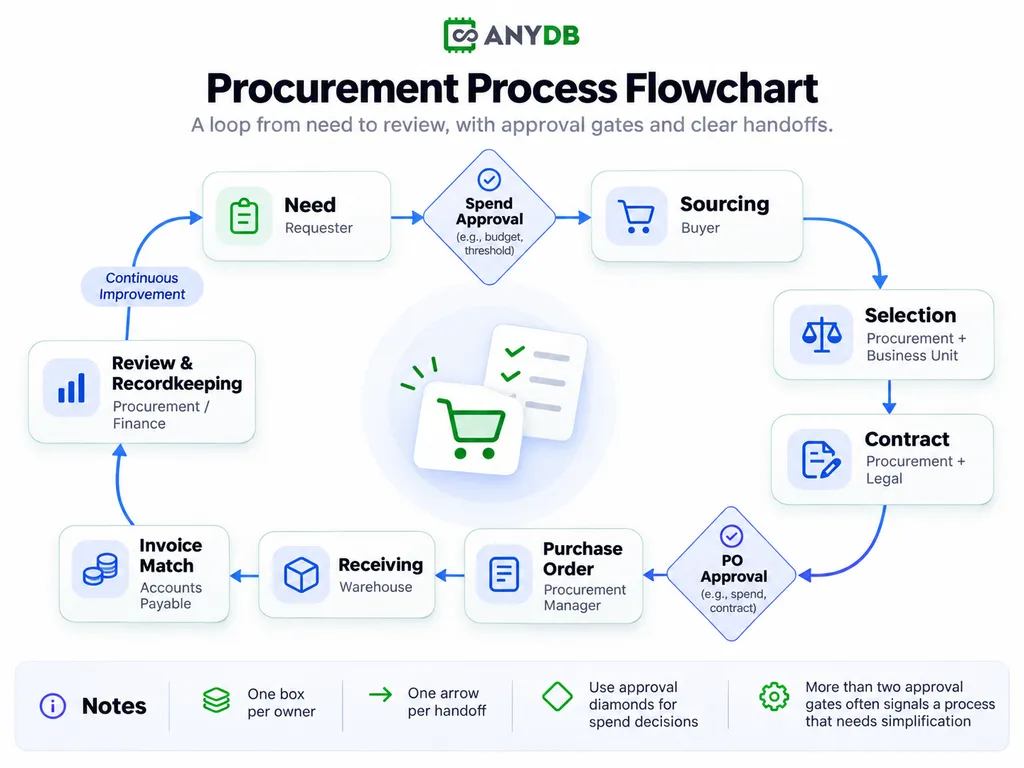
Most flowcharts draw procurement as a straight line, which hides the part that repeats. Draw it as a loop: need, sourcing, selection, contract, purchase order, receiving, invoice match, then review and recordkeeping feeding the next sourcing decision.
You will find some guides add review and recordkeeping as an eighth stage. Seven-step versions fold that work into payment, which is why the cycle looks shorter on paper than it runs in a warehouse.
For your own procurement process flowchart, you should use one box per owner, one arrow per handoff, and an approval diamond wherever someone approves spend.
A chart with more than two such gates usually marks a process that needs simplifying before it needs software.
That loop is the same one a purchase order system records, stage by stage.
Standard Procurement Procedures
A standard procedure is the written version of the cycle. It holds when you name four things: approval thresholds by spend, required documentation at each step, segregation of duties, and a retention rule for records.
You can set a 5,000 dollar threshold. Below it, one signoff suffices. Above it, you require two signoffs and three written quotes before someone issues a purchase order.
That split means the person who raises the requisition is not the person who approves the payment. The Association of Certified Fraud Examiners (ACFE) estimates that organizations lose 5% of revenue to fraud each year, so the split matters.
You can trace audit findings back to a missing threshold or a missing approval record rather than to the policy document itself. Vendor files follow the same logic, which is why vendor onboarding belongs inside the procedure.
Write the threshold before you write the policy.
How to Run a Procurement Process That Holds Up
The procurement process is a cycle, and it breaks at handoffs rather than at steps. A requisition that never reaches the approver, a receipt that never reaches accounts payable, and a contract that never reaches the vendor record all end with a payment decision made without evidence.
Run the seven steps as one connected process and you get fewer duplicate payments, an audit trail that answers a question in minutes, and a sourcing decision informed by last cycle’s supplier performance.
AnyDB runs procurement as business objects on one data model, with approvals, vendor records, and purchase orders in the same place, so the three-way match reads from one record instead of three.
Start Free Plan and model your purchase requisition and approval flow.
Frequently Asked Questions about the Procurement Process
What are the 5 steps of the procurement process?
You can compress the procurement process into five steps: need recognition, sourcing, purchase order, receiving, and invoice payment. The seven-step model splits sourcing into market research and supplier selection, then adds contract negotiation.
What are the 5 P’s of procurement?
You will not find a single agreed list. Common versions name people, process, price, place, and performance as the levers a procurement team manages. Treat any list as a checklist, not a standard.
What are the three types of procurement?
You can name them as direct, indirect, and services procurement. Direct covers materials that go into the product, indirect covers overhead purchases, and services covers contracted work such as maintenance or logistics.

The End-to-End Operations System that Finally Fits Your Reality.
No more scattered spreadsheets or rigid, disconnected tools.
AnyDB is a modern, customizable platform for managing business records and operations across teams, clients, and partners.
Learn More


Phone: (512)-761-7979
© 2024 Humanly Inc. All rights reserved.
What is AnyDB?
AnyDB is a unified, customizable data store designed to streamline and empower your entire organization. Effortlessly store, organize, and share custom business data to drive both internal and external operations across teams. Think of it as spreadsheets on steroids.Perfect for Sales, Marketing, Operations, HR, and beyond. Discover AnyDB