
Published on August 29, 2025


Searches for obsidian alternatives rarely start because the app got weaker. Obsidian still handles local Markdown files, backlinks, graph view, and private-by-default personal knowledge management well.
Work drives the shift. More than 10,000 organizations use Obsidian on the job, and the app became free for commercial use in 2025. The live question is whether a note tool can carry shared records, ownership, permissions, and approvals.
The tools below are compared by use case rather than rank: free and open-source, self-hosted, privacy-first, developer-oriented, and operational business systems.
Why Look For Obsidian Alternatives?
The reason more teams now search for Obsidian alternatives is not that Obsidian stopped being useful. It is that many teams and professionals are trying to use it for work that goes beyond personal knowledge.
Obsidian is still one of the strongest tools for personal knowledge management. Its local Markdown files, backlinks, graph view, plugins, and private-by-default structure make it a favorite for people building a “second brain,” organizing research, writing notes, or managing personal project context.
A knowledge workspace connects ideas for one person. On the other hand, an operational system carries shared records with ownership, status, permissions, and history that other people depend on.
The Problem Starts When Notes Become Operations
Context is enough for a project note. A business record has to drive action, and that difference sets the operational requirements.
Take a customer record. It connects contracts, onboarding tasks, invoices, support notes, approvals, product requests, and follow-ups, and each record carries a status someone must act on.
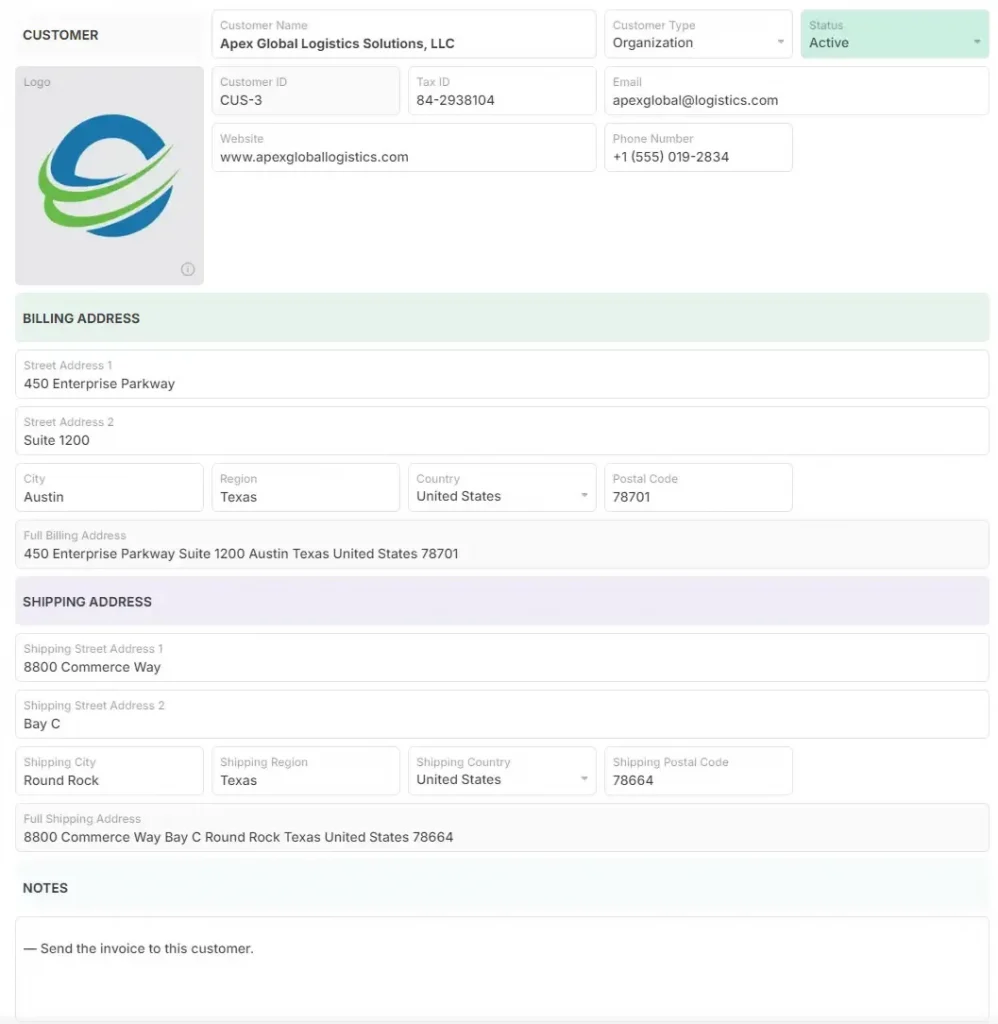
Customer Record Object. Source: AnyDB
Once notes become operations, teams need shared records, ownership, permissions, approvals, dashboards, forms, files, and workflows.
Teams Are Stretching Obsidian Into Project Management
Teams build Kanban boards, Gantt charts, tables, custom fields, due dates, and task metadata inside Obsidian, and community plugins support those project management workflows.
The more a team depends on plugins, YAML Ain’t Markup Language (YAML) properties, templates, and personal conventions, the more fragile the system becomes. That fragility is a maintenance cost that compounds as headcount grows.
Collaboration Still Has Limits
Obsidian shared vaults let teams work on the same files. Obsidian’s documentation states that collaborative live editing on the same file is unsupported, and shared vaults are limited to 20 collaborators.
Those limits create requirements teams solve elsewhere: role-based access, field-level permissions, external collaboration, audit logs, and automated workflows.
The Real Question to Address: Knowledge Workspace Or Operational System?
Obsidian organizes knowledge well. Operations-heavy companies have to manage customers, projects, orders, assets, inspections, vendors, approvals, files, inventory, and workflows as connected business records.
That is the criterion for the comparison: a knowledge workspace or an operational system.
4 Obsidian Alternatives Worth Testing
The four tools below are grouped by use case, not rank. Each is measured against the same criteria:
- Data ownership and storage model.
- Collaboration and permissions, including live editing.
- Structure and data modeling.
- Sync and hosting requirements.
- Pricing model.
- Fit for personal, team, or operational work.
1. AnyDB
AnyDB serves teams that have outgrown personal knowledge management. Obsidian connects notes and ideas; AnyDB runs business operations.
A customer object connects to contracts, onboarding tasks, invoices, files, product requests, approvals, and follow-ups. An asset object connects to inspections, maintenance records, warranties, photos, vendor documents, and audit history.
Work is modeled as objects and connected records rather than flat notes or disconnected tables. Nested sub-objects hold related records, dynamic references pull live values, and rollups aggregate child values into parent records.
Permissions control access at cell, field, and record level, and unlimited free guest accounts let clients and vendors work inside secure branded portals on custom domains.
Key Features
AnyDB pairs spreadsheet-style usability with 50+ formulas and an easy setup:
- Connected business records with files, comments, and audit history.
- Object-based structure built from types and templates.
- Forms, workflows, and approvals routed to the right person.
- Permissions by role, record, or field.
- Inventory records with stock keeping units (SKUs).
- Custom views and dashboards with per-team filters.
- Portals for clients and vendors with free guest accounts.
- Workflow automation and cloud, GovCloud, or on-premises deployment.
Downsides
AnyDB is not a Markdown-first notes app, which matters to anyone who wants freeform writing, backlinks, and local files. Also, teams that have never modeled data as objects and relationships face a different learning curve.
The community is smaller than Obsidian’s, which affects users who depend on a large plugin ecosystem.
2. Joplin
Joplin is an open-source alternative with offline functionality, end-to-end encryption, and syncing through Dropbox, Web Distributed Authoring and Versioning (WebDAV), and Nextcloud.
Official desktop, mobile, and web apps exist. Joplin lacks modern interface polish and real-time collaboration, and its mobile experience remains a pain point for attachments and formatting.
No encryption at rest and no note-specific locking may deter teams handling sensitive content. Joplin fits individuals and teams that want cloud-free workflows and will configure their own sync and backup.
Key Features
Joplin covers encryption, capture, and sync control.
- End-to-end encryption for synced notes.
- Web clipper for saving pages and articles.
- Plugin support that extends core functionality.
- Flexible sync with Nextcloud, WebDAV, and Dropbox.
- Offline-first operation for poor or intermittent connectivity.
Downsides
Limits matter most to teams running shared workflows.
- No native graph view or backlinks without plugins.
- Interface and usability lag behind modern productivity standards.
- Mobile apps are underpowered and visually dated.
- Limited real-time collaboration.
- Variable plugin quality with security caveats.
3. Standard Notes
Standard Notes is a privacy-first alternative with true end-to-end encryption on all plans, including the free version, and an open-source codebase that supports Docker self-hosting.
Its simplicity is both a strength and a constraint. Even with extensions, it lacks collaboration features, graph views, and backlinks. Users report desktop and mobile inconsistencies and unclear roadmap visibility on pricing.
It fits legal, healthcare, or policy teams that prioritize security and data ownership over collaboration and structure.
Key Features
Standard Notes centers on encryption and control.
- End-to-end encryption applied locally before syncing.
- Cross-platform sync across desktop, mobile, and web.
- Extensions for advanced editors, including Markdown, and custom themes.
- Official Docker self-hosting.
- Password-protected notes.
Downsides
Limits affect teams rather than individuals.
- Paid plan required for many essential features.
- No backlinks, graph view, or collaboration tools.
- Mobile experience lags behind desktop for formatting and attachments.
- Pricing changes without clear roadmap visibility.
- Built for individual use, with limited collaboration.
4. Trilium Notes
Trilium Notes is a developer-friendly option built for power users who prioritize deep structure, automation, and control over deployment. Its database architecture supports hierarchical note trees, embedded JavaScript automation, and note-level attribute inheritance.
Trade-offs: no native mobile app, a steep learning curve, occasional instability, and sync only through self-hosted instances or WebDAV.
It fits technical teams building internal knowledge systems or technical documentation.
Key Features
Structure and automation define the feature list.
- Hierarchical note tree with nested relationships, backlinks, and contextual links.
- JavaScript automation for custom internal workflows.
- Nested notes with inherited attributes.
- Rich text and Markdown editor options.
- Self-hosting for full control and syncing.
- Optional note or instance encryption.
Downsides
The learning curve and mobile gaps decide fit.
- An interface that can be unintuitive for new users.
- Clunky experience for non-technical teams.
- No official mobile app, and the mobile web interface is limited.
- Smaller community with limited documentation.
- Code block support and formatting still lack polish.
Obsidian Alternatives: Test, Sync, and Stay Productive
Readers who searched for obsidian alternatives usually land in one of two places: scattered spreadsheets on one side, rigid and disconnected tools on the other.
Match the tool to the constraint. Choose open-source and offline-first software for control over sync, encryption and self-hosting for security, database-backed structure for technical teams, and connected operational records for business workflows.
For that last case, AnyDB manages business records and operations across teams, clients, and partners as an object-based platform with connected records, guest portals, and free guest accounts. Teams use it as a lightweight enterprise resource planning (ERP) alternative.
Book a free demo call and see how to model a workflow with connected records, forms, and portals, or start on the free plan.
Frequently Asked Questions About Obsidian Alternatives
Why are people leaving Obsidian?
Most people are not leaving. Teams add a second tool when shared records, permissions, approvals, and audit history become requirements a local vault cannot carry.
Which is better, Obsidian or Notion, in 2026?
Neither is universally better; the choice depends on the work. Obsidian wins for private local files and backlinks, while Notion wins for shared pages and lightweight databases.
Is there a Microsoft equivalent to Obsidian?
Microsoft OneNote is the closest mainstream equivalent, and it syncs through Microsoft 365. It does not replicate Obsidian’s local Markdown files, graph view, or plugin model.
Are there free obsidian alternatives?
Joplin and Trilium Notes are free and open source, and Standard Notes encrypts notes on its free plan. Joplin and Trilium rely on your own sync target.

The End-to-End Operations System that Finally Fits Your Reality.
No more scattered spreadsheets or rigid, disconnected tools.
AnyDB is a modern, customizable platform for managing business records and operations across teams, clients, and partners.
Learn More


Phone: (512)-761-7979
© 2024 Humanly Inc. All rights reserved.
What is AnyDB?
AnyDB is a unified, customizable data store designed to streamline and empower your entire organization. Effortlessly store, organize, and share custom business data to drive both internal and external operations across teams. Think of it as spreadsheets on steroids.Perfect for Sales, Marketing, Operations, HR, and beyond. Discover AnyDB