
Published on September 25, 2026


Stocky is gone, but the work it was doing for you is still there every morning. Purchase orders still need to go out. Stock still needs to move between locations. Suppliers still call, or email, or send over a spreadsheet nobody asked for. Shopify has folded these core workflows into its own admin and POS experience, which gives a lot of businesses a clean path forward without adding a single new tool.
For others, the transition raises a bigger question: which of the stocky alternatives fits the way inventory works today? Replacing Stocky does not have to mean finding another app that looks and behaves the same way. It means figuring out which workflows need to keep running as they are, which ones deserve to work better, and where inventory has quietly become tangled up with the rest of the operation.
This guide works through that decision from the workflow up, starting with Shopify’s own native tools and moving out toward specialized inventory platforms and custom operational systems.
Stocky Is Gone. The Inventory Work Still Has to Happen.
Stocky may have reached the end of its road, but the inventory operation behind it is still very much alive. Shopify discontinued the app on August 31, 2026, and moved the core inventory workflows, including transfers, purchase orders, adjustments, and reporting, into Shopify Admin and Shopify POS.
That sounds tidy on paper. It gets more complicated once you look at what a given team was actually using Stocky for.
For one team, Stocky was a practical way to keep stock counts accurate across a handful of locations. For another, it turned sales history into purchase order suggestions before anyone had to think about it. Someone else leaned on it for supplier details, pack sizes, purchasing history, or stock movement reports. Stocky touched all these jobs at once, which is exactly why there is no single checklist for a complete replacement.
Before comparing stocky alternatives, it helps to map the work your operation needs to keep moving:
- Purchasing: How are purchase orders created, tracked, approved, and received?
- Planning: Does the team rely on forecasting, reorder points, sales history, or supplier lead times?
- Stock movement: How does inventory move between stores, warehouses, and other locations?
- Supplier management: Do different prices, currencies, pack sizes, or purchasing conditions matter?
- Counting and adjustments: How are stocktakes, discrepancies, damaged products, and corrections recorded?
- Reporting: Which historical inventory and purchasing information needs to stay available?
- Connected workflows: Does inventory feed into fulfillment, special orders, approvals, warehouse activity, or customer commitments?
There is also a practical migration detail worth keeping in view. Shopify states that historical Stocky data, including old purchase orders and stocktakes, does not move into it automatically. Historical purchase orders cannot be imported with their previous statuses, received quantities, or supplier links, and supplier records cannot be exported from Stocky at all.
So this is more than a software swap. The useful starting point is the work itself: what needs to continue, what could work better, and what now needs to connect to the rest of the operation.

Stocky Alternatives: Six Ways to Replace What the App Did
The market offers several different answers because Shopify businesses carry several different inventory problems inside them.
Some just need a straightforward way to manage stock inside Shopify. Others need sharper forecasting and replenishment. Manufacturing teams carry a different set of requirements altogether, and businesses selling across several channels often need inventory, orders, warehouses, and fulfillment working from one shared picture.
So the real comparison is about fit, not feature count.
Shopify Inventory Management
For a business with fairly straightforward inventory workflows, Shopify’s native tools might be all you need. It now supports transfers, purchase orders, receiving, inventory adjustments, and historical inventory reporting directly inside Shopify Admin and Shopify POS, along with real-time visibility across locations.
Inventory stays inside the same ecosystem as your storefront and sales activity, with nothing new to log into. The real test comes as the business grows. Does the native workflow still cover forecasting, supplier management, and purchasing once things get more complex?
Inventory Planner
Inventory Planner is built around one specific part of the inventory puzzle: deciding what to replenish and when. It connects to Shopify data to generate forecasts and replenishment recommendations, with lead times and stock cover built into the planning process.
If your operational processes are already solid and the missing piece is sharper demand planning, a dedicated planning tool like this one earns its place.
Prediko
Prediko takes the planning approach further, pairing demand forecasting with purchase orders, inventory transfers, multi-store management, analytics, and raw material tracking. Its Shopify app also supports Bill of Materials workflows for businesses planning materials alongside finished products.
Growing brands and manufacturers tend to reach for Prediko once planning starts overlapping with purchasing and product complexity.
Fabrikatör
Fabrikatör leans heavily into forecasting and replenishment for Shopify businesses. It forecasts demand at the SKU level, flags when and how much to reorder, automates purchase orders, tracks supplier costs and lead times, and supports backorders and preorders across multiple warehouses.
It stays in its lane on purpose, giving teams a dedicated planning layer without pulling them into a broader operational system.
Cin7 Core
Cin7 Core sits further along the operational spectrum. Its capabilities span inventory, purchasing, warehouse management, order management, multichannel selling, integrations, and manufacturing features such as BOM tracking and MRP.
The tradeoff is implementation. Businesses that already have inventory tangled up with several operational functions get a lot from Cin7 Core’s breadth, but they should plan for real setup time and process work to get there.
Katana
Manufacturers carry one more consideration: inventory is tied directly to production. Katana connects Shopify with inventory, production planning, purchasing, raw materials, and fulfillment, so stock movements reflect what is happening on the shop floor, not just in the warehouse.
For a make-to-order or production-focused business, replacing Stocky often means choosing a system that understands materials and production, not only finished goods.
AnyDB
AnyDB takes a different route entirely. Instead of starting from a predefined inventory app, it works as a custom operational system configured around the processes surrounding inventory.
A Shopify order can connect to inventory. A special order can trigger purchasing. A vendor can become part of the same workflow, and receiving can update the operational records your team already relies on every day. AnyDB supports two-way Shopify synchronization for key data through the AnyDB Sync app, and it extends into purchasing, vendors, fulfillment, warehouse activity, approvals, and custom workflows built around your process.
Somewhere between “we just need to track stock” and “our inventory process touches six departments,” a standard inventory app stops being enough. That’s one gap AnyDB is built for.
| Platform | Strongest fit | Main focus | What to evaluate |
| Shopify Inventory Management | Straightforward Shopify operations | Native inventory | Planning and purchasing needs |
| Inventory Planner | Demand planning | Forecasting and replenishment | Broader operational coverage |
| Prediko | Growing brands and manufacturers | Planning and purchasing | Manufacturing and warehouse needs |
| Fabrikatör | Shopify focused brands | Forecasting and PO automation | Scope beyond inventory planning |
| Cin7 Core | Broader inventory operations | Inventory, orders, warehousing | Implementation and process complexity |
| Katana | Shopify manufacturers | Production and inventory | Manufacturing workflow fit |
| AnyDB | Custom operational processes | Connected inventory and operations | How much of the surrounding operation needs to be modeled |
The interesting part is that every one of these can turn up in a search for stocky alternatives, yet they solve genuinely different problems. The operation should decide the software, not the other way around.
When Inventory Management Outgrows the Inventory App
Adding another app or another spreadsheet can create as much work as it removes. Every new tool is one more place where records need to match, statuses need to stay current, and someone has to remember which system holds the latest number.
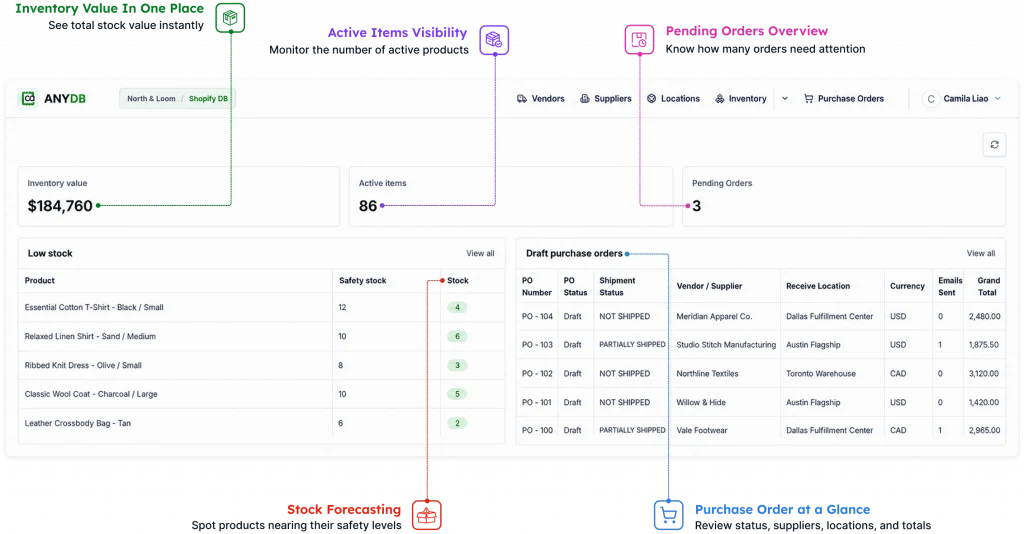
AnyDB approaches this differently. It sits behind Shopify and connects inventory to the operational processes built around it. Shopify runs the storefront and commerce activity, and AnyDB runs the workflows that keep the operation moving.
| AnyDB capability | What it enables |
| Connected records | Link products, inventory, vendors, customers, orders, locations, and purchasing |
| Configurable workflows | Build processes for special orders, approvals, receiving, transfers, and fulfillment |
| Two-way Shopify sync | Keep selected data synchronized between Shopify and AnyDB |
| Custom forms and views | Give warehouse teams, vendors, and internal users interfaces suited to their roles |
| Access controls | Control what different users can see and update |
| Logs and history | Track synchronization activity and operational changes |
| Dashboards | Give managers current visibility into inventory and related work |
The same approach reaches further than this table can show. Multiple locations, barcode and QR scanning, purchase orders, and stock movement history all live inside the same connected system. So do mobile access, custom records, and reporting.
The AnyDB for Inventory Management page walks through what that looks like in practice, and the Shopify integration itself provides configurable two-way connections for products, variants, customers, orders, inventory, and locations.
Choose the Stocky Replacement Around Your Operation
There is no universal answer among stocky alternatives. For some Shopify businesses, native inventory management already covers everything they need. Others need deeper forecasting, manufacturing capabilities, multichannel inventory, or broader operational control.
The right choice depends on how far inventory reaches into the rest of the business. Explore AnyDB as a stocky replacement today.
Frequently Asked Questions About Stocky Alternatives
Stocky supported several parts of the inventory operation at once, from purchasing and transfers to forecasting and reporting. That’s why choosing among stocky alternatives starts with the workflows a business needs to preserve, improve, or connect after the transition.
What happened to Stocky?
Shopify discontinued Stocky on August 31, 2026, after delisting it from the Shopify App Store on February 2, 2026. Shopify now directs businesses to its native inventory management features inside Shopify Admin and Shopify POS.
What are the best Stocky alternatives?
There is no universal choice. Shopify’s native inventory tools cover straightforward operations well, specialized platforms add forecasting and replenishment, and broader inventory systems handle manufacturing or multichannel needs. Businesses with highly specific workflows can look at a custom operational system instead. The right fit depends on the operation sitting behind the inventory, not on a ranked list.
Does Shopify replace Stocky?
Shopify now covers many of the core workflows Stocky used to handle, including purchase orders, receiving, inventory transfers, quantity adjustments, and inventory reporting, along with real-time inventory visibility across locations and basic tools for replenishment and reordering.
There are a few migration details worth knowing about, though. Historical Stocky purchase orders and stocktakes do not move into Shopify automatically, and historical purchase orders cannot be imported with their previous statuses, received quantities, or supplier links.
Can AnyDB replace Stocky?
Yes. AnyDB can build a flexible inventory and purchasing environment connected to Shopify. Records and workflows stay configurable across inventory, vendors, orders, locations, fulfillment, approvals, and warehouse activity, so each piece reflects how the business runs.
The distinction worth remembering is that AnyDB is a Custom Operational System, not another inventory app. It gets configured around the processes surrounding inventory, which gives businesses a way to connect Shopify commerce with the operational work happening behind every order.

The End-to-End Operations System that Finally Fits Your Reality.
No more scattered spreadsheets or rigid, disconnected tools.
AnyDB is a modern, customizable platform for managing business records and operations across teams, clients, and partners.
Learn More


Phone: (512)-761-7979
© 2024 Humanly Inc. All rights reserved.
What is AnyDB?
AnyDB is a unified, customizable data store designed to streamline and empower your entire organization. Effortlessly store, organize, and share custom business data to drive both internal and external operations across teams. Think of it as spreadsheets on steroids.Perfect for Sales, Marketing, Operations, HR, and beyond. Discover AnyDB