
Published on August 28, 2026


Losing an entire excavator is rare. Most construction companies know where their big equipment sits at any given moment. What gets lost is everything else: whether it’s actually free to use, who signed it out last, whether the inspection sticker expired last month, and whether someone already promised it to another job for Thursday.
Construction asset tracking software tends to get built around the wrong half of that problem. A GPS pin answers where. It has nothing to say about ready, assigned, or next, and those are usually the questions actually holding up the work.
Knowing where an asset is becomes much more useful when the business also knows what that asset is doing, who is responsible for it, and what needs to happen next.
In this article, you’ll learn:
- why construction asset tracking becomes difficult across different jobsites
- what to check when choosing construction asset tracking software
- how leading platforms differ in their operational focus
- when asset tracking needs to connect with broader construction workflows
The Construction Asset Problem Starts When Equipment Leaves the Yard
A construction asset changes more than its address when it moves. Send a loader to a new jobsite, and responsibility for it shifts to someone new. Its availability for other work disappears. A rough week of use can change its condition, and whatever needs to happen next, an inspection, a return, or a repair, changes right along with it.
A Location Update Is Not the Whole Record
Knowing that a skid steer is currently at Jobsite B is useful. The operations team may also need to know who is responsible for it, whether it is ready for use, how many hours it has been operating, and whether maintenance is already scheduled.
A useful asset record can bring together information such as:
- Assigned user or responsible team
- Current condition and operational status
- Engine hours or usage information
- Inspection and maintenance history
- Associated project or work order
- Relevant documents, photos, and certificates
Purchase or rental details, prior locations, scheduled transfers, and any open incidents or service requests round out the picture. Not every company needs all of these fields. Construction asset tracking software should reflect the decisions an operation actually makes around its equipment, tools, and materials, not a generic checklist.
Modern asset management platforms connect tracking with maintenance, inspections, and reporting. The value comes from bringing those pieces together so the record stays useful after the asset moves.

Construction Sites Do Not Wait for the Spreadsheet
Spreadsheets make a perfectly reasonable starting point. They are familiar, quick to configure, and easy to change when a team needs one more column. The trouble begins when one spreadsheet becomes several, and then those spreadsheets start carrying different versions of the same information.
Soon, keeping the records aligned becomes part of the job.
This creates familiar headaches. Ownership is unclear. Data gets entered twice. A shared spreadsheet also makes it hard to control who can edit information, keep a reliable history of changes, or give outside collaborators access to just what they need.
The real gap sits between how quickly the operation changes and how quickly its records can keep up. When assets move through many people, locations, and processes, the system needs to preserve that story. Storing the latest location isn’t enough.
5 Construction Asset Tracking Software Options to Consider
Construction asset tracking software covers a wide range of priorities. One platform may be built around GPS and telematics for heavy equipment. Another may focus on tools moving between warehouses and jobsites. Comparing them feature by feature can make these differences harder to see.
A more useful comparison starts with the problem each platform is designed to solve. The five options below take different approaches, from fleet visibility to tool logistics to project operations.
Motive
Strong fit: Fleet, heavy equipment, and mobile asset visibility.
Motive puts location and equipment visibility at the center of its construction offering. The platform uses GPS, telematics, geofencing, and sensors to monitor equipment. From there, it tracks utilization, engine hours, fault codes, maintenance, and movement alerts.
That makes it relevant for companies managing mobile equipment and vehicles across distributed jobsites. Teams can see where assets are and how they’re being used.
Tenna
Strong fit: Construction companies managing mixed fleets across projects.
Tenna takes a broader approach to construction equipment. It brings heavy machinery, vehicles, tools, attachments, materials, and rental assets into one system. From there, it covers location and utilization. It also handles maintenance, scheduling, and integrations with other construction tools.
For contractors managing a mixed fleet across several projects, Tenna can be a strong option.
AlignOps
Strong fit: Tools, equipment, materials, and asset logistics.
AlignOps is particularly interesting for companies where the smaller things cause the bigger headaches. Its platform tracks tools, equipment, materials, and consumables across warehouses, tool cribs, vehicles, and jobsites. It also supports requests, transfers, returns, and maintenance.
That focus matters. A missing drill doesn’t carry the price tag of an excavator, but enough missing tools can leave a crew waiting around for the same reason: the asset they need is somewhere else.
Mitti by SafetyCulture
Strong fit: Asset management connected to inspections and operational safety.
Mitti combines asset registers with inspections, maintenance, equipment performance, and mobile workflows. Teams can manage inventories and build inspection processes. They can also connect asset information to the project management, accounting, and ERP systems they already use.
It’s a useful option when asset readiness and safety processes are closely intertwined.
Contractor Foreman
Strong fit: Contractors looking for asset capabilities within construction management software.
Contractor Foreman approaches the problem from the broader construction management side. Its platform includes vehicle and equipment logs alongside work orders, purchase orders, inspections, forms, and daily logs.
This makes it relevant for contractors who want equipment information inside a wider project management environment.
| Platform | Strongest Fit | Operational Focus |
| Motive | Mobile equipment and fleet | Location, utilization, telematics. |
| Tenna | Construction asset programs | Equipment, tools, resources. |
| AlignOps | Tools and asset logistics | Tracking, transfers, warehouse, materials. |
| Mitti | Asset and safety operations | Assets, inspections, maintenance. |
| Contractor Foreman | Contractor operations | Projects, equipment, work orders. |
The right choice depends on what the operation needs to accomplish with its asset data. The feature list shows what the software can track. What matters more is what your team can actually do with that information once the asset starts moving.
When Construction Asset Tracking Needs an Operational System
A dedicated construction asset tracking platform can be the right choice when the main challenge is knowing where equipment is, how it’s used, and when it needs maintenance. GPS, telematics, RFID, and similar technologies matter because they make movement visible.
The operational picture gets more involved when that movement needs to trigger or inform other work.
A custom operational system can add real value once tracking crosses into workflow territory.
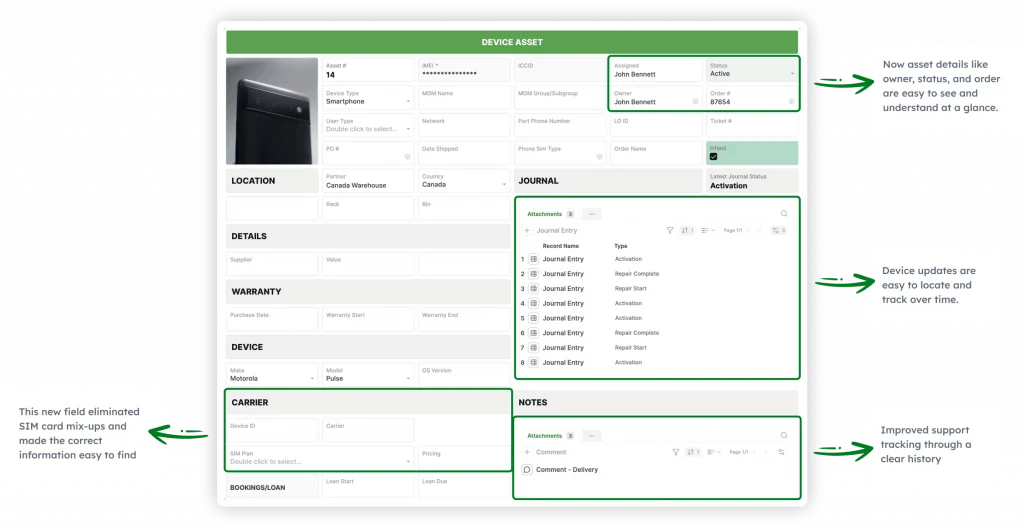
AnyDB lets companies model assets as connected operational records. Each record holds its relationships to the information and processes around it. The platform applies the same principle to installation and field service work, where a completed installation stays linked to its site visit records, maintenance reports, and warranty history instead of living in a separate file.
| AnyDB Capability | What It Enables |
| Connected asset records | Link equipment, tools, and materials to projects, people, customers, vendors, and locations. |
| Asset history | Keep movements, assignments, inspections, repairs, and status changes connected. |
| Workflows and alerts | Coordinate maintenance, inspections, transfers, approvals, renewals, and follow-ups. |
| Forms and portals | Let field teams, subcontractors, vendors, inspectors, and customers submit information securely. |
| Files and documents | Keep photos, inspection evidence, warranties, rental documents, and other records attached. |
| Dashboards and views | Give managers visibility into asset status, project allocation, pending work, and exceptions. |
| Mobile workflows | Let field users update records from where the work happens without exposing backend complexity. |
For construction companies whose asset processes reach into projects, work orders, field teams, vendors, and customer activity, AnyDB can serve as the flexible operational layer around asset tracking software. It doesn’t need to replace the technology that captures location or equipment data. It connects that information to the work happening around the asset instead.
Track the Asset. Keep the Operation Connected.
Construction asset tracking software gives teams much better visibility. The bigger gain comes from keeping that visibility connected to the work around each asset.
That is where AnyDB fits. It connects assets with the workflows, documents, people, and operational records that give each movement its context, helping teams manage complex operations.
Explore how the system can improve your asset tracking operation.
Frequently Asked Questions About Construction Asset Tracking
Construction asset tracking covers more than equipment location. These three practical questions can help clarify what to look for when evaluating software for tools, machinery, materials, and field operations.
What does construction asset tracking software track?
Construction asset tracking software can track equipment, tools, vehicles, and materials. Depending on the platform, it may also cover locations, assignments, status, maintenance, and movement history. Exact capabilities vary by platform.
What is the difference between GPS tracking and asset tracking software?
GPS is a location technology. Asset tracking software gives that location data an operational home, where it can be connected to information such as assignments, maintenance, projects, alerts, and movement history. GPS can tell a team where an asset is, while the broader system helps keep the rest of its record organized.
When does a construction company need more than an asset tracking platform?
A dedicated tracking platform can be a strong fit when the main priority is location, use, fleet visibility, or equipment maintenance. Assets often grow more connected over time, though, linking to projects, work orders, field teams, vendors, and customers. A custom operational system can provide the structure needed to keep those relationships connected.

The End-to-End Operations System that Finally Fits Your Reality.
No more scattered spreadsheets or rigid, disconnected tools.
AnyDB is a modern, customizable platform for managing business records and operations across teams, clients, and partners.
Learn More


Phone: (512)-761-7979
© 2024 Humanly Inc. All rights reserved.
What is AnyDB?
AnyDB is a unified, customizable data store designed to streamline and empower your entire organization. Effortlessly store, organize, and share custom business data to drive both internal and external operations across teams. Think of it as spreadsheets on steroids.Perfect for Sales, Marketing, Operations, HR, and beyond. Discover AnyDB