
Published on July 17, 2026


Every operation creates momentum. A customer request turns into planning. Planning triggers purchasing. Purchasing depends on supplier updates. Production waits for approvals. Delivery relies on inventory, documentation, and coordination. One action leads to the next, creating an operational workflow that stretches across the entire business.
The work keeps moving. Information does not always keep up.
Before long, teams are spending as much time confirming information as they are completing the work itself.
Improving an operational workflow comes down to one thing: making information travel with the work, so every decision is based on the same reality instead of fragmented updates.
In this article, you’ll learn why workflows become disconnected as organizations grow and practical ways to build more connected ones.
Operational Workflows Can Fail Before Anyone Notices
Operational workflow problems rarely announce themselves. More often, they arrive disguised as small delays, extra follow-ups, and repeated manual work that quietly becomes part of the routine.
As each issue seems manageable on its own, teams adapt instead of questioning why the process is getting harder to manage. Complexity grows faster than visibility. By the time anyone notices, the gap is already wide.
Watch for these patterns.
- Information moves slower than the work itself, arriving late or through the wrong channel while the work keeps going without it.
- Then there’s duplication. The same information gets copied across spreadsheets, ERPs, CRMs, and shared documents, raising the odds of inconsistent records and costly mistakes.
- External collaborators make it worse. Suppliers, contractors, and inspectors exchange updates outside the main process, and each exchange is a chance for something to get lost.
- And when the fastest way to find out what’s happening is booking a meeting, visibility has already broken down.
If several of these sound familiar, it’s worth checking your workflow before small inefficiencies calcify into structural ones.
Three moves tend to surface the biggest opportunities:
- Map the flow of work from start to finish, and mark where information slows down, approvals pile up, or manual coordination becomes necessary.
- Challenge routines nobody questions. If a task exists because “that’s how we’ve always done it,” it deserves a second look.
- Use data instead of assumptions. Cycle times, recurring bottlenecks, and repeated delays tell you where improvement will actually move the needle.
These problems seldom start because people stop doing their jobs well. They start because information fragments across systems, departments, and outside collaborators until nobody has the full picture anymore.

Four Ways to Build Connected Operational Workflows
Building a stronger workflow is all about understanding how work, information, and decisions interact, then removing whatever keeps them from moving together.
Here are four practices worth applying:
1. Understand the Entire Journey
Most teams improve the part of the process they know best. A workflow, though, is only as strong as the connections between its stages.
Rather than optimizing individual tasks, map the complete journey from the moment work begins until it’s finished.
What triggers each activity?
Which steps depend on the one before it?
Where do approvals stall things, and where does information get entered more than once?
2. Create a Single Source of Truth
Every disconnected process begins with disconnected information.
When operations run on different spreadsheets, isolated applications, and separate databases, each team ends up building its own version of reality. A connected process depends on shared records everyone actually trusts, so nobody has to ask which file is the most current before making a call.
The goal is simple: every update should strengthen the whole picture, not create one more version of the truth to argue about.
3. Connect the Systems Supporting Your Workflow
Even a well-designed process struggles when the technology behind it operates in isolation.
Whether information moves through integrations, APIs, or one unified platform, every connected system should remove manual updates, not create another synchronization chore. If your team is copying information between applications every day, the technology is adding work instead of taking it away.
There’s a simple test for this. When data changes in one place, does everyone who depends on it see the change automatically, or does someone have to go tell them?
5. Improve Continuously
A workflow should never be treated as a finished project.
As products, teams, suppliers, and customer expectations shift, the process needs to shift with them. Organizations that keep improving track what matters: cycle time, throughput, recurring bottlenecks, and feedback from the people actually doing the work.
Pro tip: the people closest to the process usually know exactly where the friction is, even if they can’t always name the fix.
Why The Best Operational Structures Are Built Around Context, Not Tasks
One of the biggest misconceptions about an operational chain is that it’s a sequence of tasks.
Every task depends on context. An approval depends on supporting documents. A purchase depends on inventory levels. Take the context away, and even the most efficient operation starts generating questions instead of answers.
This is why organizations often automate tasks and still struggle with coordination. They’ve sped up the movement of work without preserving what actually made each step make sense.
Connected operational workflows change that.
A great example comes from an AnyDB customer that transformed its order management process. As the company grew, managing orders got harder because information was scattered across emails, spreadsheets, and disconnected systems.
Teams spent time chasing updates, confirming order status, and passing information between departments. The process existed. The context around each order just wasn’t holding together.
By rebuilding it around connected records in AnyDB, every order became a shared source of truth. The payoff went beyond speed.
Teams got real-time visibility into every order. Manual coordination dropped. Everyone worked from the same information instead of chasing it down. Decisions got easier, simply because the context was already there when someone needed it.
You may also like to read: Order Management Case Study
How AnyDB Builds Connected Operational Workflows
Every platform promises better operations. The real question is what those setups stay connected to.
Many tools are built to move tasks from one person to another. That helps coordination, sure, but operations involve a lot more than assigning work.
| Traditional Tools | AnyDB Custom Operational System |
| Tasks managed separately from business data. | Object-based records connect workflows and operational data. |
| Information spread across various systems. | One connected operational environment. |
| Limited flexibility for unique processes. | Configurable workflows that reflect real operations. |
| External collaboration often requires separate portals. | Customers, vendors, contractors, and partners collaborate securely within the same platform. |
| Manual updates between systems. | Connected records reduce duplicate work. |
| Limited operational visibility. | Real-time visibility across workflows, records, and teams. |
AnyDB builds structures around object-based records that stay connected for the entire lifecycle, rather than treating automation as a series of isolated steps.
That foundation rests on a few core capabilities:
- Configurable workflow automation that adapts to how your business actually operates.
- Secure external collaboration for customers, vendors, contractors, and partners.
- Role-based permissions that control exactly who sees and edits what.
- Real-time operational visibility across every workflow, record, and team.
- No-code customization, so workflows can change without a development cycle.
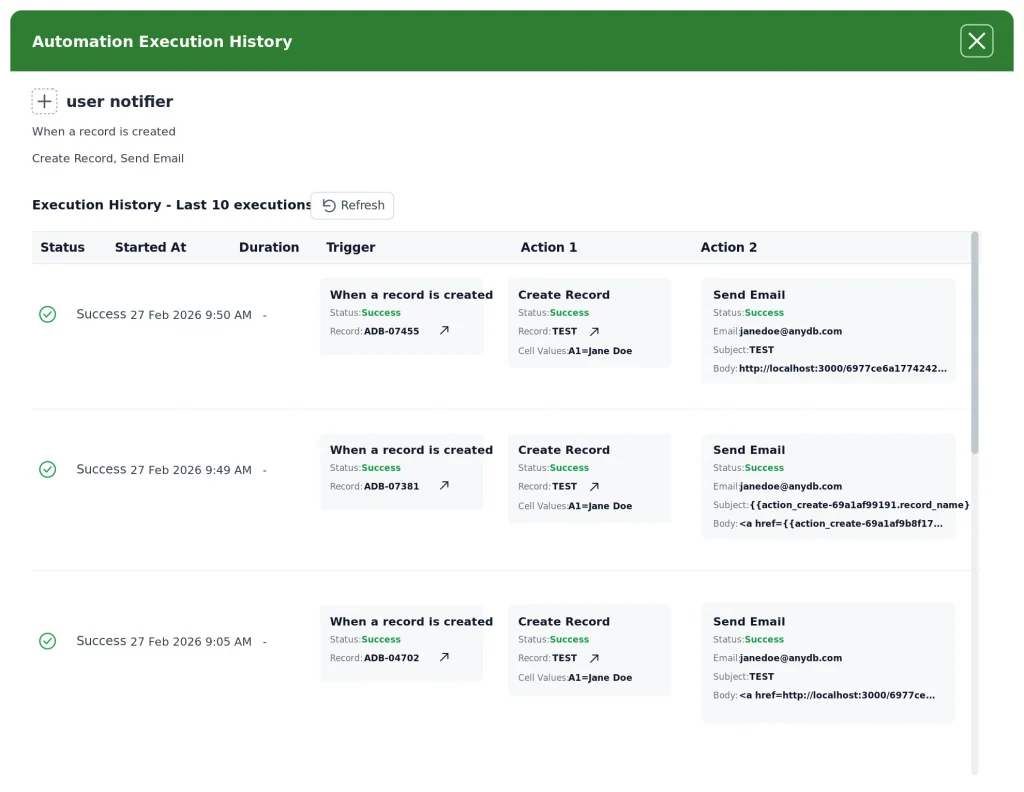
Here’s the interesting part. As operations change, the system changes with them. Each chain evolves alongside the business instead of turning into something teams eventually route around.
Build Workflows That Keep Improving
Every operational system is a chance to remove friction, strengthen collaboration, and build better visibility across the business.
The organizations that gain a lasting edge are the ones whose workflows keep adapting as fast as their operations do. AnyDB helps you build exactly that kind of workflow, connected to your real processes instead of becoming one more disconnected tool your teams work around.
Explore AnyDB Workflow Automation and discover how connected operations can support the way your business really works.
Frequently Asked Questions About Operational Workflows
Improving an operational workflow involves more than automating tasks. Here are some of the most common questions organizations ask when working toward more connected operations.
What Is an Operational Workflow?
It’s the sequence of activities, decisions, and information that moves work from start to finish. It connects people, business records, approvals, and processes so operations can progress consistently while giving teams visibility into every stage.
Why Do Operational Workflows Become Disconnected?
Growth is usually the trigger. Information spreads across spreadsheets, emails, ERPs, CRMs, and other disconnected tools, creating duplicate work, manual handoffs, and inconsistent data. Without a single source of truth, teams end up spending more time coordinating information than moving work forward.
What Makes a Workflow Effective?
Keeping work and information connected from start to finish. That means real-time visibility, automation, connected records, secure collaboration with people inside and outside the organization, role-based permissions, and enough flexibility to adapt as the business changes.
How Does AnyDB Improve Operational Workflows?
By building around configurable object-based records instead of isolated tasks. Data, documents, approvals, and collaboration all live in one environment, which gives teams better visibility, cuts down manual coordination, and lets workflows adapt without a full redesign.

The End-to-End Operations System that Finally Fits Your Reality.
No more scattered spreadsheets or rigid, disconnected tools.
AnyDB is a modern, customizable platform for managing business records and operations across teams, clients, and partners.
Learn More


Phone: (512)-761-7979
© 2024 Humanly Inc. All rights reserved.
What is AnyDB?
AnyDB is a unified, customizable data store designed to streamline and empower your entire organization. Effortlessly store, organize, and share custom business data to drive both internal and external operations across teams. Think of it as spreadsheets on steroids.Perfect for Sales, Marketing, Operations, HR, and beyond. Discover AnyDB