
Published on September 29, 2026


Operations teams use AI assistants for drafting and summarizing. AnyDB MCP, built on the Model Context Protocol (MCP), handles the harder question: can that assistant read a live work order, a SKU count, or a vendor contract?
Today, a person still copies data out of the platform and pastes it into a chat window.
AnyDB MCP is the connection that lets AI assistants read and act on structured operational data inside AnyDB.
MCP gives those assistants a defined way to reach external services, and the service here is the object-based platform holding records, sub-objects, files, and comments. The assistant works with connected records instead of pasted text.
This article covers the practical side: retrieving records, querying connected data, supporting workflows, and granting AI controlled access to business context. It ends with a demo path you can run against your own operation.
What Is AnyDB MCP?
AnyDB MCP is the Model Context Protocol connection that lets AI assistants interact with the structured operational data stored in AnyDB.
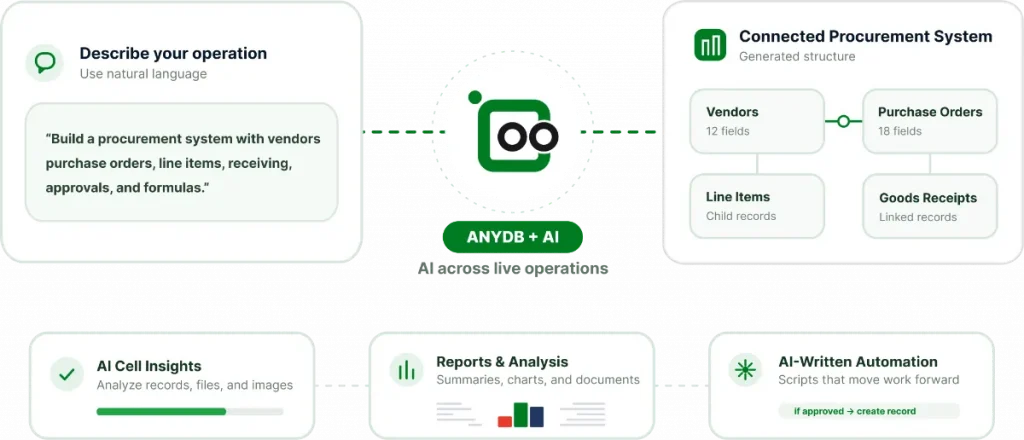
MCP is a standardized interface that allows large language agents to reach external services. Here, the service is the object-based platform holding records, sub-objects, files, comments, and audit history.
Attachment keeps a parent record and its children together, so the assistant reads one structure.
Most AI tools work with whatever a user pastes into a chat window.
The assistant never sees the live state of a work order, a stock level, or a vendor contract, so every operational answer depends on manual extraction.
A planner who copies the wrong type or an outdated template value introduces errors that survive into the report.
The assistant moves from text generator to participant in the operational system. Permissions and scope come from the platform, not from the assistant’s defaults.
What Can an AI Assistant See and Do With My Business Data?
Connecting an assistant to business records raises an immediate question: what can it see and do?
Permissions work at cell, field, and record level. The assistant reaches only what the connected user or service account is permitted to reach, so a vendor-facing assistant and an internal operations assistant return different answers to the same prompt.
For example, cell-level privacy keeps a cost column hidden from a contractor portal even when the record is shared.
Secure guest portals extend that model outward. Clients, vendors, and contractors get scoped access through unlimited free guest accounts, without per-seat licensing. Any assistant operating inside that scope inherits the same limits.
Records keep comments and audit history, so actions taken through the assistant stay traceable. Deployment options include Cloud, GovCloud, and On-Prem, which determine where the data and the connection live.
How Can AI Assistants Support Operational Workflows?
Retrieval answers a question. Workflow support moves a record through a defined process, such as order-to-delivery, vendor onboarding, or document approval. The assistant prepares, drafts, or flags, and a person approves.
A few concrete cases:
- An assistant drafts a shipment journal entry from a confirmed sales order and its order items, so the warehouse team reviews instead of retyping.
- An assistant builds a vendor onboarding checklist from a template and flags missing documents before the record advances.
- An assistant routes a contract through document approvals, adding status badges, reviewer assignments, and thread comments.
How AnyDB MCP Works with Connected Records
AnyDB MCP gives AI assistants access to the relationships between operational records, not just isolated fields. That matters when a business process depends on objects that contain, reference, or summarize other records.
For example, a Work Order can include related parts, photos, and compliance history.
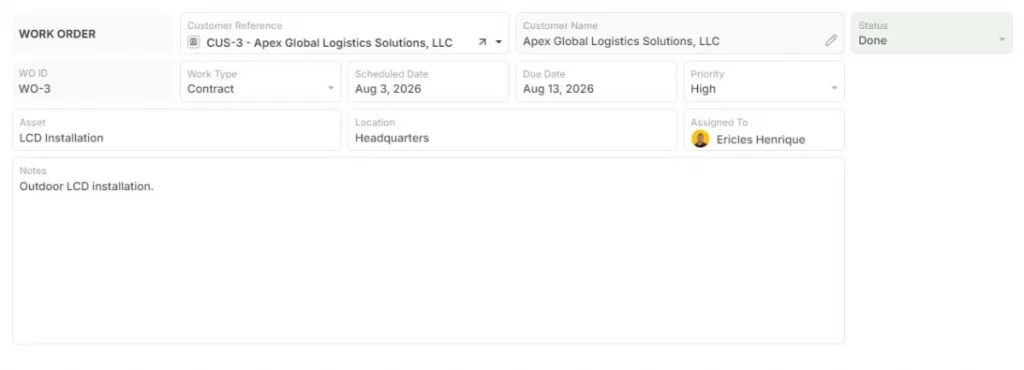
AnyDB preserves those relationships, so an assistant can work with the work order and its connected information as one operational context. The same structure applies to nested objects such as a Car linked to Engine, Frame, and Wheel records.
AnyDB also supports linked references between records that remain separate. A lookup cell can connect two objects, while a dynamic reference formula such as =DYNREF(RefCell, ‘TargetCell’) retrieves the current value from the linked record. That allows the assistant to work with live connected data instead of relying on an exported copy.
Rollups and aggregations add another layer by summarizing child values into a parent record. For example, =SUM(C@CURRREC!A11) can total component costs across a bill of materials. If a component price changes, the parent cost recalculates, and the assistant can return the updated figure.
How to Set Up AnyDB MCP for Your Team
Setup runs in minutes and hours, not in IT projects and consultant engagements. AnyDB is a lightweight ERP alternative, and the connection step reflects that positioning.
The sequence matters more than the clicks:
- Confirm the workspace and database scope the assistant should reach.
- Define the permission boundary for the connected account.
- Connect the MCP interface.
- Validate with a first retrieval query against a record whose answer you already know.
Pick a narrow starting scope. One database, such as Inventory or Field Services, produces a result you can check. Expand the scope once the first queries return expected values.
The Business Plan includes a 2-week setup and onboarding with AnyDB specialists. Teams that want to test the connection before committing can begin on the Free Plan.
AnyDB MCP in Practice: A Demo Path
The demo is a complimentary 2-week operational setup call with AnyDB specialists who model your custom workflow, with connected records, forms, and portals.
Here is the sequence:
- The specialist builds a small version of your operation, such as a work order with attached photos and a customer signoff, or a BOM with component pricing and a cost rollup.
- Then they connect an AI assistant through AnyDB MCP and runs a live retrieval query plus one workflow support action against that model.
Watch three things: whether the assistant returns current values, whether nested objects and DYNREF values appear correctly, and whether the permission boundary holds when you ask for data outside its scope.
Book a free demo call and see how to model your custom workflow!
Turn AnyDB MCP into an Operational Advantage
AnyDB MCP gives an AI assistant a working path into your operation. The connection reaches connected records through nested objects, DYNREF lookups, and rollups.
Retrieval turns a question into an answer built from live records. Workflow support drafts, flags, and routes while a person approves. Permissions decide how far the assistant can go.
The gain comes from an assistant working with live objects under the same permission model your team already uses.
AnyDB is a lightweight ERP alternative that provides the structural depth, compliance audit trails, and data security of an enterprise ERP paired with the rapid adoption and ease of a spreadsheet.
Start free or book a free demo call!
Frequently Asked Questions About AnyDB MCP
What is the Model Context Protocol and how does it apply to AnyDB?
The Model Context Protocol is a standardized interface that lets large language agents reach external services. In AnyDB, it connects an assistant to the object-based platform holding records, sub-objects, files, comments, and audit history, so the assistant reads live operational data instead of pasted text.
Can an AI assistant write to AnyDB records, or only read them?
A permitted account can submit updates where your configuration allows writes, and the assistant can prepare or draft those changes. AnyDB keeps the approval with a person, and audit history records what changed and when.
Does connecting an AI assistant to AnyDB require a paid plan?
No. The Free Plan includes five users and supports connecting a first database. The Business Plan adds custom domains, full audit logs, and a 2-week setup and onboarding engagement with AnyDB engineers.

The End-to-End Operations System that Finally Fits Your Reality.
No more scattered spreadsheets or rigid, disconnected tools.
AnyDB is a modern, customizable platform for managing business records and operations across teams, clients, and partners.
Learn More


Phone: (512)-761-7979
© 2024 Humanly Inc. All rights reserved.
What is AnyDB?
AnyDB is a unified, customizable data store designed to streamline and empower your entire organization. Effortlessly store, organize, and share custom business data to drive both internal and external operations across teams. Think of it as spreadsheets on steroids.Perfect for Sales, Marketing, Operations, HR, and beyond. Discover AnyDB