
Published on August 31, 2026


The easiest way to move from spreadsheets to software is to understand what the spreadsheets are actually doing before replacing them. A purchasing file may contain formulas that trigger approvals, color codes that signal exceptions, and conventions that only one employee knows how to interpret.
Over time, information can become scattered across duplicated files, inconsistent formats, manual validation steps, and different versions of the same data.
When several operational decisions depend on those files, maintaining a reliable source of truth becomes increasingly difficult.
A migration does not need to happen as a “big bang” project. Teams can identify the workflows and data worth preserving, structure them in a more reliable environment, and introduce the new system progressively while the business continues operating.
The goal is to preserve the logic behind the work while giving the data and workflows a structure that supports the way the business actually operates.
When Is It Time to Move From Spreadsheets to Software?
A spreadsheet can remain useful for years when one person controls it and the process is straightforward. The warning signs appear in the way the business has to work around the file.
Look for signals such as:
- Multiple versions of the same file circulate among teams;
- Several employees need to update the same records;
- Validation depends on manual checks, formulas, or macros;
- Employees maintain separate copies of operational data;
- Managers cannot tell which information is current;
- One update requires changes across several spreadsheets;
- New employees struggle to understand the file’s logic;
- Spreadsheet errors affect purchasing, inventory, customer records, financial decisions, or other operations.
Before choosing PostgreSQL, Access, Airtable, or another platform, map the workflow itself.
Who uses the data? Who validates it? What rules are embedded in the spreadsheet? How do employees interact with it? Which processes depend on those records?
That assessment determines whether the business needs a database, an application, or a broader operational system.
Why Moving From Excel to a Database Is Not the Whole Solution
A spreadsheet combines data, calculations, interface, and workflow in one familiar environment. A database primarily provides structured data storage.
Moving the records into PostgreSQL or MySQL therefore solves only one part of the problem. Employees still need a practical way to enter information, follow processes, access the right records, and understand what requires action.
A complete migration may also require interfaces, permissions, validation rules, workflows, views, reports, automations, and user-specific access.
As one Reddit discussion highlighted, even when a database is technically appropriate, the company still needs a usable interface for people to work with it.
Read Also: Master Role-Based Access Control: A Practical Guide for Businesses
What Should You Map Before Migrating Your Spreadsheets?
Before choosing software, document how the spreadsheet supports the business today. The file can reveal relationships, responsibilities, validation rules, and decisions that may disappear if the migration focuses only on importing rows and columns.
Start by mapping:
- What data is stored? Identify customers, orders, inventory, vendors, assets, financial data, or other records.
- Who creates and edits it? Document which teams own each part of the data.
- Who validates it? Identify manual checks, approvals, and people responsible for accuracy.
- Who consumes it? Note which teams rely on the information for daily work or reporting.
- What decisions depend on it? Connect records to purchasing, scheduling, fulfillment, financial, or operational decisions.
- Which spreadsheets depend on one another? Find duplicated data and manual handoffs between files.
- Which formulas, macros, or automations are essential? Separate useful business logic from obsolete workarounds.
- Which fields are mandatory? Identify information employees must provide before work can continue.
- What happens after a record is created or updated? Document the next action, approval, notification, or workflow.
Think of the spreadsheet as evidence of an existing workflow, not simply a file waiting to be imported. This gives you a safer migration path: understand the operation, structure the data, preserve essential rules, then introduce the new system incrementally.
How to Prepare Spreadsheet Data for Migration
Before importing a spreadsheet into a new system, make sure the data can support the structure you are planning to build. Cleaning the source first reduces duplicate records, inconsistent information, and manual corrections after migration.
Use this checklist:
- Remove duplicate records so the same customer, product, order, or asset does not become multiple records.
- Standardize dates and currency values so fields follow one consistent format.
- Normalize phone numbers and identifiers to make records easier to match and validate.
- Correct naming inconsistencies such as different spellings for the same supplier, location, or product.
- Remove obsolete columns that no longer support an active process.
- Identify missing information and determine which gaps require correction before migration.
- Fix formatting errors that could prevent values from being interpreted correctly.
- Separate combined information when several data points have been stored in one field.
- Define structured fields by deciding which spreadsheet columns should become fields, linked records, or other data types in the new system.
Clean First, Redesign Later
Data cleaning should prepare the spreadsheet for migration, not become an excuse to redesign every process at once. Fix what is necessary to create reliable records, then improve workflows progressively after the new system is operating.
How to Uncover the Hidden Rules Inside Your Spreadsheets
A spreadsheet rarely contains only data. Over time, employees develop conventions that become part of the process, even when nobody formally documents them. A red cell may signal an urgent issue, while an empty field may mean “not applicable” rather than missing information.
Other rules can be buried in formulas, column sequences, or dependencies between files. A second spreadsheet might validate information from the first, or a particular field may only be completed after an approval or operational event.
Before migrating, talk to the people who use these spreadsheets every day.
Ask what each field means, what triggers an update, who checks the information, and what happens after a record changes. Compare their answers with the formulas, formatting, linked files, and recurring patterns in the spreadsheets.
This step matters because transferring the visible data does not necessarily transfer the process behind it.
If hidden rules are missed, the company can migrate every row successfully while losing part of the workflow that made those records useful in the first place.
What Is the Easiest Way to Migrate From Spreadsheets to Software?
The easiest way to migrate from spreadsheets to software is to move the data and the workflow together. A no-code or low-code operations platform can preserve the familiarity of spreadsheet-based processes while adding structured records, validation, relationships, and automation.
A controlled migration can follow these steps:
- Export the Existing Data
Start with the Excel or CSV files currently used by the team. Preserve the original files as a backup before making changes.
- Import the Structured Data
Bring the cleaned records into the new platform, keeping the relationships and field structure identified during preparation.
- Recreate the Essential Workflow
Turn spreadsheet logic into structured fields, views, forms, and processes that reflect how employees actually work.
- Configure Validation Rules
Replace important manual checks with defined rules that help prevent incomplete or inconsistent records.
- Test With a Small Dataset
Use representative records to verify calculations, workflows, permissions, and outputs before migrating everything.
- Run Both Workflows Temporarily
Compare the spreadsheet and new system for a defined period. This helps identify discrepancies before the new platform becomes the source of truth.
- Move Users Gradually
Start with one workflow, department, or use case. This gives employees time to adapt without disrupting the entire operation.
- Retire Unnecessary Spreadsheets
After validation, establish the new platform as the authoritative source and reduce reliance on duplicate files.
From Spreadsheets to a Manufacturing Execution System With AnyDB
For an industrial manufacturing and repair operation in Brazil, spreadsheets were still handling critical parts of production control while the ERP remained responsible for fiscal and accounting requirements.
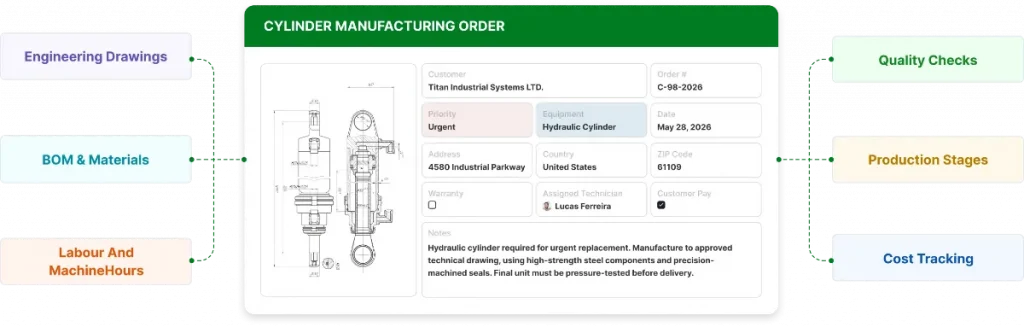
Cylinder Manufacturing Order. Source: AnyDB
With around 30 projects per month and more than 1,000 production items, the team needed clearer control over engineering approvals, purchasing, machining, production stages, dependencies, labor hours, machine hours, costs, and deadlines.
AnyDB turned the existing production spreadsheet into a structured management system where projects, tasks, approvals, documents, costing, dependencies, and department views stay connected.
- Project tracking: Active projects, responsible teams, deadlines, statuses, and completion dates.
- Production dependencies: Prerequisites between engineering, purchasing, machining, and production stages.
- Operational costing: Estimated versus actual production time and costs.
- Department visibility: Dedicated views for engineering, purchasing, production, and management.
- Documentation: Drawings, specifications, quality evidence, comments, and production instructions connected to the relevant work.
- Management visibility: Dashboards and alerts for pending activities, delays, and bottlenecks.
The result was a manufacturing execution system built from the company’s existing workflow, complementing its ERP rather than requiring the operation to replace it.
Read the full case study to see how the company migrated from spreadsheets to connected manufacturing control with AnyDB.
What Happens After You Migrate From Spreadsheets?
Moving the data is only the beginning. Once information has a structured home, teams can improve the operation progressively without rebuilding everything around a new system at once.
The next steps might include:
- Standardize processes around defined workflows and validation rules;
- Improve data quality by reducing duplicate and inconsistent records;
- Automate repetitive tasks such as notifications, approvals, and updates;
- Create reliable reports from centralized operational data;
- Define permissions so each team can access and update what it needs;
- Reduce manual validation by replacing spreadsheet checks with structured rules;
- Connect workflows that previously depended on separate files;
- Build new interfaces and applications around the same underlying records.
Here is the bottom line: migration must create lasting value. The business must gain a foundation for improving its processes as teams discover new requirements, without treating every improvement as another spreadsheet project.
Ready to Move Beyond Spreadsheets?
Book a free AnyDB demo and see how your team can turn spreadsheet-based processes into connected operational workflows, with structured records, automation, permissions, and real-time visibility.
Frequently Asked Questions About Migrating From Spreadsheets to Software
What Software Is Replacing Excel?
There is no single replacement. Depending on the workflow, businesses may use databases, no-code platforms, project-management tools, CRMs, ERPs, or custom operational applications.
Which Tool Is Best for Data Migration?
The right choice depends on the data structure, workflow complexity, integrations, users, and validation requirements. The migration process matters as much as the tool.
Can Excel Data Be Converted Into a Database?
Yes. Excel or CSV data can be imported into a database or structured platform, but the migration should also address how users will access, validate, and update that information.
Can I Migrate From Excel Without Stopping My Business?
Yes. An incremental migration with a contained workflow, validation, and temporary parallel testing can reduce disruption while users transition to the new system.
Should I Clean My Spreadsheet Before Migrating?
Yes. Remove duplicates, inconsistent formats, obsolete information, and other data-quality issues before importing the records into the new system.

The End-to-End Operations System that Finally Fits Your Reality.
No more scattered spreadsheets or rigid, disconnected tools.
AnyDB is a modern, customizable platform for managing business records and operations across teams, clients, and partners.
Learn More


Phone: (512)-761-7979
© 2024 Humanly Inc. All rights reserved.
What is AnyDB?
AnyDB is a unified, customizable data store designed to streamline and empower your entire organization. Effortlessly store, organize, and share custom business data to drive both internal and external operations across teams. Think of it as spreadsheets on steroids.Perfect for Sales, Marketing, Operations, HR, and beyond. Discover AnyDB