
Published on July 7, 2026


Choosing an ERP shapes how information moves across your business, and how well operations can adapt as new challenges come up.
The hard part is that many limitations stay invisible until after implementation. That’s when everyday processes start colliding with rigid workflows, and workarounds become part of the routine. Comparing examples of enterprise resource planning ERP systems, then, means looking well past features or pricing.
The strongest solution is the one that fits how your business actually operates. It shouldn’t ask your business to fit someone else’s model.
After all, software should make work easier, not become the newest member of the “we’ve always done it this way” club.
In this guide, we’ll explore:
- how to check ERP platforms beyond feature lists
- compare some of today’s leading solutions
- understand where traditional ERP systems excel
- why operational flexibility has become an important factor for growing organizations.
Before Comparing ERP Systems, Compare How They Fit Your Operations
Looking at examples of enterprise resource planning ERP systems is much easier once you understand how your business operates.
Two platforms may look almost identical during a product demo, yet deliver different experiences once real teams, real processes, and real customers become part of the equation.
Before comparing vendors, ask how each system performs in the areas that matter most for long-term operations:
- Operational flexibility: Can the platform adapt as your processes evolve? Or will every change need a workaround? As businesses grow, rigid systems can create more friction than consistency.
- Workflow customization: Every organization has its own approval flows, handoffs, and operational logic. The best ERP supports those differences instead of forcing everyone into the same template.
- Ease of implementation: A successful rollout depends on adoption as much as technology. If a system feels complex from day one, the spreadsheet comeback tour may begin sooner than expected.
- External collaboration: Operations never stop at your company’s front door. Vendors, customers, contractors, and partners should be able to take part without relying on disconnected tools.
- Reporting and operational visibility: Good reporting explains what happened. Great visibility shows what is happening right now, helping managers identify bottlenecks.
- Integration capabilities: Your ERP should connect with the systems your business already depends on, reducing duplicate data entry and creating a reliable source of truth.
- Scalability: The platform should continue supporting your operation as new teams, locations, and processes are added, without requiring a complete rebuild.
- Total cost of ownership: Licensing is only one part of the investment. Customizations, maintenance, user adoption, and future changes often have a much greater impact over time.
Many ERP implementations struggle not because the software lacks features, but because it cannot reflect the way the business actually works.

Five ERP Systems That Approach Operations Differently
There is no universal winner among ERP systems. Each one was built around different priorities: enterprise scale, manufacturing, or operational flexibility. The right choice depends on how well it fits the way your business works today, and where you expect it to go next.
5. SAP S/4HANA
SAP S/4HANA is built for large companies with complex operations, especially in manufacturing, supply chain, and global business management. Its analytics and deep feature set make it a strong fit for advanced operational needs. The tradeoff is complexity. Deployment often takes significant planning, customization, and a long-term investment.
4. Oracle NetSuite
Oracle NetSuite is a cloud-native ERP built for growing mid-market companies. It unifies finance, operations, inventory, and customer management in one place. Its subscription model makes expansion easier over time. Businesses with specialized processes will likely still need extra customization.
3. Microsoft Dynamics 365
Microsoft Dynamics 365 combines ERP and business apps within the Microsoft ecosystem. Organizations already using Microsoft products get familiar integrations. Deployment is modular, and customization runs deep. That flexibility suits many industries, but a successful rollout still depends on thoughtful setup.
2. Odoo
Odoo is known for its modular, open-source design and its affordable entry point. Businesses can start small and expand as their needs grow. For organizations managing customized processes, extra development often becomes necessary as complexity increases.
1. ERPNext
ERPNext is another open source ERP that appeals to small and midsize businesses, especially those in manufacturing, distribution, and professional services. Its active community gives organizations more control over their ERP setup. And they get that control without the license fees common to most commercial platforms.
Every platform on this list brings valuable strengths to different types of organizations. Still, most traditional ERP systems organize work around predefined modules. Businesses with unique processes often need more flexibility than those modules were built to give.
AnyDB vs. Traditional ERP Systems, A Different Way to Run Operations
It’s worth looking at solutions that approach operations from a different angle. Traditional ERPs are excellent at standardizing transactions across finance, inventory, procurement, and manufacturing.
AnyDB complements a different need. It connects the operational processes that often extend beyond those predefined modules.
| Traditional ERP Systems | AnyDB Custom Operational System |
| Built around predefined modules. | Built around object-based records. |
| Standard workflows. | Configurable workflows. |
| Customizations often need technical development. | No-code customization for operational teams. |
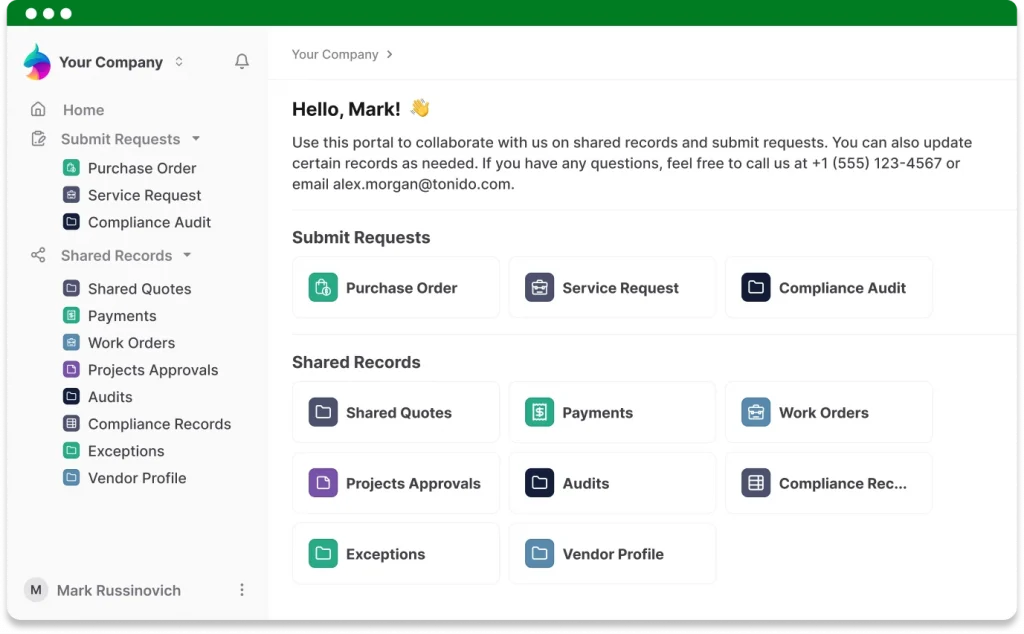
| External collaboration often relies on separate portals. | Vendors, customers, inspectors, contractors, and partners collaborate in the same platform. |
| Information is distributed across many modules. | Connected operational records create a single source of truth. |
| Process changes can be expensive and time-consuming. | Workflows evolve as operations evolve. |
Rather than replacing every ERP capability, AnyDB solves problems that many organizations still face after rollout. Those issues are familiar: disconnected data, fragmented teams, duplicate manual work, limited visibility, and vendor portals that live outside the system.
It is the difference between managing transactions and managing how work actually happens.
This is what makes AnyDB a custom operational system. Businesses build software around their operations, not the other way around.
Choose the Platform That Fits the Way Your Business Operates
Feature lists are not what make an ERP right for you. Fit is. Look for one that supports how your teams collaborate, keeps your data connected, and adapts as the business grows.
For organizations that have outgrown rigid ERP software, AnyDB offers a different path. It’s a custom operational system built around object-based records, configurable workflows, and real-time visibility.
Ready to see how that could work for your business?
Schedule a call with the AnyDB team and explore how a custom operational system can support your unique operational processes.

The End-to-End Operations System that Finally Fits Your Reality.
No more scattered spreadsheets or rigid, disconnected tools.
AnyDB is a modern, customizable platform for managing business records and operations across teams, clients, and partners.
Learn More


Phone: (512)-761-7979
© 2024 Humanly Inc. All rights reserved.
What is AnyDB?
AnyDB is a unified, customizable data store designed to streamline and empower your entire organization. Effortlessly store, organize, and share custom business data to drive both internal and external operations across teams. Think of it as spreadsheets on steroids.Perfect for Sales, Marketing, Operations, HR, and beyond. Discover AnyDB