
Published on April 27, 2026


IT asset management becomes unavoidable once an organization starts relying heavily on technology to run daily operations. What used to be a handful of laptops and a couple of servers quickly expands into a mixed landscape of employee devices, SaaS subscriptions, cloud infrastructure, mobile equipment, network hardware, and specialized tools used by different teams.
At that scale, keeping track of assets informally stops working. Devices change hands, licenses renew automatically, software is purchased outside the IT department, and infrastructure evolves faster than documentation.
This is precisely the gap IT asset management (ITAM) addresses. ITAM introduces discipline into how organizations track, govern, and maintain their technology assets. Instead of isolated lists, assets are managed as operational records with clear ownership, lifecycle tracking, and usage visibility.
When implemented properly, IT asset management gives organizations something they rarely have without it: a reliable, continuously updated view of the technology infrastructure the business actually depends on.
What Is IT Asset Management?
IT asset management (ITAM) is the operational discipline of identifying, tracking, and governing every technology asset used by an organization throughout its lifecycle. The goal is not simply to maintain an inventory, but to understand how assets are acquired, deployed, used, maintained, and eventually retired.
In practice, IT asset management creates a structured record for each asset and maintains visibility over its status, ownership, and operational context. This includes tracking where an asset is located, who is responsible for it, what systems it supports, and what costs or risks are associated with it over time.
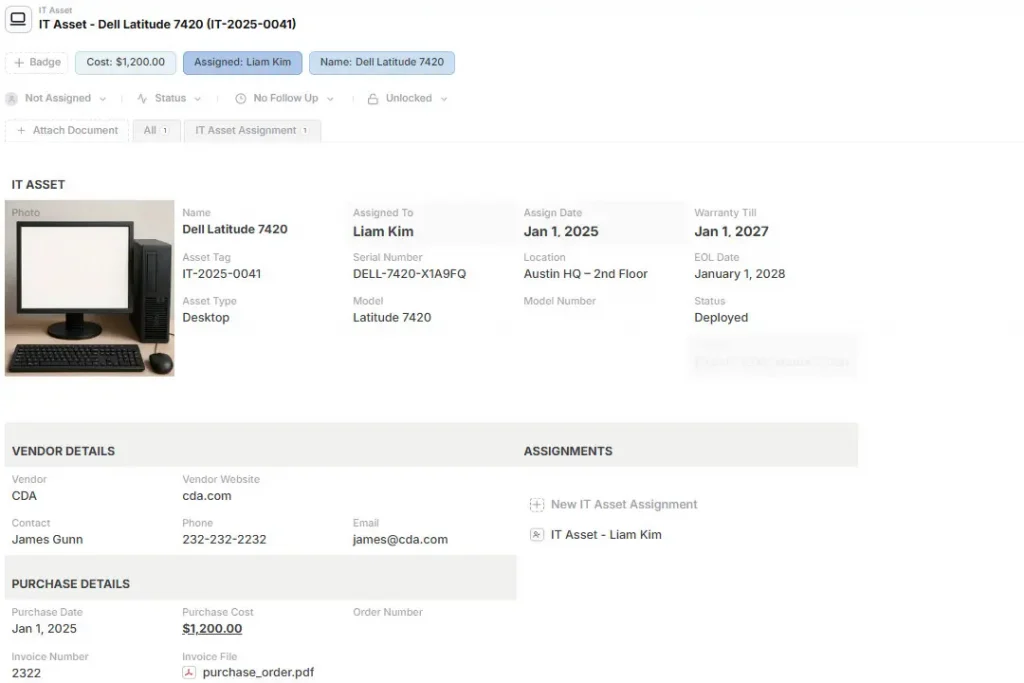
Each asset type follows its own lifecycle, but they are operationally connected and must be governed as part of the same system.
Without this lifecycle visibility, organizations struggle to control technology costs, maintain security standards, or understand the true footprint of their infrastructure.
What Counts as an IT Asset?
An IT asset is any technology resource that provides operational value to the organization and requires oversight during its lifecycle. Common examples include:
- Employee laptops and workstations;
- Servers and infrastructure components;
- SaaS subscriptions used by different departments;
- Mobile devices assigned to field teams;
- Networking equipment such as routers and switches;
- Security tools protecting the environment; and
- Software licenses tied to vendors or user accounts.
What makes modern IT asset management more complex is that assets are no longer purely physical. Digital assets such as cloud instances, software subscriptions, and API services can appear or disappear quickly, often outside traditional procurement processes.
As a result, organizations must track both physical devices and digital services with the same level of structure and governance.
Why IT Asset Management Is Important
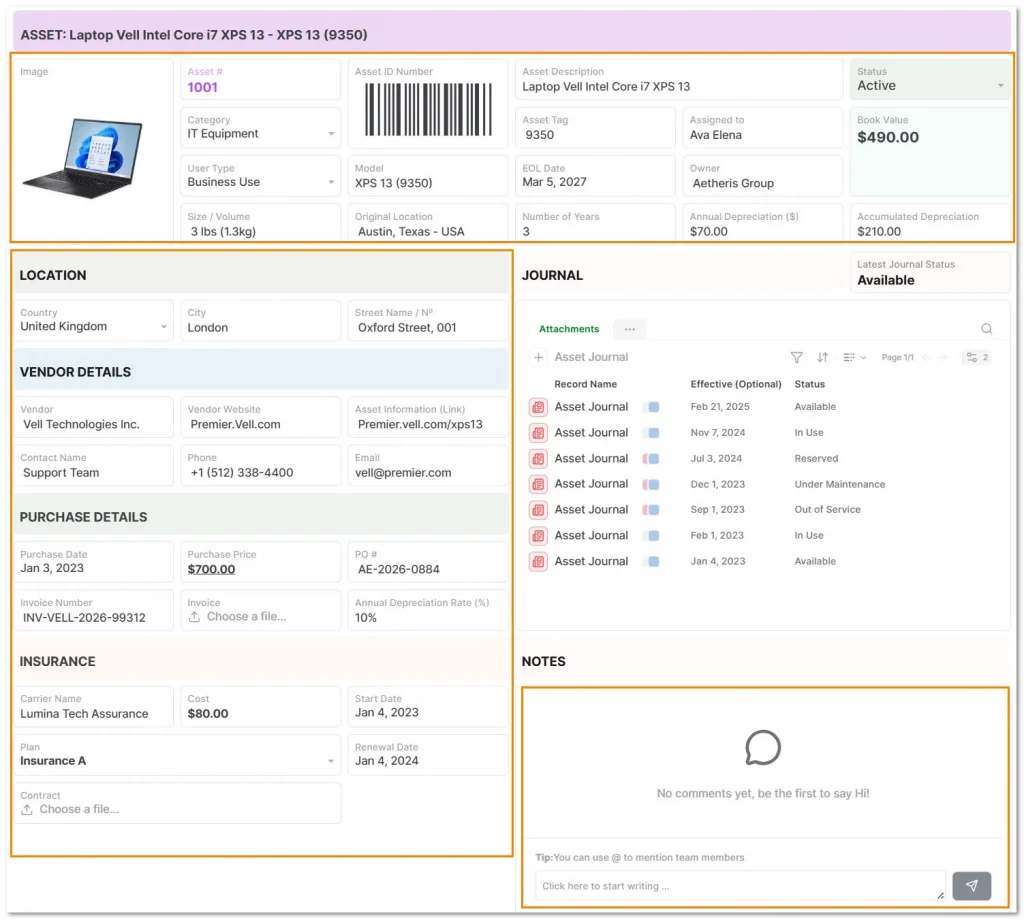
Without a structured approach, companies lose visibility over what they own, how assets are used, and where risks or inefficiencies are emerging. Its impact becomes clear in several operational areas:
- Single source of truth: Replaces fragmented spreadsheets and disconnected tools with a centralized system where IT, finance, procurement, and security teams share the same reliable asset data.
- Cost control and waste reduction: Identifies unused licenses, duplicate purchases, and underutilized hardware, allowing organizations to reallocate resources instead of buying more.
- Security and compliance oversight: Tracks patch status, software licensing, and device ownership, helping organizations reduce exposure to vulnerabilities and maintain regulatory compliance.
- Support for IT service management (ITSM): Connects assets to service desk tickets, incidents, and maintenance history, giving IT teams the context they need to troubleshoot issues quickly and maintain infrastructure reliability.
The IT Asset Management Lifecycle
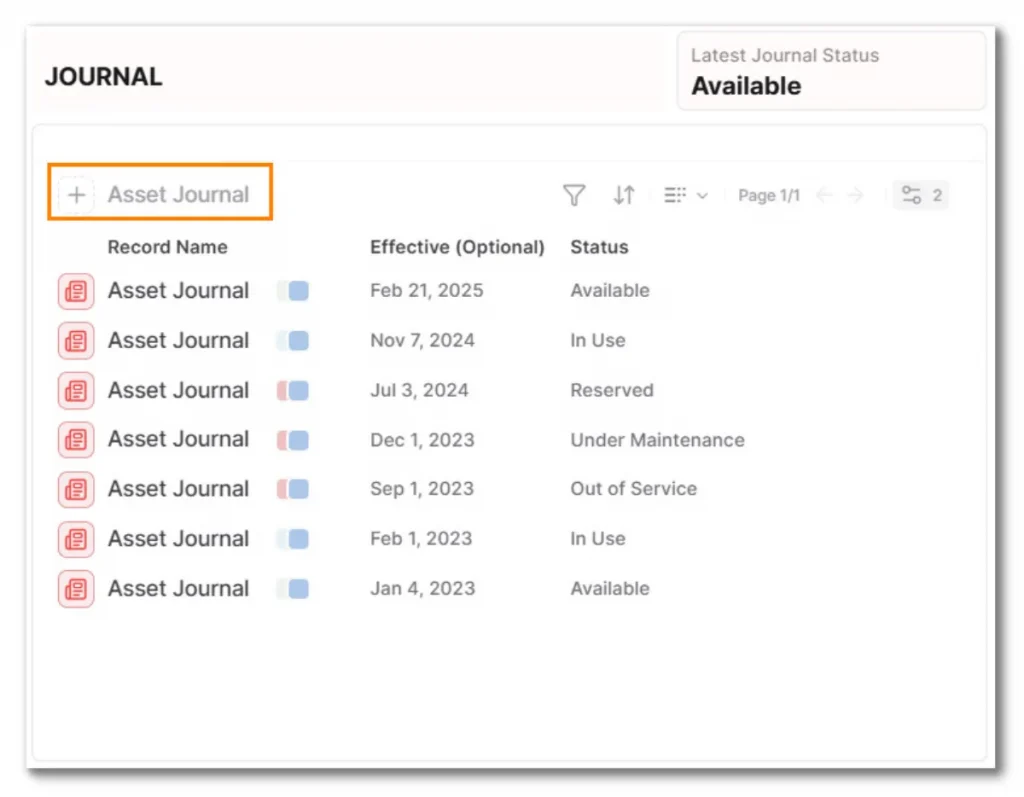
IT asset management follows a lifecycle that ensures every asset is governed from the moment it is planned until it is securely retired:
- Asset planning
The lifecycle begins by defining the organization’s technology requirements. IT teams determine what assets are needed, how they will be used, and how they fit into the existing infrastructure before procurement decisions are made.
- Procurement and acquisition
Assets are purchased through approved vendors, with contracts, warranties, and licensing terms recorded. This step establishes the financial and legal context that will follow the asset throughout its lifecycle.
- Inventory and asset registration
Once received, assets are registered in the asset management system. Unique identifiers such as asset tags, serial numbers, and assigned users ensure each asset can be tracked accurately.
- Deployment
Devices or services are configured and assigned to employees, departments, or operational systems, with ownership and location recorded.
- Monitoring and maintenance
Throughout their use, assets are monitored for performance, software updates, repairs, and usage patterns.
- Optimization
Underused assets can be reassigned, while overloaded or outdated equipment can be upgraded or replaced.
- Retirement and disposal
When assets reach the end of their useful life, they are securely decommissioned, with sensitive data destroyed and disposal handled according to compliance requirements.
IT Asset Management Best Practices
Effective IT asset management depends a little less on tools and more on operational discipline. Organizations that maintain accurate asset records usually follow a few practical principles that prevent their systems from drifting away from reality.
- Centralize asset records: Avoid maintaining separate lists across spreadsheets, service desks, procurement tools, or security platforms. A single repository should hold the authoritative record for every asset, including ownership, location, and lifecycle status.
- Track the full asset lifecycle: Many inventories only record what assets exist today. Strong ITAM practices track assets from planning and acquisition to maintenance and retirement. Recording lifecycle events, such as repairs, reassignment, or upgrades, creates historical context that is invaluable during audits or troubleshooting.
- Link assets to people, vendors, and contracts: Assets rarely operate in isolation. A laptop is tied to an employee, a warranty to a vendor, and a license to a contract. Connecting these relationships makes it easier to resolve incidents, manage renewals, and understand the operational impact of each asset.
- Automate routine asset processes: Asset management breaks down when updates rely on manual effort. Automating common workflows, such as employee asset requests, approval processes, and lifecycle updates, keeps records accurate without requiring constant administrative work from the IT team.
IT Asset Management in Practice: Device and SIM Lifecycle Tracking
A mid-market smartphone vendor managing over 11,000 devices faced a common IT asset management challenge: spreadsheets could no longer support the operational complexity of their workflow.
Each device moved through multiple stages:
- Registration;
- Inspection;
- SIM pairing;
- Location handling;
- Dispatch; and
- Customer support.
As volume increased, errors became frequent. SIM cards were assigned to the wrong devices, ownership and location were unclear without cross-checking files, and parallel edits created version conflicts.
The company replaced this setup with a structured asset management system where each device became a live record.
Device data, including serial number, owner, location, warranty status, and inspection results was stored in one place, while SIM cards were tracked as linked records paired to specific devices. Support requests submitted through a portal automatically connected to the correct asset.
The result was a fully traceable lifecycle from provisioning to customer support.
Device status, ownership, and location became visible in real time, reconciliation work disappeared, and the system scaled cleanly as the company expanded its operations through reseller partners.
How do you track 12,000 devices without spreadsheet chaos? Read the full case study here.
Bringing Structure to IT Asset Management
IT asset management works when assets are treated as operational records, not static inventory entries. Devices, licenses, infrastructure, and vendors are all part of a connected system where ownership, status, lifecycle events, and support history remain visible and traceable.
When this structure is missing, teams rely on scattered spreadsheets and partial records. As the environment grows, accuracy declines, troubleshooting slows down, and governance becomes difficult.
A structured system changes that dynamic. Assets become live records linked to people, vendors, contracts, maintenance activity, and operational workflows. IT teams gain real visibility into their infrastructure and can manage technology assets with no confidence as the organization scales.
With AnyDB, you can structure your IT assets as real operational objects and connect them to the workflows your team already runs.
Guided activation is included with the Business and Enterprise plans. We help you build your first operational workflow so you can go live quickly, typically within two weeks.
The activation focuses on one primary workflow, and additional workflows can be added after go-live.
Schedule a setup call and let us help you build your IT asset management system.
Frequently Asked Questions About IT Asset Management
Check out the answers:
Why is IT asset management important?
ITAM creates a reliable view of all technology assets, helping organizations reduce waste, improve security, avoid duplicate purchases, and maintain compliance.
What is the difference between IT asset management and IT service management?
ITAM tracks and governs assets like devices and licenses. ITSM manages services such as incidents, requests, and support operations. ITAM provides the asset data ITSM relies on.
Do small companies need IT asset management software?
Yes. Even small teams benefit from structured tracking as devices, licenses, and cloud tools grow. ITAM software prevents lost assets, wasted spending, and security gaps.

The End-to-End Operations System that Finally Fits Your Reality.
No more scattered spreadsheets or rigid, disconnected tools.
AnyDB is a modern, customizable platform for managing business records and operations across teams, clients, and partners.
Learn More


Phone: (512)-761-7979
© 2024 Humanly Inc. All rights reserved.
What is AnyDB?
AnyDB is a unified, customizable data store designed to streamline and empower your entire organization. Effortlessly store, organize, and share custom business data to drive both internal and external operations across teams. Think of it as spreadsheets on steroids.Perfect for Sales, Marketing, Operations, HR, and beyond. Discover AnyDB