OKR Management with AnyDB
Manage company, team, and individual Objectives and Key Results in one connected workspace. AnyDB helps teams define goals, assign ownership, track measurable progress, and connect strategic priorities to the work actually happening on the ground.
Move from stale quarterly spreadsheets to a living system where objectives, key results, comments, and progress reviews stay visible and connected.
Strategic goals become operational
Translate high-level priorities into trackable records with owners, timelines, and measurable outcomes.
Progress stays current
Use follow-up dates, comments, and updates to avoid stale OKRs that only get touched at quarter end.
Execution stays connected
Link objectives and key results to projects, initiatives, and related work so alignment is easier to see.
Why teams struggle with OKRs in static tools
Most teams manage OKRs in slides, spreadsheets, or scattered documents. That makes it difficult to keep goals current, connect them to real work, and maintain visibility across teams and review cycles.
Business problem
Updates are inconsistent, visibility is limited, and OKRs often go stale. Teams can define ambitious goals, but without a living system they lose the connection between planning, ownership, and execution.
Solution summary
- +Define company, team, and individual-level OKRs.
- +Link OKRs to related projects, owners, and timelines.
- +Track progress on each key result.
- +Build dashboards to view alignment and performance.
- +Assign and review updates on a regular cadence.
A simple OKR model to start with
Start with objective records at the level you manage goals, then attach or connect measurable key results, owners, and related initiatives.
Objective
Define the strategic goal, timeframe, owner, and broader narrative for what the team is trying to achieve.
Key Result
Track measurable outcomes with target values, actuals, progress percentage, and accountability.
Linked Work
Connect OKRs to projects, reports, and supporting records so the system reflects real execution.
How to set up the OKR workflow
Follow the setup sequence below to define objectives, add key results, track progress, and run review cycles in the same connected model.
- +Go to database and click on + sign.
- +Set a OKR name such as OKR Overall Company and click on Add button.
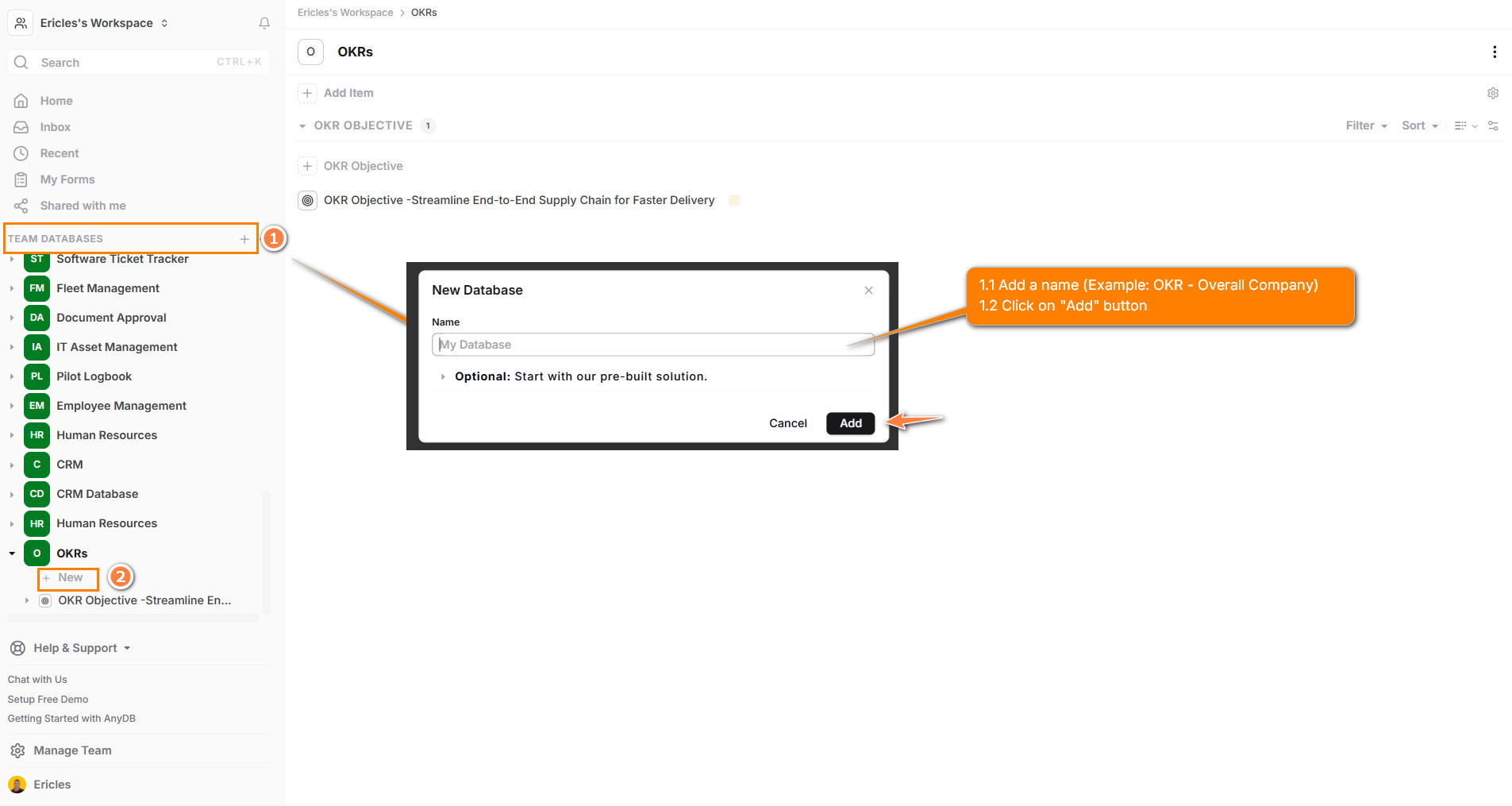
- +Click + New Item.
- +Search for OKR Objective and click on it.
- +Create a clear, inspiring Objective such as “Increase R&D investment in renewable technologies from $5M to $10M by Q4”.
- +Add a description, time period such as Q2 2025, and assign a team or an owner.
As shown in the video:
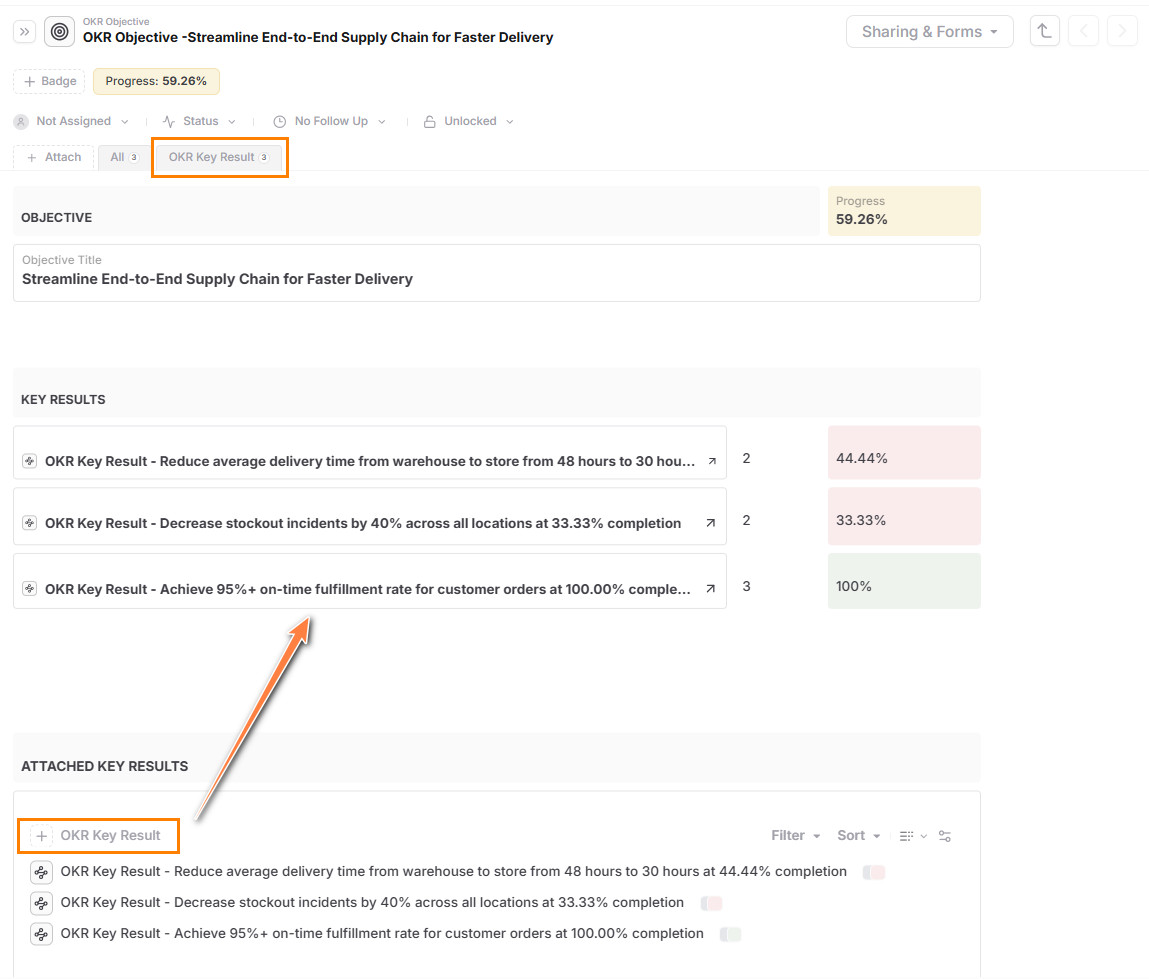
- +Use sub-items to create multiple measurable Key Results under each Objective.
- +Define the metric, target value, and starting point.
Here is how:
- +Objectives are the "what".
- +Key Results are the "how". You can link Key Results to the Objective.
- +You can also assign a person or team.
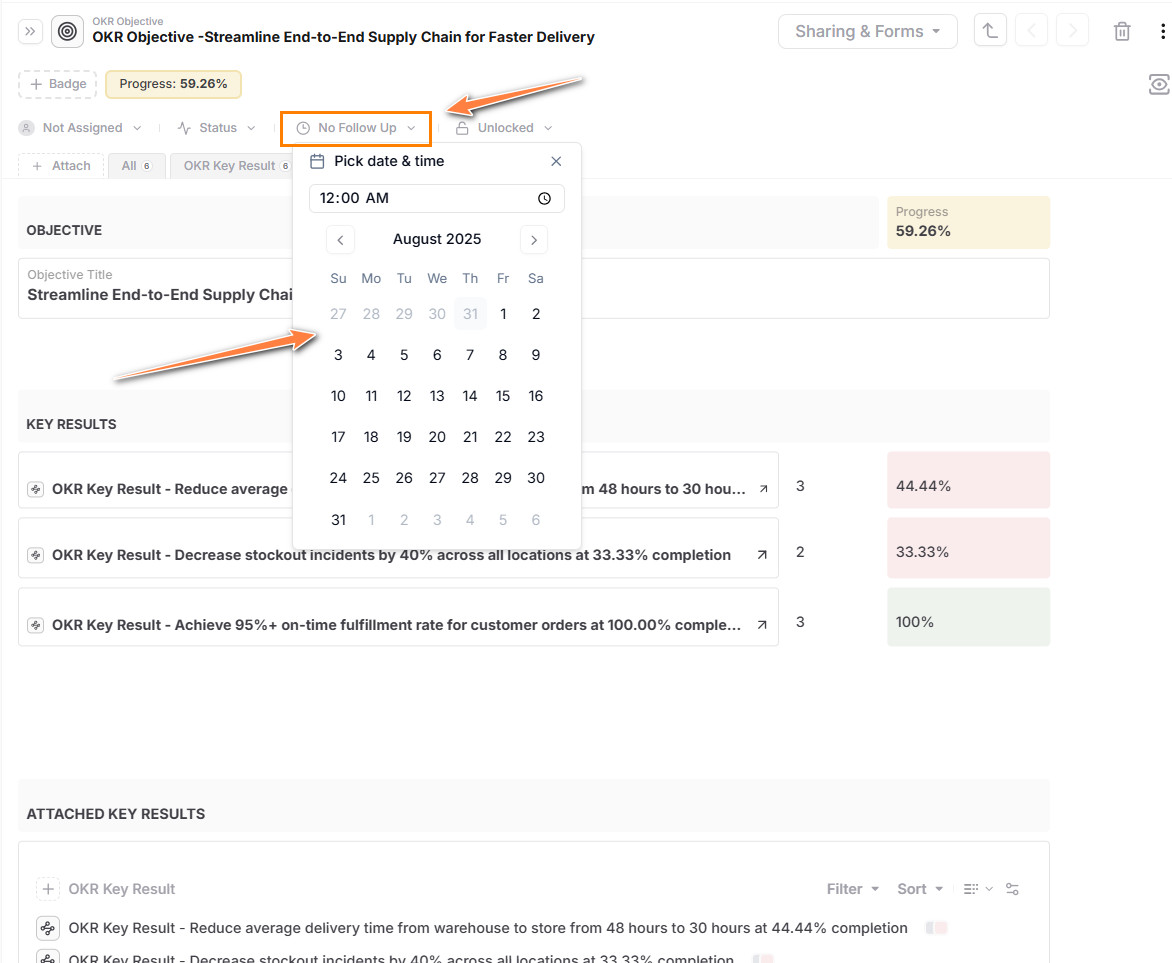
- +Set up a follow-up date.
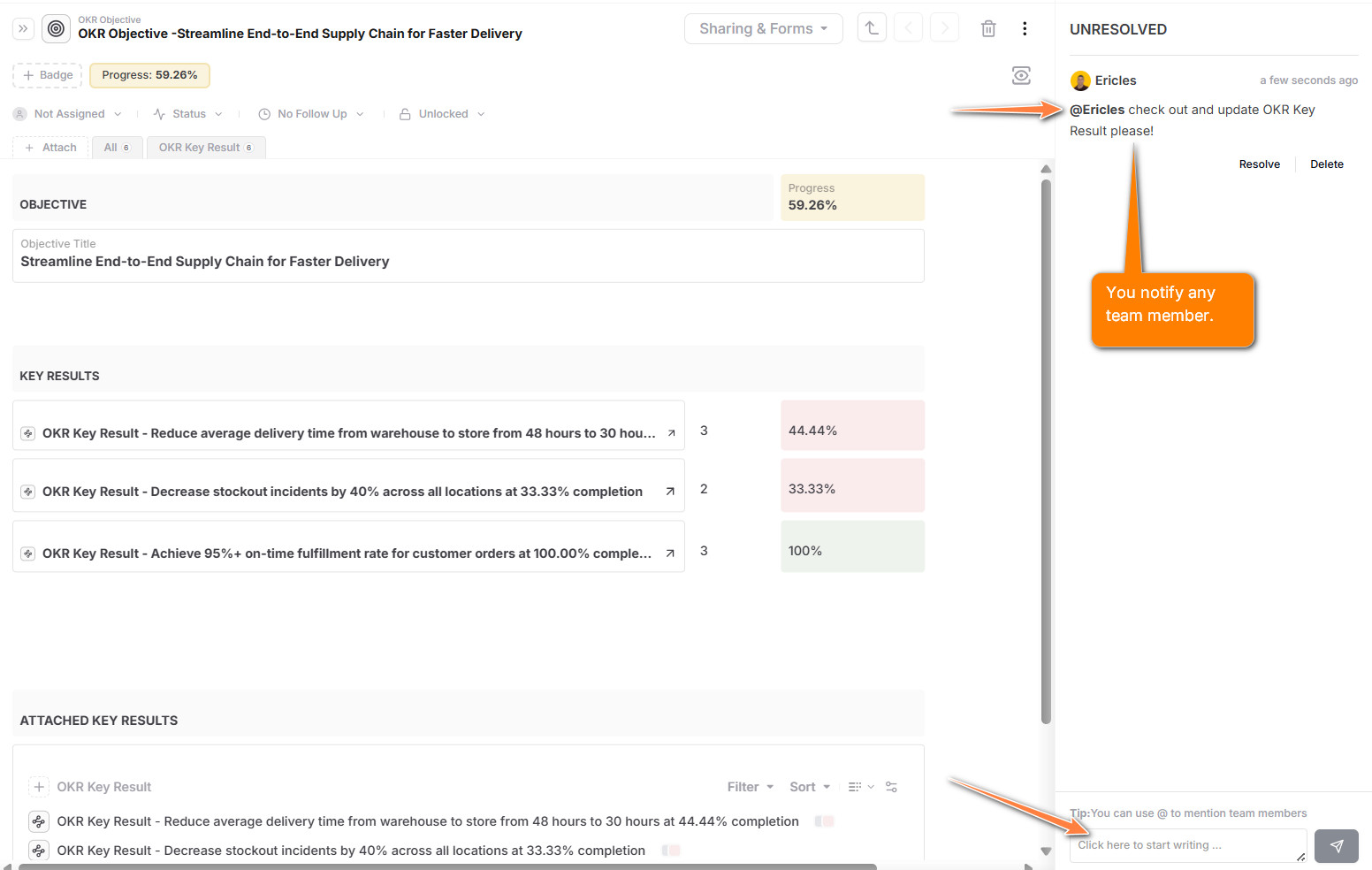
- +Use the chatbox to explain blockers or momentum.
- +Filter Key Results items and set up the 3 priorities related to the objective.
- +Conduct regular OKR reviews.
- +Follow-up progress in real time.
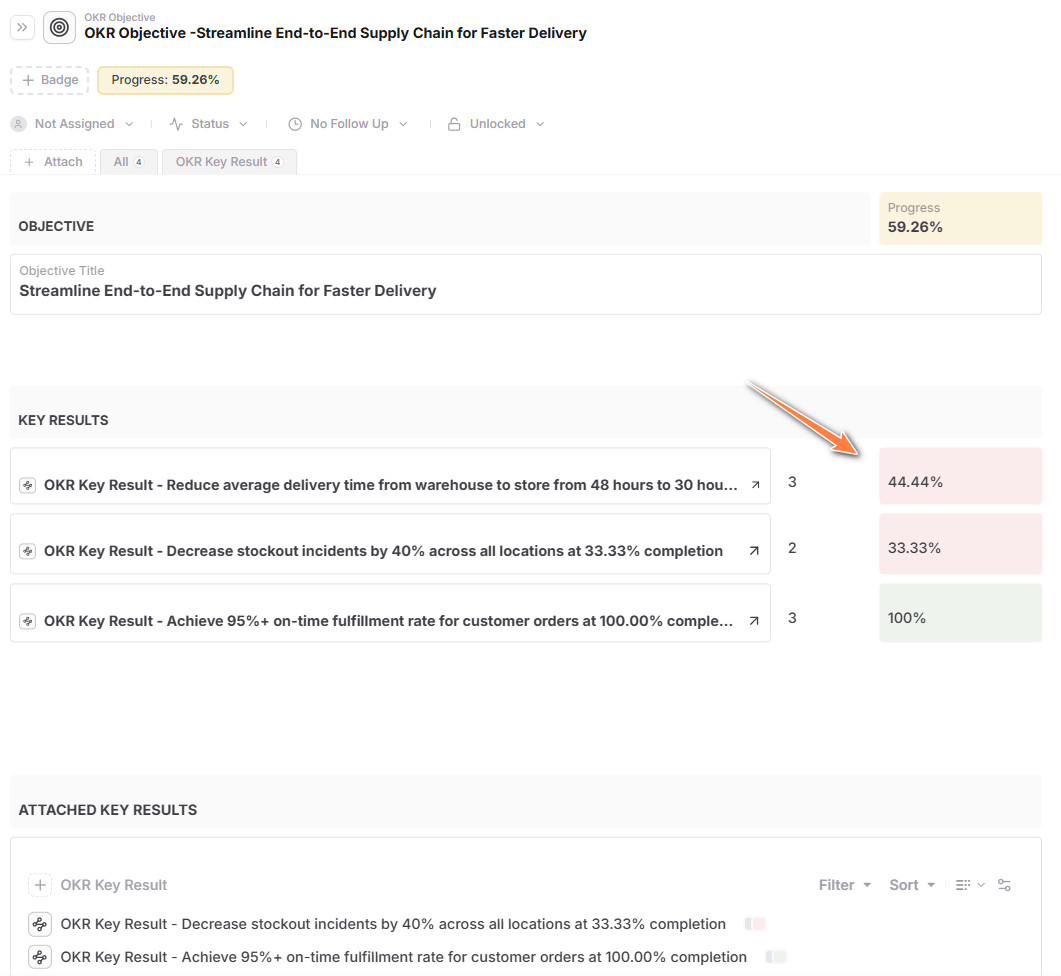
Data model reference
These fields give teams enough structure to review and update OKRs consistently.
| Field | Description |
|---|---|
| Objective Name | Strategic goal to be achieved |
| Description | Supporting context or narrative |
| Time Period | Quarter or timeframe such as Q1 2025 |
| Owner / Team | Who owns this OKR |
| Key Result Name | Specific measurable outcome |
| Target & Actual | Numeric or descriptive metrics for each key result |
| Progress (%) | Current completion percentage |
| Status | Open / Close |
| Linked items | Reference to related projects or documents |
Reporting and views
Saved views and dashboards make review cycles more actionable and help teams see alignment at multiple levels.
- +OKRs by team, owner, or time period.
- +Open vs. Closed OKRs at quarter end.
- +Company-wide alignment and focus areas.
- +Departmental or team-level progress.
- +OKRs by quarter or year.
- +Progress toward strategic themes.
Sharing and collaboration
- +Assign OKRs to individuals or teams.
- +Track progress collaboratively with comment threads.
- +Use status indicators.
- +Link updates to weekly reports or team check-ins.
- +Share views with leadership for transparency.
Tips and best practices
- +Keep Objectives qualitative and inspiring.
- +Make Key Results measurable and specific.
- +Update progress regularly, not just at the end.
- +Link OKRs to projects to show execution alignment.
Pro Tip: Create OKR templates by quarter to help teams start with the right structure every time.
Who this solution is for
- +Leadership Teams for company-wide alignment on strategic priorities.
- +People Managers for team-level goal setting and accountability.
- +Individual Contributors to connect daily work to higher-level impact.
- +Chiefs of Staff / Ops to monitor progress and remove blockers.
- +HR / People Ops to support performance and feedback cycles.
Why use AnyDB for OKRs
| Benefit | How AnyDB Supports It |
|---|---|
| Flexible Goal Setting | Define objectives at any level, company, team, or role |
| Linked Execution | Tie OKRs to actual projects, tasks, and documents |
| Transparent Progress | Live status, confidence levels, and update history |
| Custom Views | Dashboards and filters by team, time, or status |
| Review-Ready | Use in weekly or quarterly review cycles |
| Repeatable Structure | Create quarterly OKR templates and reuse across teams |
Related guides that strengthen this solution
These guides help extend OKRs into broader planning, execution, and review workflows.
Connecting Objects
Link objectives to key results, projects, and related records more clearly.
Search
Find OKRs by owner, quarter, team, or status using saved filters and views.
Sharing
Share OKR views with leadership, teams, and stakeholders who need visibility.
Sheets
Use spreadsheet-like views for faster review and operational updates across many OKRs.
Project Management
Connect strategic goals to delivery and execution work in the same operating model.
Files
Attach supporting notes, review docs, and planning files directly to OKR records.