Business Asset Tracking Guide
Use AnyDB to catalog, monitor, and manage physical and digital assets across your organization, from IT equipment and vehicles to software licenses and real estate. Start with a practical asset register, then expand it as your operating model grows.
Start with working asset tracking quickly, while keeping assets, ownership, and related records connected properly.
Use templates to start faster
Begin with a practical structure, then adapt the fields to fit the asset categories you actually manage.
Keep assets as records
Each asset should have its own record with identity, ownership, location, status, and attached files.
Attach related operational data
Use linked or attached records for maintenance, vendors, and licenses instead of forcing everything into one item.
Set up asset tracking in five steps
Follow the core setup flow below to get an asset tracking system running.
Start by choosing an existing asset tracking template from the Templates Library like “IT Asset Management” or “Fleet Tracker”, or create your own from scratch.
Here is how:
Your asset template should typically include fields like:
- +Asset Name
- +Category or Type
- +Purchase Date
- +Assigned Owner or Department
- +Location
- +Serial Number or Asset Tag
- +Warranty Expiry
- +Status such as In Use, In Repair, or Retired
- +Attachments such as invoices, photos, and certificates
You can customize this structure to reflect the types of assets in your organization.
Organize your assets by creating a dedicated Database, such as:
- +
IT Assets - +
Company Equipment - +
Real Estate Portfolio
Within each database, use folders or tags to segment different types of assets such as Laptops, Servers, Vehicles, or Buildings.
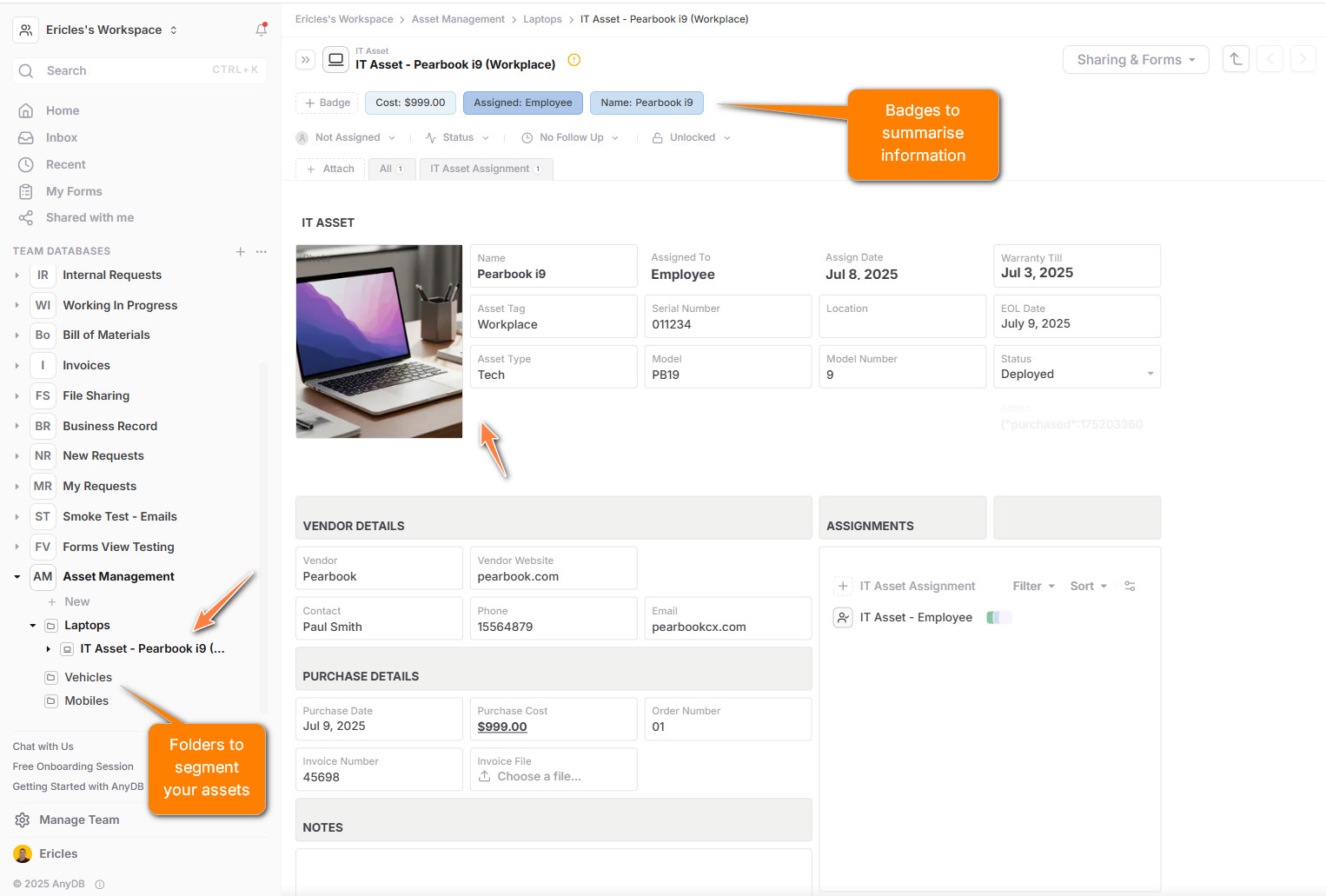
Each individual asset becomes a Record. Create a new document using the asset template and fill in its unique details.
You can:
- +Add assets manually.
- +Use an internal or public Form to collect asset data from others.
- +Bulk import assets using CSV or Excel files.
Add formulas, badges, and conditional styles to make the status and urgency of each asset visually obvious.
Instead of mixing all asset-related info in a single document, create separate record types for related records:
- +Maintenance Log to track repairs, inspections, and service events
- +License Details to track software or compliance licenses
- +Vendor Records to store supplier and warranty information
Use the “+ Attach” action inside each asset document to connect these related items. This keeps each asset record clean, modular, and scalable.
Benefits of attaching related records:
- +Related data is grouped visually and functionally.
- +You can add multiple related entries per asset.
- +Forms and automation can be applied to sub-records independently.
As an example:
With AnyDB, you can:
- +Share asset records securely with team members or external vendors.
- +Use Views to track “Out-of-Warranty Assets” or “Assigned to Team X”.
- +Export records as Excel or PDF for reports.
- +View full version history of every edit and update.
- +Set reminders for audits, service, and license renewals.
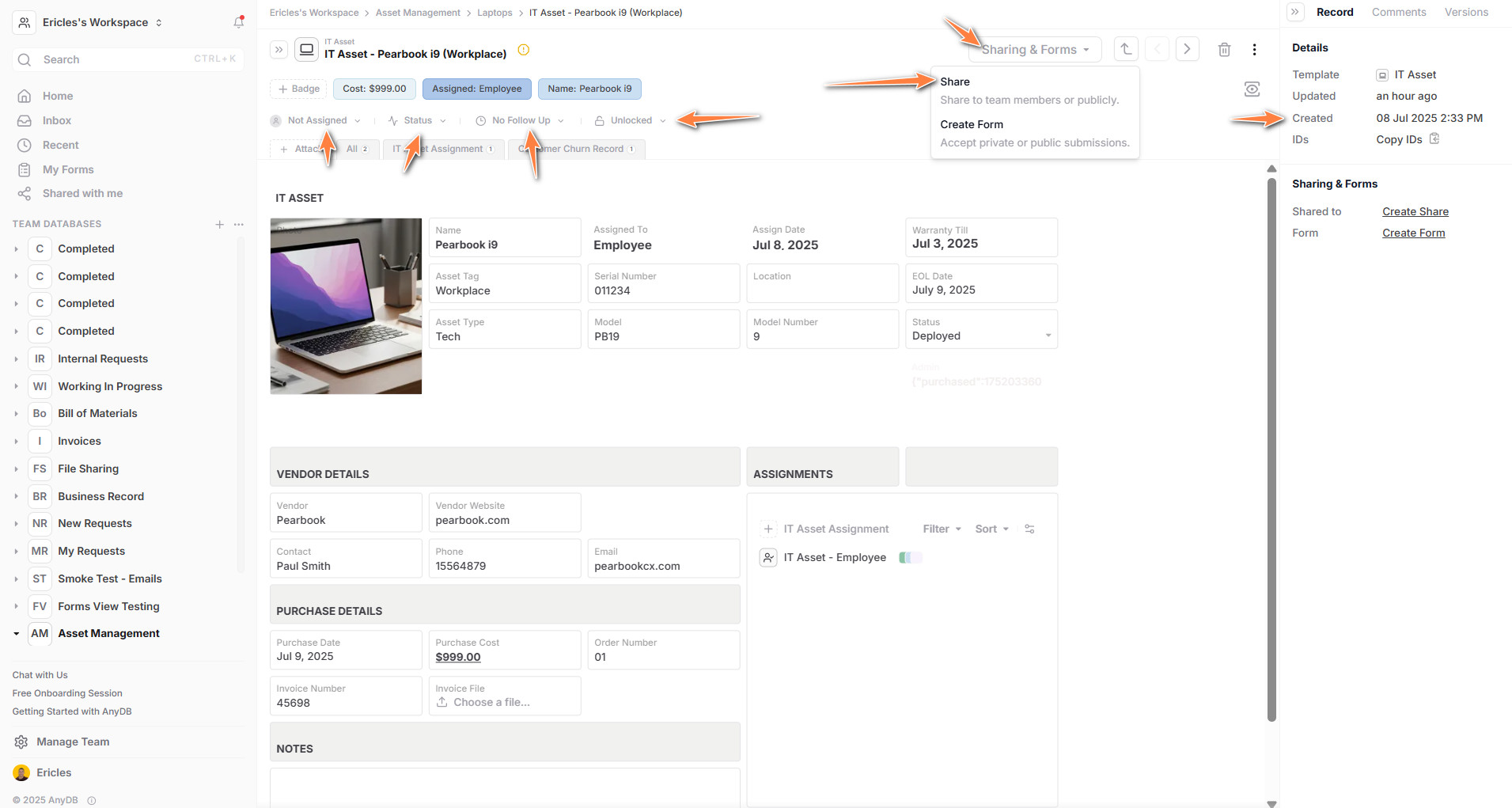
Automate asset entry with forms
Set up a public or internal form to let team members or vendors submit new assets directly. Use sub-forms to collect attachments like purchase invoices or photos alongside the asset details.
Related templates
IT Asset Management
Track devices, ownership, repairs, and lifecycle events.
Equipment Tracker
Manage shared or operational equipment with clearer status visibility.
Maintenance Log
Record inspections, service history, and asset maintenance events.
License Tracker
Keep software or compliance license records tied to the right assets.
Vendor Records
Link suppliers, warranty contacts, and contract context to asset records.
Fleet Management
Extend the same model to vehicles and transport asset workflows.
Need help modeling your asset system? Contact our solutions team for help setting up a tailored asset database.
Start organizing your business data and workflows today.