Grid View
Grid View presents records as visual cards instead of rows. Each record is shown as a self-contained block, making it easier to scan, compare, and recognize records visually.
This view is useful when records contain images, labels, or grouped information that is easier to understand as a whole rather than across columns.
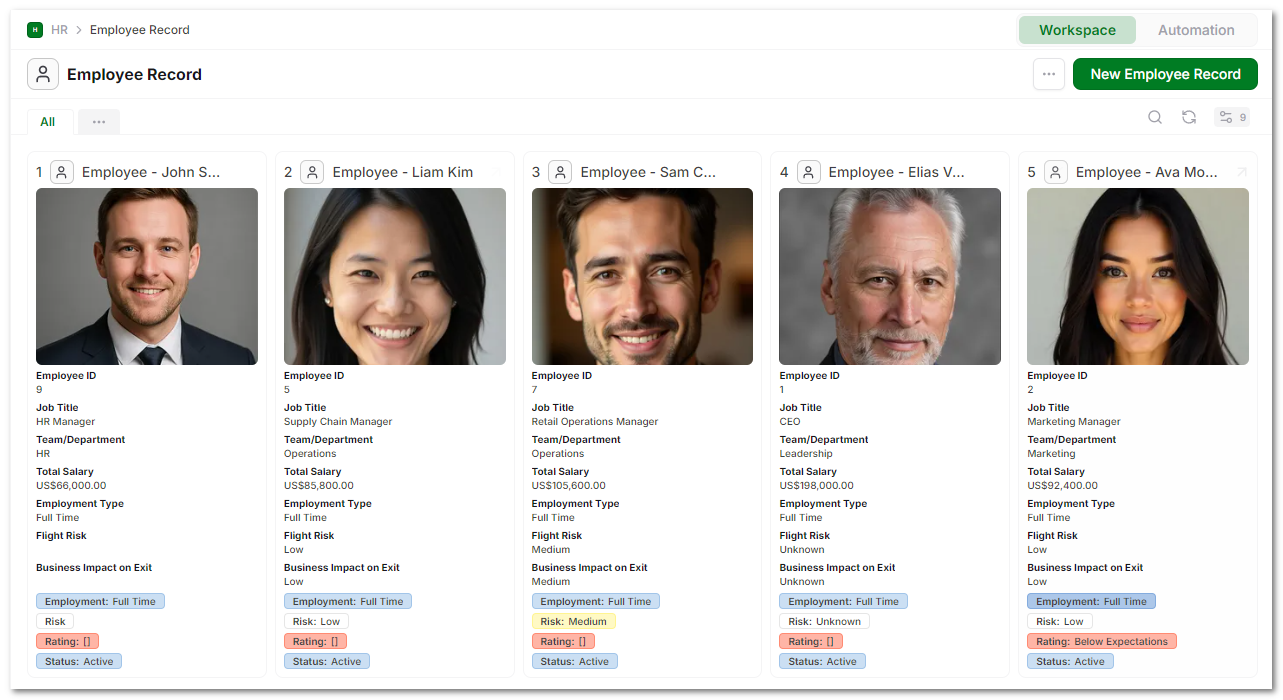
Records in the Grid
Each card represents a single record. The top of the card shows the primary field, which acts as the record’s main identifier. This is typically a name or title. Records are arranged in a grid layout, allowing multiple records to be viewed side by side.
Clicking the record name opens it in a popup. An expand option appears on hover, allowing the record to be opened in full view.
Fields Inside a Card
Each card displays a selection of fields from the record.
These can include:
- images or file previews at the top
- text fields such as names or titles
- structured fields like job title or department
- numeric or currency values
- status or category fields
Fields are stacked vertically, making it easy to read each record independently.
Visual Elements
Grid View emphasizes visual clarity:
- image fields are prominently displayed
- key fields are grouped together
- labels and values are aligned for readability
- status or category values can appear as tags or badges
This makes it easier to compare records quickly without scanning across rows.
Customizing the Grid
Grid layout is configured through the view settings.
You can:
- choose which fields appear on the card
- control the order in which fields are displayed
- apply filters to limit visible records
- adjust sorting of records
This allows you to design cards that highlight the most important information.
Selecting Records
Each card includes a selection option.
Selecting one or more records enables bulk actions such as:
- deleting records
- moving records
This allows grid-based workflows without switching views.
Creating Records
New records can be created directly from the view.
The New Record button adds a new entry, which then appears as a card in the grid.
When Grid View Fits
Grid View works best when:
- records contain images or visual elements
- you want to compare records side by side
- each record needs to be understood as a whole
- layout and presentation matter as much as data
For dense data entry or bulk editing, Table View is more efficient. Grid View is better for browsing, reviewing, and visual organization.