Teams & Workspaces
Understanding how Teams and Workspaces work together is key to using AnyDB effectively.
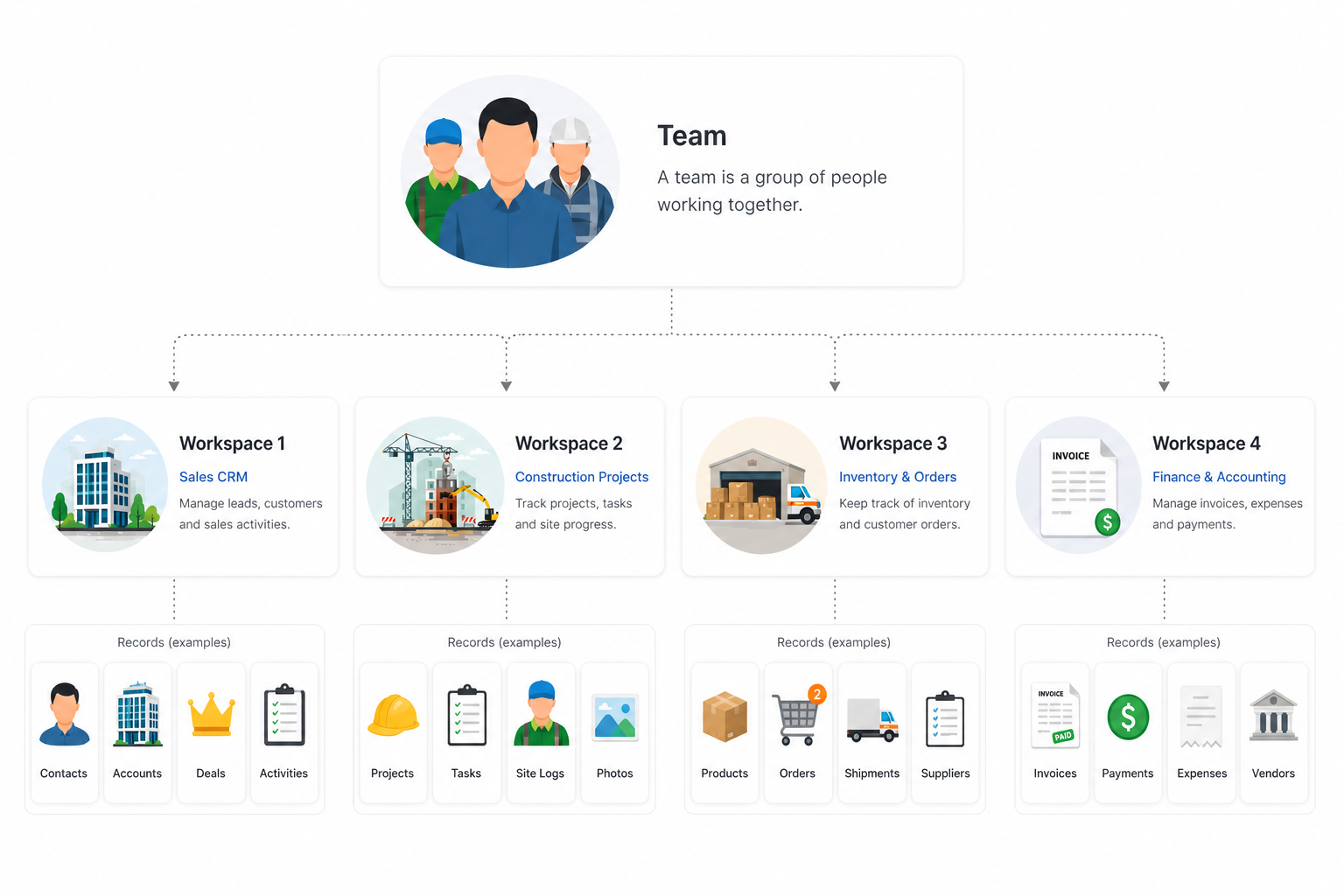
Teams in AnyDB
A Team organizes an organization or a group of people in AnyDB. Teams bring people together to manage workspaces, share records, and collaborate on workflows.
Key Concepts
-
Multiple Workspaces per Team
Each team can include unlimited number of workspaces, organized by department, function, or project. -
Invite & Manage Members
Add users to your team and assign roles that determine what they can access or edit. -
Groups for Simpler Permissions
Create groups to manage permissions across multiple users more efficiently.noteBilling is tied to Teams.
Each team is treated as a separate billing unit. If you're on a paid plan, adding multiple teams may result in multiple subscriptions.tipBest Practice:
For most organizations, especially small to mid-sized teams, we recommend using a single team with multiple workspaces. This keeps billing simple, centralizes permissions, and improves visibility across functions.
Example Team Structures
-
Company-Wide Team – Ideal for small businesses sharing all databases in one place
-
Department Teams – Separate teams for HR, Sales, Finance, etc., each with their own workspaces and members
-
Project Teams – Temporary workspaces focused on a specific initiative or client
cautionConsider billing before creating multiple teams.
While multiple teams are supported, each team has its own billing and user limits. If you're unsure, start with one team and scale your workspaces within it.
Workspaces in AnyDB
In AnyDB, your structured business data is stored as records that are individual records like a customer, an invoice, or a project task. These records live inside Workspaces, which group related records together for easier access, tracking, and control.
Key Concepts
-
Record Collections
Workspaces organize related records—for example, customer records, job applications, or inventory items. While a workspace can contain identical records, they don't have to. You can mix and match any kind of records inside a workspace. -
Permission-Based Access
Control who can view, edit, or manage records within each database by assigning roles to members or groups. -
Reusable Templates
Use templates to standardize how records are created and ensure consistency across your team.
Example Workspaces
- Sales Workspace – Includes records for leads, deals, and customer interactions
- HR Workspace – Contains employee records, onboarding documents, and review forms
- Finance Workspace – Stores invoices, budgets, and expense reports
- Project Management Workspace – Tracks tasks, milestones, and team assignments
How Teams and Workspaces Work Together
Here’s how Teams and Workspaces connect inside AnyDB:
- Create a Team – Set up a workspace for your company, department, or project
- Add Workspaces – Group related records into workspaces within the team
- Invite Members – Add teammates and assign them appropriate roles. See User Management for details.
- Manage Permissions – Define who can access or modify each workspace and its records
Example
At Acme Corp, you might organize AnyDB like this:
- A single team that contains workspaces for Sales, HR, and Finance
or - Separate teams for each department, each managing its own workspaces and records
Both approaches are valid, but billing and user management are simpler with fewer teams.