List View
List View presents records in a clean, read-only format optimized for structured data display. It is designed for scenarios where records are meant to be viewed as line items rather than edited directly.
Each row represents a record, with fields shown as columns, similar to a table but without inline editing.
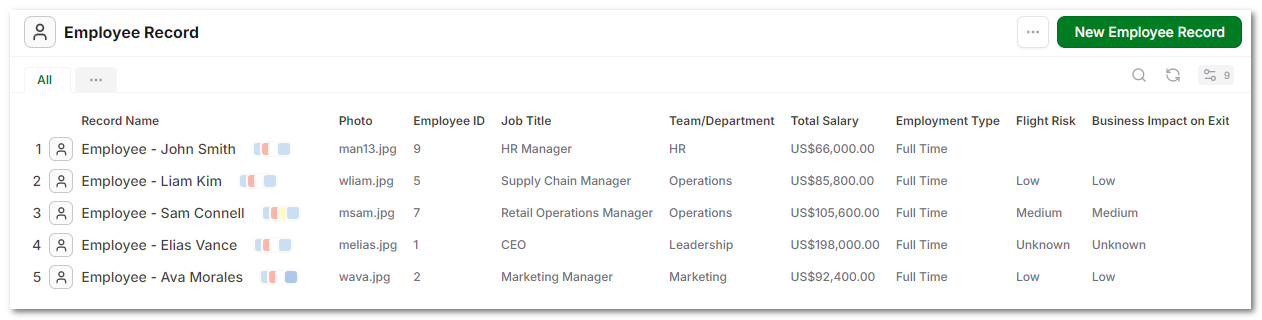
Records in the List
Each row represents a single record. The first column shows the primary field, which acts as the record’s identifier. Clicking this value opens the record in a popup. An expand option allows opening the full record view.
Records are displayed in a compact layout, making it easy to review many items at once.
Fields and Columns
Each column represents a field from the record.
Typical fields include:
- identifiers such as record name or ID
- reference fields such as employee or product
- numeric and currency values
- status or classification fields
The layout is designed for clarity and alignment, especially when working with structured or transactional data.
Read-Only Presentation
List View is not intended for editing.
- fields are displayed as values
- inline editing is not available
- the focus is on reviewing data, not modifying it
To edit records, open the full record view.
Relationship to Parent Records
List View is commonly used to display child records within a parent.
This is the primary use case.
Examples include:
- line items within a Purchase Order
- items within an Invoice
- entries within a report or checklist
In these cases, the list represents structured data that belongs to the parent and is best viewed as a set of line items.
Selecting Records
Each row includes a selection option.
Selecting multiple records enables bulk actions such as:
- deleting records
- moving records
This is useful when managing groups of related records.
Creating Records
New records can be added using the New Record option.
When used inside a parent record, this allows adding new line items directly to the list.
When List View Fits
List View works best when:
- displaying structured child records
- presenting line items in a clean format
- reviewing transactional data such as orders or invoices
- editing is not the primary action
It is especially useful when records need to be read together as part of a larger object rather than managed individually.