
Published on March 28, 2026


Operational work requests rarely arrive in one place. They come through emails, quick messages, phone calls, or even shared spreadsheets. For a while, teams keep things moving.
Then operations grow and the cracks start to show.
This is where work order management makes the difference. Instead of scattered updates, work orders provide a clear record of requests, timelines, and outcomes.
In this article, we explore:
- what work order management is
- how the work order process works
- the types of work orders organizations rely on
- and how modern object-based platforms help teams bring clarity to operational work.
What is Work Order Management?
Work order management is the structured process organizations use to create, assign,and track operational tasks. It helps teams coordinate the work that keeps operations running, from equipment maintenance to service requests and inspections.
In many companies, work begins as a request. A machine needs attention. A technician must visit a site. A facility issue requires a quick fix.
Without structure, these requests move through emails, calls, or shared notes.
Everyone is trying to help, but the path from request to completion becomes difficult to follow.
This is exactly what work order management is designed to solve. According to IBM, a well-defined work order process ensures that every operational task is documented, assigned, and completed through a consistent workflow.
Instead of scattered updates, teams follow a clear lifecycle. A typical work order lifecycle includes several steps:
- Task identification: A need for work is identified. This could be equipment failure, a maintenance request, or a service need.
- Work request submission: The request is formally recorded so the task can be reviewed and tracked.
- Approval and prioritization: Managers confirm the request, assign priority, and decide when the work should take place.
- Scheduling and assignment: Technicians or responsible teams are assigned to complete the task.
- Task execution: The work is performed in the field, on the factory floor, or within a facility.
- Documentation and completion: Technicians record what was done, including materials used or issues discovered.
- Reporting and analysis: Managers review completed work to track performance, identify patterns, and improve operations.
When this process is well-structured, work becomes easier to manage. Teams know what needs attention, who is responsible, and what has already been completed.
What is Work Order Management? Benefits and Examples
Once organizations understand the structure of work order management, the next question is “Why does it matter in daily operations?”.
A well-organized work order management system helps teams move faster, plan better, and keep work visible across the organization.
One of the most immediate benefits is reduced downtime.
When issues are logged and tracked through work orders, teams can respond quickly and resolve problems before they grow.
A small repair does not turn into a major interruption simply because it was forgotten in someone’s inbox.
Work order management also improves productivity. Clear assignments mean technicians know exactly what needs to be done and when. Managers spend less time chasing updates and more time reviewing results.
Scheduling becomes easier as well.
When tasks are documented, teams can plan technician availability, allocate materials, and organize work across locations. Instead of reacting to surprises, operations begin to feel predictable.
That is a good feeling on a busy Monday morning.
Another advantage is lower maintenance costs.
Preventive maintenance supported by structured work orders often extends asset life and reduces expensive repairs.
Work order management also strengthens compliance.
Every completed task leaves a documented history. This record helps organizations show that inspections, maintenance, and safety checks were completed.

Types of Work Orders Used in Operations
Not every operational task looks the same. Some work is planned. Some work appears unexpectedly.
For this reason, companies organize their work order management processes into different categories of work orders.
Categorizing work orders helps teams rank tasks, plan resources, and build stronger maintenance strategies over time.
What Are the Four Types of Work Orders?
Corrective Work Orders
Corrective work orders are created when something goes wrong and needs to be fixed.
This type of work order is reactive. Equipment fails, a system stops working, or a facility issue appears unexpectedly. The goal is to resolve the problem and restore normal operations.
Corrective work orders are common in maintenance environments where equipment performance is critical.
Preventive Work Orders
Preventive work orders are scheduled tasks designed to prevent failures before they happen.
Instead of waiting for equipment to break, teams perform routine servicing such as lubrication, inspections, or part replacements. These tasks are often scheduled weekly, monthly, or based on equipment usage.
Preventive work orders help reduce downtime and extend the life of operational assets.
Inspection Work Orders
Inspection work orders focus on verifying that assets, facilities, or systems meet operational and regulatory standards.
These tasks may include safety inspections, equipment condition checks, or compliance reviews required by industry regulations.
Because inspection work orders generate detailed documentation, they play an important role in compliance and operational transparency.
Service Work Orders
Service work orders are used in customer-facing operations.
They are created when a customer requests installation, repair, or technical help. The work order records the request, schedules the technician, and documents the completed service.
Service teams rely on these work orders to coordinate field visits and maintain clear communication with customers.
Across all these categories, structured work order management ensures that tasks are handled with consistency. Each work order follows a defined workflow, captures the right information, and creates a reliable operational record.
When supported by an object-based platform like AnyDB, organizations can manage these different work order types within one unified environment.
Tasks, assets, materials, and teams stay connected, which allows operations to move faster and stay aligned.
You may also like: Stock Management System for Small Business: Go Beyond Spreadsheets
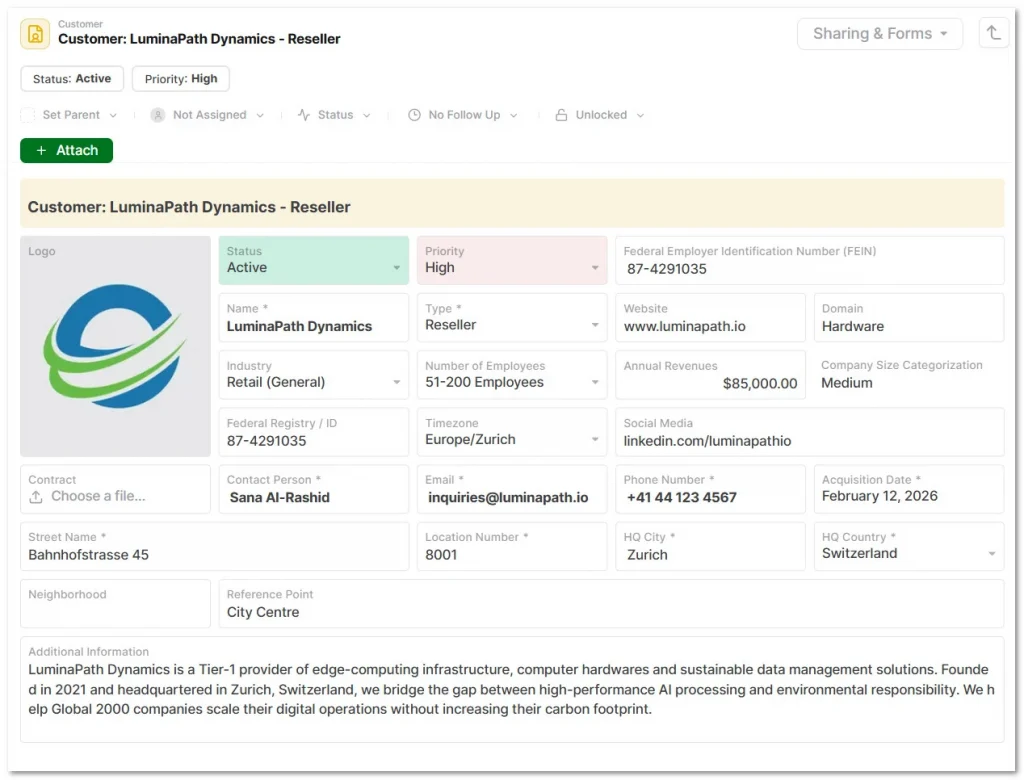
How AnyDB Supports Structured Work Order Management
As operations grow, managing tasks through emails, spreadsheets, or scattered tickets becomes difficult to sustain. Teams lose visibility, updates slow down, and important details slip between tools.
AnyDB approaches this challenge through an object-based system that models operational work in a clear and flexible way.
Each work order becomes a central object within the operational environment. From that record, teams can see:
- what needs to be done
- who is responsible
- what resources are required
- how the task progresses
This structure supports several important capabilities.
Structured Work Order Records
Each task is captured with the information teams need to complete the work, including descriptions, priorities, locations, and assigned technicians.
Connected Operational Data
Work orders connect directly to related objects such as assets, facilities, materials, or customer requests. This creates a clear operational context for every task.
Role-based Access for Teams and Contractors
Internal teams, external technicians, and partners can access the information relevant to their responsibilities without exposing unnecessary data.
AnyDB includes unlimited free guest users and secure portals; you can invite as many external contractors as needed to update their work orders in your system without paying extra per-seat licensing fees.
Workflow Automation for Approvals and Assignments
Requests can move through approval, prioritization, and assignment steps, which reduces manual coordination.
Real-time Operational Visibility
Managers and teams can see active work orders, progress updates, and completed tasks as operations evolve.
Imagine a facilities team responsible for maintaining several buildings. A technician identifies an issue with an air handling unit during an inspection.
Since AnyDB offers native iOS and Android mobile apps, the technician can scan the unit’s barcode with their phone to pull up its history and create a work order right from the field.
The work order connects to the building, the specific asset, and the responsible maintenance team. A supervisor reviews the request, assigns a technician, and schedules the repair.
As the work progresses, updates, materials used, and completion notes are recorded in the same work order.
Everyone involved can see the current status without searching across many tools. The result is that work moves forward and information stays organized.
Bring Clarity to Work Order Management
Operational work becomes much easier when it is structured and visible. With effective work order management, teams can track tasks, coordinate responsibilities, and maintain a reliable record of completed work.
The result is simple but powerful. Less downtime, better collaboration, and a clearer understanding of how operations actually perform.
Instead of juggling several tools, teams manage work through structured records that reflect their actual workflows.
If you want to bring clarity to your operations, schedule a free call with the AnyDB team. To ensure a fast and smooth transition, AnyDB provides a completely guided, free 2-week setup.
Our team will actually map out and build your custom work order workflows for you, so you can go live and experience structured operations without the heavy lifting.
Frequently Asked Questions About Work Order Management
What is work order management?
Work order management is the structured process organizations use to create, assign, track, and complete operational tasks.
Instead of relying on scattered emails, phone calls, or shared notes, it ensures that every maintenance, repair, or service request follows a clear, documented lifecycle from submission to completion.
What is the difference between a work order and a purchase order?
While both documents support daily operations, they serve very different purposes. A purchase order focuses on procurement, authorizing the purchase of goods or services from an external supplier.
A work order focuses on execution, authorizing a specific task, repair, or service to be performed by an internal team or field technician.
How does work order management reduce operational costs?
A structured work order process reduces costs by enabling preventive maintenance. By scheduling routine servicing before equipment fails, organizations can extend the life of their assets and avoid the expensive, unexpected repairs associated with corrective maintenance.
Furthermore, clear task tracking reduces operational downtime, ensuring teams aren’t wasting hours searching for updates or lost requests.
Why do spreadsheets fail for work order management?
As operations grow, spreadsheets and scattered emails struggle to handle the volume of requests. Teams lose visibility, updates slow down, and details slip through the cracks.
Modern teams are shifting to object-based systems (like AnyDB) because they treat work orders as connected records, linking the task to the specific asset, location, and responsible technician in real time.

The End-to-End Operations System that Finally Fits Your Reality.
No more scattered spreadsheets or rigid, disconnected tools.
AnyDB is a modern, customizable platform for managing business records and operations across teams, clients, and partners.
Learn More


Phone: (512)-761-7979
© 2024 Humanly Inc. All rights reserved.
What is AnyDB?
AnyDB is a unified, customizable data store designed to streamline and empower your entire organization. Effortlessly store, organize, and share custom business data to drive both internal and external operations across teams. Think of it as spreadsheets on steroids.Perfect for Sales, Marketing, Operations, HR, and beyond. Discover AnyDB