
Published on November 14, 2025


Scattered deliverables, long email threads, and too many “final_v3_really_final” files. If you work at a marketing agency, you know the drill. Between creative approvals and client feedback loops, staying organized often feels like juggling while blindfolded.
Client portals for marketing agencies offer a way out.
They give you a single, dedicated space where your team and clients can share, review, and approve work without hunting through inboxes or spreadsheets. Everything lives in one place, structured, so collaboration feels natural and smooth.
In this guide, you’ll learn:
- what a client portal is
- the specific benefits marketing agencies gain from using one
- best practices for building it
- and how AnyDB helps create a seamless client experience.
All minus the usual tool-stack chaos.
What is a Client Portal?
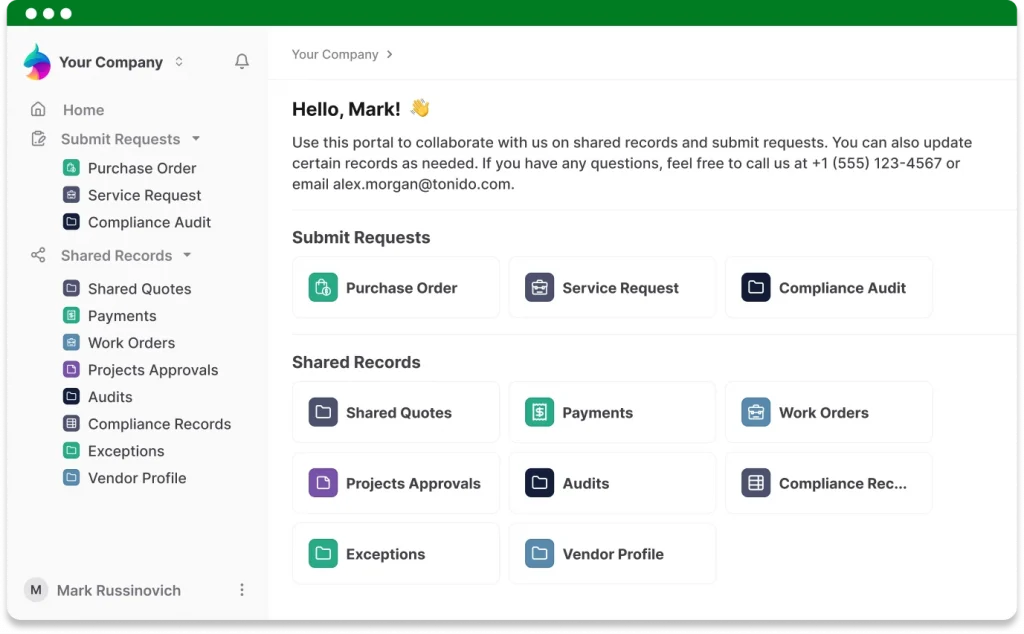
For marketing agencies, a client portal is more than a shared drive or another app link to send over email. It is a secure, branded online space where clients can log in to view project updates, download deliverables, share feedback, approve work, and track revisions.
Think of it as your agency’s digital front office, open and organized. Everything is sitting neatly inside a single environment designed for collaboration.
What sets client portals apart from file-sharing tools or email threads is accountability. Portals provide secure logins, role-based access, and a full audit trail of every action.
This means clients see only what’s meant for them, feedback stays attached to the right project, and you can always trace who did what and when.
The result is smoother communication and fewer misunderstandings on both sides.
How Do Marketing Agencies Benefit from Using a Client Portal?
For agencies, a client portal is a quiet revolution in how collaboration happens. When done right, it smooths operations and adds polish to every client touchpoint.
Let’s look at some of the real benefits:
- It Solidifies Your Workflow: Every agency has its rhythm, but it often gets lost between project threads and client messages. A client portal creates one consistent interface for every project. Clients know exactly where to look, and your team works within a clear process.
- It Gives Everyone One Central Place to Access Resources: Campaign briefs, design files, brand assets, and reports. All available in one place, so clients can find what they need. And your team saves time answering repeat questions.
- It Makes Everything Look More Polished and Professional: A dedicated client portal gives your agency a home base that looks and feels like your brand. You invite partners into a space that reinforces your professionalism.
The result? Happier clients, less back-and-forth, and more time spent on high-impact work. It raises the standard of how you collaborate.
You may also like: The Top Benefits of Customer Portal Software for Modern Companies
5 Best Practices for Creating Useful Portals for Your Clients
Building a client portal for a marketing agency is about designing an experience that makes collaboration effortless and confidence automatic.
A good portal feels invisible because everything works.
1. Consider Your Client’s Experience
Start by putting yourself in your client’s shoes. How easily can they log in, find a deliverable, or approve a revision? Use intuitive navigation and label everything.
Clients should never need to guess where to click.
2. Make It Reusable
A clever agency team knows that what works once can work again. Create separate records, folder structures, and naming conventions so each new client portal feels familiar to your team and quick to set up.
You scale your delivery process without reinventing the wheel every time.
3. Provide a Short Onboarding Guide
Even the most intuitive portal benefits from a welcome guide. A quick video or short document showing where to find files, upload revisions, or check approvals can save hours of back-and-forth. Agencies can create AI video guides to walk clients through portal features, explain workflows, and provide a more engaging onboarding experience.
4. Add Helpful Resources
Feedback often becomes the noisiest part of agency work. Centralizing it inside the portal keeps every comment attached to the right asset.
Designers, copywriters, and account managers stay on the same page, and approvals happen faster.
5. Measure and Improve
Portals are as good as their adoption. Keep an eye on how clients use them. For instance, track usage rates or faster approval times. These metrics help you refine what works and show measurable value to your leadership team.
In short, a client portal for marketing agencies is not a static tool but a living part of your workflow.
How AnyDB Delivers Client Portals for Marketing Agencies
The real power of a client portal lies in connection. Connection between people, data, and projects.
AnyDB gives marketing agencies a practical way to build portals that work for both teams and clients, without messy integrations, endless tool juggling, or blowing the budget on a stack of separate tools just to make everything talk to each other.
Connected Live Data
With AnyDB, your clients and team work from the same live records. No duplicates. No outdated files floating in email threads. When a designer updates a file or a client uploads a new version of an asset, everyone sees it in real time.
Granular Permissions Without Developer Overhead
Every client deserves to see exactly what belongs to them and nothing else. AnyDB makes that simple. You can set detailed permissions by role, project, or even individual field, all without calling in a developer.
All-in-One Portal System
Why run your agency across five different tools when one can do the job? File sharing, feedback, form submissions, and project updates: AnyDB keeps it all in one branded space. Clients log in once, and everything they need is there, neatly organized.
Predictable and Fair Pricing at Scale
One of the biggest surprises agencies face with traditional portal tools is the slow build-up of guest fees. It starts small, then suddenly every new client, partner, or collaborator becomes an extra line on the invoice. These models punish growth instead of supporting it.
AnyDB takes a completely different approach. Guest users are always free. Not partially free, not free up to a limit, but fully unlimited. No other portal tool offers this level of freedom.
You can invite every client, every vendor, and every project stakeholder without doing mental math or trimming access to control costs. It is growth without financial guesswork.
Customization and Branding That Feel Like You
Each portal you build on AnyDB carries your agency’s personality. Add your logo, welcome message, and custom subdomain like youragency.anydb.com.
Larger plans even allow a white-labeled URL, such as portal.yourdomain.com.
Reusable Templates That Save Time
Once you design the perfect client portal layout, you can clone it for future clients. Templates keep your delivery process consistent and fast.
You can launch new projects in minutes, not days, while maintaining the same level of polish every time.
In short, AnyDB helps agencies deliver great client experiences. No scattered tools, no sync issues, just a clear path from start to finish.
Learn more in the AnyDB portal guide.
Take Your Agency Workflow to the Next Level
Client portals have become a strategic asset for marketing agencies that want to simplify their workflows and elevate the client experience. A well-built portal creates structure, transparency, and trust.
AnyDB gives you the building blocks to make this happen. No juggling tools, no worrying about hidden costs. A space where everything and everyone connects.
Sign up for an AnyDB workspace, try out the portals template, and invite your first client in.
They will thank you, and your team will thank you too.

The End-to-End Operations System that Finally Fits Your Reality.
No more scattered spreadsheets or rigid, disconnected tools.
AnyDB is a modern, customizable platform for managing business records and operations across teams, clients, and partners.
Learn More


Phone: (512)-761-7979
© 2024 Humanly Inc. All rights reserved.
What is AnyDB?
AnyDB is a unified, customizable data store designed to streamline and empower your entire organization. Effortlessly store, organize, and share custom business data to drive both internal and external operations across teams. Think of it as spreadsheets on steroids.Perfect for Sales, Marketing, Operations, HR, and beyond. Discover AnyDB